Bruce Firmware · Volume 5
Bruce Firmware Volume 5 — Build, Flash & OTA
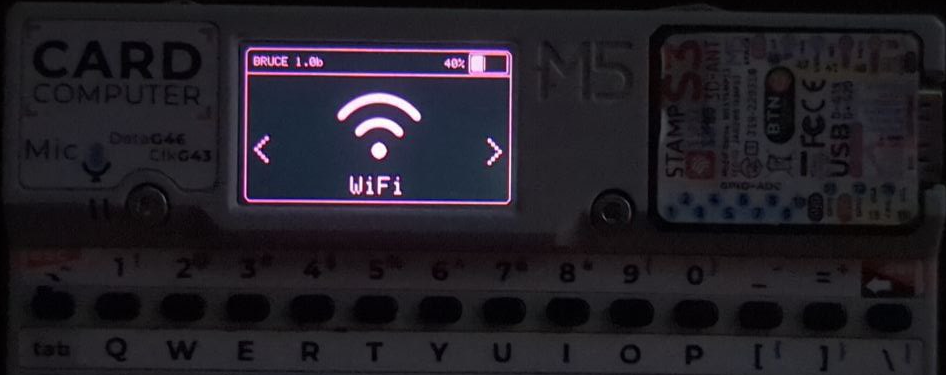
5.1 About this Volume
Vol 4 established that Bruce treats “which board am I” as a build-time question: each supported device is a PlatformIO environment that produces its own flashable image. This volume is the operational consequence of that — how those per-board images actually get onto a board, how to build one if no pre-built image exists, how M5Stack hardware gets updated over the air, what the LITE build omits and why, and what to do when a flash goes wrong.
There are five routes, and they are not equivalent. Most operators should use exactly one — the web flasher — and never touch the others. The rest exist for building from source, for hardware the browser can’t talk to, and for recovery. This volume treats them in that order of likelihood, with the hard details (flash offsets, the LITE exclusion list) called out because they are the two things that most often turn a routine flash into a brick-scare.
The firmware is AGPL-3.0; images are produced by the project’s CI from the public source tree and published on the Releases page and as GitHub Actions artifacts. There is no closed blob to obtain from anywhere else — which is also the safety rule: get images from the official flasher, Releases, or your own build, never from a random mirror (the project is frequently mirrored; the official homes are bruce.computer and github.com/pr3y/Bruce = BruceDevices/firmware).
Voice note. Reference account assembled from the official flasher, repository and wiki. Commands are quoted as the project documents them; they have not been re-run on a specific board here.
5.2 The five ways onto a board
 ┌───────────────────────────────┐
 │ Bruce image for THIS board │
 │ (Bruce-<device>.bin, per env) │
 └───────────────┬─────────────────┘
 ┌──────────────┬──────────────┼──────────────┬───────────────┐
 ▼ ▼ ▼ ▼ ▼
 Web flasher esptool.py PlatformIO M5Burner M5Launcher
 (ESP Web Tools (manual, (build from (M5 desktop (on-device
 / esptool-js; serial; source; flasher; OTA app
 browser+USB) any OS w/ the dev path) search "Bruce") catalog)
 Python)
 easiest recovery full control M5 hardware M5 hardware,
 updates reflash & custom build first install no cable
Table 1 — 2. The five ways onto a board
| Path | When to use | Prereqs | Updates an install? |
|---|---|---|---|
| Web flasher | Default for nearly everyone | Chromium-family browser, USB cable | Yes (re-flash over the top) |
| esptool.py | Recovery, scripting, no-browser hosts | Python + esptool, a board .bin | Yes |
| PlatformIO | Building from source, custom flags | PlatformIO toolchain, the repo | Yes (builds + uploads) |
| M5Burner | First install on M5Stack gear | M5Burner desktop app | Yes |
| M5Launcher | OTA install/update on M5 gear | Launcher already on the device | Yes (cable-free) |
The only hardware prerequisite common to the serial paths is a data-capable USB cable and, on some boards, knowing the BOOT/RESET button sequence to enter download mode — most modern ESP32-S3 boards auto-enter it, classic ESP32 boards sometimes need the button held. The web flasher and esptool both drive the same ROM download protocol underneath; the difference is purely the front end.
5.3 The web flasher — the primary path
The official web flasher at https://bruce.computer/flasher is the recommended install and update method for essentially all users. It is built on ESP Web Tools / esptool-js — the browser speaks to the board’s serial bootloader directly over the WebSerial API, so there is nothing to download or install on the host. It also updates an existing Bruce install: re-flashing over the top is the normal update mechanism for non-M5 boards.
The flow is deliberately minimal:
- Open the flasher in a Chromium-family browser (Chrome, Edge, Brave — WebSerial is required; Firefox/Safari do not expose it).
- Connect the board by USB.
- Pick the board from the list (the list is the same per-board environment set from Vol 4 §3).
- Grant the serial-port permission prompt and let it flash.
Because the flasher chooses the image for the board selected, it also handles the flash offset correctly for that board — which is precisely the detail that trips up the manual path (§4). This is the whole argument for using the flasher: board selection and offset are solved for you, and the image provenance is the official site.
Callout — the offset is the board’s business, not yours. Vol 4 §4 noted that each board’s CI line sets its bootloader offset (
0x0000for most S3/C targets,0x1000for classic ESP32). The web flasher reads that per-board; manual esptool does not — you supply it. Everything downstream of a wrong offset looks like a dead board but is not one (§8).
5.4 Manual flashing with esptool
When a browser can’t be used — a headless host, an automated pipeline, or a recovery situation — the board’s .bin can be flashed with esptool.py (Espressif’s reference flashing tool). The image comes from the Releases page (tagged builds) or from a GitHub Actions artifact (bleeding-edge builds of a branch). The repository documents the command directly:
# official form from the repo README
esptool.py --port /dev/ttyACM0 write_flash 0x00000 Bruce-<device>.bin
Three things an engineer should hold in mind here:
- The port is host-specific.
/dev/ttyACM0(or/dev/ttyUSB0) on Linux;/dev/cu.usbserial-*//dev/cu.usbmodem*on macOS;COMnon Windows. Identify it withls /dev/tty*(before/after plugging in) oresptool.py chip_id. - The offset must match the board. The README’s
0x00000is correct for targets whose CI line uses that offset; classic ESP32 boards use0x1000for the bootloader. If a board boots to nothing after a manual flash, the offset is the first suspect (§8). The authoritative per-board offset is the one inbuil_parallel.yml(Vol 4 §4). - A full image vs. app-only. The published
Bruce-<device>.binis a merged, flash-at-one-offset image (bootloader + partition table + app), which is why a singlewrite_flashline works. If working with separate bootloader/partition/app binaries from a source build, each has its own offset — prefer the merged image unless there’s a reason not to.
# useful adjuncts
esptool.py --port /dev/ttyACM0 erase_flash # clean slate before a flash
esptool.py --port /dev/ttyACM0 chip_id # confirm the chip + connection
A full-chip erase_flash before writing is the standard move when migrating from a different firmware or recovering from a bad state; note it also clears LittleFS, so bruce.conf and any on-chip files are lost (SD-card contents are untouched — see Vol 4 §9).
5.4.1 What is inside the merged image
The reason a single write_flash <offset> Bruce-<device>.bin works is that the published image is a merged flash image — it already contains, at their correct relative positions, the second-stage bootloader, the partition table, and the application, plus the LittleFS region definition.
 Bruce-<device>.bin (merged, written at the board's base offset)
 ┌──────────────┬─────────────────┬───────────────────────┬──────────┐
 │ 2nd-stage │ partition table │ app (Bruce / LITE) │ littlefs │
 │ bootloader │ │ │ │
 └──────────────┴─────────────────┴───────────────────────┴──────────┘
 base offset → (0x0000 on most S3/C targets; the bootloader sits at
 0x1000 on classic ESP32 — hence the per-board offset)
This is why the offset matters and why it is a board property: the base offset tells the ROM where the merged blob begins, and the partition table inside it does the rest. A source build (§5) produces the same components, but as separate bootloader.bin / partitions.bin / firmware.bin files each with its own offset — which is exactly why the merged release image is the easier thing to flash manually, and why mixing a merged-image offset with separate-component offsets is a classic error.
5.5 Building from source with PlatformIO
For custom builds — enabling or disabling a capability flag (Vol 4 §5), porting to a new board (Vol 4 §4), or just building the current main — Bruce builds with PlatformIO. The repository carries a per-board platformio.ini/boards/*.ini structure, a build.py helper, and a docker/ directory for containerised builds.
# get the source
git clone https://github.com/pr3y/Bruce.git
cd Bruce

# build one board's environment (env name = the board, see Vol 4 §3)
pio run -e m5stack-cardputer

# build and upload in one step over USB
pio run -e m5stack-cardputer -t upload --upload-port /dev/ttyACM0

# list what the tree can build
pio project config # shows the configured environments
The environment name is the board identity from Vol 4: building -e <env> yields exactly that board’s image, with that board’s compile-time feature set. A custom build is therefore “pick the env, adjust the defines in boards/<board>.ini if needed, pio run.” The docker/ path wraps the same toolchain for reproducibility and for hosts that would rather not install PlatformIO natively; build.py scripts the multi-environment build the way CI does.
Callout — building is how LITE and FULL diverge. There is no “LITE download” separate from the source; LITE is the same tree built with
LITE_VERSIONdefined (Vol 4 §5). If a board’s published image is LITE and the full feature set is wanted on it, the route is a source build without that flag — subject to whether the resulting image still fits the board’s partition (§7).
5.5.1 Docker and reproducible builds
The repository’s docker/ directory wraps the PlatformIO toolchain in a container, which solves the two perennial from-source headaches: a host that would rather not install PlatformIO and its ESP32 toolchain natively, and reproducibility — a containerized build pins the toolchain versions so the image a contributor produces matches what CI produces. For an engineer auditing an AGPL firmware before trusting it on a device that will sit on real networks, the containerized build is the clean way to go from “the source on GitHub” to “a binary I compiled and can diff against the published release.” The build.py helper scripts the multi-environment build the way the buil_parallel.yml CI workflow (Vol 4 §4) does, so building the whole matrix locally is one command rather than a loop over pio run -e ….
This is also the honest answer to “can I trust the binary.” The AGPL license guarantees the source; the reproducible container build is what lets a cautious operator verify the published image corresponds to that source rather than taking it on faith (§8’s provenance callout).
5.6 M5 devices — M5Burner and M5Launcher OTA
M5Stack hardware (Cardputer, Cardputer ADV, the M5Stick family, the Cores) has its own well-worn update ecosystem, and Bruce slots into it.
M5Burner is M5Stack’s desktop firmware manager. Bruce is published there: open M5Burner, search “Bruce”, pick the build for the device, and flash over USB. This is the most friction-free first install for someone already in the M5 ecosystem, because M5Burner knows the M5 boards and their quirks.
M5Launcher (the M5-world launcher; see Vol 4 §7) installs and updates Bruce over the air — no cable. The launcher lives resident in flash, lists installable apps, downloads the chosen Bruce image, and flashes it into the app partition. This is the cable-free update path on M5 gear, and it is the direct reason the LITE build exists: the launcher’s app partition sets the size ceiling the LITE build is trimmed to fit (§7).
 M5 hardware install/update options
 ┌────────────────────────────────────────────────────────┐
 │ First install, over USB → M5Burner (search Bruce) │
 │ Update, cable-free, on-device → M5Launcher (OTA catalog)│
 │ Update, over USB → web flasher / esptool │
 └────────────────────────────────────────────────────────┘
SD-based update is also supported on boards with a card slot (drop the image and let the firmware/launcher pick it up), which is handy in the field where neither a cable nor Wi-Fi is convenient.
5.7 The LITE build — what it drops and why
The LITE build (LITE_VERSION, Vol 4 §5) is the single most important thing to understand about Bruce distribution, because it is the reason two people running “Bruce” on similar hardware can have different features. The canonical example is the JCZN CYD-2432S028 (the common ESP32-2432S028R “Cheap Yellow Display”): its published build is LITE, “for Launcher Compatibility.”
Why it exists. A launcher (M5Launcher / Launcher) flashes Bruce into a bounded app partition. A full-feature image can exceed that partition on some boards. Rather than lock those boards out of launcher use, the project ships a size-reduced build that drops the heaviest features to fit under the ceiling. LITE is a size decision driven by the launcher partition — not a demo, not a crippled edition, and not a separate codebase (Vol 4 §5, §7).
Exactly what LITE compiles out (per the repository’s compatibility notes):
Table 2 — Exactly what LITE compiles out (per the repository's compatibility notes)
| Dropped in LITE | Subsystem | Covered in |
|---|---|---|
| Telnet | Remote shell client | Vol 6 |
| SSH | Remote shell client | Vol 6 |
| WireGuard | VPN tunnelling | Vol 6 |
| ScanHosts | Host/port discovery on the joined network | Vol 6 |
| RawSniffer | Raw Wi-Fi capture to .pcap | Vol 6 |
| Brucegotchi | Autonomous handshake collector | Vol 6 |
| BLEBacon | BLE beacon feature | Vol 7 |
| BLEScan | BLE scan/enumerate | Vol 7 |
| JS Interpreter | The scripting engine | Vol 9 |
The pattern in that list is instructive: LITE sheds the connectivity stack (Telnet/SSH/WireGuard), the heavier Wi-Fi capture/recon features (ScanHosts, RawSniffer, Brucegotchi), two BLE features, and the whole scripting engine — the biggest, most code-heavy pieces. What survives in LITE is the core on-device tooling (Wi-Fi basics, RF, IR, RFID, the file managers, the UI). An operator choosing a board partly chooses a feature tier: a full-feature board keeps everything; a LITE board (CYD-2432S028 as shipped) trades the above for launcher compatibility.
Callout — “my CYD has no JS interpreter.” This is the number-one LITE surprise. If a board is running the LITE image, the Scripts/Interpreter menu (Vol 9) is simply not compiled in. The fix is not a setting — it is either a full source build that still fits the partition, or accepting the trade. Know which build a device is running before expecting a LITE-excluded feature.
5.7.1 Choosing FULL vs LITE for a given board
For boards that have both builds available, the choice is a straightforward three-way decision:
 Need Launcher/M5Launcher OTA on this board?
 │
 ├─ Yes ───────────────────────────► use LITE (it exists to fit the launcher)
 │
 └─ No
 │
 ├─ Need the JS interpreter, SSH/Telnet/WireGuard,
 │ RawSniffer, ScanHosts, or Brucegotchi? ──────► use FULL
 │ (web-flash or source-build)
 │
 └─ Only need on-device Wi-Fi/RF/IR/RFID basics? ──► either works; LITE is leaner
The usual real-world answer for a board that is not being managed by a launcher is the FULL build — there is little reason to carry LITE’s limitations without the launcher constraint that motivates them. LITE earns its place specifically when the board must live in a launcher’s app-catalog, and the CYD-2432S028’s stock LITE image reflects that it is a common launcher target. For an owned board already running LITE where a FULL feature is wanted, the path is a web-flash or source-build of the FULL image — provided it fits the board’s flash, which it does on the ample-flash boards and may not on the tightest ones.
5.8 Release artifacts and build provenance
Knowing where an image comes from is as important as knowing how to flash it, both for trust and for picking the right build. Bruce publishes images through two channels, and they answer different needs.
Table 3 — 8. Release artifacts and build provenance
| Source | What it contains | Stability | Use for |
|---|---|---|---|
| Releases (tagged) | A versioned image per board — the “Latest” tag at the time of writing is v1.16.1 (§Vol 1/§7 notes) | Stable, tested, release-noted | Normal installs and updates |
| GitHub Actions (artifacts) | Per-board images built from a branch/commit on push | Bleeding-edge, unreleased | Trying a just-landed fix or an unreleased board port |
| Web flasher | Serves the curated image for the selected board | Tracks the project’s published builds | The default; provenance is the official site |
| Own PlatformIO build | Whatever the local tree + defines produce | Whatever you built | Custom flags, new ports, audits |
The naming convention Bruce-<device>.bin is the thread that ties this together: <device> is the PlatformIO environment name from Vol 4 §3, so the Releases asset list, the Actions artifact list, the web flasher’s board picker, and pio run -e <env> all refer to the same per-board identity. Picking the wrong device’s .bin is a common mistake with manual flashing and is, like the offset, something the web flasher removes by construction.
Provenance callout — don’t source images from mirrors. Bruce is heavily mirrored (the brief for this dive warns about exactly this). The AGPL license guarantees the source is open, but a mirror’s binaries carry no such guarantee — a tampered image on an attacker-grade device is a plausible supply-chain risk. The trustworthy images are: the official web flasher, the Releases/Actions pages of
github.com/pr3y/Bruce(=BruceDevices/firmware), M5Burner’s “Bruce” entry, and a build you compiled yourself. Nothing else.
5.8.1 Versioning and what a point release means
Bruce versions are small and frequent (v1.16.1 at the time of writing, against a repository history of thousands of commits). A point release like v1.16.1 is a roll-up of bug fixes and incremental features across subsystems — the 1.16.1 notes, for instance, touch Wi-Fi (WPA3-PSK + WPA2/WPA3 detection, a Station-Deauth fix, a Brucegotchi handshake-capture fix, a NetCut multi-target fix), BLE (more Samsung OUIs for BLE spam, ESP32-C5 BLE crash fixes), board support (a CoreS3 SD conflict fix, a T-LoRa Pager encoder fix), and so on. The operational reading: updating is low-friction (re-flash over the top, §3) and worth doing, because fixes land per-board and a point release often carries the fix for your board specifically.
5.9 Verifying a flash
A flash that completes without a tool error is not yet a confirmed-good flash — the board still has to boot. The quickest confirmation is the serial monitor: open the port at 115200 baud (Bruce’s monitor_speed, Vol 4 §3) and watch the boot log.
# watch the boot log over serial (any of these)
pio device monitor -b 115200 -p /dev/ttyACM0 # PlatformIO
esptool.py --port /dev/ttyACM0 --baud 115200 read_mac # cheap liveness check
screen /dev/ttyACM0 115200 # or screen / minicom / picocom
What a healthy boot looks like: the ESP32 ROM banner, then the second-stage bootloader, then Bruce’s own startup — and on a board with a screen, the Bruce splash (unless instantBoot is set, Vol 4 §6). What a failed boot looks like: a bootloader that loops, an invalid header message, or silence. Those symptoms route straight into the recovery tree in §10 — an invalid header after a manual flash is almost always the wrong offset.
A serial monitor is also the fastest way to tell a LITE board from a FULL board without guessing from the menus: the startup and the available features differ, and the Serial command surface (Vol 4 §8) can be queried directly rather than hunting through the on-device UI.
5.10 Updating and recovery
Updating. For non-M5 boards, re-flash over the top with the web flasher (easiest) or esptool. For M5 boards, M5Launcher OTA or M5Burner. In all cases bruce.conf persists if it lives on SD, and on LittleFS it persists across a normal re-flash but not across an erase_flash (Vol 4 §9, §4). Updating to a different build (FULL↔LITE) is just flashing the other image; settings survive on SD.
Recovery — the decision tree. A board that appears dead after a flash is, in the overwhelming majority of cases, recoverable without any hardware intervention.
 Board won't boot / blank after flash
 │
 ├─ Was it a MANUAL esptool flash? ──► check the OFFSET first
 │ wrong offset is the #1 cause; re-flash at the board's
 │ correct offset (0x0 for most S3/C, 0x1000 classic ESP32)
 │
 ├─ Flash looked incomplete / errored?
 │ erase_flash, then re-flash the merged Bruce-<device>.bin
 │
 ├─ Can't enter download mode?
 │ hold BOOT, tap RESET, release BOOT (board-specific);
 │ some S3 boards need BOOT held while plugging USB
 │
 ├─ Browser can't see the port?
 │ use a DATA cable (not charge-only); install the
 │ USB-serial driver (CP210x / CH34x) on Windows;
 │ try esptool as a cross-check
 │
 └─ Still nothing?
 erase_flash + re-flash via the web flasher (it picks
 the right image + offset) — the clean-room recovery
The key reassurance, worth stating because it changes how cautiously one flashes: the ESP32 ROM bootloader lives in mask ROM and cannot be overwritten by a bad app flash. Download mode is therefore essentially always reachable, which means a “bricked” Bruce board is almost never truly bricked — it is a wrong offset, an incomplete write, a charge-only cable, or a missing USB-serial driver. Erase, re-flash via the web flasher, and the board comes back. Genuine bricks require damaging the hardware or the ROM, neither of which a firmware flash does.
5.10.1 The host-side failures, by platform
A large fraction of “it won’t flash” reports are host problems, not board problems. The pattern is consistent enough to tabulate.
Table 4 — 10.1 The host-side failures, by platform
| Symptom | Likely cause | Fix |
|---|---|---|
| Board not listed / no port appears | Charge-only USB cable | Swap to a known data cable |
| No port on Windows | Missing USB-serial driver | Install CP210x (Silicon Labs) or CH34x (WCH) driver for the board’s bridge |
| Web flasher sees nothing | Browser lacks WebSerial | Use Chrome/Edge/Brave, not Firefox/Safari |
| Port busy / permission denied (Linux) | User not in dialout; or a monitor holds the port | usermod -aG dialout $USER (re-login); close other serial apps |
| Flash starts then fails mid-write | Flaky cable/hub; wrong baud | Direct port (no hub); let the tool auto-negotiate baud |
| Flashes fine, boots to nothing | Wrong offset (manual flash) | Re-flash at the board’s correct offset, or use the web flasher |
| Can’t enter download mode | Board needs manual BOOT/RESET | Hold BOOT, tap RESET, release BOOT (board-specific; some S3 need BOOT held while plugging in) |
The ESP32’s USB bridge is the single most common variable: M5 and LILYGO boards use different bridge chips (native USB-CDC on many S3 parts, CP210x or CH34x on others), and the Windows driver story follows the bridge, not the firmware. On Linux and macOS the drivers are generally in-kernel, and the issue is more often permissions (dialout group) or a cable.
5.10.2 Migrating from another firmware
Boards frequently arrive running something else — Marauder, a vendor demo, M5Launcher alone, or a different CYD firmware (the SquachWatch / HaleHound family discussed in Vol 10 shares the same ESP-Web-Tools flashing lineage). Migrating to Bruce is just flashing Bruce’s image, but two habits make it clean: run an erase_flash first (or let the web flasher do a full write) so no stale partition layout or LittleFS content from the previous firmware lingers, and remember that erase_flash wipes on-chip storage — anything to keep (a bruce.conf, captures) should be on the SD card, which is untouched (Vol 4 §9). Going the other direction — Bruce to something else — is symmetric: erase and flash the other image.
5.11 Reference
- Web flasher:
https://bruce.computer/flasher(ESP Web Tools / esptool-js; Chromium-family browser + WebSerial). - Boards list:
https://bruce.computer/boards. - Images: Releases + GitHub Actions artifacts on
https://github.com/pr3y/Bruce(=BruceDevices/firmware);Bruce-<device>.binmerged images. - esptool:
esptool.py --port <PORT> write_flash <OFFSET> Bruce-<device>.bin; per-board offset frombuil_parallel.yml(Vol 4 §4). - From source: PlatformIO (
pio run -e <env>/-t upload),build.py,docker/. - M5 ecosystem: M5Burner (search “Bruce”); M5Launcher (OTA). SD-based update on carded boards.
- LITE build:
LITE_VERSIONon CYD-2432S028 and other Launcher targets; drops Telnet, SSH, WireGuard, ScanHosts, RawSniffer, Brucegotchi, BLEBacon, BLEScan, JS Interpreter (§7). - Related volumes: Vol 4 (architecture — envs, flags,
bruce.conf, Launcher), Vol 6 (the connectivity/Wi-Fi features LITE drops), Vol 7 (the BLE features LITE drops), Vol 9 (the JS interpreter LITE drops).
Comments (0)