Chameleon Ultra · Volume 11
Chameleon Ultra — Side-by-Side Comparisons
Proxmark3 RDV4 vs iCopy-X vs Flipper Zero vs Chameleon Lite — when each wins, when to combine, what the Chameleon Ultra uniquely delivers
11.1 Contents
- The comparison framework — portability vs capability vs emulation depth
- Chameleon Ultra vs Proxmark3 RDV4 — emulator vs lab instrument
- Chameleon Ultra vs iCopy-X — emulation vs physical clone
- Chameleon Ultra vs Flipper Zero — RFID specialist vs multi-tool
- Chameleon Ultra vs Chameleon Lite — what the MFRC522 adds
- Combined-toolkit scenarios — when to carry multiple tools
- Capability comparison table
11.2 The comparison framework — portability vs capability vs emulation depth
Every tool in the RFID operator’s lineup represents a different trade-off along three independent axes. Before scoring any specific device against the Chameleon Ultra, it is worth making those axes explicit, because the same feature that makes a device score well on one axis predictably costs it on another.
Physical portability. This axis covers form factor, weight, battery life, and what the device needs from its environment to operate. The Chameleon Ultra is 40 × 24 × 8 mm and 8 grams — closer to a key fob than to most electronic instruments. That size comes at a cost: the Chameleon Ultra has no display, no keypad, and requires a phone or laptop running ChameleonUltraGUI (over BLE or USB-C) before the operator can change slots, initiate attacks, or manage card data. Portability, in other words, is about more than physical size — a device that requires a tethered laptop to operate is not truly portable even if it is physically compact. The scoring throughout this volume accounts for both physical size and operational dependency.
Protocol capability breadth and depth. Breadth covers how many distinct radio protocols and frequency bands a device addresses. Depth covers how far into each protocol it goes: can it read, write, and attack? Which attack algorithms are available, and do they run on-device or does computation offload to a host? Can it handle hardened cards (HardNested), obscure LF families (LegIC, HiTag2), or non-standard HF types (DESFire EV3 with AES-128, FeliCa, iCLASS)? A device with wide breadth but shallow depth may identify a card without being able to attack it. A device with deep MIFARE Classic attack capability but narrow protocol support fails when it meets an unfamiliar card type.
Emulation fidelity. The third axis distinguishes devices by how convincingly and how conveniently they can present a captured credential to a real access-control reader. Key sub-factors are: slot count (how many independent card identities can the device carry simultaneously?), anti-emulation bypass fidelity (how precisely does the device match the timing, SAK/ATQA values, and sector-access conditions of the original card?), and operational independence (can the operator switch credentials without reaching for a phone or navigating a menu tree?). A device with a single emulation slot and no multi-slot switching loses points on this axis regardless of how well it emulates a single card. A device that requires menu navigation for each slot change imposes operational overhead during engagements that require rapid credential rotation.
The four comparators in this volume — Proxmark3 RDV4, iCopy-X, Flipper Zero, and Chameleon Lite — each represent a recognizable archetype: the lab instrument, the standalone push-button cloner, the multi-modal generalist, and the lightweight emulator in the same product family. The Chameleon Ultra is the field emulator: it pays a significant cost on the display/keypad sub-axis of portability and is not competitive outside the ISO 14443A and LF-credential domains, but within that domain it offers the deepest multi-slot emulation capability of any device in this lineup. The sections below make those trade-offs concrete.
11.3 Chameleon Ultra vs Proxmark3 RDV4 — emulator vs lab instrument
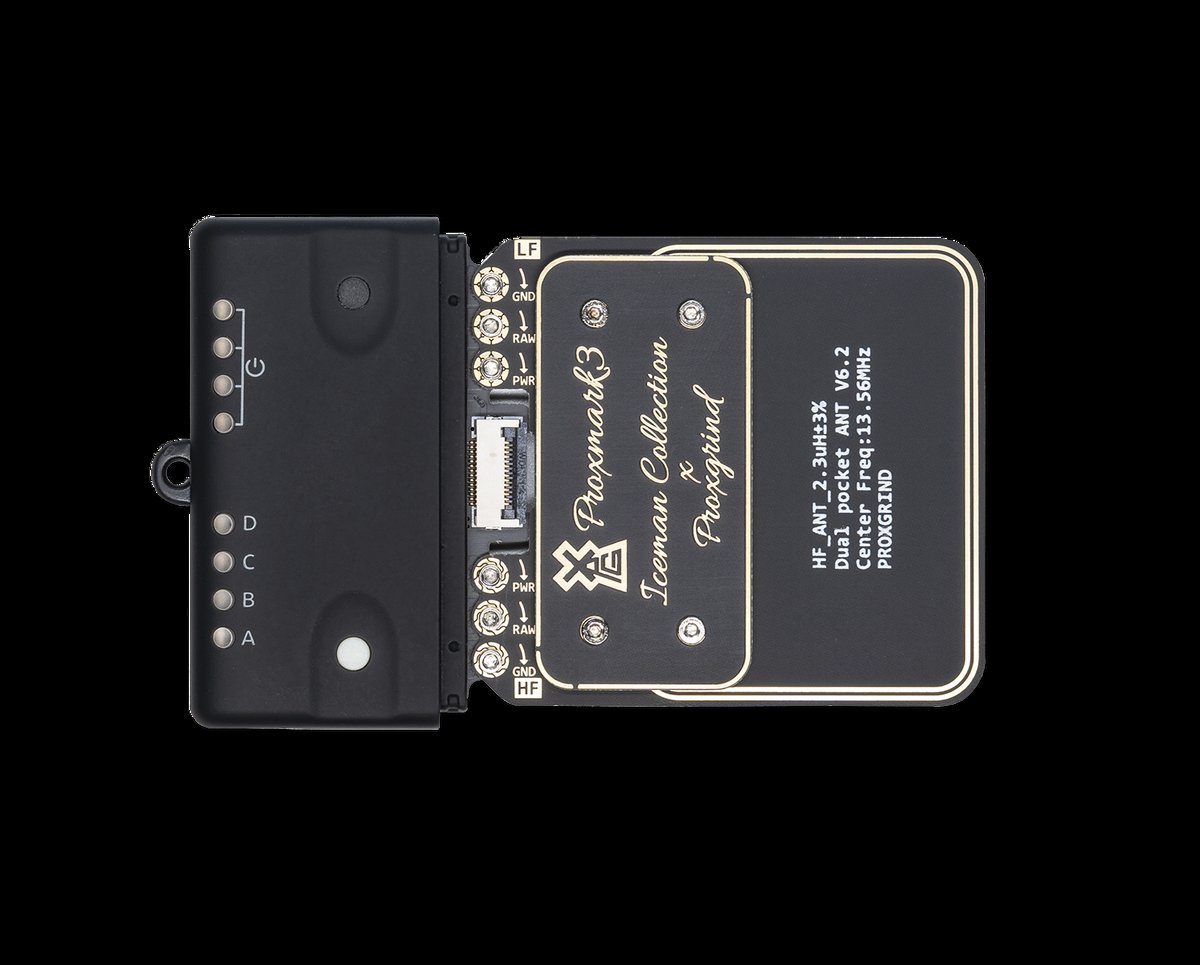
The Proxmark3 RDV4 is the laboratory-grade half of the RFID research toolkit. Where the Chameleon Ultra is designed to go into a jacket pocket and present captured credentials to readers in the field, the Proxmark3 RDV4 is a bench instrument: it is driven from a laptop running the Iceman-fork open-source client (pm3 REPL), uses large socketed antenna boards that plug into dedicated LF and HF antenna ports on the device, and relies on the host CPU for computationally intensive attack steps including the full HardNested phase. The two devices are complements, not competitors.
11.3.1 Where the Proxmark3 RDV4 wins
LF antenna range and fidelity. The Proxmark3 RDV4’s LF antenna is a purpose-designed LC tank with matched filtering, automatic gain control, and hardware-level signal processing. The standard internal LF antenna achieves read distances of 66–72 mm on typical HID Prox credentials (per Lab401 product specifications); the optional long-range LF antenna board extends this to 110–133 mm. The Chameleon Ultra’s nRF52840-driven LF path, by contrast, achieves approximately 20 mm or less under community-measured conditions — a consequence of having no dedicated LF reader IC (see Vol 2 §4 for the underlying hardware explanation). For any engagement where the LF read range is the limiting variable — outdoor readers with generous coil-to-credential spacing, long-range readers in industrial environments, or investigative work where the operator cannot approach closer than arm’s length — the Proxmark3 RDV4 is the correct instrument and the Chameleon Ultra is the wrong one.
Protocol coverage depth. The Iceman firmware on the Proxmark3 RDV4 covers every RFID/NFC protocol family in current research scope: ISO 14443A/B at all card varieties (MIFARE Classic, MIFARE Plus, MIFARE DESFire EV1/EV2/EV3, NTAG, MIFARE Ultralight C, MIFARE Ultralight EV1), ISO 15693 (ICODE SLI/SLIX family), FeliCa (F212 and F424), HF iCLASS (partial — SE/SEOS requires the iCS Decoder accessory from iCopy-X), and a full LF catalog that includes EM4x70, LegIC Prime (read-only research mode), HiTag2 with key-recovery capability, T5577 at block level, HID Prox, Indala, Paradox, PAC, FDX-B, and dozens of other 125 kHz protocol families. The Chameleon Ultra’s protocol support, while covering the dominant 125 kHz families and ISO 14443A, does not include ISO 14443B, ISO 15693, FeliCa, or the obscure LF families. The Proxmark3 RDV4 is the correct tool when the card on the bench is anything other than a standard ISO 14443A credential or a common LF protocol.
Attack computation speed. When a MIFARE Classic target requires HardNested — the attack path for hardened cards where no sector key is yet known, requiring statistical recovery from encrypted nonce pairs — the Proxmark3 RDV4’s host-side computation on an x86 laptop completes in one to three minutes for a typical 1K card. The Chameleon Ultra runs the same attack on its nRF52840 Cortex-M4F; the same hardened 1K card may take ten to thirty minutes or more under field conditions (estimate from community reports — precise timing depends on card generation and key entropy). For engagements where the operator has bench time and wants to fully characterize every card before field deployment, the Proxmark3 RDV4’s host-accelerated HardNested is the faster preparation tool.
SIM/SAM reader module. The Proxmark3 RDV4.01 ships with an integrated SIM/SAM card reader that the Chameleon Ultra does not replicate — relevant for research into GSM SIM card vulnerabilities, smart-card infrastructure security, or environments where ISO 7816 contact cards appear alongside contactless credentials.
11.3.2 Where the Chameleon Ultra wins
Form factor and field portability. The Proxmark3 RDV4 with antenna boards attached is approximately 126 × 59 × 18 mm without accounting for the antenna connectors and cables that add further bulk; it is not a device that conceals in a card pocket or hangs on a keychain. The Chameleon Ultra at 40 × 24 × 8 mm and 8 grams is. This is not a marginal difference — the Chameleon Ultra can be physically presented to an access-control reader the way a credential is presented, by slipping it from a pocket; the Proxmark3 RDV4 must be held in hand with a cable running to a connected laptop.
Multi-slot credential inventory. The Proxmark3 RDV4 has no multi-slot emulation model. Its emulation capability (card simulation via the PM3’s own HF and LF hardware) is a single-card function designed for testing and protocol research rather than carrying a library of sixteen credentials into the field. The Chameleon Ultra’s 8+8 slot model, BLE-selectable from a phone in seconds, has no equivalent in the Proxmark3 architecture.
Battery-independent operation. The Chameleon Ultra can be loaded with slots, disconnected, and carried in a pocket indefinitely — the 90 mAh LiPo delivers approximately six months of standby (per Lab401 specification), with the device waking instantly on RF field detection. The Proxmark3 RDV4 in its base configuration requires USB connection to a host at all times. The optional Blue Shark Bluetooth/battery module (~€200 additional, included in Lab401’s Complete pack at €529) adds a 400 mAh battery and Bluetooth 2.0 EDR for wireless client operation and a standalone capture mode, but this is an accessory that brings the total kit cost substantially above the Chameleon Ultra’s ~€129 price point while still not providing the slot-inventory model.
Price. The Proxmark3 RDV4 standard pack is priced at approximately €329 at Lab401 (per current product page); the Complete pack with Blue Shark and additional antennas is €529. The Chameleon Ultra is €129. The price differential is meaningful when the use case is access-control emulation rather than lab research.
11.3.3 The canonical combined workflow
The two devices operate in sequence rather than in competition. The Proxmark3 RDV4 handles the bench preparation: hf mf autopwn orchestrates the full Crypto1 attack cascade and writes a complete .mfd dump including recovered sector keys. That dump is imported into ChameleonUltraGUI, assigned to a slot, and the Chameleon Ultra carries it into the field without the laptop. The hand-off is seamless because the .mfd binary format is the same standard across PM3, iCopy-X, and ChameleonUltraGUI. When the Ultra’s on-device Crypto1 suite is sufficient for the target card (factory keys or easy Nested), the PM3 does not need to enter the workflow at all. The PM3 becomes necessary when the card technology falls outside the Ultra’s scope, when HardNested would take too long in the field, or when protocol analysis rather than emulation is the goal.
11.4 Chameleon Ultra vs iCopy-X — emulation vs physical clone
The iCopy-X (marketed as iCopy-XS in current production) is a portable push-button RFID cloner built around the same Proxmark3 protocol silicon that the Iceman-fork firmware runs on — AT91SAM7S512 ARM7TDMI microcontroller plus Xilinx Spartan-3 XC3S100E FPGA, with hardware schematics and FPGA Verilog published open-source since August 2021. The device wraps that PM3-equivalent engine in a 120 × 55 × 24 mm enclosure with a 1.3-inch 240×240 RGB LCD, four navigation buttons, a 2,000 mAh Li-ion battery, and a microSD for dump storage, enabling completely standalone operation with no host computer required. Understanding the iCopy-X in this context — as a PM3 in an appliance enclosure with a touch of its own push-button logic layer on top — clarifies why it and the Chameleon Ultra occupy different operational roles despite overlapping in RFID territory.
11.4.1 Where the iCopy-X wins
Standalone operation with physical clone output. The iCopy-X’s Auto Clone mode reads a card, runs whatever attack is appropriate (DarkSide if the card is vulnerable to the NACK-based weak PRNG exploit, Nested across remaining sectors if one key is known, HardNested for hardened sectors), and writes the result to a compatible blank — T5577 for LF protocols, MIFARE Magic Gen1a or Gen2 for HF — without any host computer, app, or BLE connection. The operator removes the iCopy-X from a pocket, presses one button, places the source card and then the target blank, and the physical clone is complete. This workflow produces a durable physical artifact: the cloned blank card behaves identically to the original credential when presented to the target reader, can be handed to a colleague, and functions without any battery or wireless connection of its own. The Chameleon Ultra produces no physical artifact. Its emulation evaporates when the device is not present and powered.
No dependency on blank-card stock management. Paradoxically, the iCopy-X’s physical-clone model can be operationally simpler than the Chameleon Ultra’s digital model when an engagement specifically requires physical card delivery. The operator needs T5577 and Magic blanks in stock, but those are inexpensive and widely available. The iCopy-X’s clone workflow imposes no slot-management overhead, no BLE pairing, and no app on a phone.
Attack depth via Iceman firmware. Because the iCopy-X now runs the Iceman Proxmark firmware (the current iCopy-XS firmware is the latest Iceman release), its attack suite is as complete as the PM3’s: DarkSide, Nested, StaticNested, HardNested, MFKEY32v2, and the extended LF attack catalog including HiTag2, T5577 password brute-force, and EM4x70 key recovery. This is the same attack depth as the Proxmark3 RDV4, delivered in a standalone appliance with a consumer-grade user interface.
iCLASS SE/SEOS support via accessory. The optional iCS Decoder module ($488 USD, a separate USB-C accessory device) extends the iCopy-X to cover HID iCLASS SE/SEOS credentials by decoding them and re-encoding as legacy SIO format — a capability the Chameleon Ultra has no path to at all.
11.4.2 Where the Chameleon Ultra wins
Multi-slot digital credential inventory. The iCopy-X has no multi-slot emulation model in the same sense as the Chameleon Ultra. Its emulation mode (simulating a previously cloned card via the on-board PM3 hardware) is a single-card function; switching to a different captured credential requires navigating the device’s menu to a different saved dump. The Chameleon Ultra’s 8+8 slot model, with instant BLE slot-switching from a phone or single-button press on the device, allows an operator to cycle through sixteen independent credentials against a reader in seconds. For engagements that test multiple access levels, multiple door types, or multiple card generations at the same facility, the Chameleon Ultra’s slot inventory is faster and more operationally clean than loading successive iCopy-X dumps one at a time.
Form factor. The iCopy-X at 120 × 55 × 24 mm is roughly three times the footprint of the Chameleon Ultra at 40 × 24 × 8 mm. The iCopy-X does not fit in a standard card pocket and is substantially more conspicuous to present near a reader antenna. The Chameleon Ultra’s form factor advantage is meaningful for engagements where concealment matters.
Price. The iCopy-X is priced at €375 to €529 depending on configuration at Lab401 — roughly three to four times the Chameleon Ultra’s ~€129. The price premium reflects the iCopy-X’s integrated screen, standalone compute capability, and physical-clone output, which are valuable features for their intended use case but carry a cost that is not justified when the goal is purely emulation.
No physical inventory to manage. Every iCopy-X clone operation requires a blank card, which must be purchased in advance, assigned to the credential, and physically tracked. The Chameleon Ultra’s emulation model requires no blank stock. For an operator managing a large credential inventory across multiple engagements, the Chameleon Ultra’s digital model eliminates the per-credential physical artifact management burden entirely.
11.4.3 Data pipeline: iCopy-X to Chameleon Ultra
The iCopy-X’s microSD stores card dumps in the same .mfd binary format the Proxmark3 client and ChameleonUltraGUI import. An operator who captures a card with the iCopy-X can simultaneously produce a physical clone (iCopy-X to Magic blank) and load the same dump into a Chameleon Ultra HF slot (microSD export → ChameleonUltraGUI import) without a second read of the original card. This pipeline is the standard dual-carry scenario: iCopy-X produces the physical artifact; Chameleon Ultra holds the digital copy in a multi-slot inventory.
11.5 Chameleon Ultra vs Flipper Zero — RFID specialist vs multi-tool
The Flipper Zero is built around an STM32WB55 dual-core MCU (Cortex-M4 application + Cortex-M0+ radio), a TI CC1101 sub-GHz transceiver, an ST25R3916 NFC/RFID frontend, a 125 kHz LF RFID subsystem, an infrared transmit/receive module, iButton/1-Wire reader, GPIO header, and a 128×64 monochrome LCD with a five-button navigation cluster and independent BLE 5.0 — all in a device approximately 100 × 40 × 25 mm with an integrated rechargeable battery. It is the broadest-coverage device in this lineup by radio domain count. Against the Chameleon Ultra, the Flipper Zero is the right framing question to ask: when does RFID breadth serve better than RFID depth?
11.5.1 Where the Flipper Zero wins
Sub-GHz breadth. The CC1101 covers approximately 300–928 MHz and enables the Flipper to read, record, and replay sub-GHz signals — car key fobs, garage door remotes, legacy door-entry transmitters, weather stations, tire-pressure monitors, and a large share of the low-power IoT RF landscape. This entire domain is absent from the Chameleon Ultra’s feature set. For any engagement that includes a sub-GHz entry vector — an older wireless door-entry system using rolling-code or static-code 433 MHz or 868 MHz transmitters — the Flipper is the only device in this lineup that addresses it.
Infrared and iButton. The Flipper Zero’s IR transmit and receive subsystem functions as a universal remote and IR signal logger. Its iButton/1-Wire reader covers the Dallas DS1990A and DS1961S contact identification tokens common in older Russian/Eastern European access-control systems and in some North American parking and building intercom deployments. Neither capability exists on the Chameleon Ultra.
BadUSB over USB HID. When connected to a USB host, the Flipper Zero can enumerate as a standard HID keyboard and execute DuckyScript-style injection payloads. This is a separate attack surface from RFID entirely; carrying a Flipper Zero means carrying a USB HID injection capability alongside the RFID tool without adding a second device.
Standalone screen-driven operation. The Flipper Zero’s LCD and five-button navigation interface allow a fully standalone operational workflow: read a card, review its type and UID on screen, emulate it against a reader, review the result — all without any companion phone or laptop. The Chameleon Ultra offers no comparable on-device UI for any operation beyond slot cycling via the two physical buttons.
LF protocol breadth. The Flipper Zero’s 125 kHz LF subsystem reads and emulates more than thirty LF protocol families — EM4100 and its variants, HID H10301 and Generic HID Prox, Indala, Kantech, IOProx, AWID, FDX-A, ISO FDX-B, Paradox, PAC, Stanley, Keri, Gallagher, Honeywell, Viking, Jablotron, Pyramid, Farpointe, Nexwatch, Guardall, G-Prox II, Noralsy, and others (per Flipper Zero official documentation). The Chameleon Ultra’s LF stack covers the eight most common LF families that account for approximately 99% of deployed credentials, but does not cover the full thirty-plus family list the Flipper addresses.
HF protocol breadth. The ST25R3916 is a multi-standard NFC/RFID frontend that handles ISO 14443A, ISO 14443B, ISO 15693, and FeliCa in a single chip. The Chameleon Ultra’s MFRC522 covers ISO 14443A only. This matters in environments that mix protocol families: a building that uses ISO 15693-based ICODE SLI badges alongside MIFARE Classic door credentials requires the Flipper’s ST25R3916 for the ICODE side; the Chameleon Ultra cannot address it.
11.5.2 Where the Chameleon Ultra wins
Multi-slot credential inventory. The Flipper Zero maintains one active emulation identity at a time. It stores a library of saved credentials on its microSD card, but switching between them requires navigating the on-device menu — selecting RFID or NFC, browsing the file list, selecting the credential, and activating emulation. For an engagement that requires testing eight different MIFARE Classic credentials against a single reader in rapid succession, the Chameleon Ultra’s slot-switch model — a single button press or a BLE command from the phone — is substantially faster. This operational speed advantage compounds with credential count: at sixteen credentials, the difference between a BLE slot-switch and four menu-navigation steps per card change is significant at the pace of real field tests.
Crypto1 attack depth on ISO 14443A. The Chameleon Ultra runs DarkSide, Nested, StaticNested, HardNested, and MFKEY32 v2 entirely on-device via the MFRC522 and nRF52840 attack engine. The Flipper Zero’s mainline firmware is substantially more limited in this area. Mainline firmware performs dictionary and KDF attacks against known default keys during card reading, and can collect nonces via MFKey32 for offline key recovery from sniffed reader–card exchanges. Hardnested recovery requires the operator to save nonces and process them with an external tool (the HardnestedRecovery application or a web service) — the computation does not run on the Flipper itself. DarkSide and Nested attacks are not in mainline Flipper firmware as of mid-2026. Community firmware variants (Momentum, Xtreme) and third-party FAP applications (such as the mifare_nested app available via Flipper Lab) add limited Nested attack capability beyond mainline, but neither community firmware nor any available FAP matches the Chameleon Ultra’s complete on-device HardNested implementation that recovers keys with no prior known-key sector.
ISO 14443A emulation timing fidelity. The MFRC522 is a silicon implementation specifically designed for ISO 14443A reader and emulation workflows. The ST25R3916 is a broader multi-standard frontend that handles four protocol families. The dedicated MFRC522 path in the Chameleon Ultra gives the firmware a more tightly controlled ISO 14443A emulation timing environment — more precise anti-collision frame timing, more accurate SAK/ATQA response windows. Whether a given access-control reader detects this difference depends on that reader’s tolerance for emulation timing variance; readers with strict timing windows are more likely to reject the Flipper’s emulation than the Chameleon Ultra’s. This is the structural architectural reason the Chameleon family has historically been the preferred emulation platform for access-control audit research.
Form factor. The Flipper Zero at approximately 100 × 40 × 25 mm, while compact for a multi-modal tool, is perceptibly different from a standard card credential in size and presentation. The Chameleon Ultra at 40 × 24 × 8 mm can be presented at an access-control reader with the same gesture as presenting an ordinary access card. This physical distinction matters for engagement scenarios where the operator’s device must not draw attention.
11.5.3 Complementary posture
The Flipper Zero and Chameleon Ultra fill adjacent roles on the same engagement. The recommended division of labor: Flipper Zero assigned to sub-GHz door-entry transmitters, IR-controlled devices, and any iButton or BadUSB vectors present at the target site; Chameleon Ultra assigned to the ISO 14443A and LF RFID access-control credential side of the engagement. Each device handles the domain it was optimized for without duplicating the other’s function. Dump files captured by the Flipper on its SD card can be imported into ChameleonUltraGUI for the extended multi-slot emulation campaign on the Chameleon Ultra, and vice versa, via the shared .nfc / .rfid formats the Flipper exports and the .mfd-compatible import path in ChameleonUltraGUI.
11.6 Chameleon Ultra vs Chameleon Lite — what the MFRC522 adds
The Chameleon Lite is the emulation-only member of the RRG/Proxgrind Chameleon family. It shares the same nRF52840 SoC and the same GPL-3.0 firmware codebase as the Ultra, with the same 8 HF + 8 LF slot architecture, the same BLE/USB-C control surface via ChameleonUltraGUI, and the same LF protocol families supported through the nRF52840’s own peripheral-driven LF path. The critical architectural difference is the absence of the MFRC522 HF reader frontend. That single omission defines a fundamentally different operational envelope, and the sections below explain precisely why.
A note on battery: the RRG technical whitepaper describes the Lite’s battery as a 35 mAh button cell; the current Lab401 Chameleon Lite product page (accessed 2026-06) lists a 90 mAh LiPo. This discrepancy is addressed in Vol 2 §9 and reflects a hardware revision between the reference design and current production. The Ultra’s battery is consistently documented as a 90 mAh LiPo across all sources. Vol 2’s hardware comparison table covers both variants; this section does not repeat that table but rather focuses on the capability delta that the MFRC522’s presence or absence creates.
11.6.1 What the absence of the MFRC522 means
Without the MFRC522, the Chameleon Lite has no path to generate a 13.56 MHz carrier field. It cannot initiate a reader transaction, send an anticollision command, authenticate to a MIFARE Classic sector, or read any byte of a target card’s memory. The nRF52840’s NFC-A hardware block — shared across both Ultra and Lite — can only respond passively to an incoming reader field; it cannot drive one. This is the absolute boundary: the Lite can emulate; it cannot read.
The consequence for Crypto1 attacks is total. The DarkSide, Nested, StaticNested, HardNested, and MFKEY32v2 attacks in the Ultra’s firmware all require the MFRC522 to drive a reader field, generate authentication nonce pairs, and receive card responses. Without the MFRC522, none of these attack routines can run. The Lite firmware includes the same attack code as the Ultra (shared codebase with conditional compilation gates), but every attack command exits immediately with “reader not available” when invoked on a Lite. The Lite is categorically an emulation device, not an attack device.
The Lite’s correct operational model is consequently: obtain a card dump by other means (Proxmark3 RDV4 bench session, iCopy-X Auto Clone capture, or a dump exported from a colleague’s Chameleon Ultra), import the dump into ChameleonUltraGUI, load it into a Lite slot, and carry the Lite into the target environment as a presentation device. This is a perfectly valid and common workflow when the capture and attack phases are handled at the bench before field deployment. The Lite is the right choice for operators whose field task is credential presentation alone — access-control testers who know exactly which cards they will encounter and who already have the dumps in hand.
11.6.2 What the MFRC522 enables on the Ultra
The Ultra’s MFRC522 enables three capabilities that the Lite cannot replicate:
On-device HF card reading. The Ultra can read any ISO 14443A card within its approximately 3–4 cm reader range in the field. UID, ATQA, SAK, and (for MIFARE Classic) the public sector data are available in seconds via ChameleonUltraGUI’s card-read flow. This is the first step of the read→attack→emulate cycle.
On-device Crypto1 key recovery. The MFRC522 drives the reader field required to mount DarkSide (no prior key needed), Nested (one key known), StaticNested (static nonces), and HardNested (hardened card, one key known) attacks against MIFARE Classic targets. The attack runs on the nRF52840 Cortex-M4F; ChameleonUltraGUI provides real-time progress and recovered-key visualization. For typical factory-keyed deployments (all-0xFF default keys), Nested completes in under a minute. HardNested against a fully hardened card may take 10–30 minutes on-device; in those cases, the Ultra’s MFRC522 still initiates the capture of nonce pairs that can be transferred to a laptop for faster host-side processing.
MFKEY32v2 sniff-mode key recovery. When the Ultra is in sniff mode — passively recording an exchange between a legitimate card and a reader — the MFRC522 captures the authentication nonce pairs that the Crypto1 cipher generates. MFKEY32v2 then recovers sector keys from those captured nonces without requiring any active attack against the card. This path does not need the Ultra to directly interrogate the target card at all; it only needs the Ultra to be in proximity during a legitimate reader-card authentication event.
11.6.3 Form factor and price trade-off
The Chameleon Lite is larger than the Ultra in its standard form (61 × 36 × 8.8 mm vs 40 × 24 × 8 mm for the Ultra) and occupies a single-PCB blue plastic housing without the dual-PCB-plus-spacer architecture of the Ultra. Despite being larger, it is priced significantly lower — approximately €59 / ~$60 USD vs approximately $130 USD at current market pricing — reflecting the omission of the MFRC522 and its supporting analog circuitry.
The correct device selection is therefore determined entirely by the operational requirement for field reading and attack capability. If the field workflow is exclusively credential presentation from pre-loaded dumps, the Lite is the more economical and lower-maintenance tool. If any part of the workflow requires reading an unknown card, recovering unknown keys, or running sniff-mode key capture in the field, the Ultra is the only option in the Chameleon family.
11.7 Combined-toolkit scenarios — when to carry multiple tools
The preceding sections make the case for each tool individually; this section addresses the question of combined-toolkit loadouts — when the Chameleon Ultra’s capabilities are best complemented by a second device, and which device fills which role in each scenario.
11.7.1 Ultra + Proxmark3 RDV4: the full read-research-emulate cycle
The canonical combined loadout for advanced RFID engagements is the Ultra for field carry and the Proxmark3 RDV4 for bench preparation. The workflow divides cleanly: the evening before a field engagement, the operator brings all known or anticipated credential types to a bench with the PM3 and a laptop, runs hf mf autopwn or the appropriate protocol-specific attack against each, produces .mfd dumps, and imports them into ChameleonUltraGUI slots on the Chameleon Ultra. The next morning, the operator carries only the Ultra and a phone into the target environment.
The PM3 earns its place when any of the following conditions apply: the target card is hardened and HardNested would take more than thirty minutes on the Ultra; the target card is outside the Ultra’s ISO 14443A + standard LF scope (DESFire EV3 with AES, iCLASS, FeliCa, ISO 15693, HiTag2, LegIC); or protocol analysis — not just key recovery — is required to understand an unusual card implementation. Outside those conditions, the Ultra’s on-device attack suite handles the read-and-capture phase in the field without a PM3 present.
Operational overhead of carrying both: the PM3 is bench-fixed equipment in this scenario, not carried in the field. The combined-tool cost to the operator is prep time at the bench — not field weight.
11.7.2 Ultra + iCopy-X: emulation and physical artifact from the same capture
The combined loadout that requires both the iCopy-X and the Chameleon Ultra is the engagement that needs both a durable physical clone and a multi-slot digital credential inventory from the same source credential. The iCopy-X performs Auto Clone on the source card and writes a physical blank (T5577 for LF, Magic Gen2 for HF MIFARE Classic); the operator simultaneously pulls the dump from the iCopy-X’s microSD and imports it into a Chameleon Ultra slot. The physical blank goes to a colleague who needs to operate at a different door, at a different time, without a device to power. The Ultra carries the same credential plus seven others, enabling rapid digital testing across multiple readers throughout the engagement.
This loadout incurs field overhead of carrying both devices. The iCopy-X at 120 × 55 × 24 mm requires a different pocket from the Ultra’s card-slot format, and the 120 mm form factor is not inconspicuous at close-approach distances. Whether the combined loadout is justified depends entirely on whether physical-blank delivery is a requirement of the engagement.
11.7.3 Ultra + Flipper Zero: multi-modal engagement coverage
The combined loadout that is most frequently useful in all-hazards physical penetration testing is the Flipper Zero and the Chameleon Ultra. Each device handles the domain the other cannot: Flipper on sub-GHz entry transmitters (car park gates, wireless alarm panels, keypad-and-remote door systems), IR-controlled devices, and BadUSB vectors; Ultra on ISO 14443A multi-slot emulation, MIFARE Classic key recovery, and LF access-control credential carry. Neither device duplicates the other’s primary capability, and the combined weight and volume of both devices is modest — both fit in a pair of jacket pockets.
The operational framing that avoids redundancy: the Flipper handles the reconnaissance and opportunistic capture tasks early in an engagement, where its screen and standalone UI make it faster to characterize unknown targets. The Chameleon Ultra handles the exploitation and emulation phase, where its multi-slot inventory and MFRC522-backed Crypto1 attacks provide the depth the Flipper cannot. Dump files captured by the Flipper can feed the Chameleon Ultra’s slot inventory; the Ultra’s BLE-controlled slot switching can be driven from the same phone that monitors the Flipper’s findings.
11.8 Capability comparison table
The table below consolidates the five-device comparison across the axes established in §1. Where a capability is present but limited in scope or requires external tooling, the cell notes the specific constraint rather than assigning a binary value.
Table 1 — 7. Capability comparison table
| Capability | Chameleon Ultra | Proxmark3 RDV4 | iCopy-X | Flipper Zero | Chameleon Lite |
|---|---|---|---|---|---|
| HF emulation (ISO 14443A / MIFARE Classic) | ✓ | ✓ | ✓ | ✓ | ✓ |
| LF emulation (EM410x / HID Prox / common families) | ✓ | ✓ | ✓ | ✓ (30+ families) | ✓ |
| Multi-slot simultaneous carry (8 HF + 8 LF) | ✓ | — | — | — (library, single active) | ✓ |
| HF card reader on-device | ✓ (MFRC522, ISO 14443A) | ✓ (full: 14A/B, 15693, FeliCa) | ✓ (PM3-equivalent) | ✓ (ST25R3916: 14A/B, 15693, FeliCa) | — |
| DarkSide / Nested / HardNested on-device | ✓ (full suite) | ✓ (host-side compute, faster) | ✓ (full suite) | limited (MFKey32 sniff + dict; HardNested external only) | — |
| Sub-GHz (~300–928 MHz) | — | — | — | ✓ (CC1101) | — |
| Infrared TX/RX | — | — | — | ✓ | — |
| BadUSB / USB HID injection | — | — | — | ✓ | — |
| Standalone operation (no host required) | — (BLE/USB app needed) | — (USB required; standalone with optional Blue Shark module) | ✓ (LCD + keypad + 2000 mAh) | ✓ (LCD + 5-button nav) | — (BLE/USB app needed) |
| Clone to physical blank | — | via PM3 client + blank | ✓ (Auto Clone native) | ✓ (T5577 LF; limited Magic HF via community firmware) | — |
| Open-source firmware | ✓ (GPL-3.0) | ✓ (GPL-3.0, Iceman fork) | ✓ (Iceman firmware; hardware open-source since 2021) | ✓ (GPL-3.0; official + Momentum/Xtreme variants) | ✓ (GPL-3.0) |
| Approximate street price (USD, mid-2026) | ~$130 | ~$350 (standard) | ~$400 (basic) | ~$170 | ~€59 / ~$60 |
11.8.1 Table notes
Chameleon Lite LF emulation (previously [VERIFY]): Confirmed ✓. The Lab401 Chameleon Lite product page documents “8 Low-Frequency Tag Slots” with “125KHz EM4XX emulation” — the same nRF52840 LF path as the Ultra, supporting the same common LF protocol families. Source: Lab401, lab401.com/products/chameleon-lite.
Chameleon Lite multi-slot 8+8 (previously [VERIFY]): Confirmed ✓. The Lab401 Chameleon Lite product page explicitly states “8 High-Frequency Tag slots, 8 Low-Frequency Tag Slots.” Source: Lab401, lab401.com/products/chameleon-lite.
Chameleon Lite DarkSide/Nested/HardNested (previously [VERIFY]): Confirmed —. The Lite has no MFRC522, so no 13.56 MHz carrier field generation is possible. All Crypto1 attack routines in the shared firmware require the MFRC522 and return “reader not available” on the Lite. This is architecturally settled in Vol 2 §3.2.
Flipper Zero Crypto1 attacks (marked “limited”): Mainline Flipper firmware (as of firmware 1.x, mid-2026) includes dictionary + KDF attacks against known default keys during card reading, and MFKey32 key recovery from nonces collected during sniff mode. DarkSide and Nested attacks are not in mainline. HardNested is referenced in the Flipper Community Wiki but requires external computation — the operator saves nonces on the Flipper and processes them with the HardnestedRecovery tool or an equivalent web service. Community firmware (Momentum, Xtreme) and third-party FAP applications (e.g., mifare_nested on Flipper Lab) extend Nested attack capability beyond mainline, but no available Flipper platform — mainline or community — matches the Chameleon Ultra’s complete on-device HardNested suite. Sources: Flipper Community Wiki (flipper.wiki/mifareclassic/); Flipper Zero official documentation (docs.flipper.net); GitHub issue #4194 in the flipperdevices/flipperzero-firmware repository.
Proxmark3 RDV4 standalone (marked ”—; standalone with optional Blue Shark module”): The base PM3 RDV4 requires USB connection to a host at all times. The optional Blue Shark Bluetooth/battery module (included in the Lab401 Complete pack at €529) adds Bluetooth 2.0 EDR and a 400 mAh battery, enabling standalone capture and simulation modes without a cable. The standalone note is accurate for the complete-kit configuration only. Source: Lab401, lab401.com/products/proxmark-3-rdv4-standalone-kit.
Proxmark3 RDV4 LF antenna range (supporting §2.1): Standard internal LF antenna range is 66–72 mm per Lab401 specifications; long-range LF antenna extends to 110–133 mm. Source: Lab401, lab401.com/products/proxmark-3-rdv4-01-long-range-lf-antenna-pack.
iCopy-X Crypto1 attacks: The iCopy-X now runs the Iceman Proxmark firmware (as of current iCopy-XS firmware, confirmed via Lab401 product page: “runs the latest ‘iceman’ Proxmark firmware”), placing it at the same Crypto1 attack depth as the PM3 RDV4. Source: Lab401, lab401.com/products/icopy-x.
Comments (0)