Hacker Tradecraft · Volume 16
Hacker Tradecraft Volume 16 — Computer-Hacking Tradecraft: Keyloggers, BadUSB, and Implants
Physical-access computer intrusion at engineer depth — HID keystroke injection from the original USB Rubber Ducky through BadUSB and the Hak5 implant family, hardware versus software keyloggers, network implants and drop boxes, the combined RF-plus-physical staging chain, and the defender's view
Contents
1. About this volume
This is the fourth volume of the reference cluster (Vols 13-17). Vol 13 treated SDR and sub-GHz at the I/Q + Nyquist + receive-chain + replay-workflow level; Vol 14 covered the 2.4/5/6 GHz Wi-Fi and BLE attack surface — frame types, the rogue-AP family lineage, the WPA2/WPA3 handshake-capture-and-offline-crack pipeline, the BLE protocol stack; Vol 15 closed the RF half of the reference cluster with the LF/HF RFID and NFC card ecosystem and the access-control attack surface. This volume opens the non-RF half of the cluster: physical-access computer-hacking tradecraft. The scope is the class of attacks delivered by a person standing next to a target machine or its network port — keystroke injection, hardware keyloggers, network implants — not the broader network-based offensive-security toolchain that the hat volumes already covered.
The framing is the same as the three RF volumes. The reader — tjscientist, a 45-plus-year EE and software engineer — already knows what a USB descriptor is, has read the BadUSB CVE writeups when they were fresh in 2014, and owns the canonical Hak5 implant family at the hardware level. What this volume does is wrap the physical-access category in the security-research framing the hat volumes have been deferring here, and give the Ducky Script deep dive — which carries the full per-device treatment of the Hak5 family at engineer depth — a stable set of vol16-<slug> anchors to link into. The content, in operational order: the HID-injection principle and the BadUSB threat class (§2); the hardware-versus-software keylogger split and where the modern smart keyloggers like the Hak5 Key Croc sit (§3); the network-implant catalog — drop boxes and persistence devices, from the historical PWN Plug through the current Hak5 LAN Turtle / Packet Squirrel / Shark Jack lineup (§4); the Hak5 implant family as a mapped capability catalog with deep cross-links into the Ducky Script deep dive for per-device depth (§5); combined workflows that pair this volume’s physical-implant capabilities with the RF tools of Vols 13-15 (§6); the defender’s view (§7); and the cross-reference index (§8) plus footnoted bibliography (§9).
Reference-cluster role. Like Vols 13-15, every H2 heading in this volume becomes a frozen vol16-<heading-slug> anchor at first commit. The headings are deliberately chosen to be time-stable (5-10 words, slug-friendly, no / or & characters — Vol 11’s RF/HID heading slugified as rfhid and caused cross-reference issues later, a lesson the entire reference cluster now applies). Other Hack Tools deep dives deep-link into these anchors as HackerTradecraft_Complete.html#vol16-<slug>. The primary cross-link target is the Ducky Script deep dive, which covers the four canonical Hak5 implant families (USB Rubber Ducky, Bash Bunny, Key Croc, O.MG family) at full per-device depth — this volume defers operational walkthroughs and DuckyScript language details to that deliverable and provides the tradecraft framing and capability catalog that orient the deep dive in the broader physical-access security landscape. Inside the series, the hat volumes have already deferred multiple threads here: Vol 7 §3 referenced the black-hat criminal-economy use of HID injection and physical drop boxes; Vol 10 §3 treats the defender’s view of USB-port control, EDR HID filtering, and keystroke-rate anomaly detection; Vol 11 §3.6 covered the red-team operator’s physical-entry RF/HID staging layer at the operational-workflow level. This volume deepens the capability-and-protocol side of all of those references.
What this volume does not duplicate. The hardware-and-firmware depth on individual implants lives in the Ducky Script deep dive, which is referenced extensively below. Each canonical Hak5 implant — USB Rubber Ducky Mark I / II / III, Bash Bunny, Key Croc, O.MG Cable / Plug / Adapter — has a dedicated volume there at full hardware-and-payload-language depth. The DuckyScript 1.0 and 3.0 language references, the Payload Studio workflow, the per-device deployment recipes, the combined-workflow staging with Pineapple, the defender countermeasures, and the legal-posture framing all live there. This volume’s §5 is the capability map across that ecosystem, not a duplicate of the per-device treatment.
The network-implant family (LAN Turtle, Packet Squirrel, Shark Jack) does not currently have its own Hack Tools deep dive — those devices are covered in §4 here at the capability level that the rest of the reference cluster operates at. The hardware keylogger family (KeyGrabber, KeyLlama, KeyCarbon, the Hak5 Key Croc as the modern smart variant) likewise has its capability framing in §3 here, with per-device depth on the Key Croc specifically in the Ducky Script deep dive.
Vol 16 treats the physical-access computer-hacking category at the tradecraft level — what the capability surface looks like, where each tool class sits historically, what the workflow’s attack chain is from physical access to persistence, and where the legal lines fall. Hardware-and-firmware depth on individual implants is the Ducky Script deep dive’s job; the tradecraft framing is this volume’s.
2. HID injection and BadUSB — the keystroke-injection principle
The keystroke-injection attack is the foundational physical-access computer-hacking primitive, and the rest of this volume is shaped around it. The principle is straightforward in the way that all of the most consequential vulnerabilities are: it exploits a design assumption the operating system has been making since the original IBM PC’s BIOS handed off keyboard control to MS-DOS — the keyboard is a trusted source of human input and its keystrokes do not require authentication. A USB device that enumerates as a keyboard inherits all of that trust. If the device can then type — at a few thousand keystrokes per second, invisible to the user, while the user is away from the machine for the fifteen seconds it takes — it can execute arbitrary code at the privilege level of the logged-in session. No exploit, no shellcode, no memory-corruption primitive: just the OS trusting its keyboard the way it always has.
This section covers the principle (§2.1), the USB HID class implementation that makes it work (§2.2), the original USB Rubber Ducky as the production-quality reference implementation (§2.3), the BadUSB threat class that generalizes it to firmware-modifiable commodity USB devices (§2.4), the threat model and attack window (§2.5), and the reference platform comparison table (§2.6).
2.1 The HID trust model — why a USB device can be a keyboard
The Universal Serial Bus specification defines a small number of device classes — broad categories that tell the host operating system how to talk to a newly-enumerated device. Mass Storage Class is the one a USB flash drive announces; Communications Device Class is what a USB-Ethernet adapter or USB-serial converter announces; Audio Class is what a USB microphone announces. Human Interface Device (HID) Class is what a keyboard, mouse, gamepad, or generic input device announces.1 The HID specification defines a report descriptor — a small data structure the device sends to the host at enumeration time that describes the format of the input reports the device will be sending. A keyboard’s report descriptor declares it as a keyboard with the standard 8-byte HID keyboard report layout: a modifier byte, a reserved byte, and six bytes of currently-pressed keycodes. The host driver — usbhid on Linux, hidclass.sys on Windows, IOHIDFamily on macOS — reads the descriptor at enumeration, recognizes it as a keyboard, and starts piping the input reports into the OS’s standard keyboard event path.
That standard keyboard event path is what gives the attack its scope. Keystrokes go to the foreground window, just as if a human were typing — they invoke menu shortcuts, type into terminals, launch programs, navigate web forms, execute scripts. The operating system’s permission model treats them as user input, which means anything the logged-in user could type, the injected keystrokes can type. On an unlocked machine, that’s arbitrary code execution. On a locked screen, it’s a denial-of-service surface (typing into the password prompt) and on some configurations a credential-prompt-spoofing surface.
The design property that makes this work is that the HID class does not authenticate. When a USB device enumerates and presents itself as a keyboard, the host operating system has no protocol-level mechanism to verify that the device is really a keyboard — that it was made by a keyboard manufacturer, that its descriptor honestly reflects its intent, that the keystrokes coming from it actually represent a human pressing keys. The HID specification was written in 1996, three years before the iMac shipped USB-only and 18 years before BadUSB demonstrated what the lack of authentication enabled. The fix for this design assumption — USB-C Authentication Protocol with cryptographic device attestation — was added to the USB Type-C specification in 2019 and remains, as of early 2026, largely unimplemented at the host-OS level.2
2.2 The USB HID enumeration and injection sequence
What actually happens when a USB-HID injection device is plugged in is a sequence of standard USB transactions, each of which is identical to what happens when a real keyboard is plugged in:
                         USB HID INJECTION SEQUENCE
                         ──────────────────────────

   ┌─────────────────────────────────────────────────────────────────┐
   │ STEP 1 — PHYSICAL CONNECTION                                    │
   │                                                                 │
   │   Attacker plugs the device into a USB port on an unlocked      │
   │   machine. The host's USB bus signals VBUS power (5 V, up to    │
   │   500 mA on USB 2.0; up to 900 mA on USB 3.x).                  │
   └────────────────────────────┬────────────────────────────────────┘
                                │
                                ▼
   ┌─────────────────────────────────────────────────────────────────┐
   │ STEP 2 — ENUMERATION                                            │
   │                                                                 │
   │   Host: USB Reset → Get Device Descriptor → assigns address     │
   │   Device: returns descriptor: VID, PID, USB-class = HID         │
   │           interface descriptor: HID class, subclass=Boot,       │
   │           protocol=Keyboard                                     │
   │           HID report descriptor: standard 8-byte keyboard       │
   │   Host: loads HID class driver; registers a new keyboard        │
   │         in the input subsystem (~100-500 ms total)              │
   └────────────────────────────┬────────────────────────────────────┘
                                │
                                ▼
   ┌─────────────────────────────────────────────────────────────────┐
   │ STEP 3 — INJECTION                                              │
   │                                                                 │
   │   Device sends a stream of HID input reports:                   │
   │     ┌────────┬────────┬────────┬────┬────────┬────────┐         │
   │     │ MOD    │ resvd  │ key1   │ ...│ key5   │ key6   │         │
   │     │ 1 byte │ 1 byte │ 1 byte │    │ 1 byte │ 1 byte │         │
   │     └────────┴────────┴────────┴────┴────────┴────────┘         │
   │   Each report = "these keys are pressed right now."             │
   │   Sending a report with all zeros = "key released."             │
   │   "Press 'A' then release" = 2 reports, can fire ~1 ms apart    │
   │   ⇒ ~1,000 chars/sec sustained on most USB stacks               │
   │                                                                 │
   │   Stream typed into whatever window has focus:                  │
   │     - terminal: shell commands                                  │
   │     - Run dialog (Win+R on Windows): launches arbitrary EXE     │
   │     - Spotlight (Cmd+Space on macOS): same idea                 │
   │     - browser address bar: URL navigation / javascript:URI      │
   └────────────────────────────┬────────────────────────────────────┘
                                │
                                ▼
   ┌─────────────────────────────────────────────────────────────────┐
   │ STEP 4 — PAYLOAD COMPLETES                                      │
   │                                                                 │
   │   Device LED indicates completion (on USB Rubber Ducky Mk II).  │
   │   Attacker physically retrieves the device.                     │
   │   On many designs, post-execution staged loader has already     │
   │   established persistence (reverse shell, scheduled task, etc). │
   └─────────────────────────────────────────────────────────────────┘
Figure 16.1 — The HID injection sequence. Steps 1 and 2 are byte-for-byte identical to what happens when a real keyboard is plugged in — that’s the whole point. The host’s USB and HID stacks have no protocol-level way to distinguish a real keyboard from a maliciously-crafted HID device that types its payload. Step 3 is where the divergence is operationally visible: a human types at 200-400 keystrokes per minute; an HID-injection device types at 60,000-120,000 keystrokes per minute. That speed is the leading detection signal — and the leading reason payload designers throttle it down (DuckyScript’s DELAY and DEFAULTDELAY commands exist precisely to shape the injection rate, both to dodge anomaly detection and to give the target OS time to process the keystrokes without dropping them).
2.3 The USB Rubber Ducky — the production-quality reference implementation
The USB Rubber Ducky, released by Hak5 founder Darren Kitchen in 2010, is the canonical HID-injection device.3 4 It was not the first HID-injection demonstration in security research — Adrian Crenshaw’s Programmable HID USB Keystroke Dongle (PHUKD) work from earlier in 2010 established the public concept5 and the Teensy 2.0 microcontroller board6 became the hobbyist platform a year before the Rubber Ducky shipped — but the Rubber Ducky was the first turnkey commercial HID-injection device, packaged in a USB-flash-drive-shaped enclosure with a microSD card slot for payload storage, a one-button trigger, an indicator LED, and a domain-specific language (DuckyScript) for authoring payloads. The Mark I was a 32-bit AT32UC3B1256 microcontroller (Atmel AVR32 family); the Mark II (released July 2022) is an ARM Cortex-M4 in the same form factor with a faster CPU, USB-C, and DuckyScript 3.0; the Mark III (released 2024) further extends the platform with multi-mode operation.7
The Rubber Ducky’s design choices have shaped every subsequent HID-injection device in the category:
- Form factor. USB flash drive — the most invisible USB form factor in an office. A real flash drive on a coworker’s desk attracts no attention; a malicious device disguised as a flash drive attracts no attention either. The Mark II ships with replaceable enclosures (the “branded” variant looks like a generic-vendor USB drive; the “naked” variant exposes the PCB for the operator’s chosen cover).
- Payload storage. microSD card carrying a compiled binary blob (
inject.bin) — the host-side Payload Studio editor + a command-line encoder (duckencoder) compile DuckyScript source into the binary. The microSD lets the operator carry multiple payloads on multiple cards, swap quickly between them, and physically remove the payload from the device for transport (the device with no SD card carries no payload). - Trigger. A pushbutton on the side of the Mark II launches the payload (Mark I auto-launched on enumeration); the LED indicates payload state. Both options have operational tradeoffs (auto-launch is hands-off but commits the operator immediately; button-trigger lets the operator confirm correct window focus before firing).
- DuckyScript language. A small DSL designed for HID-injection-payload authoring. DuckyScript 1.0 is a simple imperative sequence (
STRING,ENTER,DELAY,GUI,ALT,CTRL). DuckyScript 3.0 (Mark II / III) is a substantially-richer language with variables, control flow, conditional branches, attack-mode declarations, jitter, and exfil. The Ducky Script deep dive covers both languages at full depth in its Vols 2-7; this volume defers all language details to that deliverable.
The Rubber Ducky’s commercial significance is that it productized the HID-injection attack for the security-research market. After 2010, “writing a HID-injection payload” was no longer a hardware-design project requiring AVR32 firmware authoring and a custom PCB; it was a fifteen-minute scripting exercise in DuckyScript on a device that anyone could buy for $40-60. That commodification is what made the technique a working part of the red-team operator’s kit and what made the BadUSB threat class — covered next — operationally consequential rather than theoretical.
2.4 BadUSB — the generalized firmware-modifiable threat class
The BadUSB class of attacks was disclosed by Karsten Nohl, Sascha Krißler, and Jakob Lell of SR Labs at Black Hat USA 2014 in the talk “BadUSB — On Accessories That Turn Evil.”8 The technical insight: commodity USB devices — flash drives, webcams, hubs, charging cables, even some keyboards — contain programmable microcontrollers running modifiable firmware, and the firmware is typically reprogrammable from the USB host without user awareness (the firmware update path is usually undocumented but accessible via vendor-specific control transfers). SR Labs demonstrated that the Phison 2251-03 USB controller, used in a substantial fraction of commodity USB flash drives, was firmware-modifiable from a Linux host, and that reprogrammed firmware could make the flash drive present itself as a USB keyboard and a flash drive (or as a USB-Ethernet adapter + keyboard combo, etc.) — silently changing identity at host re-enumeration.
The significance was that the attack moved from purpose-built devices (the USB Rubber Ducky, the Teensy with custom firmware, the AVR-based PHUKD designs) to commodity devices. The flash drive a user already trusts and uses every day can be reflashed to become a HID-injection device on its next plug-in. SR Labs documented:
- HID injection — reflashed flash drive presents as both flash drive and keyboard; types payload on enumeration.
- DNS spoofing — reflashed device presents as a USB-Ethernet adapter; advertises itself as the lower-metric default route; intercepts DNS for the host.
- Boot record modification — reflashed device modifies the contents of files on its own storage when written to by the host (silent compromise of files copied through).
- Smartphone-via-USB attacks — reflashed device presents as a USB host to a connected smartphone, executing AT-command-based attacks against the modem.
The defense at the host-OS level was — and remains, as of 2026 — limited. The Phison 2251-03 specifically was retired from production by manufacturers who took the disclosure seriously, but the broader category (controllers from Phison, Silicon Motion, JMicron, and others) remained reprogrammable in field-deployed devices for years. The fundamental design fix is USB-C Authentication Protocol, which adds cryptographic device-attestation challenges at enumeration, requiring the device to prove its identity with a vendor-signed certificate before the host grants full USB privileges. USB-C Authentication was specified in 2019 but remains largely unenabled at the OS level: Windows added support for it in 2023, but the host-side policy that enforces “only allow attested devices” is opt-in and rarely deployed; macOS and Linux do not enforce attestation by default.9
In operational terms, BadUSB and the Hak5 Rubber Ducky converge on the same attack surface from opposite ends: the Rubber Ducky is a purpose-built HID-injection device disguised as a flash drive; a BadUSB-reprogrammed flash drive is a real flash drive turned into a purpose-built HID-injection device. Both abuse the same HID-trust-model design assumption; both result in arbitrary code execution at the logged-in user’s privilege level; both are defended against with the same techniques (covered in §7).
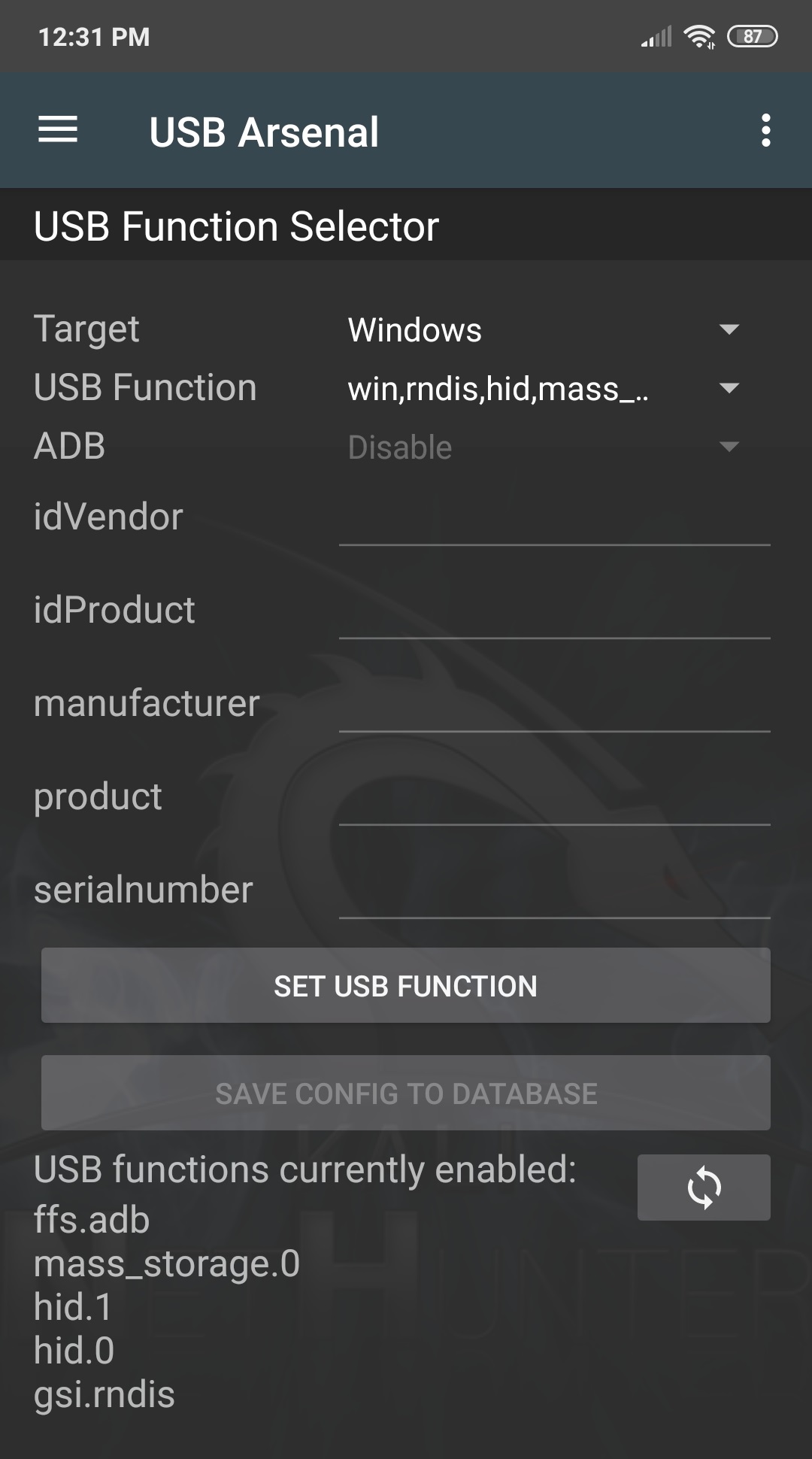
Figure 16.2 — Kali NetHunter USB-Arsenal HID-injection control panel on an Android phone. Photo: File:NetHunter USB-Arsenal.jpg by Re4sonkernel. License: CC BY-SA 4.0 (https://creativecommons.org/licenses/by-sa/4.0). Via Wikimedia Commons (https://commons.wikimedia.org/wiki/File%3ANetHunter%20USB-Arsenal.jpg).

2.5 The threat model — physical access, attack window, defenses
The HID-injection / BadUSB threat model has three load-bearing properties that distinguish it from network-based attacks:
Physical access is required. The attacker (or an unwitting human cutout) must physically connect the device to a target USB port. This is the attack’s principal limit — and the principal reason the technique is most often paired with social engineering (Vol 17), physical-entry red-team work (Vol 11 §3.6), or distributed-drop tactics (“USB drop attacks” — leaving USB devices in parking lots, conference centers, hotel hallways for opportunistic discovery by curious targets).10 11
The attack window is short but typically sufficient. A standard DuckyScript payload completes in 5-30 seconds. The attacker needs the target machine to be (a) unlocked and (b) unattended for that window. In office environments, the unlocked-and-unattended condition is routinely met — coffee runs, restroom breaks, lunch — and the dominant operational risk is being caught in physical proximity to the target rather than the payload running too slowly to complete. Operationally, the attacker either uses a button-triggered device that they fire personally (high-confidence target identification, requires their physical presence) or pre-configures an auto-trigger device that they leave behind (lower-confidence target, but the attacker is no longer present when the payload fires).
Defenses operate at three layers. USB-port-level control (disabling unused ports, USB-device-class allow-listing, USB-port physical covers) at the host configuration layer; EDR USB filtering and keystroke-rate anomaly detection at the host-software layer; physical security (visitor escort, USB-port monitoring, port-cover plates in conference rooms) at the building layer. Each of these is treated in detail in §7.
2.6 The HID-injection platform comparison
The HID-injection ecosystem in 2026 spans purpose-built commercial devices, reprogrammable commodity hardware, and software-defined options on existing hardware (phones, computers, Pi-class single-board computers). The substantive comparison:
| Platform | Form factor | Cost (early 2026) | Trigger | Payload language | Cross-link |
|---|---|---|---|---|---|
| USB Rubber Ducky Mk II / Mk III (Hak5) | USB flash drive | $80-100 | Button or auto on enumeration | DuckyScript 3.0 | Ducky Script Vol 2-4 |
| USB Rubber Ducky Mk I (Hak5, legacy) | USB flash drive | $40-60 (secondhand) | Auto on enumeration | DuckyScript 1.0 | Ducky Script Vol 3 |
| Bash Bunny (Hak5) | USB-A device, two-position switch | $135 (Bash Bunny Mark II) | Switch position selects payload | bunny-script (ATTACKMODE, QUACK, full Linux shell) | Ducky Script Vol 9 |
| Key Croc (Hak5) | USB pass-through device | $200 | Match-and-trigger keyword (passive); DuckyScript on match | DuckyScript 3.0 + match-rules + bunny-script | Ducky Script Vol 10 |
| O.MG Cable / Plug / Adapter (MG / Hak5) | USB cable, charger, USB-A adapter | $120-180 (Basic) / $180-220 (Elite) | Wi-Fi C2 from operator’s phone | DuckyScript 1.0 / 3.0 via web UI | Ducky Script Vol 11 |
| Teensy 2.0 / 3.x / 4.x (PJRC) | Naked microcontroller PCB | $20-30 (Teensy 4.0) | Auto on enumeration; programmable | Arduino sketches + HID library | (No Hack Tools deep dive — DIY platform) |
| Digispark / Arduino Pro Micro (multiple vendors) | Tiny ATtiny85 board | $3-8 (Digispark clone) | Auto on enumeration | Arduino sketches + DigiKeyboard / Keyboard library | (No Hack Tools deep dive — DIY platform) |
| BadUSB-reprogrammed USB flash drive (Phison 2251-03 and successors) | Real-looking USB flash drive | $5-15 (commodity flash drive) | Custom firmware decides | C firmware (Phison vendor SDK + community tooling) | (Karsten Nohl / SR Labs 2014; not a commercial product) |
| Kali NetHunter on Android phone | Smartphone | (already owned) | Manual via NetHunter app HID-Arsenal | DuckyScript via Kali HID payloads | (No Hack Tools deep dive — Kali firmware project) |
| Raspberry Pi Zero W + P4wnP1 | Pi Zero W in USB host-cable | $15-25 (Pi Zero W) | Multiple — Wi-Fi C2, button, scripted | DuckyScript + HIDScript + bash | 12 |
| MalDuino (Maltronics) | USB flash drive form factor | $25-40 (depending on variant) | Switch-selected payload | DuckyScript 1.0 (legacy compat) | (No Hack Tools deep dive — third-party clone) |
| Flipper Zero + USB BadUSB app (community FAPs) | Flipper Zero plus USB cable | (Flipper already owned) | Flipper UI | DuckyScript 1.0 (Flipper’s port; subset of 3.0) | Flipper Zero deep dive |
Table 16.1 — HID-injection platform comparison. The four canonical Hak5 platforms (Rubber Ducky / Bash Bunny / Key Croc / O.MG family) dominate the practitioner market because they’re production-quality, well-documented, and supported by an active payload-development ecosystem (the Hak5 Payload Hub at payloadhub.com publishes hundreds of community payloads). The DIY tier (Teensy, Digispark, Raspberry Pi Zero with P4wnP1) is functionally equivalent at lower cost but requires custom firmware authoring. The BadUSB tier — reprogrammed commodity flash drives — is the threat class that’s most consequential for defenders because it generalizes the attack to devices that look like real flash drives. The Flipper Zero’s BadUSB application is the most accessible entry point because the Flipper hardware is already in many practitioner pockets and the FAP-installed BadUSB app speaks DuckyScript 1.0 from microSD-stored payloads.
The DuckyScript-language convergence across the table is operationally significant. The same payload, with minor port adjustments, can be delivered by a Rubber Ducky, a Bash Bunny’s QUACK command, an O.MG Cable’s web UI, a Flipper Zero’s BadUSB app, or a NetHunter Android phone. The Ducky Script deep dive documents that portability at its Vols 2-7 (language reference) and Vols 8-12 (per-device payload deployment).
A capability-level DuckyScript example to illustrate the language’s surface — not an operational walkthrough (those live in the Ducky Script deep dive):
REM Capability illustration only — opens Windows Run dialog,
REM types a calculator launch. This is the "hello world" of HID
REM injection; real payloads stage shells, exfiltrate credentials,
REM modify registry, install persistence.
DELAY 2000        REM wait 2s for OS to register the new keyboard
GUI r             REM Windows key + r → Run dialog
DELAY 500         REM wait for Run dialog to appear
STRING calc.exe   REM type the command
ENTER             REM execute
The full DuckyScript 3.0 language — variables, IF/ELSE, WHILE, FUNCTION, jitter, extension framework, encrypted exfiltration — is in Ducky Script Vol 4 at full depth. The payload patterns (launcher / staged loader / exfiltrator / operator-gated / conditional) are catalogued in Ducky Script Vol 13.
3. Keyloggers — hardware versus software
The keylogger category splits sharply along a hardware/software boundary that determines almost every operational property the practitioner cares about: how the device is installed, how it captures, where the captured data goes, how the defender detects it, and what the legal posture is. This section walks the split (§3.1), the hardware-keylogger family (§3.2), the software-keylogger family (§3.3), the Hak5 Key Croc as the modern smart-keylogger hybrid that bridges the categories (§3.4), and the comparison table (§3.5).
3.1 The hardware/software split
Hardware keyloggers are physical devices placed between the keyboard and the host computer. They operate at the USB or PS/2 protocol layer — sitting inline on the wire, observing the keystroke traffic as it passes through, recording it to internal flash memory, and (in some models) exposing the captured data via a covert retrieval mechanism (a memory-mode toggle that makes the device present as a flash drive when a hotkey is typed; a Wi-Fi access point that the device advertises for wireless retrieval; an SMS or LTE exfil channel for cellular-equipped models). The host operating system sees no keylogger — it sees only the legitimate keyboard the keylogger is forwarding traffic from.
Software keyloggers are code running on the host that hooks into the operating system’s input event path. On Windows, the canonical implementation is SetWindowsHookEx(WH_KEYBOARD_LL, ...), which installs a low-level keyboard hook that receives every keystroke before it reaches the foreground window. On Linux, the equivalent is reading from /dev/input/event* (requires root or the input group) or using the X11 record extension (legacy X11; not Wayland). On macOS, it’s CGEventTapCreate(...) with the kCGSessionEventTap parameter. Kernel-mode software keyloggers (rootkit territory) install themselves as kernel drivers hooking the keyboard interrupt handler or the USB-HID stack at the kernel level, evading user-mode detection but creating substantial kernel-activity signal that endpoint detection picks up.
The operational consequences of the split:
| Property | Hardware keylogger | Software keylogger |
|---|---|---|
| Installation | Physical access to the keyboard cable | Code execution on the target (via phishing, HID injection, exploit, etc.) |
| Detection by host OS | None — invisible at the OS layer | Detectable by EDR via API call introspection, behavioral analysis, or kernel-driver enumeration |
| Detection by user | Visual inspection of the keyboard cable; some devices are small enough to escape casual inspection | None except via security software notification |
| Output retrieval | Physical retrieval (USB toggle, hotkey memory-mode, on-board screen) or wireless (Wi-Fi, LTE, BT) | Network exfiltration to attacker-controlled C2 (HTTPS POST, DNS exfiltration, email) |
| Persistence | Survives OS reinstall, user account changes, full disk wipe | Lost on antivirus removal, OS reinstall, or hardware replacement |
| Capture fidelity | Every keystroke at the wire level — including pre-boot BIOS / disk-encryption passphrases | Every keystroke at the OS layer — does NOT capture pre-boot (the OS isn’t running yet) |
| Legal exposure | Same as any unauthorized-recording statute; both federal and state wiretap laws may apply | Same — software keyloggers also touch CFAA “without authorization” |
The pre-boot capture distinction is operationally consequential. A target who runs disk encryption (BitLocker, FileVault, LUKS) types the disk passphrase before the operating system loads — no software keylogger is running yet, but a hardware keylogger on the keyboard cable captures the passphrase along with everything else. This is the classic threat model against laptop hardware on which the attacker briefly has physical access (a hotel room, a checked airline bag, a corporate fleet handed over for repair), and is why high-assurance computing environments still treat keyboard-cable inspection as part of secure-boot operational hygiene.
3.2 Hardware keyloggers — the device catalog
The commercial hardware-keylogger market is dominated by a small set of vendors with overlapping product lines:
KeyGrabber (Keelog) — the long-standing market leader in inline USB and PS/2 keyloggers. The KeyGrabber USB and KeyGrabber PS/2 baseline models are small inline cylinders (~2.5 cm long, USB-A male to USB-A female form factor) with 2-16 GB of internal flash; the “Pro” variants add a hotkey-triggered memory mode (typing a configurable sequence like kbs exposes the device as a USB mass-storage device with the captured keystrokes in a text file); the “Wi-Fi” variants add an integrated 802.11 access point the device emits, retrievable wirelessly via a browser interface; the “LTE/GSM” variants add cellular exfil to SMS or email; the “Forensic” variants add timestamp-tagged capture for chain-of-custody work. Pricing is $40-200 depending on feature set.13 The KeyGrabber product line is honestly disclosed by Keelog as both a security-research tool and a defensive forensic tool — the same hardware is sold to corporate security teams who deploy them on company-owned machines for monitoring purposes (a legal use case in many jurisdictions when documented in employee policy).
KeyLlama — similar inline form factor, focused on the budget end. KeyLlama USB and KeyLlama PS/2 at $40-70 with 2-8 GB internal flash and hotkey memory-mode retrieval. Less feature-rich than KeyGrabber but functionally equivalent for the core “capture every keystroke to internal flash” use case.
AirDrive (Hak5-adjacent / KeyGrabber Wi-Fi variant) — KeyGrabber’s Wi-Fi product line marketed under the AirDrive brand. AirDrive Keylogger Pro adds the integrated Wi-Fi AP with SSID/password configurability, browser-based retrieval, scheduled email reporting, and an optional Forensic data-integrity mode.
KeyCarbon — older brand (originally KeyKatcher) with a small product line still on market. PS/2 and USB inline models, similar feature set to KeyLlama but at a slightly higher price point.
KeySweeper — not a commercial product, but a notable research demonstration. Samy Kamkar’s 2015 KeySweeper project14 is an Arduino-based attack against Microsoft 2.4 GHz wireless keyboards: a small device disguised as a USB wall charger that passively decodes the wireless keyboard’s RF signal (a 27 MHz GFSK link in early Microsoft keyboards; later wireless keyboards moved to AES-encrypted protocols, blunting the attack on current hardware) and exfils the captured keystrokes over GSM. KeySweeper is a useful reference point for the broader “wireless keyboard sniffing” threat class — modern Bluetooth keyboards encrypt their link via the standard BLE pairing process, but legacy 2.4 GHz wireless keyboards in the secondhand market remain vulnerable.
3.3 Software keyloggers — the software-attack-surface catalog
Software keyloggers split into three tiers by their privilege level and detection surface:
User-mode keyloggers. The most common category in commercial spyware and red-team tooling. Hook into the OS’s user-mode input event pipeline (Windows: SetWindowsHookEx(WH_KEYBOARD_LL); macOS: CGEventTapCreate; Linux: X11 record extension or root-equivalent /dev/input/event* reads). Run as a normal user-space process. Detectable by EDR via API-call monitoring (Windows: ETW providers covering Win32k event injection; CrowdStrike Falcon, SentinelOne, Microsoft Defender for Endpoint all alert on SetWindowsHookEx calls from non-trusted processes) and by user-mode behavioral analysis (a process that opens a hook and never closes it is a keylogger pattern).
Kernel-mode keyloggers. Run as a kernel driver hooking the keyboard interrupt at ring 0 (Windows) or the USB-HID stack at kernel level. Substantially harder to detect from user space — by design, they’re below the level where user-mode telemetry can see them. Detectable by kernel-mode EDR drivers (CrowdStrike Falcon, SentinelOne, Carbon Black, Microsoft Defender for Endpoint all run kernel-level drivers that enumerate other kernel drivers and flag suspicious behavior); detectable by code-signing requirements on modern Windows (kernel drivers must be Microsoft-signed since Windows 10, raising the bar for casual kernel rootkit deployment). Rootkit territory — the implementation effort is substantial enough that this tier is mostly nation-state and high-end APT, not commodity criminal.
Browser-extension and credential-grabber category. Strictly speaking not keyloggers — they intercept form submissions at the browser DOM level rather than keystrokes at the OS level — but functionally similar from a credential-theft perspective. A malicious browser extension with permissions: ["webRequest", "webRequestBlocking"] or content-script access can read every form submission before it’s encrypted at the TLS layer. Mostly Chrome / Edge / Firefox extension malware, with the occasional Safari version. Detection is primarily at the extension-store level (Google and Microsoft both run telemetry-driven malicious-extension detection in their stores).
The detection economics for software keyloggers in 2026 favor the defender for the commodity-malware tier (every major EDR detects user-mode hook installation and most kernel-rootkit techniques) and favor the attacker for the highly-targeted tier (a custom kernel-rootkit keylogger written by a competent attacker with novel evasion techniques can persist for months against typical EDR before detection). The Vol 10 §3.2 treatment of EDR / XDR / MDR is the defender’s-view companion to this section.
3.4 The Hak5 Key Croc — the smart-keylogger hybrid
The Key Croc, released by Hak5 in May 2020, is the modern smart hardware-keylogger that bridges the keylogger and HID-injection categories. It’s a passive USB-keyboard pass-through device (USB-A male upstream, USB-A female downstream — the keyboard plugs into one side, the host into the other) that captures every keystroke to internal flash and runs a match-and-trigger engine: when the captured keystroke buffer matches an operator-defined pattern (a credit-card number format, a password-like string, the word “password” itself, an SSH command pattern), the device fires a DuckyScript-class payload — switching from passive keylogger to active HID-injection device on a content-driven trigger.15 16
The architecture is best read as “Bash Bunny + USB pass-through + match-and-trigger engine.” The device runs the same Linux subsystem the Bash Bunny does, supports the same ATTACKMODE / QUACK directives in its payloads (the Ducky Script deep dive covers the Key Croc at full depth in its Vol 10), exposes the same payload-slot model with switch-selected configurations, adds a Wi-Fi C2 channel (the device emits a configurable SSID for operator interaction), and adds the unique match-rules YAML that defines the keyword-triggered payload activation. The “smart” in “smart keylogger” refers to the device’s ability to act on what it captures in real time, not just store it for later retrieval.
The operational use cases the Key Croc enables that pure passive keyloggers do not:
- Trigger-on-credential: when the captured buffer matches “password” followed by 8+ characters, immediately exfiltrate the captured password via Wi-Fi C2 to the operator.
- Trigger-on-shell: when the captured buffer matches
sshfollowed by user@host, fire a HID-injection payload that types a follow-on command in the same SSH session. - Trigger-on-payment-card: when the captured buffer matches a credit-card number format (Luhn-valid 13-19 digit sequence), tag the capture for priority exfil.
The technique is the bridge between this volume’s two main categories: the Key Croc is a hardware keylogger that becomes a HID-injection device on content-driven trigger. That hybrid is what makes it the most operationally interesting device in the modern keylogger market for red-team work.
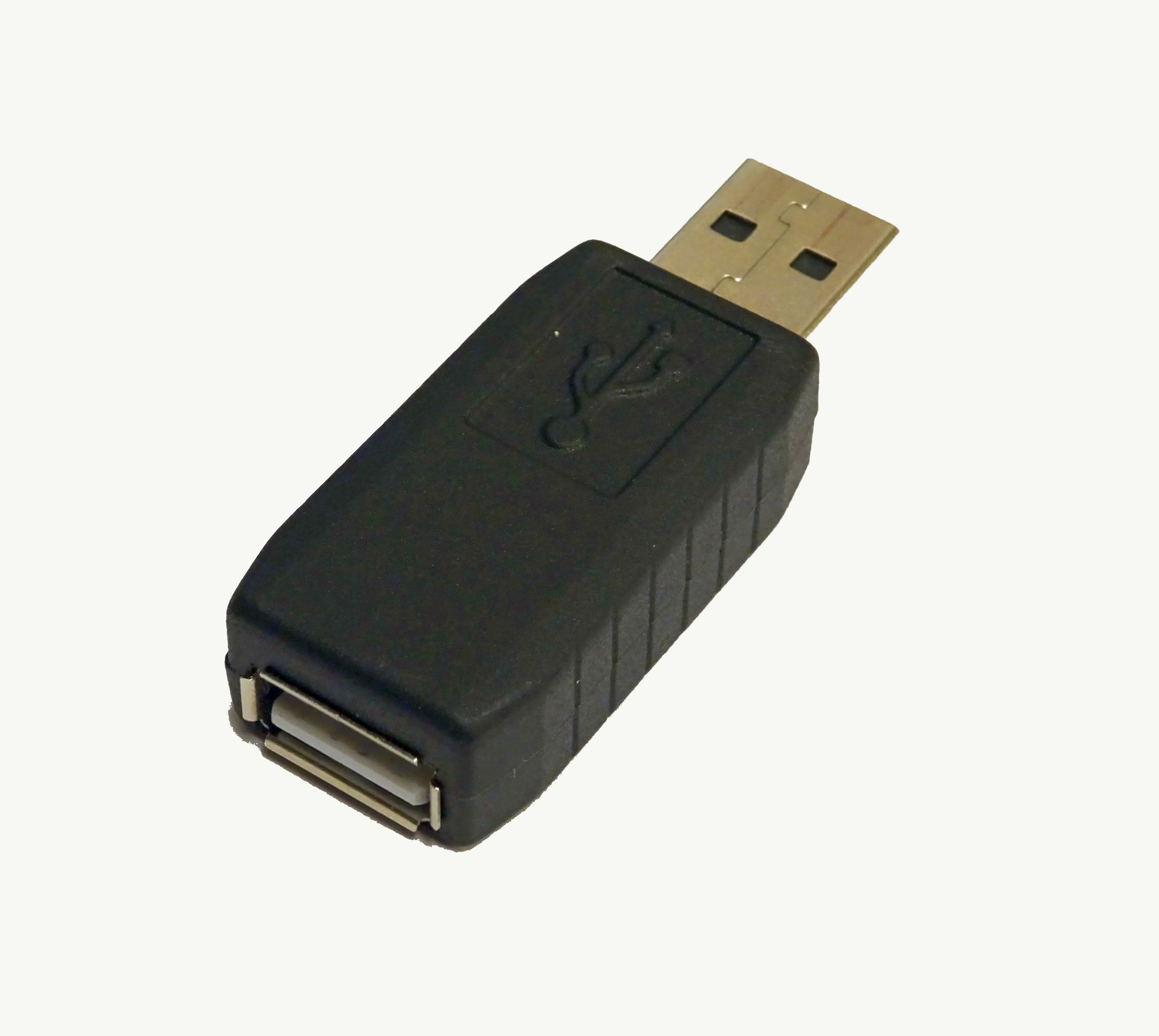
Figure 16.3 — USB hardware keylogger inline form factor. Photo: File:USB Hardware Keylogger.jpg by Stefan Bellini. License: CC0 (http://creativecommons.org/publicdomain/zero/1.0/deed.en). Via Wikimedia Commons (https://commons.wikimedia.org/wiki/File%3AUSB%20Hardware%20Keylogger.jpg).

3.5 Keylogger comparison
| Category | Installation method | Detection difficulty (target) | Detection difficulty (defender with EDR) | Retrieval | Typical use |
|---|---|---|---|---|---|
| Inline hardware (KeyGrabber, KeyLlama, KeyCarbon) | Physical access to keyboard cable, ~5 sec to install | High — invisible to OS, requires physical inspection | Very high — EDR cannot see hardware below the OS | Hotkey memory-mode; physical retrieval | Targeted hardware-tampering attack; corporate forensic logging |
| Wi-Fi-equipped hardware (AirDrive, KeyGrabber Wi-Fi) | Same as above | High — but the embedded Wi-Fi AP is detectable on a wireless survey | Medium — anomalous Wi-Fi AP near workstations triggers WIDS | Wi-Fi browser interface; live retrieval | Persistent monitoring; covert long-term capture |
| Smart hybrid (Hak5 Key Croc) | Physical access; ~5 sec | High at the hardware level; the match-and-trigger payload’s HID injection is detectable as keyboard-anomaly when it fires | Medium for capture; high for the moment of injection (keystroke-rate spike) | Wi-Fi C2; SD-card retrieval | Red-team targeted credential harvest with active follow-up |
| User-mode software (commodity spyware, red-team tools) | Code execution on target | None (invisible until detected) | Low-Medium — EDR API-call monitoring detects most | Network exfil to C2 (HTTPS, DNS, email) | Mass commodity malware; basic red-team |
| Kernel-mode software (rootkit-class) | Code execution + privilege escalation; signed driver requirement on Windows | Very high | Medium-Low for competent EDR with kernel-mode coverage | Network exfil; covert storage | Nation-state, APT, high-end red team |
| Browser extension / form-grabber | Extension install (user accepts) | Medium | High at the extension-store level; lower for direct-install sideloading | HTTP POST to attacker-controlled endpoint | Credential theft against web-app users |
| Wireless keyboard sniffer (KeySweeper-class) | Place receiver within RF range of target wireless keyboard | High — passive receive only | Very high — defender has no visibility into RF environment without dedicated WIDS | RF capture decoded by receiver; cellular/Wi-Fi exfil | Legacy 2.4 GHz wireless keyboards; modern BLE keyboards are encrypted |
Table 16.2 — Keylogger category comparison. The hardware-software split is the primary axis; the second axis is the retrieval / exfil channel, which determines whether the attacker needs physical re-access (pure passive hardware) or has live data access (Wi-Fi-equipped hardware, software with C2, smart-hybrid Key Croc). The detection-difficulty columns are deliberately not collapsed into a single “detectability” score — the defender’s posture (EDR-deployed enterprise vs. consumer machine; physical security included or not) substantially changes the calculus. As a working rule: against a non-EDR-equipped target, hardware keyloggers are essentially undetectable; against a competent EDR-equipped target, software keyloggers are typically caught within hours-to-days, and the hardware-keylogger category retains its near-undetectable position for as long as physical inspection isn’t part of the defender’s routine.
4. Network implants — drop boxes and persistence devices
The third major physical-access tool category is the network implant — a small hardware device deployed onto a target network’s wiring or USB-Ethernet path, providing covert persistent network access for an attacker to later reach into the target environment remotely. The category overlaps with the HID-injection family (a Bash Bunny in Ethernet-attack mode is a transient network implant; a LAN Turtle is its persistent cousin), and overlaps with the broader “drop box” category from physical-pentest practice. This section covers the category’s history (§4.1), the active Hak5 network-implant product line (§4.2), the DIY tradition with Raspberry-Pi-class hardware (§4.3), and the comparison table (§4.4).
4.1 The drop-box history — from PWN Plug to modern implants
The modern network-implant category was popularized by Dave Porcello’s Pwn Plug (Pwnie Express, founded 2010), a wall-wart-sized Linux SBC running a customized Debian-derived OS preloaded with Metasploit, Kismet, Aircrack, and a SSH-reverse-tunnel-over-3G-or-4G persistence stack.17 18 The Pwn Plug was the first commercial productization of the “leave a computer in their network, exfiltrate over a persistent reverse-tunnel” pattern, sold to corporate red teams and authorized penetration testers at $700-1,200 depending on configuration. The product line expanded to the Pwn Phone (Android-based handheld), the Pwn Pad (tablet form factor), and the Pwn Pulse central-management platform. Pwnie Express was acquired by Outpost24 in October 2019 (not Rapid7 — a common misattribution) and the consumer Pwn Plug product line was discontinued, though Outpost24 retained the wireless-assessment technology for integration into their enterprise platform.19
The Pwn Plug’s design choices — small SBC, persistent reverse SSH tunnel, cellular fallback, full Linux toolchain, web-based command interface — defined the network-implant category and are visible in essentially every modern product, including the current Hak5 lineup (§4.2) and the DIY Raspberry Pi builds (§4.3). The “Mini Pwner” (Dustin Webber, 2012) was a notable open-source contemporary built on the TP-Link MR3020 mini-router, demonstrating that the network-implant pattern could be productized at the $40-60 price point on commodity travel-router hardware. The Mini Pwner is essentially obsolete in 2026 (the MR3020 hardware is no longer produced and OpenWrt support is end-of-life), but the design pattern it pioneered — repurposed commodity OpenWrt router as a drop-box — is alive and well in the GL.iNet travel-router family that many practitioners use as ad-hoc implants today (the GL-BE3600 in tjscientist’s MY_GEAR inventory is in this lineage).
4.2 The Hak5 network-implant product line
The current Hak5 network-implant product line covers three distinct operational modes — passive capture, active recon, and persistent foothold — each in a distinct form factor:
LAN Turtle (Hak5, released July 2015) — the canonical “plug into an open USB port and an Ethernet port and leave it” persistent-implant device.20 Form factor is a USB-A-to-Ethernet adapter that looks indistinguishable from a generic USB-Ethernet dongle ($10-15 at any electronics retailer). Internally, a custom Linux SBC (Atheros AR9331 SoC, OpenWrt-based) provides the persistent compute. The Ethernet side connects to the target network; the USB side draws power from the host machine (or a wall-USB charger; or a USB battery pack for desk-detached operation). The persistent reverse-SSH-tunnel module (“autossh” with retry-on-failure) phones home over the Ethernet uplink to an operator-controlled C2 host. Modules cover scripted recon (Meterpreter staged delivery, nmap orchestration, DNS-spoof, evil-DHCP), persistent VPN tunneling, and credential-harvest scenarios. The 3G LAN Turtle variant adds cellular fallback. The LAN Turtle’s value proposition is invisibility: the device looks like an ordinary USB-Ethernet adapter, the cable runs from a USB port to an Ethernet port in a way that’s visually consistent with normal corporate wiring, and the network-side signature (a single internal IP on the corporate LAN doing periodic SSH-out to an external host) is dwarfed by the noise of normal corporate Internet activity. Current pricing $130-180.
Packet Squirrel (Hak5, original 2017; Mark II current as of 2026) — the inline Ethernet packet-capture-and-MITM device. Form factor is a small inline Ethernet device (two RJ-45 ports) that sits between a target Ethernet device and the wall jack / switch, passing traffic through transparently while capturing it to internal storage or actively manipulating it.21 Payloads cover passive capture (full PCAP of all traffic to internal SD card), DNS spoofing, scripted MITM, VPN-tunnel passthrough, and the “exfil over persistent reverse-tunnel” pattern. The original Packet Squirrel was a 470 MHz MIPS SoC with limited compute; the Packet Squirrel Mark II (current 2026) is a substantially upgraded design with quad-core ARM SoC, USB-C power, gigabit Ethernet on both interfaces, and a richer Linux userland. The Packet Squirrel’s value proposition is inline access — the device is on the wire, with bidirectional traffic visibility, and can both capture for later analysis and inject for active attack. Current Mark II pricing ~$200.
Shark Jack (Hak5, released 2019) — the active portable Ethernet auditor, designed for short-engagement work rather than long-term deployment.22 Form factor is a pen-sized Ethernet device with an integrated battery, a power button, and a small LED indicator. The use case: walk up to a network port (in a conference room, in a kiosk’s back panel, in an unattended corner office), plug the Shark Jack in, press the trigger button, walk away while the device runs a pre-configured payload (network sweep, DHCP request to characterize the LAN segment, ARP scan, optional exfil over the cellular Shark Jack Cable variant), then collect the device a few minutes later for offline analysis of what it captured. The “60-second sprint” use case — get on the wire, characterize the segment, get off the wire — is the design intent. Pricing ~$100.
Screen Crab (Hak5, current product) — adjacent to the network-implant category but worth mentioning here for completeness. The Screen Crab is an HDMI pass-through device that sits between a target display and the source (laptop, KVM, etc.) and captures the displayed video to internal storage or streams it over Wi-Fi. Not strictly a network implant (it captures visual output, not network traffic), but operationally similar in its “drop and forget” deployment model.
All four Hak5 implants use the same DuckyScript-extended payload language family for orchestration. The Ducky Script deep dive covers their payload language in Vol 9 (Bash Bunny) and Vol 14 (combined workflow); the network-implant-specific payload patterns are documented at the Hak5 Payload Hub.23
4.3 The DIY tradition — Raspberry-Pi-based drop boxes
Parallel to the commercial Hak5 line, a long-standing DIY tradition uses commodity single-board computers — primarily the Raspberry Pi family — as drop-box hardware. The pattern is straightforward: a Raspberry Pi Zero W ($15), a microSD card with a preconfigured Linux image carrying Kali Linux’s penetration-testing toolchain (kali-arm) plus a persistent reverse-tunnel daemon, a USB power source (wall USB, battery pack, or — for the LAN-Turtle-equivalent use case — a USB-A-to-host-mode cable that draws power from the target machine), and an optional Wi-Fi or Ethernet adapter for network access.
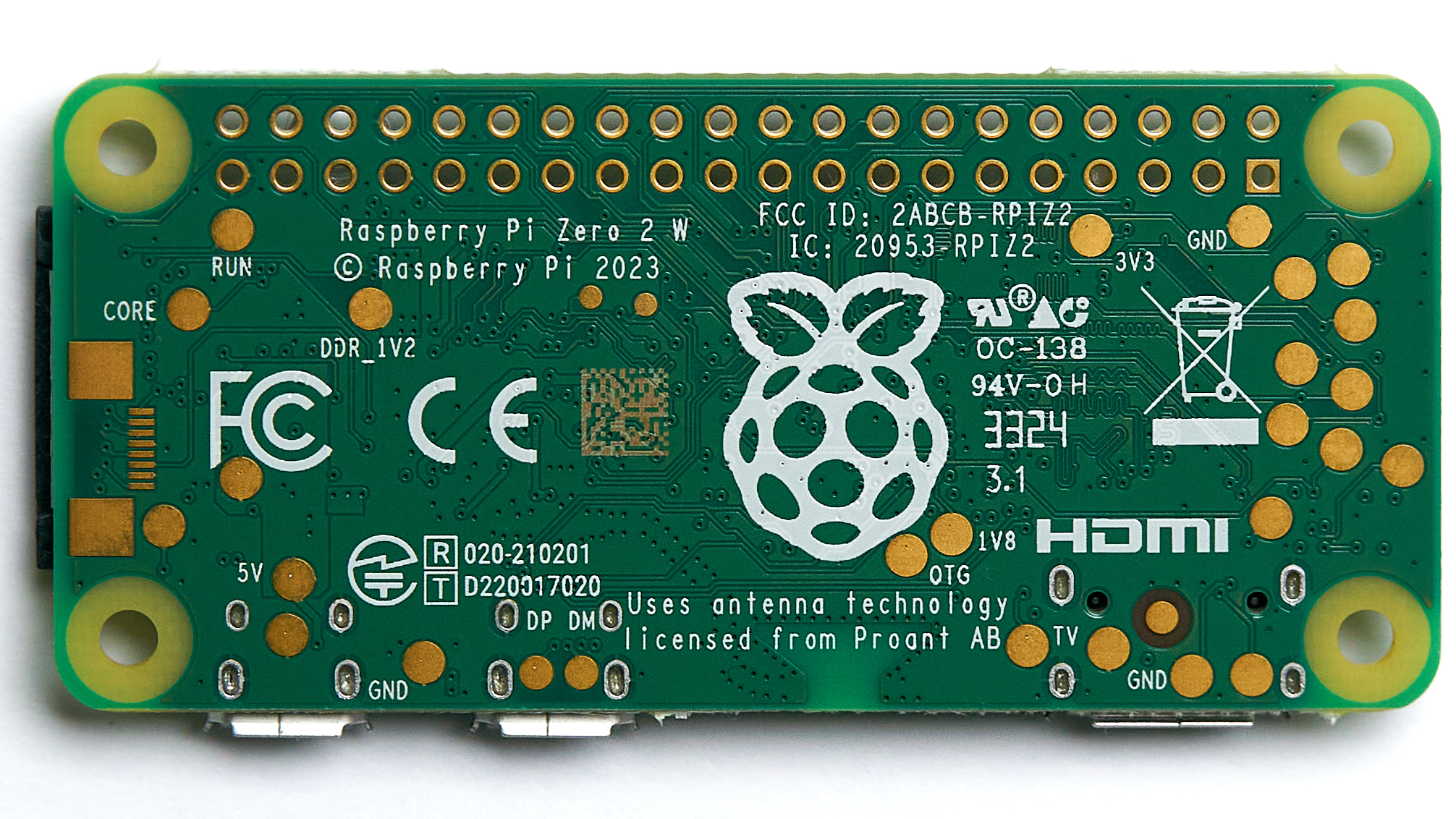
Figure 16.4 — Raspberry Pi Zero 2 W single-board computer. Photo: File:Raspberry Pi Zero 2 W — 2024 — 0012.jpg by Anil Öztas. License: CC BY 4.0 (https://creativecommons.org/licenses/by/4.0). Via Wikimedia Commons (https://commons.wikimedia.org/wiki/File%3ARaspberry%20Pi%20Zero%202%20W%20—%202024%20—%200012.jpg).

The most-cited community drop-box project is P4wnP1 (RoganDawes), an Open-Source attack platform that converts a Raspberry Pi Zero W into a multi-vector USB attack device.12 P4wnP1 (and its successor P4wnP1 A.L.O.A.) implements HID injection, USB-Ethernet attack vectors, USB-mass-storage emulation, Wi-Fi C2, BLE C2, and a scripted-payload framework — essentially every capability of the Hak5 Bash Bunny plus a network-implant subset of the LAN Turtle, on a $15 Pi Zero W. The tradeoff vs. the commercial Hak5 products is the same tradeoff as in every DIY-vs-commercial security tool comparison: substantially lower hardware cost, substantially higher operator-time investment to deploy and maintain, less polished payload-development tooling.
Other notable DIY platforms in the network-implant category:
- Raspberry Pi 4 + Kali Linux + persistent SSH tunnel — the canonical “DIY drop box” build. Plug a Pi 4 with the Kali kali-arm image into a corporate Ethernet port, draw power from PoE injector or wall USB, and an SSH reverse tunnel makes the Pi reachable from the operator’s C2 server. Substantial Linux compute (4 GB or 8 GB RAM), full Kali toolchain (Metasploit, nmap, Burp, Aircrack-ng, the whole catalog), and the form factor is small enough to hide behind a desk or in a server-room rack. The $35-75 price point makes it disposable for engagement-scoped deployment.
- Travel routers (GL.iNet GL-BE3600, GL-MT3000, GL-AR300M) running OpenWrt with a curated package set — the modern Mini Pwner heir. The GL.iNet hardware family runs OpenWrt natively, supports USB modems for cellular fallback, and the form factor (pocket-size travel router) is plausible cover for the “left it on the desk by accident” scenario. tjscientist’s MY_GEAR includes a GL-BE3600 — the GL-iNet platform documented at
../../GL-iNet GL-BE3600/— which is in this family at the high end of the modern lineup.
4.4 The network-implant comparison
| Device | Form factor | Cost (early 2026) | Primary capability | C2 channel | Cross-link |
|---|---|---|---|---|---|
| Hak5 LAN Turtle | USB-Ethernet adapter | $130-180 | Persistent SSH foothold via USB+Ethernet | SSH reverse tunnel via target’s Internet uplink; cellular variant adds 3G | Ducky Script Vol 14 (combined workflow) |
| Hak5 Packet Squirrel Mark II | Inline 2-port Ethernet device | ~$200 | Inline packet capture or MITM; passive PCAP or active manipulation | Wi-Fi C2; persistent reverse SSH; SD-card retrieval | (No dedicated deep dive) |
| Hak5 Shark Jack | Pen-sized Ethernet device with battery | ~$100 | Active short-engagement Ethernet recon | None primary; payload-stored data retrieval; Cable variant adds cellular | (No dedicated deep dive) |
| Hak5 Screen Crab | HDMI inline pass-through | ~$200 | HDMI video capture | Wi-Fi C2; SD-card retrieval | (No dedicated deep dive) |
| Pwn Plug (Pwnie Express, legacy) | Wall-wart Linux SBC | Discontinued (2019 EOL after Outpost24 acquisition) | Full Linux pentest toolchain with persistent reverse tunnel | SSH reverse; cellular | Historical reference only |
| Mini Pwner (open source, ~2012) | TP-Link MR3020 + custom firmware | $40-60 historical (MR3020 EOL) | OpenWrt-based drop box | SSH reverse via target Internet | Historical reference only |
| Raspberry Pi Zero W + P4wnP1 | Pi Zero W in USB host-cable | $15-25 (Pi Zero W) + accessories | Multi-vector HID + USB-Ethernet + Wi-Fi C2 | Wi-Fi C2; BLE C2; staged | 12 |
| Raspberry Pi 4 + Kali Linux | Pi 4 in any enclosure | $35-75 | Full Kali pentest toolchain | SSH reverse, persistent VPN, custom C2 | (DIY platform) |
| GL.iNet GL-BE3600 (or family) | Pocket travel router | $90-150 | OpenWrt-based drop box; Wi-Fi 7 capable | SSH reverse via target Internet | ../../GL-iNet GL-BE3600/ |
| GL.iNet GL-AR300M / GL-MT300N | Small travel router | $25-40 | OpenWrt-based budget drop box | SSH reverse via target Internet | (No dedicated deep dive) |
Table 16.3 — Network-implant comparison. The Hak5 line dominates the commercial market for purpose-built implants; the DIY tier (Raspberry Pi + Kali; GL.iNet travel routers + OpenWrt) is the cost-competitive alternative with substantially higher operator investment. The Pwn Plug entry is historical reference — the device that established the category in 2010 is long off the market, but its DNA is in every active implant in the table. The choice between commercial and DIY is mostly an operations-time-vs-money tradeoff: the Hak5 line is deployable in minutes (insert SD card with payload, plug in, walk away); the DIY tier is deployable in hours-to-days the first time and minutes thereafter once the operator’s standard image is built.
5. The Hak5 implant family — mapped catalog
The Hak5 implant family is the canonical product line in the physical-access computer-hacking category and orients this entire volume. Hak5 — founded by Darren Kitchen in 2005 as a hacker podcast and grown into the dominant practitioner-tools brand of the modern era — ships and supports four canonical HID-injection / keylogger platforms, three network-implant platforms, and an HDMI-capture platform, plus the WiFi Pineapple Wi-Fi audit line (covered in Vol 14 and the WiFi Pineapple deep dive), all integrated through a common payload-language family (DuckyScript 1.0 / 3.0 plus device-specific extensions), a common cloud orchestration layer (Cloud C2), and an aligned set of vendor documentation, payload hubs, and field accessories.
This section is the capability map across that ecosystem, with deep cross-links into the Ducky Script deep dive for per-device hardware depth, payload-language reference, and operational workflow. The Ducky Script deep dive carries the per-device treatment at engineer depth in its Vols 8-12; this section does not duplicate that content but provides the family-level map that orients which device the operator reaches for in which scenario.
5.1 The family hierarchy
The Hak5 implant ecosystem organizes into three operational categories, each with a distinct attack-surface focus:
                        HAK5 IMPLANT FAMILY HIERARCHY
                        ─────────────────────────────

    ┌───────────────────────────────────────────────────────────────────┐
    │  HID-INJECTION / KEYLOGGING (the "USB attack" subfamily)          │
    │                                                                   │
    │   USB Rubber Ducky Mk I / II / III ────► canonical HID injection  │
    │      • DuckyScript 1.0 (Mk I) / 3.0 (Mk II/III)                   │
    │      • USB flash drive form factor                                │
    │      • Single-payload + microSD                                   │
    │                                                                   │
    │   Bash Bunny Mk I / II ──────────────────► multi-vector HID +     │
    │      • bunny-script + ATTACKMODE + QUACK     storage + Ethernet   │
    │      • Two-position payload-select switch                         │
    │      • Full Linux subsystem                                       │
    │                                                                   │
    │   Key Croc ──────────────────────────────► passive keylogger +    │
    │      • DuckyScript + match-and-trigger       active HID injection │
    │      • USB pass-through form factor                               │
    │      • Wi-Fi C2                                                   │
    │                                                                   │
    │   O.MG Cable / Plug / Adapter ───────────► covert HID + Wi-Fi C2  │
    │      • DuckyScript via web UI                                     │
    │      • Disguised-as-real-cable form factor                        │
    │      • The "you can't tell it's malicious" tier                   │
    │                                                                   │
    │   Cross-link: Ducky Script Vols 8-11 (per-device full depth)      │
    └───────────────────────────────────────────────────────────────────┘

    ┌───────────────────────────────────────────────────────────────────┐
    │  NETWORK IMPLANT (the "drop-box" subfamily)                       │
    │                                                                   │
    │   LAN Turtle ─────────────────────────────► persistent foothold   │
    │      • USB-Ethernet adapter form factor                           │
    │      • Reverse SSH; cellular variant                              │
    │                                                                   │
    │   Packet Squirrel Mark II ────────────────► inline Ethernet MITM/ │
    │      • Two-port inline form factor             capture            │
    │      • Wi-Fi C2; SD-card retrieval                                │
    │                                                                   │
    │   Shark Jack ─────────────────────────────► active short-engagement│
    │      • Pen-sized with battery                  Ethernet recon     │
    │      • 60-second sprint workflow                                  │
    │                                                                   │
    │   Cross-link: § 4.2 above                                         │
    └───────────────────────────────────────────────────────────────────┘

    ┌───────────────────────────────────────────────────────────────────┐
    │  DISPLAY CAPTURE                                                  │
    │                                                                   │
    │   Screen Crab ────────────────────────────► HDMI passthrough +    │
    │      • Inline HDMI form factor                 video capture      │
    │      • Wi-Fi C2; SD-card retrieval                                │
    └───────────────────────────────────────────────────────────────────┘

    ┌───────────────────────────────────────────────────────────────────┐
    │  WIRELESS AUDIT (separate product category — see Vol 14)          │
    │                                                                   │
    │   WiFi Pineapple Mark VII / AC Tactical / Pager / Enterprise      │
    │      • Cross-link: Vol 14 §6 + WiFi Pineapple deep dive (21 vols) │
    └───────────────────────────────────────────────────────────────────┘

    ┌───────────────────────────────────────────────────────────────────┐
    │  FLEET ORCHESTRATION                                              │
    │                                                                   │
    │   Cloud C2 ───────────────────────────────► centralized payload   │
    │      • Self-hosted or Hak5-hosted              distribution +     │
    │      • Devices phone home over HTTPS           captured-data exfil│
    │      • Cross-link: Ducky Script Vol 14 §6                         │
    └───────────────────────────────────────────────────────────────────┘
Figure 16.5 — Hak5 implant family hierarchy. The four HID-injection / keylogging platforms (Rubber Ducky / Bash Bunny / Key Croc / O.MG family) and the three network implants (LAN Turtle / Packet Squirrel / Shark Jack) plus the Screen Crab cover the physical-access attack surface from “type a payload” through “passively capture keystrokes” through “drop a persistent network foothold” through “capture displayed video.” The WiFi Pineapple line is a separate product category covered in Vol 14 and the WiFi Pineapple deep dive. Cloud C2 is the cross-cutting fleet-orchestration layer that all of them can phone home to for centralized payload distribution and exfil aggregation.
5.2 The capability table — what each device does, what to reach for
| Device | Form factor | Primary capability | Cost (early 2026) | Year released | Cross-ref (full depth) |
|---|---|---|---|---|---|
| USB Rubber Ducky Mk II | USB flash drive | HID keystroke injection with DuckyScript 3.0; button-triggered | $80 | 2022 (Mk I: 2010) | Ducky Script Vol 8 |
| USB Rubber Ducky R (“Mk III” naming unclear) | USB flash drive (USB-C + USB-A variants for the modernized refresh) | HID injection with extended DuckyScript 3.0 features; the current shop SKU as of 2026 is the “USB Rubber Ducky R” — Hak5’s docs portal still organizes only by Mk I (2011) and Mk II (2022), so whether the R is the Mk III or a separate revision is not authoritatively documented as of the May 2026 audit. Verify against shop.hak5.org/products/usb-rubber-ducky-r before relying on a specific generation label. | ~$100 (verify) | 2024 (verify) | Ducky Script Vol 8 |
| Bash Bunny Mk II | USB-A device + switch | Multi-vector HID + storage + Ethernet; bunny-script + ATTACKMODE | $135 | 2022 (Mk I: 2017) | Ducky Script Vol 9 |
| Key Croc | USB pass-through | Passive keylogger + match-and-trigger HID injection; Wi-Fi C2 | $200 | May 2020 | Ducky Script Vol 10 |
| O.MG Cable Basic | USB cable (Lightning / USB-C / USB-A) | HID injection over Wi-Fi C2; “ordinary cable” cover | $120 | DEF CON 27 (Aug 2019) | Ducky Script Vol 11 |
| O.MG Cable Elite | USB cable | HID injection + storage + advanced trigger logic + geofence | $180 | 2021+ | Ducky Script Vol 11 |
| O.MG Plug | USB wall charger | HID injection from a USB wall-charger cover | $180 | 2022 | Ducky Script Vol 11 |
| O.MG Adapter | USB-A-to-USB-C adapter | HID injection from an “adapter” cover | $130 | 2022 | Ducky Script Vol 11 |
| LAN Turtle | USB-Ethernet adapter | Persistent SSH foothold; module-based; 3G variant available | $130-180 | July 2015 | § 4.2 above |
| Packet Squirrel Mark II | Inline 2-port Ethernet device | Inline capture / MITM; payload-orchestrated | ~$200 | 2024 (Mk I: 2017) | § 4.2 above |
| Shark Jack | Pen-sized Ethernet device | Active short-engagement Ethernet recon; battery-powered | ~$100 | 2019 | § 4.2 above |
| Screen Crab | Inline HDMI device | HDMI video capture | ~$200 | 2018 | (Not detailed in this volume) |
| WiFi Pineapple Mark VII | Pentest-platform handheld | Rogue-AP / KARMA / MANA / handshake-capture | ~$100 | 2020 | Vol 14 §6; WiFi Pineapple deep dive |
| Cloud C2 | Self-hosted Linux server | Fleet-orchestrated payload distribution + exfil aggregation | Free (community edition) / paid tiers | Original release ~2019 | Ducky Script Vol 14 §6 |
Table 16.4 — Hak5 implant family capability catalog. The HID-injection tier dominates the rows because Hak5’s product strategy is built around that attack surface (the company started with the Rubber Ducky and the language ecosystem has driven their subsequent product evolution). The DuckyScript language family ties the ecosystem together — payloads written for one device port to others with mostly-mechanical adjustments (the Ducky Script deep dive Vol 14 covers cross-device combined workflows at full depth). Cloud C2 is the bridge from “one device, one payload” to “fleet of devices, orchestrated campaign” — a substantial operational upgrade for engagements with multiple drop points.
5.3 Picking the right device — the decision logic
The working pattern across the family:
- “I need to type a payload on a target machine in 5-30 seconds while I’m physically present.” → USB Rubber Ducky Mk II (button-triggered, single-vector, fast). The simplest HID-injection device in the family, the most well-documented, the easiest payload-development path.
- “I need a multi-vector attack — HID injection plus USB-Ethernet plus mass-storage exfil in the same payload.” → Bash Bunny. The two-position switch lets the operator carry two different multi-vector payloads simultaneously;
ATTACKMODElets a single payload switch between vectors mid-execution. - “I need to leave a device on a target keyboard for hours-to-days, capturing everything typed.” → Key Croc. The match-and-trigger engine adds the “act on what you capture” capability that pure passive keyloggers don’t have.
- “I need a HID-injection device that looks completely innocuous and that I can trigger remotely.” → O.MG Cable (or Plug or Adapter, depending on what cover fits the engagement). The Wi-Fi C2 channel lets the operator trigger payload execution from across the room rather than requiring physical proximity at fire time. Most covert of the family.
- “I need a persistent network foothold on a target LAN that survives reboots and that I can reach from outside.” → LAN Turtle. The USB-Ethernet form factor is plausible-deniable as ordinary IT equipment.
- “I need inline visibility into the network traffic between a specific device and the rest of the network.” → Packet Squirrel Mark II. The two-port inline form factor puts the operator in the middle of the conversation.
- “I need a 60-second active recon sprint on a network port, then I leave.” → Shark Jack. Battery-powered, payload-driven, no persistence — pure short-engagement work.
- “I need to manage a fleet of deployed devices across multiple engagement sites with centralized payload distribution and exfil collection.” → Cloud C2 plus the device fleet of choice.
The Ducky Script deep dive Vol 7 carries this decision tree at the per-device-pair level (Rubber Ducky vs Bash Bunny, Bash Bunny vs Key Croc, etc.) with the operational reasoning behind each choice.
5.4 Cloud C2 — the fleet orchestration layer
Hak5’s Cloud C2 is the centralized command-and-control server that sits across the Hak5 implant family, providing fleet-orchestrated payload distribution, captured-data aggregation, and remote device management. The architecture: each device in the field (LAN Turtle, Packet Squirrel, Key Croc, Bash Bunny in certain configurations, O.MG cables) phones home over HTTPS to a Cloud C2 server (self-hosted on an operator-controlled VPS or purchased as a managed service from Hak5); the server provides a web UI for the operator to push payloads to devices, see what’s been captured, manage device groupings, and orchestrate multi-device campaigns.
For single-device hobbyist work, Cloud C2 is overkill. For multi-device engagement work — a red-team campaign with drop-boxes at five sites, or a research-network with eight Key Crocs and four LAN Turtles deployed across multiple test labs — Cloud C2 transforms the operational workflow from “manually log into each device” to “operate the fleet from a single web UI.” The Ducky Script deep dive Vol 14 §6 covers Cloud C2 at full operational depth.
The licensing — Cloud C2 has a free Community tier (limits on device count and feature set) and paid Pro / Enterprise tiers — and the self-hosting option (the server runs on Linux x86-64; the source is open and supportable by the operator) make it accessible to budget-constrained operators while still scaling to enterprise red-team engagements with hundreds of deployed devices.
6. Combined workflows — RF plus physical implant staging
The reference cluster’s value emerges most clearly at the seams between volumes. Vols 13-15 covered the RF half; this volume covers the physical-access half; the engagements that matter operationally usually combine both. This section catalogues the canonical combined-workflow patterns where this volume’s physical-access tools chain with the RF tools of Vols 13-15 to produce attack chains that no single tool class accomplishes alone. The framing is capability-and-architecture rather than operational walkthrough — the operational walkthroughs live in the Ducky Script deep dive Vol 14 (Hak5-cross-device combined workflows), the WiFi Pineapple deep dive (Pineapple-centric combined workflows), and the engagement-methodology framing in Vol 11 §3.6 (red-team operator’s RF/HID staging layer at the engagement level).
6.1 The combined-workflow chain — the engagement is the unit
                        COMBINED RF + PHYSICAL ATTACK CHAIN
                        ──────────────────────────────────

   ┌──────────────────────────────────────────────────────────────────┐
   │ STAGE 1 — RECONNAISSANCE                                         │
   │                                                                  │
   │   RF tools (Vols 13-15):                                         │
   │     • SDR for sub-GHz traffic profiling (HackRF, RTL-SDR)        │
   │     • Wi-Fi scanning + survey (Marauder, Pineapple recon mode)   │
   │     • BLE enumeration (Flipper, Marauder, Ubertooth)             │
   │     • RFID identification (Proxmark3 / Flipper survey of badges) │
   │                                                                  │
   │   Output: target characterization (what credentials, what cards, │
   │   what wireless networks, what BLE devices are in scope)         │
   └────────────────────────────┬─────────────────────────────────────┘
                                │
                                ▼
   ┌──────────────────────────────────────────────────────────────────┐
   │ STAGE 2 — PHYSICAL ENTRY                                         │
   │                                                                  │
   │   RFID badge clone (Vol 15 §5):                                  │
   │     • Capture HID Prox / iCLASS Legacy / MIFARE Classic badge    │
   │     • Clone to Proxmark3 or Flipper                              │
   │     • Use clone for door access                                  │
   │                                                                  │
   │   OR: social engineering tailgate (Vol 17)                       │
   │   OR: lock-picking + physical bypass (Vol 11)                    │
   └────────────────────────────┬─────────────────────────────────────┘
                                │
                                ▼
   ┌──────────────────────────────────────────────────────────────────┐
   │ STAGE 3 — IMPLANT DEPLOYMENT (this volume)                       │
   │                                                                  │
   │   Network implant (§4):                                          │
   │     • LAN Turtle into a USB port + Ethernet jack                 │
   │     • Packet Squirrel inline on a target's Ethernet              │
   │                                                                  │
   │   HID injection (§2 + §5):                                       │
   │     • Rubber Ducky into unlocked machine → staged payload        │
   │     • O.MG Cable replacing a target's USB cable on their desk    │
   │                                                                  │
   │   Keylogger (§3):                                                │
   │     • Key Croc inline on a target's keyboard                     │
   └────────────────────────────┬─────────────────────────────────────┘
                                │
                                ▼
   ┌──────────────────────────────────────────────────────────────────┐
   │ STAGE 4 — REMOTE C2 + EXFIL                                      │
   │                                                                  │
   │   Implant phones home over the target network (LAN Turtle → SSH  │
   │   reverse) or over the implant's own Wi-Fi (O.MG Cable, Key Croc │
   │   to operator-controlled AP, possibly the operator's WiFi        │
   │   Pineapple Pager carried during a parking-lot return visit).    │
   │                                                                  │
   │   Captured credentials, captured packets, captured keystrokes    │
   │   exfil to operator-controlled C2 (Cloud C2 or custom).          │
   └────────────────────────────┬─────────────────────────────────────┘
                                │
                                ▼
   ┌──────────────────────────────────────────────────────────────────┐
   │ STAGE 5 — LATERAL MOVEMENT (out of scope for this volume)        │
   │                                                                  │
   │   Credentials harvested feed into network-side attack chain      │
   │   (Vol 11 §4 — red-team methods + tradecraft; the C2 + lateral   │
   │   + persistence + objectives phase of an engagement).            │
   └──────────────────────────────────────────────────────────────────┘
Figure 16.6 — The combined RF + physical attack chain. The engagement is the operational unit: no single tool class — RF reconnaissance, badge cloning, HID injection, network implant, keylogger — wins the engagement alone. The chain is what the engagement is. This volume’s contribution is Stages 3 (implant deployment) and the Stage 4 exfiltration mechanics; Vols 13-15 cover Stages 1 and 2 (RF reconnaissance and badge cloning); Vol 17 covers the social-engineering layer that often glues Stages 2 and 3 together; Vol 11 covers the engagement-methodology framing across the whole chain.
6.2 The canonical combined-workflow patterns
The combined-workflow patterns that appear consistently in published red-team methodology guides, vendor product documentation, and the Ducky Script deep dive Vol 14’s operational-walkthrough chapter:
Pattern A — Badge-clone → physical entry → HID drop. Recon captures an in-scope badge (Vol 15); the operator clones it (Flipper or Proxmark3); the clone gets the operator through the door; on the unattended floor, the operator plugs a Rubber Ducky into an unlocked workstation for the 15-second window required to fire a staged-loader payload; the staged loader establishes persistent C2 to an operator-controlled server. The entire chain takes 5-10 minutes once the badge is captured. The clone is the access enabler; the Ducky is the payload delivery; the staged loader is the persistence.
Pattern B — Pineapple captive-portal → HID payload. Operator deploys a WiFi Pineapple in the target’s vicinity (parking lot, lobby, conference room across the hall) configured for a karma-style rogue-AP and a captive-portal landing page. Targets’ devices, with prior-network association leaks, auto-connect; the captive portal directs to a download page hosting an apparently-legitimate “network update” executable. Optionally: a Rubber Ducky payload on an unlocked machine first opens the URL in the captive portal so the user-action-required step is skipped. The WiFi Pineapple deep dive Vol 21 cheatsheet documents this Pineapple-plus-Ducky pattern explicitly.
Pattern C — LAN Turtle drop + RF survey. During an authorized red-team engagement, the operator drops a LAN Turtle on a target workstation for persistent network access, then leaves the building, then conducts wireless surveys from the parking lot using the WiFi Pineapple Pager (or Mark VII + AC Tactical) to enumerate the wireless networks visible from outside the building. The LAN Turtle gives wired-network access; the Pineapple gives wireless-network access; combined, the operator has both attack surfaces visible from a remote vantage.
Pattern D — O.MG Cable as Bluetooth-triggered HID payload. The O.MG Cable family replaces the Ducky’s “operator-button-trigger” with a Wi-Fi (or in newer variants, BLE) C2 channel. The cable, plugged into the target’s desk (replacing a normal charging cable; the cover story is “I noticed your old cable was frayed, here’s a new one”), waits indefinitely for the operator to trigger the payload over Wi-Fi from elsewhere in the building. The operator’s trigger device is typically a smartphone or laptop running the O.MG web UI. This is the most-covert HID injection pattern in the family — there is no physical sign of attack until the operator fires the payload, and the cable looks like an ordinary cable on the target’s desk indefinitely.
Pattern E — Key Croc + match-and-trigger → Pineapple-staged credentials. The Key Croc captures keystrokes passively; on match of an SSH command pattern, it exfiltrates the captured username/password over Wi-Fi to the operator’s nearby Pineapple acting as a transient relay. The operator never needs to physically return to the target for the credentials — the match-and-trigger plus the wireless exfil makes the device operationally autonomous for the engagement window.
6.3 The combined-workflow table
| Workflow | RF tool (Vols 13-15) | Physical implant (this volume) | Target capability | Cross-link |
|---|---|---|---|---|
| Badge-clone → HID drop | Flipper Zero / Proxmark3 (clone HID Prox or MIFARE Classic) | Rubber Ducky or Bash Bunny on unlocked workstation | Persistent foothold post-entry | Vol 15 §5 + § 5 above |
| Pineapple captive-portal → HID | WiFi Pineapple (KARMA + captive portal) | Rubber Ducky (URL-open payload) | User-action-required step bypassed | Vol 14 §3 + WiFi Pineapple deep dive |
| LAN Turtle drop + RF survey | WiFi Pineapple Pager (wireless recon) | LAN Turtle (wired persistence) | Combined wireless + wired access from outside | Vol 14 §6 + § 4.2 above |
| O.MG Cable BLE-trigger | (Optional: Flipper BLE for trigger) | O.MG Cable Elite | Wait-indefinitely covert injection | Ducky Script Vol 11 |
| Key Croc match + Pineapple exfil | WiFi Pineapple (Wi-Fi relay) | Key Croc (match-and-trigger) | Autonomous credential capture + exfil | Ducky Script Vol 10 |
| Marauder evil portal → HID drop | ESP32 Marauder (rogue-AP + evil portal) | Rubber Ducky (post-entry follow-up) | Wi-Fi credential capture chained to wired-credential harvest | Vol 14 §3 + ESP32 Marauder Firmware deep dive |
| NFC-tag attack → HID redirect | Flipper Zero (NFC tag write) | O.MG Cable on target machine (post-redirect HID) | NFC-tag-launched URL → captive-portal-served HID-payload-followup | Vol 15 §4 |
| Sub-GHz remote → physical sensor trigger | HackRF (sub-GHz transmit) | (No HID implant required — RF alone) | Doorbell-spoof / garage-door-open / IoT-actuator trigger as physical-entry enabler | Vol 13 §4 |
Table 16.5 — Combined RF + physical-implant workflow patterns. Each row pairs an RF capability from Vols 13-15 with a physical-access capability from this volume to produce an attack chain that exceeds the sum of its parts. The patterns appear in the published red-team methodology literature (TrustedSec, SpecterOps, the SANS GIAC pentest curriculum) and in vendor documentation across the Hak5 ecosystem. The engagement is the operational unit — single-tool engagements are rare in modern red-team practice; combined-workflow chains are the standard pattern.
The Ducky Script deep dive Vol 14 §3-§5 covers Pattern A and Pattern B at full operational depth (specifically the “Ducky-points-the-target-at-the-Pineapple play”); the WiFi Pineapple deep dive Vols 17-21 covers the Pineapple-centric end of the same chains. The Vol 11 §3.6 red-team-engagement framing places these combined workflows in the context of the broader engagement lifecycle (recon → external → physical → internal → C2 → objectives → reporting). Vol 17 — the next volume in this reference cluster — will cover the social-engineering layer that often serves as the connective tissue between Stages 1 and 2 of the combined-workflow chain.
7. Defense and detection
The defender’s perspective on physical-access computer-hacking attacks is harder than the network-attack defender’s perspective in several specific ways: the attack often leaves no network-layer footprint (a HID injection on a local workstation is invisible to the SIEM unless the payload itself touches the network), the attack often operates below the level of the host’s security-monitoring telemetry (a hardware keylogger sits below the OS; a BadUSB-reprogrammed device looks like a normal USB device at every host-visible layer), and the attack often depends on physical security controls that have not historically been on the security organization’s owned list (USB-port covers, conference-room CCTV, badge-controlled door schedules). This section covers the defender’s working toolkit: USB port and device control (§7.1), endpoint detection (§7.2), keystroke-rate anomaly detection (§7.3), network monitoring for implant beaconing (§7.4), and physical-security controls (§7.5). The Vol 10 §3 treatment of the broader defensive toolchain is the parent reference for the host-level and network-level pieces; this section covers the physical-access-specific elements.
7.1 USB port and device control
The first line of defense is USB device-class control at the operating-system level. The host OS can be configured to enforce policies on which USB device classes are allowed, which specific devices (by VID/PID) are allowed, and which USB ports are enabled at all.
Windows. Group Policy or Microsoft Defender for Endpoint USB device control allows the administrator to define allow-lists and block-lists for USB devices by class, VID/PID, instance ID, or device class GUID. The relevant policies live under Computer Configuration > Administrative Templates > System > Device Installation > Device Installation Restrictions.24 The strongest policy — “Prevent installation of devices not described by other policy settings” combined with an allow-list of approved keyboard / mouse / storage VID-PIDs — blocks the canonical Rubber Ducky and Bash Bunny VID/PIDs (which the operator can change by reflashing the device, but the policy still blocks the default configurations). Microsoft Defender for Endpoint also adds richer USB device-control via its Attack Surface Reduction rules; the “Block untrusted USB devices” ASR rule blocks devices that don’t match a configured allow-list.
A practical PowerShell example of querying current USB device-control posture on a Windows host:
# Inventory currently-enumerated USB devices on a Windows host —
# the defender's baseline for what's plugged in right now.
Get-PnpDevice -PresentOnly | Where-Object {
    $_.InstanceId -like "USB\*"
} | Select-Object FriendlyName, Class, InstanceId | Format-Table -AutoSize

# Enumerate the Device Installation policy (GP-set values, if any).
Get-ItemProperty -Path "HKLM:\SOFTWARE\Policies\Microsoft\Windows\DeviceInstall\Restrictions" `
    -ErrorAction SilentlyContinue
macOS. macOS has historically been less aggressive about USB device-class restriction; the introduction of USB Restricted Mode in iOS / iPadOS (and the macOS Endpoint Security framework) added some surface for restricting USB device behavior, but the Mac is generally less restrictive than enterprise Windows by default. MDM (Jamf, Kandji, Microsoft Intune) deployments add device-class allow-listing policy.
Linux. USBGuard is the canonical Linux USB device authorization framework.25 It runs as a daemon, intercepts USB device authorization, and applies rule-based policies (allow specific VID/PIDs, block all HID devices except the laptop’s built-in keyboard, etc.). The rule language is expressive enough to implement the same allow-list policies as Windows GP. USBGuard is the standard defense for Linux laptops with high physical-access risk.
The fundamental limit. USB device-class restriction does not — and cannot — defeat all HID-injection attacks, because the legitimate-use case for a USB keyboard is to be a USB keyboard. The defender can block all USB keyboards except the one originally enumerated at boot, which works on single-user laptops with stable hardware but breaks the moment a user plugs in a new USB keyboard for legitimate work. The defender can require that all new USB keyboards be approved interactively, which works in enterprise environments with helpdesk-mediated provisioning but produces friction in normal use. The full-restriction posture is most operationally viable on dedicated kiosks, ATM-class devices, point-of-sale terminals, and other single-purpose hardware — and least viable on general-purpose workstations where users routinely connect mice, keyboards, dongles, and dock components.
7.2 EDR USB filtering
The major EDR (Endpoint Detection and Response) platforms have all added USB device-control modules over the last several years:
- CrowdStrike Falcon USB Device Control: per-device-class allow-listing, full audit log of USB device connections, integration with Falcon Insight for cross-host correlation of USB-driven attack patterns.26
- Microsoft Defender for Endpoint Device Control: integration with the Windows USB device-installation policies above, plus EDR-correlated alerting on suspicious USB device behavior (e.g., a flash drive that also enumerates as a keyboard — the BadUSB signature).27
- SentinelOne, Carbon Black, Cortex XDR, Trellix Endpoint Security — all have analogous USB-device-control modules with broadly similar feature sets.
The EDR USB filtering layer adds value beyond OS-level USB control in two specific places: cross-host correlation (the same Rubber Ducky VID/PID enumerated on three workstations within a one-hour window across one building floor is a strong attack signal) and post-event forensic investigation (the EDR’s audit log retains the full USB-connection history, enabling DFIR analysts to reconstruct what was connected and when after a suspected incident).
7.3 Keystroke-rate anomaly detection
A subset of EDR products and dedicated anti-HID-injection tools (Endpoint USB Defender, GoldHID, the open-source duckhunter and beamgun projects) implement keystroke-rate anomaly detection — observing the inter-keystroke timing of input events and alerting when the rate exceeds a human-plausible threshold. The thresholds are calibrated against typical human typing speeds:
- Average typist: ~200 keystrokes per minute (~3.3 kps)
- Fast typist: ~400-500 keystrokes per minute (~7 kps)
- Professional typist: ~600-700 keystrokes per minute (~10-12 kps)
- HID-injection device (default DuckyScript, no
DELAYadjustments): ~60,000-120,000 keystrokes per minute (~1,000-2,000 kps)
The anomaly is large enough (a factor of 100x to 600x above the human ceiling) that the detection is high-confidence when triggered. The counterstrategy from the offensive side is to throttle the injection rate — DuckyScript’s DELAY and DEFAULTDELAY commands plus the DuckyScript 3.0 JITTER directive (which adds randomized inter-keystroke delays) let the operator pace the injection at human-plausible rates, defeating naive rate-anomaly detection at the cost of substantially longer payload execution time. The defender’s response is then to look for patterns rather than rates — keystroke sequences that are improbable for a human (no backspaces, no typos, no mid-word pauses, precisely-timed delays between keystrokes) — but the pattern-detection arms race favors a competent offensive operator who can shape the injection trace to look human.
7.4 Network monitoring for implant beaconing
The network-implant tier (LAN Turtle, Packet Squirrel, Shark Jack, custom Pi-Zero drop boxes) requires phone-home C2 traffic to be operationally useful. That C2 traffic — typically HTTPS to an operator-controlled server, occasionally DNS exfiltration, occasionally cellular data over LTE — is the primary network-layer detection signal.
The defender’s tools (covered at depth in Vol 10 §3):
- Network behavior anomaly detection (NBAD) on the SOC’s network-monitoring stack (Suricata, Zeek, Arkime) flags new internal hosts exhibiting periodic outbound HTTPS to never-before-seen destinations. The LAN Turtle’s persistent SSH reverse tunnel produces a distinctive signature — sustained outbound TCP/443 with constant low-rate traffic (the SSH keepalives).
- DNS-monitoring tools (Cisco Umbrella, Cloudflare for Teams, Splunk-with-DNS-logging) flag queries to suspicious or never-before-seen domains, including the dynamic-DNS domains commonly used by C2 frameworks.
- Network access control (802.1X) at the access layer blocks unauthorized devices from getting onto the network in the first place. A LAN Turtle plugged into an 802.1X-protected jack will fail authentication and be quarantined to a guest VLAN with no internal access.
The Cloud C2 channel — which is HTTPS to a Hak5-published or operator-self-hosted endpoint — has detectable TLS fingerprints (JA3/JA4 hashes characteristic of the Go HTTP client the implants typically use) and detectable timing patterns (the implants poll on a regular interval, producing periodic HTTPS connections that NBAD systems flag as beaconing).
7.5 Physical security and procedural controls
The deepest physical-access defenses operate at the building and procedural layer:
- USB port locking — physical covers (Kensington USB port blockers, Lindy USB port locks, Schneider USB port blockers) that physically prevent USB devices from being inserted into unused ports. Cheap (~$5-20 per port-set), effective, and rare in practice because they make legitimate USB use (mice, keyboards, charging) require physical key access.
- Tamper-evident seals on USB ports — adhesive seals that visibly fracture when a USB device is inserted, providing an audit trail.
- CCTV coverage of workstations in sensitive areas (server rooms, executive offices, finance terminals) — adds a forensic-recovery surface even if real-time detection misses the attack.
- Visitor escort policies — the dominant physical-security control against drop attacks; an attacker who cannot be alone in a corporate space cannot drop an implant.
- USB-drop-attack awareness training — staff education on the “found USB drive” attack pattern (the canonical Stuxnet vector). Substantially reduces the click-rate but never to zero; large studies (Tischer et al., USENIX 2016) show that even after training, ~30-45% of dropped USB drives still get connected to a corporate machine.11
- Conference-room and shared-workstation hygiene — periodic physical inspection of USB ports on shared hardware; periodic re-imaging of shared-workstation OS to defeat persistent software keyloggers.
The legal line — load-bearing callout. Every tool described in this volume is dual-use. A USB Rubber Ducky used against a machine the operator owns is a security-research exercise; the same Rubber Ducky used against a coworker’s machine, a former employer’s network, or any system without written authorization is a federal felony under the Computer Fraud and Abuse Act (CFAA — 18 U.S.C. § 1030) and likely a state-law unauthorized-access offense as well. A LAN Turtle dropped on a network without written engagement scope is criminal possession-of-tools-of-burglary in many states and CFAA-prohibited intrusion regardless of jurisdiction. A keylogger installed on a machine without written authorization is a wiretap-act violation under the Electronic Communications Privacy Act (ECPA — 18 U.S.C. § 2510 et seq.) at the federal level and analogous state statutes elsewhere. Hardware keyloggers carrying a video-recording component (the Screen Crab is the relevant Hak5 product) trigger additional state-law eavesdropping statutes in two-party-consent jurisdictions. The legal line is the same as the lines drawn for the WiFi Pineapple deep dive Vol 19, the Ducky Script deep dive Vol 16, Vol 11 §3.6 for red-team engagement framing, and the project-wide
legal_ethics.mdbaseline: own the hardware you’re testing or have written authorization. There is no passive-research defense for the implant family because there is no passive use case — every device in §5 takes an active action against a target that constitutes an attack absent permission. The Ducky Script deep dive Vol 16 treats this posture in extensive depth; Vol 19 (when authored) will treat the full statutory framework.
7.6 The defender’s countermeasure summary
| Threat category | Primary defense | Secondary defense | Detection surface |
|---|---|---|---|
| HID injection (Rubber Ducky, Bash Bunny, O.MG) | USB device-class allow-list (Windows GP / USBGuard); EDR USB filter | Physical USB-port locking; conference-room hygiene | EDR USB-connection audit log; keystroke-rate anomaly detection |
| BadUSB-reprogrammed flash drives | USB device-class allow-list; USB-C Authentication (where supported) | Physical USB-port locking; tamper-evident seals | EDR USB-connection audit log (the BadUSB device may show both keyboard and storage class — a strong signal) |
| Hardware keyloggers (KeyGrabber, KeyLlama, etc.) | Physical inspection of keyboard cables; tamper-evident seals on PCs | Switch to wireless BLE keyboards (encrypted); periodic physical audits | None at host or network layer — purely physical surface |
| Software keyloggers (user-mode and kernel-mode) | EDR API-call monitoring; kernel-driver enumeration | OS-level hook-installation auditing | EDR alerting on hook-installation patterns; behavioral process analysis |
| Wireless keyboard sniffers (KeySweeper-class) | Switch to BLE encrypted keyboards (modern AES-encrypted by default) | RF environment monitoring (WIDS / spectrum scanning) | RF-layer detection only; not visible to host/network monitoring |
| Network implants (LAN Turtle, Packet Squirrel, custom) | 802.1X NAC at access layer | Periodic physical inventory of network closets and workstation cabling | SIEM beaconing detection; new-internal-host alerts; JA3/JA4 fingerprinting; periodic ARP-table audit |
| Drop boxes (PWN Plug, Pi 4 + Kali) | 802.1X NAC; visitor escort | Physical environment search at end of business day | Same as network-implant detection surface |
| Smart keyloggers (Hak5 Key Croc) | Physical inspection + EDR keystroke-rate anomaly when match-trigger fires | Wireless monitoring (Key Croc emits configurable SSID) | Periodic physical audit; WIDS for the Key Croc’s Wi-Fi C2 channel |
| HDMI / display capture (Hak5 Screen Crab) | Physical inspection of monitor cables | Conference-room cabling hygiene | None at host or network layer — purely physical surface |
Table 16.6 — Defender countermeasure summary against the physical-access computer-hacking attack family. The pattern that emerges across the table: the physical-access category has a much weaker defensive position than the network-attack category, because most of the attacks operate below or alongside the host’s security telemetry, and the defenses that matter most are physical-security controls (port locks, tamper seals, visitor escort, periodic physical audit) that have historically been outside the security team’s owned scope. The Vol 10 §3.7 RF-defensive-angle treatment is the parent reference for the wireless-RF detection components (KeySweeper-class attacks, Key Croc Wi-Fi C2, LAN Turtle 3G uplink). The Vol 12 §4 purple-team treatment is where these countermeasures should be validated — running tabletop and physical-emulation exercises against the controls to confirm they trigger detection before relying on them.
8. Cross-reference index
The Vol 16 contribution to the canonical anchor index that Vol 21 consolidates. The nine H2 headings below are frozen append-only as of this volume’s first commit — renaming any of them changes the auto-generated vol16-<slug> anchor and silently breaks inbound links.
| From | Anchor target in Vol 16 | Context |
|---|---|---|
| Vol 6 §3 | #vol16-the-hak5-implant-family-mapped-catalog | White-hat sanctioned-engagement tooling — the Hak5 family in the authorized pentester’s working set. |
| Vol 7 §3 | #vol16-hid-injection-and-badusb-the-keystroke-injection-principle | Black-hat criminal-economy USB-attack tooling — the capability surface that’s commodified at low cost. |
| Vol 7 §3 | #vol16-keyloggers-hardware-versus-software | Criminal credential-harvest pipelines — software keyloggers as the commodity-malware tier. |
| Vol 8 §3 | #vol16-hid-injection-and-badusb-the-keystroke-injection-principle | Grey-hat security research into HID injection and BadUSB; Karsten Nohl / SR Labs as the canonical research lineage. |
| Vol 10 §3 | #vol16-defense-and-detection | Blue-team defender view — USB control, EDR HID filtering, keystroke-rate anomaly, network beaconing detection. |
| Vol 11 §3.6 | #vol16-combined-workflows-rf-plus-physical-implant-staging | Red-team operator’s combined RF + physical-implant workflow at engagement-methodology depth. |
| Vol 11 §3.6 | #vol16-the-hak5-implant-family-mapped-catalog | Hak5 implant family in the red-team operator’s kit during physical-entry engagement. |
| Vol 12 §4 | #vol16-defense-and-detection | Purple-team validation of physical-access countermeasures via tabletop and emulated-implant exercises. |
| Vol 13 §3 | #vol16-combined-workflows-rf-plus-physical-implant-staging | Sub-GHz attack chains paired with HID-injection follow-up. |
| Vol 14 §3 | #vol16-combined-workflows-rf-plus-physical-implant-staging | WiFi Pineapple rogue-AP + HID-injection follow-up combined workflow. |
| Vol 14 §6 | #vol16-the-hak5-implant-family-mapped-catalog | The WiFi Pineapple as part of the broader Hak5 product family. |
| Vol 15 §5 | #vol16-combined-workflows-rf-plus-physical-implant-staging | Badge-clone → physical entry → HID-implant drop combined workflow. |
| Ducky Script deep dive | #vol16-hid-injection-and-badusb-the-keystroke-injection-principle | The HID-injection-principle context for DuckyScript’s design. |
| Ducky Script deep dive | #vol16-the-hak5-implant-family-mapped-catalog | The capability-map orientation for the four canonical Hak5 implants. |
| Ducky Script deep dive | #vol16-keyloggers-hardware-versus-software | The hardware-vs-software-keylogger split context for the Key Croc’s smart-keylogger position. |
| Ducky Script deep dive | #vol16-combined-workflows-rf-plus-physical-implant-staging | The combined-workflow-staging context for the Pineapple + Ducky and other multi-tool chains. |
| WiFi Pineapple deep dive | #vol16-the-hak5-implant-family-mapped-catalog | The broader Hak5 family context for the Pineapple’s place in the ecosystem. |
| WiFi Pineapple deep dive | #vol16-combined-workflows-rf-plus-physical-implant-staging | The Pineapple + Ducky combined workflow as the canonical example. |
| Flipper Zero deep dive | #vol16-hid-injection-and-badusb-the-keystroke-injection-principle | The Flipper’s BadUSB FAP as one of the entries in the HID-injection platform catalog. |
| Vol 17 (Social engineering tradecraft) | #vol16-combined-workflows-rf-plus-physical-implant-staging | Social engineering as the connective tissue between RF reconnaissance and physical implant drop. |
| Vol 19 (Legal line & ethics) | #vol16-defense-and-detection | The CFAA / ECPA / state-statute framework that this volume’s §7 callout summarizes. |
| Vol 20 (Cheatsheet) | All §2 + §5 + §6 anchors | HID-injection and Hak5-family field-card material; the combined-workflow attack-chain template. |
| Vol 21 (Glossary + canonical anchor index) | Every Vol 16 H2 anchor | Vol 21 consolidates the series anchor catalog. |
Table 16.7 — The Vol 16 cross-reference index. The pattern matches Vols 13-15: hat volumes link out for capability and platform context (§2 HID-injection principle for grey-hat research framing; §3 keyloggers for criminal-economy framing; §5 Hak5-family catalog for white-hat / red-team operator’s working set; §7 defense for blue-team and purple-team), tool deep dives link in to ground their hardware in the broader tradecraft (the Ducky Script deep dive is the primary cross-link target across multiple anchors), reference-cluster siblings build on adjacent foundations (the RF cluster Vols 13-15 hand off combined-workflow capabilities to §6), and the synthesis volumes consume Vol 16 anchors for their cheatsheet and anchor-index roles. The append-only discipline on the H2 headings is what keeps this index stable across the deep-dive cluster.
The frozen H2 anchors as committed in this volume:
#vol16-about-this-volume#vol16-hid-injection-and-badusb-the-keystroke-injection-principle#vol16-keyloggers-hardware-versus-software#vol16-network-implants-drop-boxes-and-persistence-devices#vol16-the-hak5-implant-family-mapped-catalog#vol16-combined-workflows-rf-plus-physical-implant-staging#vol16-defense-and-detection#vol16-cross-reference-index#vol16-resources
9. Resources
Primary references for Vol 16, organized by topic, with footnoted citations to the specific papers, tools, statutes, and documentation.
HID specification and USB foundations. The USB Implementers Forum’s HID Class Specification (Version 1.11, 2001)1 is the canonical reference for the USB Human Interface Device class — what a USB keyboard is at the protocol level. The USB-C Authentication Protocol Specification (2019)2 is the authoritative reference for the cryptographic device-attestation framework that addresses the BadUSB threat class at the spec level; deployment status as of early 2026 is documented in industry reporting.9
BadUSB and the original research lineage. Karsten Nohl, Sascha Krißler, and Jakob Lell’s BadUSB — On Accessories That Turn Evil presentation at Black Hat USA 20148 is the canonical disclosure of the BadUSB threat class. Adrian Crenshaw’s PHUKD: Programmable HID USB Keystroke Dongle (2010) is the academic-and-hobbyist predecessor work documenting HID-injection on the Teensy 2.0 platform.5 The Teensy microcontroller platform6 is the open-source hobbyist foundation that the entire purpose-built-HID-injection-device lineage built on.
Hak5 product family — primary documentation. The Hak5 USB Rubber Ducky documentation portal3 is the authoritative product reference; Darren Kitchen is the founder and the Rubber Ducky’s original 2010 designer.4 The Rubber Ducky Mark II launch (July 2022) is documented in Hak5’s product communications.7 The Bash Bunny documentation lives at docs.hak5.org/bash-bunny. The Key Croc product page and Hak5’s 2020 launch coverage15 16 document the smart-hybrid keylogger. The O.MG Cable was launched by Mike Grover (“MG”) at DEF CON 27 (August 2019) with initial public sales at $200.28 The current shop.hak5.org product catalog is the authoritative cross-reference for the current lineup; the Ducky Script deep dive is the engineer-grade per-device reference.
Hak5 network implants. The LAN Turtle (released July 2015) is documented at docs.hak5.org/lan-turtle.20 The Packet Squirrel was originally released in 2017; the Packet Squirrel Mark II is the current generation.21 The Shark Jack was released in 2019.22 The Hak5 Payload Hub23 is the community-contributed payload repository spanning the product line.
Pwnie Express history. The original Pwn Plug was developed by Dave Porcello (Pwnie Express founder, 2010) as a wall-wart-form-factor Linux SBC drop box.17 Pwnie Express was acquired by Outpost24 in October 2019, not Rapid7 (a common misattribution).19 18 Pwnie Express’s product line was discontinued post-acquisition; Outpost24 integrated the wireless-assessment technology into its enterprise platform.
Software keyloggers and credential-harvest tools. The Win32 API hook documentation for SetWindowsHookEx is the foundational Microsoft reference.29 Microsoft Defender for Endpoint’s Attack Surface Reduction (ASR) rules including USB device-control documentation lives at Microsoft Learn.27 CrowdStrike Falcon’s USB Device Control product documentation26 covers the corresponding enterprise tier.
KeySweeper and wireless-keyboard research. Samy Kamkar’s KeySweeper: Covert Wireless Keyboard Sniffer (2015)14 is the canonical research reference for the wireless-keyboard sniffing attack family. The KeySweeper hardware design and source are public on Kamkar’s GitHub.
USB device control on Linux. USBGuard25 is the canonical Linux USB authorization daemon. The project lives at github.com/USBGuard/usbguard and is packaged in most distribution repositories. Windows USB device-installation policy is documented in the Microsoft Learn Group Policy reference.24
USB drop-attack research. Matt Tischer, Zakir Durumeric, Sam Foster, Sunny Duan, Alec Mori, Elie Bursztein, and Michael Bailey’s Users Really Do Plug in USB Drives They Find (IEEE Symposium on Security and Privacy 2016, with USENIX Security 2016 follow-on)11 is the foundational research on USB-drop-attack effectiveness. The Stuxnet incident (June 2010 disclosure) is the canonical reference for the USB-drop-attack tactic’s nation-state-grade history.10
P4wnP1 and DIY drop-box framework. Marcus “RoganDawes” Mengs’s P4wnP1 project12 is the canonical open-source multi-vector USB attack platform for the Raspberry Pi Zero W. The project successor P4wnP1 A.L.O.A. (A Little Offensive Application) extends the original with additional payload-stage and C2 features. Source and documentation at github.com/RoganDawes/P4wnP1_aloa.
Combined-workflow methodology. The Ducky Script deep dive Vol 14 carries the operational-walkthrough depth on Hak5-internal-family combined workflows. The WiFi Pineapple deep dive carries the Pineapple-centric combined workflows. TrustedSec, SpecterOps, and SANS GIAC pentest curricula are the practitioner-community references for engagement-level combined-workflow methodology; specific publications cited where they shaped this volume’s framing.
Legal framework. The Computer Fraud and Abuse Act (18 U.S.C. § 1030) is the primary federal statute applicable to unauthorized HID-injection / implant deployment.30 The Electronic Communications Privacy Act / Federal Wiretap Act (18 U.S.C. § 2510 et seq.) is the primary federal statute applicable to unauthorized keylogger deployment.31 State-law variations (California Penal Code § 502 for unauthorized access; New York Penal Law § 156 for computer trespass; analogous statutes in every state) layer on top. The legal_ethics.md project-wide baseline frames the operational posture; Vol 19 (when authored) will treat the full statutory landscape.
Sibling Hack Tools deep dives — the device-level depth that this volume deliberately doesn’t duplicate:
- Ducky Script deep dive:
../../Ducky Script/03-outputs/DuckyScript_Complete.html(the primary cross-link target — 18 volumes covering DuckyScript 1.0 / 3.0, the four canonical Hak5 implant families, Payload Studio, combined workflows, defense, posture, comparison, cheatsheet) - WiFi Pineapple deep dive:
../../WiFi Pineapple/03-outputs/WiFiPineapple_Complete.html(sibling Hak5 platform — the wireless-audit half of the Hak5 ecosystem; combined-workflow staging covered in its Vol 14) - Flipper Zero deep dive:
../../Flipper Zero/03-outputs/Flipper_Zero_Complete.html(BadUSB FAP — the most accessible entry-level HID-injection platform) - GL-iNet GL-BE3600:
../../GL-iNet GL-BE3600/(the modern Mini-Pwner-heir travel-router-as-drop-box platform)
Series cross-references in this volume. Vol 6 §3, Vol 7 §3, Vol 8 §3, Vol 10 §3 for the hat-volume tooling treatments that link in for the Hak5-family and HID-injection capability framing. Vol 11 §3.6 for the red-hat physical-entry RF/HID staging engagement-methodology context. Vol 12 §4 for purple-team validation of the §7 defense countermeasures. Vol 13, Vol 14, Vol 15 for the RF reference-cluster halves of the combined-workflow patterns. Vol 17, Vol 19, Vol 20, Vol 21 for the remaining reference-cluster and synthesis volumes.
Footnotes
-
USB Implementers Forum, Device Class Definition for Human Interface Devices (HID), Version 1.11, June 27, 2001. The canonical specification for the USB HID class — describes the descriptor format, the report-protocol, the boot protocol that PC BIOSes use, and the standard usage pages. https://www.usb.org/sites/default/files/hid1_11.pdf. ↩ ↩2
-
USB Implementers Forum, USB Type-C Authentication Specification, Revision 1.0, March 25, 2019. The authoritative reference for the cryptographic-attestation framework added to USB Type-C as the technical fix for BadUSB-class attacks. Requires PKI infrastructure, signed device certificates, and host-side policy enforcement. https://www.usb.org/document-library/usb-authentication-specification-rev-10-ecn-and-errata-through-january-7-2019. ↩ ↩2
-
Hak5, USB Rubber Ducky Documentation. https://docs.hak5.org/hak5-usb-rubber-ducky/. Authoritative product reference covering hardware, DuckyScript 3.0, payload deployment, troubleshooting. Hak5’s documentation portal also covers Bash Bunny, Key Croc, Packet Squirrel, LAN Turtle, Shark Jack, and Cloud C2. ↩ ↩2
-
Darren Kitchen launched the USB Rubber Ducky in 2010, originally developed as a personal tool for automating repetitive IT-administration tasks (printer fixes, network-share configuration). The device evolved into Hak5’s flagship product and the foundation of the modern HID-injection commercial market. Coverage of the original launch in Hak5 podcast archives at hak5.org/episodes. ↩ ↩2
-
Adrian Crenshaw, PHUKD: Programmable HID USB Keystroke Dongle, 2010. The pre-Rubber Ducky academic-and-hobbyist HID-injection-on-Teensy work. Documented at irongeek.com (Crenshaw’s research site). https://www.irongeek.com/i.php?page=security/programmable-hid-usb-keystroke-dongle. ↩ ↩2
-
PJRC Teensy USB Development Board family. https://www.pjrc.com/teensy/. The Teensy 2.0 (2008+) and successors (3.x, 4.x) are ATMega32u4 / NXP-based microcontroller boards with native USB host capability and an Arduino-compatible programming environment. The hobbyist HID-injection community’s pre-Rubber-Ducky platform of choice. ↩ ↩2
-
USB Rubber Ducky Mark II launched July 2022 with substantially upgraded hardware (ARM Cortex-M4, USB-C, faster CPU) and the introduction of DuckyScript 3.0 (variables, control flow, attack-mode declarations, jitter, extension framework). Hak5 launch coverage at shop.hak5.org/products/usb-rubber-ducky. ↩ ↩2
-
Karsten Nohl, Sascha Krißler, and Jakob Lell (SR Labs), BadUSB — On Accessories That Turn Evil, Black Hat USA 2014, August 7, 2014, Las Vegas NV. The original BadUSB disclosure documenting Phison 2251-03 firmware reprogrammability and the generalized USB-firmware-modification threat class. Slides and video: https://www.blackhat.com/us-14/briefings.html#badusb-on-accessories-that-turn-evil. Companion paper available via SR Labs. ↩ ↩2
-
USB-C Authentication deployment status as of early 2026 — Windows 11 added host-side support in 22H2 (October 2022); macOS and Linux do not enforce attestation by default; consumer-device support is sparse. The technology specification exists and has had limited deployment in enterprise hardware (some Lenovo ThinkPad and HP EliteBook lines) but the broader market has not yet adopted the model. Bruce Schneier’s commentary on the spec’s slow uptake is a useful reference point. ↩ ↩2
-
The Stuxnet worm (publicly disclosed in June 2010) is the canonical nation-state-grade example of USB-drop-attack tactics. Stuxnet propagated via infected USB flash drives, exploiting four Windows zero-day vulnerabilities (including LNK file parsing — CVE-2010-2568) to gain initial access to air-gapped Iranian nuclear-enrichment systems running Siemens S7 PLCs. Symantec’s W32.Stuxnet Dossier (2011) is the canonical technical reference. ↩ ↩2
-
Matt Tischer et al., Users Really Do Plug in USB Drives They Find, IEEE Symposium on Security and Privacy 2016. Documented 297 USB drives dropped on the University of Illinois campus; 48% were picked up and connected, with the first connection happening within six minutes of dropping. Foundational research on USB-drop-attack effectiveness against typical users. ↩ ↩2 ↩3
-
Marcus “RoganDawes” Mengs, P4wnP1 and P4wnP1 A.L.O.A. (A Little Offensive Application). https://github.com/RoganDawes/P4wnP1_aloa. The canonical open-source multi-vector USB attack platform for the Raspberry Pi Zero W — implements HID injection, USB-Ethernet attack vectors, USB-mass-storage emulation, Wi-Fi C2, BLE C2, and a scripted-payload framework. ↩ ↩2 ↩3 ↩4
-
KeyGrabber product line (Keelog). https://www.keelog.com/. Long-standing inline-USB and PS/2 hardware-keylogger family with multiple tiers (baseline / Pro hotkey-memory / Wi-Fi / LTE-GSM / Forensic). Sold both as a security-research tool and as a corporate forensic / employee-monitoring product (the latter being legal in many jurisdictions when documented in employee policy). Pricing $40-200 depending on feature set. ↩
-
Samy Kamkar, KeySweeper: $10 USB Charger That Logs Wireless Microsoft Keystrokes, January 2015. The canonical Arduino-based wireless-keyboard-sniffing research demonstration; passive RF capture of legacy 2.4 GHz Microsoft keyboards with optional GSM exfil. Source and write-up: https://samy.pl/keysweeper/. The attack is largely closed against modern AES-encrypted BLE keyboards but remains a useful reference for the wireless-keyboard threat class. ↩ ↩2
-
Hak5, Key Croc Documentation. https://docs.hak5.org/key-croc/. The Key Croc was released in May 2020 as the modern smart hybrid combining passive USB-keyboard keylogging with active match-and-trigger DuckyScript-payload firing. ↩ ↩2
-
Darren Kitchen / Hak5 introduced the Key Croc in May 2020. The device’s match-and-trigger engine and Wi-Fi C2 channel make it the most operationally flexible hardware keylogger in the modern commercial market. Coverage in Hak5 release communications and the product page at shop.hak5.org/products/key-croc. ↩ ↩2
-
Dave Porcello, Pwn Plug, originally released by Pwnie Express in 2010. The wall-wart-sized Linux SBC drop box that established the modern network-implant product category. Coverage in Dark Reading at “Pwnie Express Rolls Out Pwn Plug” and the company’s history pages. ↩ ↩2
-
Pwnie Express company history — founded 2010 by Dave Porcello; product line included Pwn Plug, Pwn Phone, Pwn Pad, Pwn Pulse central-management platform. Crunchbase: https://www.crunchbase.com/organization/pwnie-express. ↩ ↩2
-
Outpost24 acquired Pwnie Express on October 3, 2019. Outpost24 retained the wireless-assessment technology and integrated it into the Outpost24 full-stack assessment platform; the consumer Pwn Plug product line was discontinued. Press release: https://outpost24.com/blog/outpost24-acquires-pwnie-express/. NOTE: Pwnie Express was NOT acquired by Rapid7, a common misattribution in security-research writing. ↩ ↩2
-
Hak5, LAN Turtle Documentation. https://docs.hak5.org/lan-turtle/. The LAN Turtle was released in July 2015 as the canonical “USB-Ethernet adapter form factor” persistent-network-implant device. ↩ ↩2
-
Hak5, Packet Squirrel Mark II. https://shop.hak5.org/products/packet-squirrel-mark-ii. The Mark II is the current-generation (2024) Packet Squirrel with quad-core ARM SoC and gigabit Ethernet on both interfaces; the original Mark I was released in 2017. ↩ ↩2
-
Hak5, Shark Jack. https://shop.hak5.org/products/shark-jack. Released in 2019 as the active short-engagement portable Ethernet auditor. ↩ ↩2
-
Hak5 Payload Hub — community-contributed payload repository spanning the Hak5 product line. https://payloadhub.com/. Categorized by device (Rubber Ducky / Bash Bunny / Key Croc / O.MG / LAN Turtle / Packet Squirrel / Shark Jack), with featured-payloads curation, contributor profiles, and award designations. ↩ ↩2
-
Microsoft, Manage Device Installation with Group Policy. https://learn.microsoft.com/en-us/windows/client-management/manage-device-installation-with-group-policy. The authoritative Group Policy reference for USB-device-installation restrictions on Windows — class-level allow-listing, VID/PID-level rules, device-class GUID policies. ↩ ↩2
-
USBGuard project — the canonical Linux USB device authorization daemon. https://github.com/USBGuard/usbguard. Provides rule-based USB-device authorization policy at daemon level; packaged in most distribution repositories. ↩ ↩2
-
CrowdStrike, Falcon USB Device Control product documentation. https://www.crowdstrike.com/cybersecurity-101/endpoint-security/device-control/. Enterprise-tier USB device-control with per-device-class allow-listing, audit logging, cross-host correlation. ↩ ↩2
-
Microsoft, Device Control in Microsoft Defender for Endpoint. https://learn.microsoft.com/en-us/defender-endpoint/device-control-overview. Authoritative reference for MDE’s USB-device-control feature, including ASR rules and policy management. ↩ ↩2
-
Mike Grover (“MG”) publicly demonstrated and sold the O.MG Cable at DEF CON 27 in August 2019 at $200 per unit. The device’s “Wi-Fi-enabled HID-injection USB cable disguised as a normal charging cable” pattern was the canonical productization of the long-anticipated “malicious USB cable” threat class. Coverage in Sophos News (February 13, 2019 prototype reveal), TechRadar (August 2019 launch), and Gizmodo. https://news.sophos.com/en-us/2019/02/13/evil-usb-o-mg-cable-opens-up-wi-fi-to-remote-attacks/. ↩
-
Microsoft, SetWindowsHookExA function (winuser.h) documentation. https://learn.microsoft.com/en-us/windows/win32/api/winuser/nf-winuser-setwindowshookexa. The canonical Win32 API reference for installing global keyboard hooks (
WH_KEYBOARD_LL) — the foundational software-keylogger primitive on Windows. ↩ -
Computer Fraud and Abuse Act, 18 U.S.C. § 1030. The primary federal statute applicable to unauthorized HID-injection and network-implant deployment. The “without authorization” and “exceeds authorized access” language has been refined by case law including Van Buren v. United States, 593 U.S. ___ (2021), which narrowed the scope of “exceeds authorized access” to access of files/databases the person was not entitled to obtain. ↩
-
Electronic Communications Privacy Act (Title III of the Omnibus Crime Control and Safe Streets Act of 1968, as amended), 18 U.S.C. § 2510 et seq. The Federal Wiretap Act portion (§§ 2510-2522) is the primary federal statute applicable to unauthorized keylogger deployment. State-law analogs vary: California Penal Code § 631 (eavesdropping on telegraphic/telephonic communication, extended to electronic by case law); New York Penal Law § 250 (eavesdropping); analogous statutes in every US state. ↩