HackRF One · Volume 10
HackRF One Volume 10 — Mayhem Firmware (App Catalog, Navigation, Building, Plugins)
The standalone-radio personality — what it does, how to navigate it, and how to build it
10.1 About this Volume
Mayhem is the community firmware that turns a HackRF One + PortaPack into a standalone handheld radio. Where the stock GSG firmware (Vol 4) provides USB-driven control from a host computer, Mayhem provides an on-device UI with a catalog of receive, transmit, decode, and utility apps that run without a host.
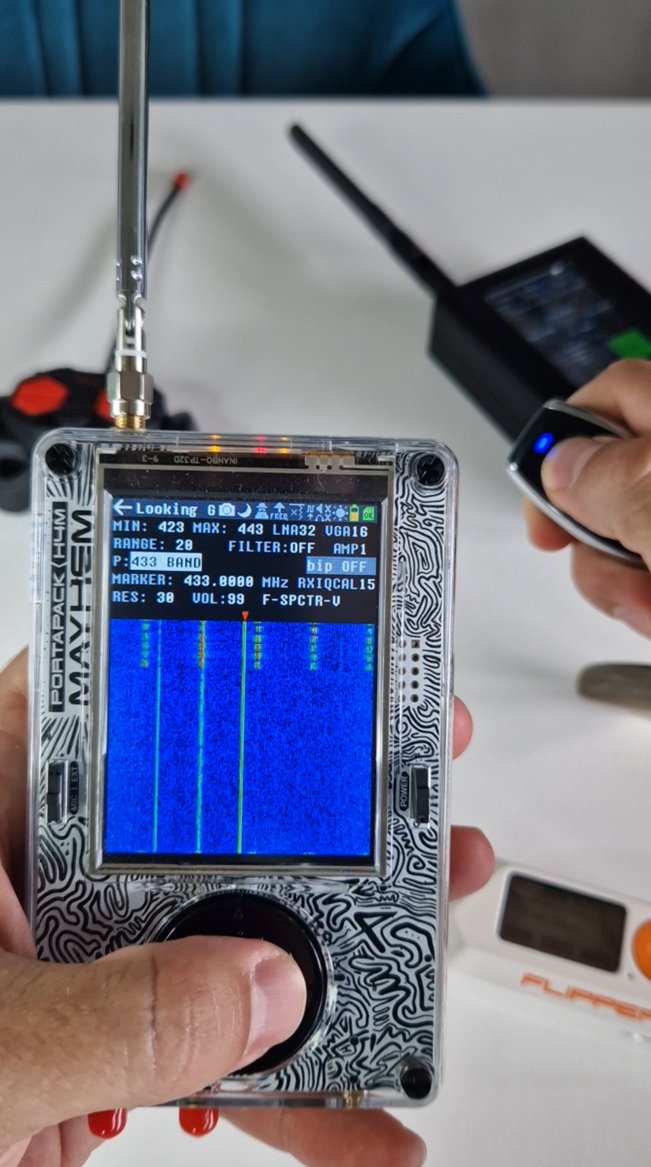
The two firmware streams are mutually exclusive — only one runs on the LPC4320 at a time. Switching is a hackrf_spiflash operation. Mayhem is covered end-to-end: install, navigation, app catalog, configuration, and building from source.
Mayhem source: github.com/portapack-mayhem/mayhem-firmware. Latest nightly: 2026-05-05 (latest stable nightly: 2026-03-07). Wiki: github.com/portapack-mayhem/mayhem-firmware/wiki.
10.2 Mayhem History — Sharebrained → Furrtek → Mayhem
The fork lineage:
- 2014–2018 — Jared Boone (sharebrained.com) creates the original PortaPack firmware as part of the H1 launch. This is the canonical first-generation: navigation, basic RX apps, AM/NBFM/WBFM demod.
- 2018–2019 — Furrtek (Sébastien Bourdeauducq’s friend) forks it to add transmit apps and the “Havoc” feature set. The “havoc” name persists in some app names today.
- 2019–present — Mayhem org consolidates the fork. Maintained by a rotating group of contributors. App count grows from ~20 (havoc era) to 80+ (current).
- 2024 — Mayhem team co-develops with the H4M hardware vendor; H4M-specific features ship in firmware on day one of H4M’s release.
Today’s Mayhem firmware compiles and runs on H1, H2, H2+, H4, and H4M — the same source tree, with build-time selection of board variant. Nightly releases on GitHub.
10.3 Installing Mayhem on Your H2
10.3.1 Download the latest release
# Visit https://github.com/portapack-mayhem/mayhem-firmware/releases
# Download mayhem_firmware-vX.Y.Z.zip (or nightly-tag-YYYY-MM-DD.zip)
unzip mayhem_firmware-*.zip
ls
# firmware.bin       ← LPC4320 firmware
# portapack-h2.dfu   ← (or h1 / h2plus / h4 / h4m)
# sdcard/            ← microSD card payload
10.3.2 Flash the firmware
# Method 1: hackrf_spiflash (the easy way, requires HackRF stock firmware
# to currently be running so USB enumerates)
hackrf_spiflash -w firmware.bin

# Method 2: DFU (when stock firmware is not running)
hold DFU + plug USB → device enumerates as 1d50:6088
dfu-util -i 0 -s 0x0000:leave -D firmware.bin
10.3.3 Prepare the SD card
Mayhem expects a FAT32-formatted microSD card with a specific directory tree. Copy the contents of sdcard/ from the release zip onto the root of the card:
SD_CARD_ROOT/
├── APPS/                ← optional dynamically-loaded apps
├── ASSETS/              ← font, splash images
├── CAPTURES/            ← Mayhem stores captures here
├── REPLAY/              ← place IQ captures here for the Replay app
├── SETTINGS/            ← settings.ini
├── WAV/                 ← audio recordings
├── HACKRF.CFG           ← (optional) HackRF-specific config
└── PORTAPACK.CFG        ← PortaPack-specific config
Insert the SD card into the H2, power on, and the Mayhem boot screen appears. First-run takes ~5 s as Mayhem reads the SD card.
10.4 Navigation Conventions
Mayhem has a uniform UI:
Table 1 — Mayhem has a uniform UI
| Control | Action |
|---|---|
| 5-way nav: up/down/left/right | Move highlight |
| 5-way nav: centre press | Select / confirm |
| OPTIONS button | Show menu of context-specific options |
| BACK button | Go up one level |
| MENU button | Return to main menu (long-press for power off) |
| Rotary jog wheel (if equipped) | Same as up/down; press = centre press |
The home screen shows category tiles. Each category opens a list of apps. Each app’s screen has a status bar at the top (frequency, gain, mode, battery) and a working area below.
10.5 The App Catalog
Mayhem ships with ~80 apps as of nightly-2026-05. Categorised:
10.5.1 Receive
Table 2 — 5.1 Receive
| App | What it does |
|---|---|
| Audio (NFM/WFM/AM) | Standard voice reception with audio out |
| ADSB | 1090 MHz aircraft tracking with map/text view |
| AIS | 162 MHz marine traffic decode + position display |
| Analog TV | Vertical-line analog video receive |
| APRS | 144.39 MHz ham packet decode |
| BTLE | Bluetooth Low Energy advertising packet capture |
| Capture | IQ capture to SD card at user-set rate (up to ~5 MS/s practical) |
| Fax | HF weatherfax decode |
| Frequency Manager | Bookmark frequencies for quick recall |
| Pocsag | Pager protocol decode |
| Radiosonde | Weather balloon telemetry |
| Recon | Scan a frequency list, log signals |
| RDS | FM broadcast metadata |
| Replay | Play back IQ from SD card |
| Spectrum analyzer | Mini-hackrf_sweep UI |
| TPMS | Tire-pressure monitor decode |
| Tetra | TETRA digital trunked radio (rx) |
| WFM | Wide FM broadcast receive |
| Whistle | Acoustic whistle detection (proof-of-concept) |
10.5.2 Transmit
Table 3 — 5.2 Transmit
| App | What it does |
|---|---|
| Audio TX (NFM/WFM/AM) | Voice TX with mic input |
| BHT TX | Bidirectional Hand Talkie protocol |
| Burger TX | (legacy joke app; transmits a known harmless waveform) |
| Encoders TX | OOK encoder repository: PT2262, PT2240, EV1527, HT12E, … many garage/door codes |
| Foxhunt TX | Sub-GHz beacon for fox-hunting practice |
| Generic TX | Free-form pattern transmitter |
| Glonass / GPS sim TX | Spoofed GNSS signal output (use carefully — Vol 11) |
| Jammer | Wide-band jamming pattern (illegal in most jurisdictions — Vol 11) |
| Microphone | TX from mic in real-time |
| OOK / Mousejack | Microsoft / Logitech wireless mouse / keyboard injection |
| Playback | Play back captured IQ as TX |
| Test tone | Continuous tone at any frequency |
| Tetra TX | TETRA replay (illegal in most jurisdictions on commercial bands) |
| Whip antenna sweep | Calibrate your antenna’s resonant frequency |
10.5.3 Utilities
Table 4 — 5.3 Utilities
| App | What it does |
|---|---|
| Settings | Configure clocks, frequency offsets, audio settings, theme |
| Battery info (H4/H4M) | Real-time charging status |
| Clock | RTC display + sync |
| Notepad | Plain text editor with on-screen keyboard |
| File manager | Browse SD card |
| RGB LED | Test the front-panel LEDs |
| Soundboard | Play stored .wav files |
| Calculator | Basic four-function |
| Game of life | Conway’s GoL on the LCD |
10.5.4 Debug
Table 5 — 5.4 Debug
| App | What it does |
|---|---|
| HackRF debug | Read/write registers in MAX2837 / RFFC5072 / Si5351 |
| Memory dump | Inspect raw LPC4320 memory |
| FOK signal generator | Hardware-confirmation tone |
| About | Firmware version, git hash, hardware revision |
The full categorised list with descriptions is on the Mayhem wiki at github.com/portapack-mayhem/mayhem-firmware/wiki/Main-Menu.
10.6 Configuration via settings.ini
Mayhem persists configuration in SETTINGS/settings.ini on the SD card. Key options:
[mayhem]
language = en
theme = default
ppm_offset = -3                   ; HackRF One frequency-offset correction
                                  ; (use Audio app + known reference to calibrate)
audio_volume = 24                 ; 0..63
agc_enabled = 1                   ; auto gain control on RX

[clocks]
clkin_enabled = 0                 ; 1 to use external CLKIN

[frequency_manager]
default_step = 6250               ; Hz; ham 70cm uses 6.25 kHz

[capture]
default_rate = 2000000
auto_filename = 1                 ; YYYYMMDD-HHMMSS.cfile
A clean SD card with an empty settings.ini causes Mayhem to fall back to safe defaults; corrupting settings.ini is one of the first things to check when an H2 acts strange after firmware update.
10.7 Frequency Manager
Mayhem’s Frequency Manager app stores user-defined frequency bookmarks with name, modulation, and gain settings. Persisted as FREQMAN/freqman.ini on the SD card. Editing this file manually (in a text editor on the host) is supported — the format is documented:
; Format: f=<freq_hz>, n=<name>, m=<modulation>
f=433920000, n=Garage door, m=AM
f=144390000, n=APRS, m=NFM
f=121500000, n=Aviation distress, m=AM
f=2412000000, n=WiFi ch1, m=NFM
A reasonable starter list, populated for North America:
- 88–108 MHz: WBFM (broadcast)
- 108–137 MHz: AM (aviation)
- 144–148 MHz: NFM (2-m ham)
- 162.4–162.55 MHz: NFM (NOAA weather)
- 433.05–434.79 MHz: AM (ISM remotes)
- 460–470 MHz: NFM (FRS / GMRS)
- 902–928 MHz: AM/FSK (US ISM)
- 1090 MHz: pulse-position (ADS-B)
- 2412 / 2437 / 2462 MHz: complex (WiFi)
Drop these into FREQMAN/freqman.ini and they appear in the Frequency Manager app.
10.8 Building Mayhem from Source
Required for custom features or to track the very latest commits.
10.8.1 Prerequisites
- Docker (recommended) or a Linux dev environment
- ~2 GB of RAM and ~2 GB of disk for the build container
10.8.2 Docker build (the easy path)
git clone --recursive https://github.com/portapack-mayhem/mayhem-firmware
cd mayhem-firmware

# Build the Docker container (one-time, ~10 minutes)
docker build -t mayhem-build .

# Run the build inside the container
docker run --rm -v $(pwd):/build mayhem-build
# Output appears in build/ — firmware.bin and portapack-{h1,h2,h2plus,h4,h4m}.dfu
10.8.3 Local build
If you don’t want Docker, follow the full toolchain setup at docs/Building-Locally.md in the repo. Requires:
- GCC ARM Embedded
- CMake ≥ 3.5
- Python 3 with
intelhex - A few smaller packages
The Docker path is recommended unless you’re a frequent Mayhem developer.
10.9 Plugins and OTA
10.9.1 The plugin model
Some Mayhem apps support plugins loaded from the SD card at runtime — small .ppfu files that extend functionality (e.g. additional decoder protocols for the Encoders TX app, additional remote-control codes). The plugin format is documented in the Mayhem wiki under “Plugins”.
For most users, plugins are pre-built and downloaded — the wiki has a curated list at wiki/Plugins.
10.9.2 OTA / SD-card updates
Mayhem can self-update from the SD card. Drop a new firmware.bin into the SD card root, boot Mayhem, and the boot screen offers an upgrade. This is the easiest update path — no host computer, no hackrf_spiflash, no DFU dance. Newer Mayhem releases recommend this path explicitly.
10.9.3 MayhemHub (web UI)
portapack-mayhem/MayhemHub is a browser-based control panel that talks to a HackRF + PortaPack over USB while it’s running Mayhem^[https://github.com/portapack-mayhem/MayhemHub]. Useful for remote-driven workflows without needing to physically interact with the H2’s tiny buttons.
10.10 The Mayhem Wiki — Where to Look
The Mayhem wiki at github.com/portapack-mayhem/mayhem-firmware/wiki is the canonical operational reference. Sections that are particularly useful:
- Main Menu — full categorised app list with descriptions
- Apps — per-app deep-dive pages
- FAQ — common gotchas
- Building from Source — current build instructions
- Plugins — current plugin catalogue
- Hardware — H1/H2/H2+/H4/H4M differences from a firmware perspective
For most “how do I do X?” questions the answer is: check the wiki first.
10.11 Switching Back to GSG Firmware
Sometimes you want to drop Mayhem and run GSG stock firmware (e.g. for a host-driven hackrf_transfer workflow that needs the latest USB protocol features). The procedure:
# Download the latest GSG firmware from
# https://github.com/greatscottgadgets/hackrf/releases
# Unpack hackrf_one_usb.bin

# Flash it (Mayhem must currently be running and USB-enumerable)
hackrf_spiflash -w hackrf_one_usb.bin

# Verify
hackrf_info
# Should now show GSG firmware version (e.g. 2026.01.1) instead of Mayhem
Going back to Mayhem reverses the procedure with the Mayhem firmware.bin.
The two firmware streams are entirely independent — they share the same hardware (LPC4320, MAX2837, etc.) but are different code with different purposes.
10.12 Cheatsheet Updates from this Volume
For Vol 12:
- Mayhem latest: nightly-2026-05-05 (most recent stable: nightly-2026-03-07)
- Mayhem repo:
github.com/portapack-mayhem/mayhem-firmware - SD card format: FAT32; copy
sdcard/payload to root - Flash Mayhem:
hackrf_spiflash -w firmware.bin - OTA: drop
firmware.binon SD card root, boot, accept upgrade - Major app categories: RX, TX, Utility, Debug — ~80 apps total
- Mutual exclusion: GSG stock and Mayhem can’t run simultaneously
- MayhemHub: browser UI at
github.com/portapack-mayhem/MayhemHub
10.13 Resources
Table 6 — 13. Resources
| Resource | URL |
|---|---|
| Mayhem firmware repo | https://github.com/portapack-mayhem/mayhem-firmware |
| Mayhem latest release | https://github.com/portapack-mayhem/mayhem-firmware/releases |
| Mayhem wiki | https://github.com/portapack-mayhem/mayhem-firmware/wiki |
| Mayhem main menu reference | https://github.com/portapack-mayhem/mayhem-firmware/wiki/Main-Menu |
| Mayhem plugins catalog | https://github.com/portapack-mayhem/mayhem-firmware/wiki/Plugins |
| MayhemHub web UI | https://github.com/portapack-mayhem/MayhemHub |
| jLynx fork of Mayhem (alternative build) | https://github.com/jLynx/portapack-mayhem |
| H4M review (which is co-developed with Mayhem) | https://www.rtl-sdr.com/a-review-of-the-new-hackrf-portapack-h4m/ |
| Sharebrained PortaPack origin | https://github.com/sharebrained/portapack-hackrf |
Comments (0)