HaleHound · Volume 12
HaleHound Volume 12 — Cheatsheet, Legal & Glossary
Laminate-ready field cards, the authorization envelope, and a plain-language glossary for the whole deep dive
12.1 About this Volume
Volume 12 is the reference card deck. Everything here is condensed from Vols 2–10 into a form meant to be printed, laminated, and carried — seven field cards (A–G), the legal/authorization envelope, and a glossary covering every term of art used across the deep dive. It introduces no new facts; where a card is terse, the cited volume carries the full treatment.
Warning — This volume states capabilities and settings only. It contains no step-by-step offensive procedures and no reproduced module menu tree — consistent with Vol 8 and the hub’s posture for the WiFi Pineapple / ESP32 Marauder / Ducky Script dives. Read Section 9 before any field use.
12.2 Card A — pinout quick-reference
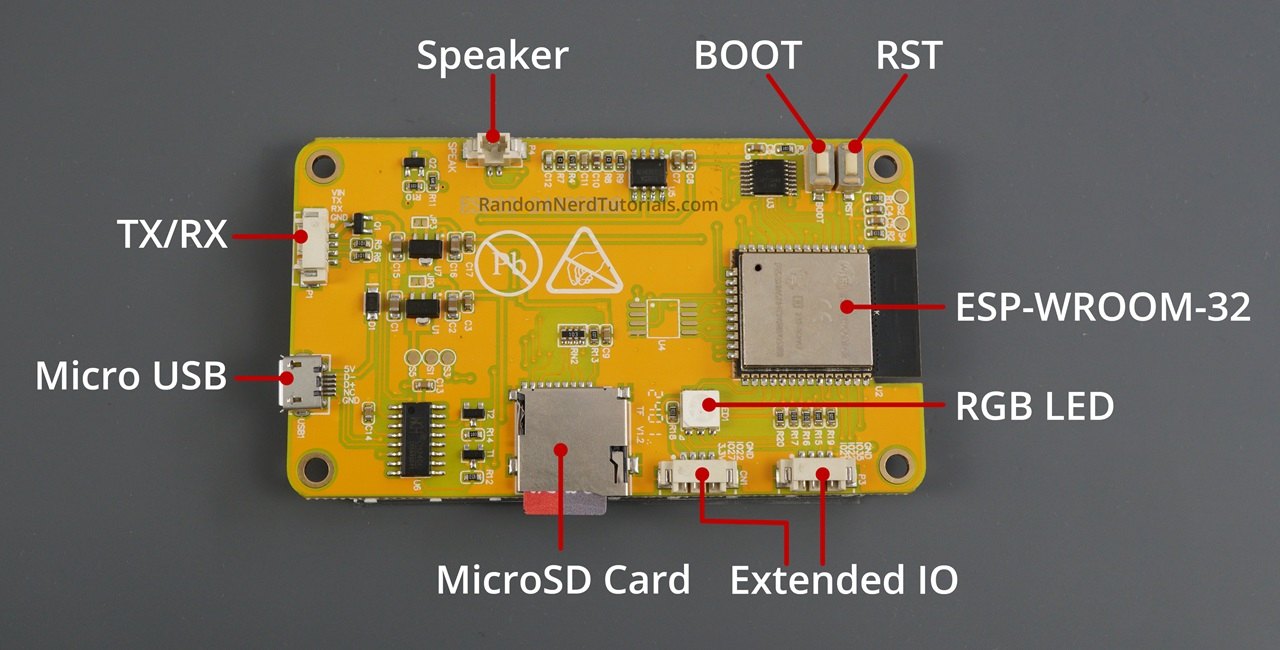
All external radios share the VSPI bus (GPIO 18/19/23) with the built-in SD card; the firmware’s SPI manager arbitrates so only one device talks at a time. Chip-select and control pins are what differ per device and per board. HaleHound corrects CiferTech’s swapped CC1101 pins: GDO0 = TX, GDO2 = RX.
  ┌───────────────── HALEHOUND VSPI (shared) ─────────────────┐
  │  SCK  = GPIO 18      MOSI = GPIO 23      MISO = GPIO 19     │
  │  + SD card on the same bus (arbitrated)                    │
  └────────────────────────────────────────────────────────────┘
Table 1 — 2. Card A — pinout quick-reference
| Device | SCK/MOSI/MISO | CS / SS | Control pins | Notes |
|---|---|---|---|---|
| CC1101 (HW-863) | 18 / 23 / 19 | GPIO 27 (2.8″) / 21 (3.5″) | GDO0=22 (TX), GDO2=35 (RX) | CS pin is the backlight on the other panel |
| NRF24L01+PA+LNA | 18 / 23 / 19 | CSN GPIO 4 (→ 26 on E32R28T/R35T) | CE=16, IRQ=17 (optional) | 10 µF cap across VCC/GND |
| PN532 V3 (SPI) | 18 / 23 / 19 | SS GPIO 17 | — | DIP: CH1=OFF, CH2=ON |
| GPS (GT-U7/NEO-6M) | — (UART) | — | TX→GPIO 1 (P1 hdr), RX unused | 9600 baud; firmware Serial.end() during use |
| E07-433M20S PA | 18 / 23 / 19 | GPIO 27/21 | GDO0=22, GDO2=35, TX_EN=4, RX_EN=0 | VCC from independent buck only |
   Per-board CS cheat (the one thing that moves)
   ═══════════════════════════════════════════════
   2.8″ (esp32-cyd / E32R28T)  → CC1101 CS = GPIO 27   (GPIO 21 = backlight)
   3.5″ (E32R35T)              → CC1101 CS = GPIO 21   (GPIO 27 = backlight)
   E32R28T / E32R35T           → NRF24 CSN = GPIO 26   (GPIO 4 = PA TX_EN)
Tip — If a radio fails init after wiring, check three things in order: shared VSPI continuity (18/23/19), the correct per-board CS pin, and — for any Ebyte PA module — that VCC is on the independent 3.3 V buck, not the CYD rail. See Vol 3.
CYD header legend — the pins above land on three physical headers, which the README names:
Table 2 — CYD header legend — the pins above land on three physical headers, which the README names
| Header | Carries (as used) | Notes |
|---|---|---|
| CN1 | 3.3 V, GND, CC1101 CS (GPIO 27) | Primary breakout for the SPI radios |
| P3 | GDO0 (GPIO 22), GDO2 (GPIO 35) | CC1101 TX/RX data lines |
| P1 | VIN, GND, GPIO 1 (TX), GPIO 3 (RX) | JST header; GPS lands here (GPIO 1) |
The NRF24 and PN532 reuse GPIOs 4/16/17 — the pins that drive the CYD’s on-board RGB LED on a stock board — which is why those functions are given up when the external radios are wired (Vol 3).
12.3 Card B — flashing steps
Full procedure and troubleshooting: Vol 7. Boards ship without firmware.
  FLASH A HALEHOUND  (desktop Chrome/Edge only — no Safari, no phone)
  ══════════════════════════════════════════════════════════════════
   1. Install CH340 driver if the board isn't detected
        Windows : CH341SER.EXE      macOS : CH341SER_MAC.ZIP
        Linux   : built into kernel 5.x+ (nothing to install)
   2. Open  flash.halehound.com  in Chrome or Edge (desktop)
   3. Plug in the CYD with a DATA USB cable (not charge-only)
   4. Pick your board: esp32-cyd | esp32-e32r35t | esp32-e32r28t | esp32-cyd-hat
   5. Click Connect & Flash  →  writes bootloader + partitions + app
   6. Power-cycle when it finishes
  ──────────────────────────────────────────────────────────────────
   OTA (field, no PC):  put a .bin in  /firmware/  on the SD, then
                        Tools ▸ Update Firmware
Table 3 — 3. Card B — flashing steps
| Step gotcha | Fix |
|---|---|
| Board not listed on flasher | Install CH340 driver; use a data (not charge-only) cable |
| Safari / phone can’t flash | Web Serial is Chrome/Edge desktop only |
| Need latest everything | Use the web flasher (writes bootloader+partitions+app) |
| No laptop in the field | OTA from SD /firmware/*.bin (app image only) |
  RECOVERY (board bricked / unknown state)
  ══════════════════════════════════════════════════════════
   1. Web flasher is the clean recovery — it rewrites bootloader +
      partitions + app in one pass (OTA only writes the app image)
   2. If not detected: reinstall CH340, try another DATA cable/port
   3. Confirm the right BOARD is selected before flashing (wrong
      target → wrong CS pin → radios fail, but the board still boots)
   4. After recovery: first-boot touch calibration runs again
The web flasher is always the fallback because it writes the complete image; an OTA that went wrong cannot be worse than a full reflash can fix. The only hard requirement for recovery is a desktop Chrome/Edge session and a data cable.
12.4 Card C — first boot & settings
  FIRST BOOT
  ═══════════════════════════════════════════════════════════
   • Touch calibration runs automatically — tap the 4 corner crosshairs
   • Wrong orientation?  Settings ▸ Rotation  (no reflash needed)
   • Touch still offset?  Tools ▸ Touch Calibrate (4-corner)
   • VALHALLA gate appears: ACCEPT → offensive tools unlocked
                            DECLINE → Blue Team mode (passive/defensive
                                      only; persists across reboots)
   • Home-screen banner shows current mode (VALHALLA / BLUE TEAM)
Table 4 — 4. Card C — first boot & settings
| Setting | Options | Use |
|---|---|---|
| Brightness | PWM 10–255 | Battery vs daylight |
| Screen Timeout | 30 s / 1 m / 2 m / 5 m / 10 m / Never | Field power saving |
| Rotation | 0° / 180° / 90° CW / 90° CCW | Fix upside-down display |
| Color Mode | Default / Colorblind / High Contrast | Readability |
| Swap Colors / Invert | BGR↔RGB / inverted toggle | Panel variants |
| CC1101 Module | Standard HW-863 ↔ E07 PA | Enable the sub-GHz PA |
| Set PIN | 4-digit boot lock | Device lock |
| Device Info | Heap, CPU, flash, board name | Verify board/health |
Note — Blue Team mode is the posture default for anyone without authorization to transmit: it strips the device to passive/defensive modules (Jam Detect, detectors, scanners) and persists across reboots. The VALHALLA gate is a liability acknowledgement, not a license to operate — Section 9 governs.
12.5 Card D — SD card layout
FAT32 microSD. Nothing is required — every module creates folders as needed and handles a missing card gracefully. Full detail: Vol 8.
  /sd/
  ├── subghz/        Flipper .sub files for .Sub Read (subfolders OK)
  ├── eapol/         EAPOL / PMKID captures (hashcat format)
  ├── wardriving/    GPS-tagged AP logs (CSV → WiGLE/GIS)
  ├── wp_loot/       WhisperPair + BLE Predator + Flock You loot
  ├── loot/          BLE Predator GATT dumps + honeypot loot
  ├── creds.txt      Custom credentials for IoT Recon (optional, you add)
  ├── iot_recon.txt  IoT Recon attack reports
  └── firmware/      OTA update .bin files (Tools ▸ Update Firmware)
Table 5 — 5. Card D — SD card layout
| Folder | Written by | Moves to |
|---|---|---|
/subghz/ | .Sub Read (reads) | ↔ Flipper Zero |
/eapol/ | EAPOL/PMKID capture | → hashcat (desktop) |
/wardriving/ | Wardriving (GPS) | → WiGLE / mapping |
/firmware/ | operator (stages .bin) | ← web flasher build |
/creds.txt | operator | used by IoT Recon |
Loot hygiene — captured data (/eapol/, /wp_loot/, /loot/, /wardriving/, iot_recon.txt) may contain handshakes, credentials, device identities and GPS tracks from an authorized engagement. Treat the SD card as sensitive: wipe or securely retain per the engagement’s data-handling terms, do not carry other clients’ loot between jobs, and keep the card out of the committed repo. The device applies no encryption to the SD by default.
12.6 Card E — TX power & band reach
Every attack radio runs at maximum power by design. Source: Vol 8, Vol 10.
Table 6 — 6. Card E — TX power & band reach
| Radio | Max TX | Band | Module |
|---|---|---|---|
| Wi-Fi (ESP32) | +20.5 dBm | 2.4 GHz only | built-in |
| BLE (ESP32) | +9 dBm | 2.4 GHz | built-in |
| NRF24+PA+LNA | +20 dBm | 2.400–2.525 GHz | external |
| CC1101 stock | +12 dBm | 300–439 MHz (firmware) | HW-863 |
| CC1101 + E07 PA | +20 dBm | 300–439 MHz (firmware) | E07-433M20S |
   Band reach map
   ═══════════════════════════════════════════════════════
   sub-GHz 300–439 MHz ── CC1101 / E07 ....... capture/replay/.sub
   2.4 GHz Wi-Fi ........ ESP32 ............... scan/deauth/portal/EAPOL
   2.4 GHz BLE .......... ESP32 ............... tracker/GATT/beacon
   2.4 GHz (2.400–2.525) NRF24 ............... sniff/MouseJack/carrier
   ────────────────────────────────────────────────────────
   5 GHz Wi-Fi .......... NOT REACHABLE (needs ESP32-C5) — Vol 10 §10
Warning — “Max power by design” means these radios can exceed regulatory limits for unlicensed operation in many jurisdictions. Transmit only where the operator is authorized and within applicable RF rules — Section 9 and
../_shared/legal_ethics.md. The store’s “300–928 MHz” CC1101 figure describes the silicon; HaleHound’s sub-GHz features are scoped to 300–439 MHz.
12.7 Card F — known issues & fixes
From the README issues table (Vol 3, Vol 7) plus build notes.
Table 7 — 7. Card F — known issues & fixes
| Symptom | Cause | Fix |
|---|---|---|
| NRF24 random resets | PA+LNA current spikes | Solder 10 µF cap across VCC/GND at module |
| PA module won’t init / brownouts | Ebyte PA on CYD 3.3 V rail | Power E07/E01 VCC from an independent 5 V→3.3 V buck; common ground |
| GPS dead / conflicts with USB | GPIO 1/3 are UART0 | Firmware Serial.end() during GPS; TX→GPIO 1 works on all boards |
| Display upside-down after flash | Default rotation | Settings ▸ Rotation (no reflash) |
| Touch offset after flash | Needs calibration | Auto on first boot, or Tools ▸ Touch Calibrate |
| Radio on wrong CS pin | Per-board CS differs | CC1101 CS = 27 (2.8″) / 21 (3.5″); NRF24 CSN = 26 on R28T/R35T |
| Board not detected on flasher | Missing CH340 / charge-only cable | Install CH340; use a data USB cable |
| PlatformIO build fails | Python 3.14 | Use Python 3.10–3.13 or patch platform.py |
   The two "do this or it won't work" rules
   ═══════════════════════════════════════════════════════
   1) 10 µF cap across the NRF24 VCC/GND  → stops resets
   2) Ebyte PA VCC on its OWN 3.3 V buck  → stops brownouts
      (signals still go to ESP32 GPIO; all grounds tie together)
12.8 Card G — build-path & SKU quick-pick
Two build architectures, identical firmware. Prices USD, as of 2026-10-16; a one-person catalogue, prices/stock drift. Full sourcing: Vol 4.
   Classic   = exposed-SPI CYD + Cinder Ferret carrier + harness (more wiring)
   Fire Weasel = integrated radio board + "leash" (~45-min build)
Table 8 — 8. Card G — build-path & SKU quick-pick
| SKU (as of 2026-10-16) | Path | Price |
|---|---|---|
| 4in HaleHound COMPLETE BUILD | Prebuilt (Classic, 3.5″ ST7796) | $245 |
| HaleHound 3.5″ Complete Unit | Prebuilt | $235 |
| Fire Weasel 4in DIY kit | Fire Weasel DIY | $198 |
| Fire Weasel + leash PRO DIY kit | Fire Weasel DIY | $185 |
| DIY HaleHound 3.5″ kit | DIY | $149 |
| DIY 2.8″ HaleHound kit (E32R28T exposed-SPI) | DIY | $139 |
| Fire Weasel Board + Leash (fully assembled) | Component | $78 |
| Fire Weasel Board + Leash (DIY, un-soldered) | Component | $48 |
| Cinder Ferret V2.2 (double-NRF) | Carrier | $40 |
| Cinder Ferret V2 | Carrier | $40 |
| Cinder Ferret (V1) | Carrier | $30 |
| Cases (2.8″ / 3.5″ / Sasquatch / bone-pile) | Case | $30–45 |
| 3.5″ exposed-SPI CYD (bare) | Bare board | $18 |
| 2.8″ E32R28T exposed-SPI CYD (bare) | Bare board | $15.85 |
| Weasel leash replacement | Accessory | $8 |
Not in the box (any SKU): firmware (flash at flash.halehound.com), battery (solder a 1S LiPo to BAT+/BAT−), antennas (operator’s choice), the independent 3.3 V buck for PA modules, and on some SKUs the PN532.
12.8.1 Antennas & power quick-ref
Antennas are the operator’s choice and are never included. The vendor’s listed recommendations and the battery/power chain are summarised below (Vol 6 has the full power section).
Table 9 — 8.1 Antennas & power quick-ref
| Item | Vendor-listed example | Band / role |
|---|---|---|
| 2.4 GHz antenna | Bolton Dart | Wi-Fi / BLE / NRF24 (2.4 GHz) |
| Sub-GHz antenna | ANT700 (telescopic) | CC1101 300–439 MHz |
| Battery | 3.7 V 1S LiPo, PH2.0 plug (e.g. 5000 mAh for endurance, 1200 mAh for compact) | Portable power to BAT+/BAT− |
| Boost/charger | PowerBoost-1000C-class | 3.7 V → 5 V + USB charge |
| PA buck | AMS1117-3.3 / MP2307, ≥500 mA | 5 V (VBUS) → 3.3 V for E07/E01 VCC only |
   Match the antenna to the radio
   ═══════════════════════════════════════════════════════
   CC1101 / E07  (sub-GHz 300–439 MHz) ─▶ ANT700 / 433 MHz whip
   NRF24         (2.4 GHz)             ─▶ 2.4 GHz (Bolton Dart / SMA)
   ESP32 Wi-Fi/BLE                     ─▶ on-board (CYD) or 2.4 GHz
12.8.2 Pre-flight checklist
  BEFORE FIELD USE  (laminate this side up)
  ═══════════════════════════════════════════════════════════
  [ ] Authorization: own the target OR written, scoped permission (§9)
  [ ] Posture: Blue Team unless authorized to transmit (home banner)
  [ ] Band legal for the operator in this jurisdiction (§6, §9)
  [ ] Firmware/build confirmed: About + Device Info (board name matches)
  [ ] SD inserted, FAT32, spare known-good .bin in /firmware/
  [ ] NRF24 10 µF cap present; PA modules on independent buck
  [ ] Antennas attached to the matching ports (never TX without antenna)
  [ ] Battery charged; boost/charger seated
Warning — Transmitting without an antenna connected can damage a radio’s output stage. Attach the correct-band antenna before enabling any transmit module.
12.9 The legal & authorization envelope
HaleHound is an offensive tool that transmits at maximum power across six vectors. The hub’s standing rules in ../_shared/legal_ethics.md apply in full; the points below are the HaleHound-specific restatement. None of this is legal advice.
12.9.1 The non-negotiables
- Owned hardware or written authorization. Every transmit target must belong to the operator or be covered by explicit, written, scoped authorization from its owner. This covers Wi-Fi networks, BLE devices, sub-GHz remotes, NFC cards, and anything a drone module touches.
- No jamming. The firmware carries wideband carrier modules (
WLAN Ember,SubGHz Scorch,Proto Kill, the drone carrier). Continuous-wave jamming is illegal under FCC rules and most equivalents regardless of intent — 47 U.S.C. §333 is the usual U.S. hook. Do not operate them against live spectrum. - No unauthorized access. Deauth, evil-twin/captive-portal credential harvest, EAPOL/PMKID capture, MouseJack HID injection, BLE GATT writes, card cloning — all are unauthorized-access territory (CFAA in the U.S.) when used against equipment the operator does not own and is not paid to test.
- RF regulation applies. Power, frequency and duty cycle are regulated. Aviation, public-safety, licensed-commercial and amateur-without-a-license bands are off-limits. HaleHound’s max-power design removes the firmware-side guardrails; that shifts responsibility to the operator, it does not legalize anything.
12.9.2 VALHALLA / Blue Team as a posture control
VALHALLA gating is a liability acknowledgement and a mode switch, not authorization. Declining the gate drops the device into Blue Team mode — passive/defensive modules only (Jam Detect, detectors, scanners), persistent across reboots. Blue Team is the correct default posture for any environment where the operator is not authorized to transmit. Accepting VALHALLA does not create a right to operate offensive modules against third-party systems.
   Decision gate before any transmit
   ═══════════════════════════════════════════════════════
   Own the target  OR  hold written, scoped authorization?
        │ NO                              │ YES
        ▼                                 ▼
   Blue Team mode only            Confirm band is legal for the operator,
   (passive/defensive)            then proceed within scope + RF rules
12.9.3 Vector-specific notes
Table 10 — 9.3 Vector-specific notes
| Vector | The line |
|---|---|
| Sub-GHz replay | Replaying into the operator’s own controlled environment is fine; against a vehicle/door/gate they don’t own it is theft/B&E territory. Rolling-code (KeeLoq) replay usually fails by design — Vol 8. |
| Wi-Fi | Deauth / evil-portal / EAPOL against networks the operator doesn’t own is illegal. Beacon spam in public can be an interference violation. |
| BLE / tracker | Tracker-spoof/replay and GATT writes against others’ devices are unauthorized access; CVE-probe modules are research-only on owned gear. |
| NFC/RFID | Reading a card the operator carries is fine; cloning building-access cards without the building owner’s written authorization is illegal (CFAA and equivalents). |
| MouseJack / HID | Injecting into a machine the operator doesn’t own, without permission, is unauthorized access — even “awareness” payloads. |
| Drone RID spoof | Broadcasting false Remote ID is regulated airspace activity; detection/awareness is the defensible use. |
Warning — The vendor sells units AS-IS with the buyer accepting full responsibility and confirming they are 18+ (from the store terms). That contract does not substitute for authorization. When scope is unclear, operate in Blue Team mode and confirm authorization before transmitting. See
../_shared/legal_ethics.md→ “What this means.”
12.9.4 Scope worksheet (fill before any engagement)
  ENGAGEMENT SCOPE  (keep the signed copy; hub rule: _shared/authorizations/)
  ═══════════════════════════════════════════════════════════════
  Target owner / authorizer : ____________________________________
  Written authorization on file? ....... [ ] yes   [ ] no → STOP
  In-scope SSIDs / BSSIDs ............... ________________________
  In-scope BLE / NFC devices ............ ________________________
  In-scope sub-GHz targets (owned) ...... ________________________
  Bands/power permitted for operator .... ________________________
  Explicitly OUT of scope ............... ________________________
  Jamming / carrier modules ............. [ ] DISABLED (default)
  Start / end window .................... ________________________
  Operator / date / signature ........... ________________________
Per the hub standing rules, maintain a list of owned targets (with photos/serials where applicable) and keep authorization letters in ../_shared/authorizations/ (gitignored). Replaying a captured signal back into the operator’s own controlled environment is lab work; transmitting against neighbours, public infrastructure, or vehicles is not — the worksheet exists to keep that line visible.
Glossary
Table 11 — 10. Glossary
| Term | Meaning |
|---|---|
| ALPR | Automatic License Plate Reader. HaleHound’s Flock You module passively detects Flock Safety ALPR cameras and Raven/ShotSpotter sensors by BLE fingerprint. |
| APSTA | The ESP32 mode running AP and station roles at once — STA scans while the AP side injects raw frames. |
| ASTM F3411 | The Remote ID standard for drones (broadcast over Wi-Fi Beacon/NaN and BLE). HaleHound detects and can spoof it. |
| Blue Team mode | HaleHound’s persistent passive/defensive-only mode entered by declining the VALHALLA gate — detectors and scanners, no offensive transmit. |
| CC1101 | Sub-GHz transceiver IC. HaleHound uses it (HW-863 or amplified E07) for 300–439 MHz capture/replay/brute/.sub work at +12 dBm (stock) / +20 dBm (E07). |
| CE | Chip Enable — the NRF24 control line (GPIO 16) that toggles RX/TX. Distinct from CSN. |
| CH340 | The USB-to-serial bridge chip on CYD boards. Its driver must be present for the host to see the board for flashing. |
| Chameleon Ultra | nRF52840 NFC/RFID emulator (RRG/Proxgrind). HaleHound drives one over BLE as an RFID backend for NTAG r/w and mfkey32. |
| Cinder Ferret | The carrier board (V1/V2/V2.2) that mounts the external radios onto an exposed-SPI CYD in the Classic build. V2.2 adds a second NRF24 slot. |
| Crypto1 | The proprietary MIFARE Classic cipher; weak and attackable (key brute force / mfkey32). The PN532 suite targets MIFARE Classic. |
| CS / SS / CSN | Chip Select / Slave Select / Chip Select Not — the per-device line on the shared VSPI bus that selects which radio is addressed. The pin differs per board (Card A). |
| CYD | ”Cheap Yellow Display” — the ESP32-2432S028(R) family of $7–18 touchscreen dev boards HaleHound runs on. |
| de Bruijn sequence | A cyclic sequence that contains every possible fixed-length substring once — used by the sub-GHz Brute Force module to generate codes efficiently. |
| EAPOL | Extensible Authentication Protocol over LAN — the WPA 4-way handshake HaleHound captures (with PMKID) and saves in hashcat format. |
| ESP32-DIV | CiferTech’s MIT-licensed (2023) ESP32 RF pocket tool; the parent project HaleHound forked. |
| Eddystone / iBeacon | Google and Apple BLE beacon advertisement formats the BLE Beacon module can broadcast. |
| Evil Twin | A rogue AP impersonating a legitimate SSID to harvest credentials (HaleHound’s GARMR captive portal). Category-level only in this dive. |
| Fast Pair / Airoha RACE | Named BLE CVE-probe modules (Google Fast Pair; Airoha audio-chip link-key extraction). Research-only, on owned devices. Category-level in this dive. |
| Goodspeed (promiscuous) | Travis Goodspeed’s NRF24 promiscuous-mode technique the NRF Sniffer uses to capture raw 2.4 GHz packets. |
| hashcat | Desktop password-recovery tool; HaleHound saves EAPOL/PMKID in its format for offline cracking. |
| E07-433M20S | Ebyte CC1101 module with a 20 dBm PA; the optional amplified sub-GHz front end (needs an independent 3.3 V buck). |
| E01-2G4M27SX | Ebyte NRF24-class 2.4 GHz PA module; same independent-buck requirement. |
| Fire Weasel | The integrated-radio-board build path with a “leash” cable — a ~45-minute build, identical firmware to Classic. |
| GARMR | HaleHound’s captive-portal / evil-twin credential-harvest component (category-level). |
| GDO0 / GDO2 | CC1101 general digital output pins used as the TX/RX data lines. HaleHound fixes CiferTech’s swap: GDO0=TX, GDO2=RX. |
| GATT | Generic Attribute Profile — the BLE service/characteristic table that recon and fuzzing modules enumerate. |
| ILI9341 / ST7796 | The display controllers: ILI9341 (240×320, 2.8″) and ST7796 (320×480, 3.5″). The UI scales to both. |
| KeeLoq | A common rolling-code scheme for remotes; replay usually fails by design because the code advances each press. |
| LNA | Low-Noise Amplifier — the receive-side amplifier on a “PA+LNA” module, improving sensitivity. |
| mfkey32 | A MIFARE Classic key-recovery attack; available via the Chameleon Ultra BLE backend. |
| MIFARE Classic | A widely used 13.56 MHz contactless card family (Crypto1) the NFC suite scans/reads/clones/brute-forces/emulates. |
| MouseJack | A class of attacks injecting keystrokes into vulnerable 2.4 GHz wireless keyboards/mice via the NRF24 (Bastille, 2016). |
| NDEF | NFC Data Exchange Format — the record format (URL/Text) the NTAG Tools suite decodes and composes. |
| NRF24L01+PA+LNA | A 2.4 GHz transceiver with power amp + LNA; HaleHound’s external 2.4 GHz radio (sniff, MouseJack, carrier) at ~+20 dBm. |
| NTAG213/215/216 | NFC Forum Type-2 tag ICs handled by the NTAG Tools suite (dump, NDEF, write, lock, password). |
| OOK | On-Off Keying — the simple amplitude modulation most sub-GHz remotes use; HaleHound captures raw OOK pulse dumps. |
| OTA | Over-The-Air update — here, flashing an application .bin from the SD /firmware/ folder (Tools ▸ Update Firmware). |
| PA | Power Amplifier — the transmit-side amplifier (e.g., the E07’s 20 dBm stage). |
| PMKID | Pairwise Master Key Identifier — a WPA value that can seed an offline crack; captured alongside EAPOL. |
| PN532 | A 13.56 MHz NFC controller (Elechouse V3, SPI mode, DIP CH1=OFF/CH2=ON); HaleHound’s default on-board NFC backend. |
| Remote ID (RID) | The broadcast identity a drone transmits (ASTM F3411); HaleHound detects and can spoof it. |
| RFAL / ST25R3916 | ST’s NFC reader IC and its RF Abstraction Layer driver — a wired-up but still-in-development RFID backend (stub) in HaleHound. |
| WiGLE | A crowdsourced Wi-Fi geolocation database; HaleHound’s GPS-tagged wardrive CSVs export toward it. |
| VALHALLA | HaleHound’s liability-disclaimer gate: accept to unlock offensive modules, decline to enter persistent Blue Team mode. |
| VSPI | One of the ESP32’s hardware SPI buses (GPIO 18/19/23). All external radios and the SD card share it; the SPI manager arbitrates. |
| XPT2046 | The resistive touch controller on the CYD panels, driven over SPI. |
12.10 Cross-reference index
Table 12 — 11. Cross-reference index
| For… | See |
|---|---|
| What HaleHound is / isn’t, decision tree | Vol 1 |
| CYD boards, displays, SD/VSPI, power rails | Vol 2 |
| Full radio pinouts, per-board CS, independent buck | Vol 3 |
| Complete BOM, 22 SKUs, what’s not in the box | Vol 4 |
| Classic build (Cinder Ferret + harness) | Vol 5 |
| Fire Weasel build + shared power section | Vol 6 |
| Web Serial flashing, CH340, first boot, recovery | Vol 7 |
| Capability categories, VALHALLA/Blue Team, UI, loot | Vol 8 |
| Authorized use cases & field OPSEC | Vol 9 |
| v4.0 release model, OTA, upgrades, ecosystem, 5 GHz gap | Vol 10 |
| Comparison vs SquachWatch/Nyan/Marauder/Flipper/Banshee/Chameleon | Vol 11 |
| Hub-wide legal rules | ../_shared/legal_ethics.md |
| Cross-tool comparison / sortable matrix | ../_shared/comparison.md, the capability matrix |
Note — Cards A–G are condensed references; where a value differs between boards or SKUs, the cited volume is authoritative. Prices are a 2026-10-16 snapshot of a one-person catalogue and will drift. Operate within Section 9 and
../_shared/legal_ethics.mdat all times.
Comments (0)