M5Stack Cardputer ADV · Volume 3
M5Stack Cardputer ADV Volume 3 — Pinout and Expansion Buses
GPIO map, Grove HY2.0-4P top-edge port, 14-pin EXT bus underside, USB-OTG side, SPI + I²C bus sharing
3.1 About this volume
Vol 3 documents the expansion surfaces of the Cardputer ADV — every pin you can touch from outside the enclosure, every bus that’s exposed, every pin assignment you need to write Arduino/PlatformIO code that wires to external hardware. The information is the bridge between Vol 2 (what’s inside the box) and Vol 4 (what you can plug into the box).
Three expansion paths: Grove (top edge, HY2.0-4P, primary for quick sensors), EXT (underside, 14-pin 2.54 mm, primary for Cap-class daughter cards), USB-C OTG (side, for HID inspection + mass storage + serial console).
The bus-conflict reference in § 8 is the section most often referenced in practice: “can I plug X on Grove while Y is on EXT?” answers.
3.2 GPIO map — full pin assignment table
The ESP32-S3FN8 has 47 GPIOs routed externally on the Stamp-S3A; the Cardputer ADV uses essentially all of them. Authoritative reference: the Cardputer ADV pinout PDF in M5Stack docs.
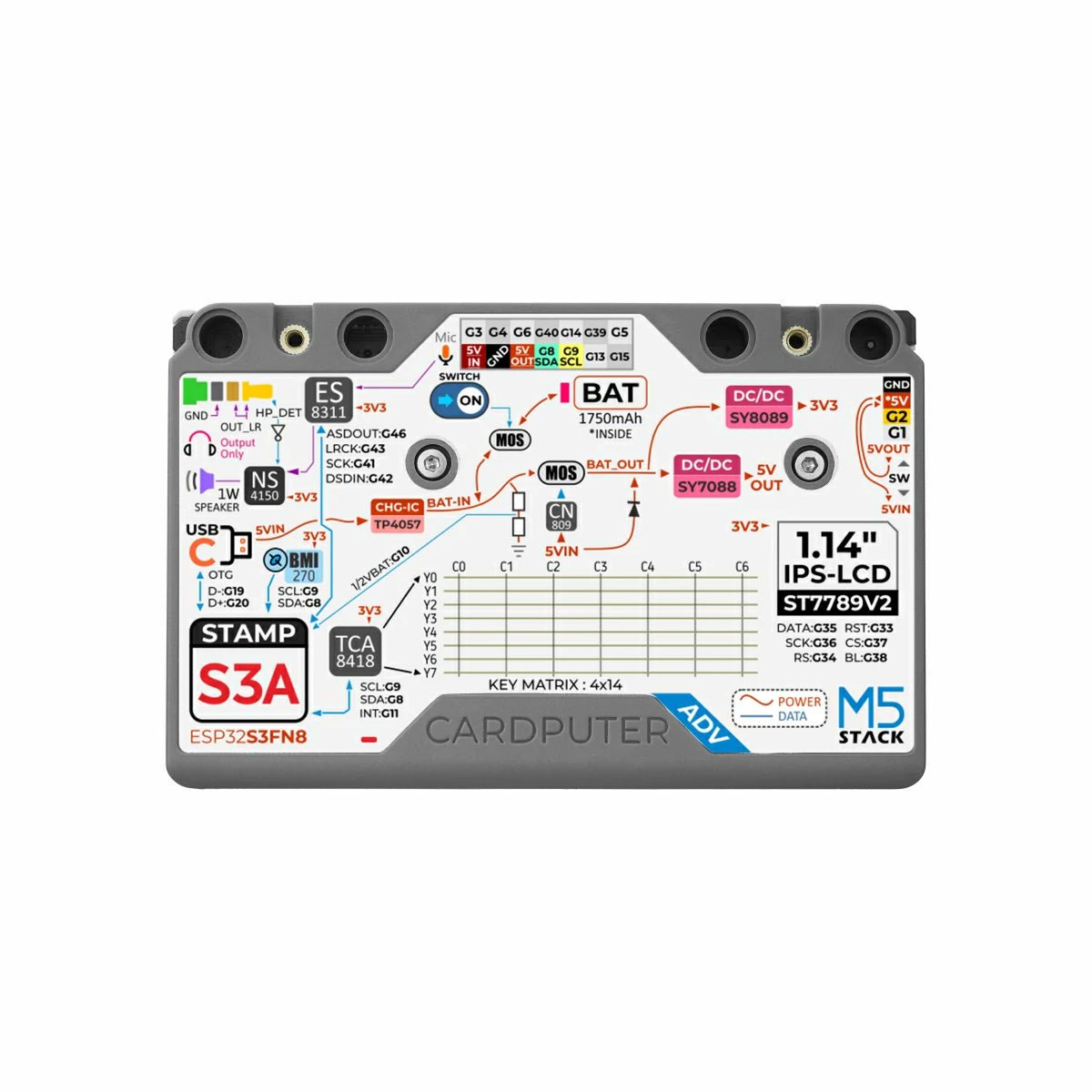
Figure 3.1 — The Cardputer ADV back-side silkscreen: power, buses, audio, key matrix, and the EXT header pinout. Photo via web image search.
Table 1 — 2. GPIO map — full pin assignment table
| GPIO | Function | Notes |
|---|---|---|
| 0 | BOOT button | Hold during USB plug-in to enter download mode |
| 1 | Grove TX (UART) / I²C SCL (secondary, re-tasked) | Grove pin 4 |
| 2 | Grove RX (UART) / I²C SDA (secondary, re-tasked) | Grove pin 3 |
| 3 | EXT RESET | Drives SX1262 RST on Cap LoRa-1262 |
| 4 | EXT INT | SX1262 IRQ / DIO1 input |
| 5 | EXT CS | SX1262 NSS chip-select |
| 6 | EXT BUSY | SX1262 BUSY status input |
| 7 | (internal — power switch / battery routing) | — |
| 8 | I²C SDA (primary, shared bus) | Codec + keyboard scanner + IMU + EXT + Grove-when-I²C |
| 9 | I²C SCL (primary, shared bus) | Same |
| 10 | Battery ADC | Voltage divider ~0.49× V_BAT |
| 11 | Keyboard INT (from TCA8418) | Falling edge on event-FIFO entry |
| 12 | microSD CS | Active-low |
| 13 | EXT UART RX (from AT6668 TX) | UART2 RX in default firmware |
| 14 | SPI MOSI | Shared with display + microSD + EXT |
| 15 | EXT UART TX (to AT6668 RX) | UART2 TX in default firmware |
| 16-17 | (internal — display backlight control / power) | — |
| 18-19 | USB D-/D+ | Native USB peripheral |
| 20-32 | (internal / display matrix / power management) | Various |
| 33-37 | LCD bus signals | LCD parallel-mode or SPI-bus auxiliary lines |
| 38 | RGB LED (WS2812-style on-board indicator) | Single addressable LED |
| 39 | SPI MISO | Shared with display (MISO unused there) + microSD + EXT |
| 40 | SPI SCK / microSD CLK | Shared |
| 41-43 | I²S bus (audio) | Bit clock + word select + data |
| 44 | IR TX LED drive | 940 nm consumer-IR transmit |
| 45-46 | I²S audio (continued) | Master clock + data direction |
Caveats when reading this table:
- Multiple GPIOs are shared (SPI bus, I²C bus) — same pin, same signal, multiple peripherals on different CS / addresses.
- Some assignments are firmware-conventional rather than hardware-fixed (e.g., G1/G2 as Grove UART is the default; firmware can re-task them to I²C).
- The internal-only GPIOs (7, 16-17, 20-32) handle power management, level shifters, and display backlight — they’re not user-routable.
For Arduino sketches, the M5Cardputer library exposes named constants for the canonical assignments (M5.Lcd.cs, M5.Mic.bclk, etc.) so most application code doesn’t need this table. The table is for: writing bare-metal ESP-IDF code, debugging hardware-level issues, designing custom hardware that plugs into the Cardputer ADV.
3.3 Grove HY2.0-4P port (top edge)
3.3.1 Default function — PortC UART
The top-edge Grove HY2.0-4P connector is a standard M5Stack-convention “PortC” — a 4-pin Grove cable carrying GND + 5V + UART RX + UART TX.
Table 2 — 3.1 Default function — PortC UART
| Grove pin | Wire color | GPIO | Default function |
|---|---|---|---|
| 1 | Black | GND | Ground |
| 2 | Red | — | 5V boost output (from USB or battery boost) |
| 3 | White | GPIO 2 | UART2 RX (default) |
| 4 | Yellow | GPIO 1 | UART2 TX (default) |
This is the canonical wiring for serial sensors and actuators — GPS modules, RS232 / RS485 adapters, modems, etc. The 5V rail can power small peripherals directly (sensors typically draw < 50 mA so well within budget).
3.3.2 Re-tasking to I²C
Firmware can re-task G1/G2 to I²C by:
- Switching the ESP32-S3 pin mux from UART2 to I²C peripheral.
- Using a separate
Wire1instance (not the defaultWire, which is on G8/G9):
#include <Wire.h>

void setup() {
    Wire1.begin(2, 1);  // SDA=G2, SCL=G1 (yellow=TX→SCL, white=RX→SDA — verify against your Grove cable)
    // ... use Wire1 instead of Wire for this bus
}
Many Cardputer firmwares (Bruce, RFID-PN532-i2c-CARDPUTER) do this for Grove I²C peripherals — PN532 NFC readers, environmental sensors, etc.
Pin-direction caveat: Grove cables are color-conventional but variants exist. Some breakout boards label pins differently. When wiring a new Grove peripheral, verify with a multimeter or trust the M5Stack-supplied cables.
3.3.3 Secondary I²C bus considerations
The Grove-rebound G1/G2 secondary I²C is completely separate from the primary I²C bus (G8/G9). Different Wire instance in Arduino — Wire1 not Wire. Different ESP32-S3 I²C peripheral.
Implications:
- An I²C device on Grove cannot share the same address as one on the primary bus.
- An I²C device on Grove does not appear on the primary bus’s address scan. They’re physically isolated buses.
- Pull-up resistors: if the sensor breakout doesn’t have built-in pull-ups, add 4.7 kΩ to 3.3 V on SDA and SCL. Most modern breakouts include them.
- Speed: the secondary I²C bus can run at 100 kHz or 400 kHz standard. Faster (1 MHz / Fast Mode Plus) works on capable chips but verify per-chip.
3.3.4 Power rail (5V output)
Grove pin 2 outputs 5V sourced from USB-C input (when plugged in) or from a battery boost converter (when on battery). Budget: ~500 mA shared with the on-board peripherals — drawing too much on Grove can brownout the system.
Sensors typically draw < 50 mA; actuators (servos, relays, LEDs) can pull more. For high-current Grove peripherals, prefer USB-C-powered operation over battery-only.
For 3.3 V-only peripherals, use a small linear regulator (AMS1117-3.3 module breaks out a 3-pin step-down) between the Grove 5V and the sensor’s VCC. Or wire to the EXT bus’s 3V3 pin directly (Vol § 4.3).
3.4 14-pin EXT bus (underside)
3.4.1 Full pinout table
The 14-pin EXT bus on the underside is a 2.54 mm 2-row header (7 × 2 = 14 positions). It’s the primary expansion path for Cap modules — tightly-coupled daughterboards that mate flush against the Cardputer ADV’s underside.
Approximate pinout (verify against the vendor’s Cardputer ADV pinout PDF — pin numbering convention varies by drawing):
Table 3 — Approximate pinout (verify against the vendor's Cardputer ADV pinout PDF — pin numbering convention varies by drawing)
| Pin | Signal | GPIO | Function |
|---|---|---|---|
| 1 | 3V3 | — | 3.3 V power rail (system rail) |
| 2 | 5V_IN | — | 5 V rail (from USB or battery boost) |
| 3 | EXT RESET | GPIO 3 | Active-low reset to SX1262 (or similar EXT peripheral) |
| 4 | EXT INT | GPIO 4 | Interrupt input (e.g., SX1262 DIO1) |
| 5 | EXT CS | GPIO 5 | SPI chip-select for EXT peripheral |
| 6 | EXT BUSY | GPIO 6 | Status input (e.g., SX1262 BUSY) |
| 7 | I²C SDA | GPIO 8 | Shared primary I²C bus |
| 8 | I²C SCL | GPIO 9 | Shared primary I²C bus |
| 9 | EXT UART TX | GPIO 15 | UART TX to EXT (typically GNSS RX on AT6668) |
| 10 | MISO | GPIO 39 | Shared SPI MISO |
| 11 | SCK | GPIO 40 | Shared SPI SCK |
| 12 | MOSI | GPIO 14 | Shared SPI MOSI |
| 13 | EXT UART RX | GPIO 13 | UART RX from EXT (typically GNSS TX on AT6668) |
| 14 | GND | — | Ground |
3.4.2 Signal-group organization
The EXT bus is organized by functional groups:
- Power (1, 2, 14): 3V3 + 5V_IN + GND
- Cap-control bundle (3, 4, 5, 6): RESET + INT + CS + BUSY — designed for the SX1262 LoRa modem’s exact pinout. Reusable for any SPI peripheral that needs reset + interrupt + chip-select + status, but most Caps follow the SX1262 convention.
- I²C (7, 8): primary shared I²C bus. Caps can share peripherals here at non-conflicting addresses.
- UART (9, 13): UART2 routed to the EXT. Default function on the Cap LoRa-1262 is GNSS UART (AT6668). Caps without a GNSS can ignore these or re-task them.
- SPI (10, 11, 12): shared SPI bus. Combined with the Cap-control bundle (3-6), enables full SX1262-class peripherals.
This grouping reflects the Cap LoRa-1262 use case as the canonical EXT design. New Caps inherit the same organization to maintain compatibility — drop-in replacement is the goal.
3.4.3 Power rails (5V_IN, 3V3, GND)
Table 4 — 4.3 Power rails (5VIN, 3V3, GND)
| Rail | Pin | Source | Budget | Typical use |
|---|---|---|---|---|
| 5V_IN | 2 | USB-C input or battery 5V boost | ~500 mA shared | Higher-current peripherals (SX1262 +22 dBm TX draws ~163 mA peak) |
| 3V3 | 1 | System rail post-buck | ~200 mA budget on EXT | Low-current MCU-class chips, GNSS module |
| GND | 14 | Ground | — | — |
Budget is shared with the on-board peripherals. Drawing too much on EXT can brown out the Cardputer ADV. The Cap LoRa-1262 is designed to fit within budget; custom Caps need to verify the math.
For peripherals that need both 3.3V and 5V (rare — most are one or the other), wire both.
3.4.4 Mating connector — 2.54 mm header convention
The Cardputer ADV side has a 14-pin female header (sockets, accepts standard 2.54 mm headers). The Cap side has 14-pin male pins.
For custom Caps, use any 2.54 mm 2-row male header (TE Connectivity, Samtec, generic AliExpress). Pin pitch must match exactly — 2.54 mm. M5Stack publishes the mechanical reference in the Cardputer-Adv Structure Files PDF.
The mating distance (Cap PCB → Cardputer ADV PCB) is set by the header heights. Standard 2.54 mm headers give ~8.5 mm spacing — typical for a daughter card with no tall components. If your custom Cap has tall components on the side facing the Cardputer ADV, use a longer header or add standoffs.
3.5 USB-C OTG (side)
3.5.1 Device mode (default)
In device mode, the Cardputer ADV is a USB peripheral connected to a host (laptop, desktop, phone via USB-C). What the host sees:
- USB CDC serial (typical Arduino USB-CDC bridge —
/dev/ttyACM0on Linux,COM-Non Windows) - USB HID keyboard / mouse (when running BadCard / Bruce BadUSB modules)
- USB Mass Storage (when configured — Cardputer becomes a USB flash drive)
Device mode is the default in all M5Launcher / Bruce / Marauder / NEMO firmwares. Switch happens at build time via -DARDUINO_USB_MODE=1.
3.5.2 Host mode (OTG)
In host mode (USB On-The-Go), the Cardputer ADV becomes the USB host and can enumerate USB peripherals plugged in via a USB-C-to-A adapter:
- USB keyboards: physical Cherry MX or membrane keyboards — more comfortable than the 56-key chiclet for sustained typing.
- USB mass-storage thumb drives: read / write files. Bruce supports this via file manager.
- USB-to-Serial adapters (FTDI, CH340, CP210x, PL2303): the Cardputer becomes a portable serial console. Plug into a router / switch / industrial controller for debugging.
- USB MIDI controllers: feed audio codec from MIDI input.
- USB HID inspection (BadUSB Hunter, NEMO + M5Launcher): plug in any HID device, Cardputer reports its descriptors, warns if it’s a surreptitious USB Rubber Ducky-class device.
What doesn’t work in host mode (as of 2026-05-13):
- USB Wi-Fi adapters — no community firmware ships a CDC-ECM driver suitable for the S3’s USB host stack.
- USB Ethernet adapters — same.
- Webcams — no UVC driver.
- External GPUs — obviously not.
3.5.3 Build-flag selection
; platformio.ini snippet
build_flags =
    -DARDUINO_USB_MODE=1                          ; Device mode (the default for most firmwares)
    ; OR
    -DARDUINO_USB_MODE=0                          ; Host mode (OTG)
    -DARDUINO_USB_CDC_ON_BOOT=1                   ; USB-CDC available on boot (works in either mode)
Switching between modes requires a firmware re-flash. Some firmwares (M5Launcher’s BadUSB Hunter) provide a runtime-switchable mode by including both USB stacks compiled in — costlier in flash size but more user-friendly.
3.6 SPI bus sharing — display + microSD + EXT
The SPI bus on the Cardputer ADV serves three peripherals:
Table 5 — The SPI bus on the Cardputer ADV serves three peripherals
| Peripheral | CS pin | Notes |
|---|---|---|
| Display (ST7789V2) | (internal to Stamp-S3A) | Always present |
| microSD | GPIO 12 | Present when card inserted |
| EXT bus (Cap LoRa-1262 SX1262) | GPIO 5 | Present when Cap mated |
Bus arbitration via chip-select discipline:
- Each transaction asserts its CS active-low while transferring, deasserts at end.
- ESP32-S3 SPI peripheral handles the CS toggling per
spi_device_transmit()call. - M5GFX, SD.h, and RadioLib (the canonical drivers) cooperate correctly when used together.
Observed contention behaviors:
- Long SD writes (multi-MB file dump) block display refresh visibly. The display shows a brief “freeze” for the duration of the write.
- Concurrent display refresh + SD read for boot-splash image: works but startup is ~200 ms slower than display-only.
- LoRa TX + SD write simultaneously: arbitrated, but throughput on each drops. Avoid by buffering SD writes in RAM and flushing between LoRa transmissions.
For high-throughput capture (e.g., probe-request flooding pcap), pre-allocate a 32-64 KB RAM buffer and flush to SD periodically rather than per-packet.
3.7 I²C bus map — codec + keyboard + IMU + EXT + Grove
The primary I²C bus (G8/G9 SDA/SCL) hosts a substantial set of devices:
Table 6 — The primary I²C bus (G8/G9 SDA/SCL) hosts a substantial set of devices
| Address (default) | Device | On board / external |
|---|---|---|
| 0x18 | ES8311 audio codec | On board |
| 0x34 | TCA8418 keyboard scanner | On board |
| 0x68 (or 0x69) | BMI270 IMU | On board |
| 0x43 | PI4IOE5V6408 GPIO expander (Cap LoRa-1262 FM8625H antenna switch control) | On Cap LoRa-1262 when mated |
| varies | EXT-bus I²C devices | Any Cap with I²C peripherals |
| varies | Grove-I²C-mode peripherals | Only when Grove is re-tasked to I²C (G1/G2 secondary bus is separate) |
Bus speed: 400 kHz nominal (Fast Mode). 100 kHz also supported for slower peripherals.
Address scan: M5Cardputer library exposes Wire.beginTransmission(addr); err = Wire.endTransmission(); pattern — sweep 0x03-0x77 to discover devices. Bruce and Marauder include built-in I²C scanner utilities.
Address-conflict avoidance: M5Stack-shipped peripherals are chosen to avoid clashing. Third-party I²C peripherals at conflicting addresses must be address-changed (most have DIP switches or solder bridges for ±1 addr) or routed to the secondary Grove I²C bus instead.
3.8 Bus-conflict reference
Table 7 — 8. Bus-conflict reference
| Combination | Compatible? | Notes |
|---|---|---|
| Cap LoRa-1262 (EXT) + Grove UART sensor | ✓ | Different buses |
| Cap LoRa-1262 (EXT) + Grove I²C sensor (G1/G2 secondary) | ✓ | Different I²C buses |
| Cap LoRa-1262 (EXT) + Grove I²C sensor at 0x43 (same as PI4IOE on Cap) | ✓ | Different I²C buses — no conflict |
| Cap LoRa-1262 (EXT) + USB OTG host | ✓ | Independent paths |
| Cap LoRa-1262 (EXT) + microSD | ✓ | Same SPI bus, different CS lines |
| CC1101 on EXT (no LoRa Cap) + Grove sensor | ✓ | CC1101 takes EXT; Grove independent |
| Two Caps stacked on EXT | ✗ | Only one Cap mates at a time (mechanical) |
| Grove UART + I²C on G1/G2 secondary bus | ✗ | Conflicting pin function — must pick one or the other |
| Cap LoRa-1262 + Grove I²C device at the same address as a Cap’s I²C device | ✓ | Different I²C buses |
| Multiple I²C sensors on primary bus (G8/G9) | ✓ | Provided no address collisions |
| USB OTG + microSD + display SPI | ✓ | Independent paths |
The main constraint: only one Cap on EXT at a time (mechanical, not electrical). For multi-functional builds: pick the most-needed Cap, or use Grove-side modules for the additional capability. Or design a stacking Cap with pass-through pins (community-discussed but no shipping product yet).
3.9 Practical wiring examples
Wiring a generic I²C sensor (BME280) to Grove:
Sensor side                           Cardputer ADV
─────────                            ─────────
VCC (3.3V)  ─── (AMS1117-3.3) ─── 5V (Grove pin 2)
GND         ────────────────────── GND (Grove pin 1)
SDA         ────────────────────── G2 (Grove pin 3)
SCL         ────────────────────── G1 (Grove pin 4)

Add 4.7 kΩ pull-ups SDA→3.3V and SCL→3.3V if BME280 breakout lacks them.

Arduino code:
    Wire1.begin(2, 1);    // SDA=2, SCL=1 on Wire1
    sensor.begin(&Wire1, 0x76);    // BME280 default address
Wiring a CC1101 sub-GHz module directly to EXT (with Cap LoRa-1262 removed):
CC1101 module     EXT bus pin (Cardputer ADV underside)
─────────────     ──────────────────────
VCC (3.3V)        EXT pin 1 (3V3)
GND               EXT pin 14 (GND)
CSN               EXT pin 5 (CS, GPIO 5)
SCK               EXT pin 11 (SCK, GPIO 40)
MOSI              EXT pin 12 (MOSI, GPIO 14)
MISO              EXT pin 10 (MISO, GPIO 39)
GDO0              EXT pin 4 (INT, GPIO 4)
GDO2              (leave open or wire to a spare GPIO)

Bruce firmware Settings → SubGHz Pinout → CC1101 on EXT → maps the pins
above to CC1101 driver. Then Bruce's SubGHz menu (replay / jam / capture)
works as if a CC1101 Grove Unit were attached.
Wiring a PN532 NFC reader to Grove I²C:
PN532 side                           Cardputer ADV
─────────                            ─────────
VCC (5V or 3.3V)  ─────────────── 5V (Grove pin 2)
GND               ─────────────── GND (Grove pin 1)
SDA               ─────────────── G2 (Grove pin 3)
SCL               ─────────────── G1 (Grove pin 4)

PN532 board DIP switches: I²C mode (0:ON, 1:OFF) — module has SPI/I²C/HSU
modes; need to set I²C.

Use RFID-PN532-i2c-CARDPUTER firmware (Jojorel) or Adafruit_PN532 library
with Wire1.begin(2, 1) reroute.
3.10 Resources
- Cardputer ADV pinout PDF: https://docs.m5stack.com/en/core/Cardputer
- ESP32-S3 GPIO matrix: ESP32-S3 datasheet § 5
- HY2.0-4P connector: JST documentation
- Bus Pirate 6 (sister deep dive on wired-protocol exploration):
../../../Bus Pirate 6/03-outputs/BusPirate6_Complete.html
Forward references
- Cap modules in detail: Vol 4 § 2
- Grove Units catalog: Vol 4 § 3
- Cap LoRa-1262 SX1262 bring-up via these pins: Vol 5 § 3
- USB-OTG BadUSB recipes: Vol 9 § 2.6 + Vol 9 § 7
This is Volume 3 of a twelve-volume series. Next: Vol 4 catalogs the module ecosystem — Cap modules, Grove Units, the HAT-doesn’t-fit warning, M5MonsterC5 for 5 GHz, and DIY hardware patterns.
Comments (0)