AirTags · Volume 12
AirTags Volume 12 — DIY Detection & Finding
The engineer-on-the-bench counter-surveillance toolkit: nRF Connect, bluetoothctl, btmon and the legacy hcitool path, an nRF52840 sniffer feeding Wireshark, the FF 4C 00 12 separated-state signature to match on, the key-rotation problem and why you correlate persistence + RSSI within one sweep session instead of across rotations, a bleak RSSI-walk logger, the NFC serial read, and the reproducible sweep-your-own-car/bag/room decision tree
12.1 About this Volume
Vol 11 mapped the off-the-shelf detection toolkit — the iOS and Android OS-native alerts, Apple’s Tracker Detect, AirGuard, the commercial sweepers, and the Apple+Google DULT framework. Those tools work, they are mostly free, and for a non-technical person they are the right first answer. This volume is the do-it-yourself counterpart: the same detection job done by an engineer with a Linux box, a $10 Bluetooth dongle, a sniffer, and a phone — reading raw advertising bytes instead of trusting a vendor’s classifier. Where Vol 11 said “install AirGuard,” Vol 12 says “here is what AirGuard is doing, and here is how to do it yourself with bluetoothctl, a tshark display filter, and a bleak script you can read end to end.”
The reason to do it yourself is not that the apps are bad — it is that the apps are black boxes with hard-coded gates. They only flag what their classifier decides to flag, they impose the by-design co-travel delay (Vol 11 §2.3), and they are blind to anything outside their compliance model (Vol 11 §6.3). When you scan the raw air yourself, you see every Find My advert in range the instant it arrives — no delay, no suppression — and you decide what is suspicious. That power comes with a cost the whole volume keeps returning to: you also see every coffee-shop AirTag and every passing iPhone, so the engineering problem is not detecting a Find My signal (trivial) but deciding which one is following you (the hard part, §4).
Posture — this is a sweep of YOUR own space. Every procedure in this volume is framed one way: you are checking your car, your bag, your room, your person for a tracker that someone else may have planted on you. That is the protective, counter-surveillance use, and it is the only use this volume teaches. Reading the rotating public key off a tag tells you nothing about who owns it and is useless for tracking another person (the key is anonymous by construction — Vol 2 §7); the only identity this volume extracts is the serial of a tag you have physically found on your own property, read over NFC, to hand to police (§6). Keep the line bright: sweep what is yours, never surveil a person. The legal envelope is _shared/legal_ethics.md and Vol 14.
What this volume covers, and what it defers. Here: the BLE scanning toolchain tool-by-tool (§2), the exact bytes that identify a Find My / AirTag advert and the separated-state byte (§3), the key-rotation problem and the single-session correlation that beats it (§4), RSSI-walk localization with a bleak logger (§5), the NFC serial read of a found tag (§6), and the reproducible sweep decision tree that ties it all together (§7). Reused wholesale and not re-derived: the advertising payload byte anatomy and the rotating-key crypto (Vol 2 §3–§4), and the separated-state status byte plus the NFC/Lost-Mode read path (Vol 4 §2, §4.2, §4.4). Deferred: running these exact techniques on owned Hack Tools gear — the Flipper Zero BLE apps, the ESP32 Marauder BLE scan on the AWOK Dual Touch V3 and Ruckus Game Over modules, the Nyan Box, the nRF52840 as a Flipper-class accessory, and HackRF for the UWB band — is Vol 13; the off-the-shelf detector products are Vol 11; the legal/ethics line is Vol 14 and _shared/legal_ethics.md. The sibling counter-surveillance topic — finding hidden cameras rather than trackers — is the Nyan Box/ deep dive, whose RF-sweep and RSSI-walk methodology is the closest cousin to what this volume does for BLE.
Spec-sourced, with a software toolchain that is real even though the tags are not yet on the bench. As of 2026-06-26 no AirTags or detectors are on this bench, so none of the captures below are live — the annotated frames reuse Vol 2’s byte layout and the byte semantics are sourced there.^[The advertising-byte layout, the
0x004C/0x12Find My signature, and the rotating-key behavior are all carried from Vol 2 (Heinrich, Stute, Kornhuber & Hollick, “Who Can Find My Devices?”, PoPETs 2021(3), pp. 227–245, DOI 10.2478/popets-2021-0045) and Vol 4; this volume applies them, it does not re-derive them. The separated-state status byte and the long-lived separated key are from Vol 4 §4.2 and §4.4.] But the tooling is real and current:bluetoothctl,btmon,btmgmt, the deprecatedhcitool/hcidump, Nordic’s nRF Sniffer for Bluetooth LE feeding Wireshark/tshark, thebleakcross-platform BLE library, andlibnfc/nfcpyare all shipping software you can run today. Where an exact flag, field name, or library-API detail is version-sensitive (Wireshark display-filter field names andbleak’s RSSI accessor are the two most likely to drift), this volume flags it inline. When tags reach the bench the captures get replaced with livebtmon/sniffer logs committed under the AirTagsprojects/tree, per the spec’s bench trajectory.
12.2 The BLE scanning toolchain
Detection is, mechanically, passive listening. A separated Find My tag transmits a non-connectable advertisement (ADV_NONCONN_IND — Vol 2 §2.2), so there is nothing to connect to, nothing to interrogate over GATT; the entire detection surface is the bytes the tag shouts into the air. Every tool in this section does the same fundamental thing — receive BLE advertising PDUs and surface their manufacturer-specific data and RSSI — and they differ only in how much of the raw frame they expose, whether they show live signal strength, and whether they are sniffer-grade (seeing every PDU on the air) or host-stack-grade (seeing what your own Bluetooth controller chose to report).
   The DIY detection pipeline — passive listen, then decide
   ════════════════════════════════════════════════════════

   AIR (2.4 GHz, channels 37/38/39)
        │  ADV_NONCONN_IND  ·  FF 4C 00 12 …  ·  rotating key
        ▼
   ┌──────────────────────────────────────────────────────────┐
   │  CAPTURE LAYER  (pick one)                               │
   │   • phone app      → nRF Connect            (§2.1)       │
   │   • host BLE stack → bluetoothctl / btmon   (§2.2–2.3)   │
   │   • legacy stack   → hcitool + hcidump      (§2.4)       │
   │   • true sniffer   → nRF52840 + Wireshark   (§2.5)       │
   └───────────────────────────┬──────────────────────────────┘
                               │  raw mfr-data bytes + RSSI
                               ▼
   ┌──────────────────────────────────────────────────────────┐
   │  FILTER:  company 0x004C  AND  Apple type 0x12  AND       │
   │           status byte = separated            (§3)         │
   └───────────────────────────┬──────────────────────────────┘
                               ▼
   ┌──────────────────────────────────────────────────────────┐
   │  DECIDE:  does ONE separated tag PERSIST + track RSSI as  │
   │           I move?  (single-session correlation, §4)       │
   └───────────────────────────┬──────────────────────────────┘
                               ▼
   ┌──────────────────────────────────────────────────────────┐
   │  LOCATE (RSSI-walk, §5)  →  NFC-read serial (§6)  →       │
   │  document + report (§7.3)                                 │
   └──────────────────────────────────────────────────────────┘
The capture layer is the only part that varies by tool; the filter, decide, locate, and read stages are identical regardless of which radio fed them. That is why this section is a menu — pick the capture tool you have, then everything downstream (§3–§7) is the same.
12.2.1 nRF Connect for Mobile
The lowest-friction entry point is nRF Connect for Mobile (Nordic Semiconductor; free, Android and iOS) — a professional-grade BLE scanner that runs on the phone already in your pocket. It is the bridge between the app tier of Vol 11 and the bench tier of this volume: unlike AirGuard it has no tracker-specific classifier, but unlike AirGuard it shows you the raw advertising bytes and a live RSSI graph for every device in range, which is exactly what you need to identify a Find My advert by hand.
The workflow for a sweep:
- Scan opens a live list of every advertiser in range, each row showing its (rotating) address, RSSI in dBm updating in real time, and an expandable raw-data view.
- Filter by RSSI — drag the RSSI floor up to, say, −70 dBm so the list collapses to only nearby devices. A tag hidden on you is close, so it stays in the list while distant strangers’ devices drop out. This is the single most useful triage step on the phone.
- Filter by manufacturer / raw data — nRF Connect lets you filter the advertising data; key on the Apple company ID. Expand a candidate row and read the Manufacturer data field: a Find My tag shows company
0x004Cfollowed by12 19 …(the Apple type0x12and length0x19— §3). - Live RSSI graph — tapping a device opens a strip-chart of its RSSI over time. This is your RSSI-walk instrument (§5): watch the trace climb as you move toward the tag.
The honest limitation, the same one Vol 11 §3.3 names: nRF Connect shows you all BLE devices and does not tell you which is a tracker — you do the classification by reading the 0x004C / 0x12 bytes yourself (§3). It also cannot persist a correlation across the address rotation as cleanly as a logging tool, so for a long sweep the bleak logger of §5.3 or a sniffer capture (§2.5) is stronger. But for a fast “is there a separated Find My tag within a metre of me right now,” nRF Connect on the phone is the fastest tool in this volume.
12.2.2 Linux scanning with bluetoothctl
On a Linux host the supported, modern front-end to the BlueZ stack is bluetoothctl (BlueZ 5.x — current releases are in the 5.6x–5.7x range; bluetoothctl and btmgmt are the maintained tools, while hcitool of §2.4 is deprecated). It drives discovery through the kernel’s management interface and reports each discovered device’s address, name, RSSI, and — via info — its manufacturer data.
A scan session, restricting to BLE and to nearby devices:
$ bluetoothctl
Agent registered
[bluetooth]# power on
Changing power on succeeded
[bluetooth]# menu scan
[bluetooth]/scan# transport le        # BLE only — ignore classic BR/EDR
[bluetooth]/scan# rssi -75            # only report devices at or above -75 dBm
[bluetooth]/scan# clear               # reset the discovery filter later
[bluetooth]/scan# back
[bluetooth]# scan on
Discovery started
[CHG] Device E1:A2:0B:2C:5E:88 RSSI: -63
[NEW] Device D7:91:4F:1C:6A:22 RSSI: -71
[CHG] Device E1:A2:0B:2C:5E:88 RSSI: -59     # getting WARMER as I move
...
[bluetooth]# devices
Device E1:A2:0B:2C:5E:88 (unknown)
Device D7:91:4F:1C:6A:22 (unknown)
[bluetooth]# info E1:A2:0B:2C:5E:88
Device E1:A2:0B:2C:5E:88 (random)
        RSSI: -59
        ManufacturerData Key: 0x004c                 # Apple — the Find My company ID
        ManufacturerData Value:
  12 19 00 bb bb bb bb bb bb bb bb bb bb bb bb bb    # 0x12 = Find My, 0x19 = len 25,
  bb bb bb bb bb bb bb bb bb 02 00                   # 0x00 = status byte (decode §3.2)
[bluetooth]# scan off
Discovery stopped
[bluetooth]# exit
Three things to read off that session. The address is shown as (random) — that is the random-static address whose top two bits are forced to 0b11 and which actually carries five bytes of the rotating public key (Vol 2 §2.3, §3.3), so it is not a stable MAC and will change at the next rotation. The ManufacturerData Key: 0x004c is the Apple company ID, and the ManufacturerData Value begins 12 19 00 … — Apple type 0x12 (Find My), Apple length 0x19 (25), status byte 0x00. That 0x004c + leading 12 is the entire Find My fingerprint you are hunting (§3.1). The repeated [CHG] … RSSI: lines climbing from −63 to −59 are your RSSI-walk feedback (§5) — the device getting warmer as you close on it.
The catch with bluetoothctl: it surfaces what the controller chose to report through the host stack, it de-duplicates aggressively, and its RSSI update cadence is coarser than a sniffer’s. It is excellent for “is a Find My tag near me and is it getting warmer,” and it is on every Linux box without extra hardware — but for byte-exact, every-PDU fidelity you drop to btmon (§2.3) or a real sniffer (§2.5).
12.2.3 The btmon HCI trace
btmon is BlueZ’s HCI monitor — it passively decodes every Host-Controller Interface packet flowing between the kernel and your Bluetooth controller, including every LE Advertising Report your adapter receives. It does not initiate scanning (it only traces), so the idiom is: start a scan in one place, run btmon in another to watch the decoded adverts. It is the cleanest way to see a fully-parsed Find My frame — PDU type, address type, company ID, the raw Apple bytes, and RSSI — without a dedicated sniffer.
# Terminal 1 — start an LE scan (either of these initiates discovery):
sudo btmgmt find                       # one-shot LE+BR/EDR discovery, or:
bluetoothctl scan on                   # leave a scan running

# Terminal 2 — passively decode the adverts the controller reports:
sudo btmon

# To pull only Apple Find My adverts out of the live trace, grep the
# decoded company line plus the type byte (btmon prints Apple as "(76)"
# because 0x004C == 76 decimal):
sudo btmon | grep --line-buffered -A4 -E 'Company: Apple|Type: 12'

# To keep a capture for later Wireshark analysis (btmon snoop format):
sudo btmon -w sweep.btsnoop           # then: wireshark sweep.btsnoop
A single decoded Find My advertising report in the btmon trace looks like this — annotated against Vol 2’s layout:
> HCI Event: LE Meta Event (0x3e) plen 42
      LE Advertising Report (0x02)
        Num reports: 1
        Event type: Non connectable - Undirected (ADV_NONCONN_IND) (0x03)   # Vol 2 §2.2
        Address type: Random (0x01)
        Address: E1:A2:0B:2C:5E:88 (Resolvable)                              # = key bytes, not a MAC
        Data length: 30
        Company: Apple, Inc. (76)              # 76 == 0x004C  (little-endian 4C 00 on the wire)
          Type: 12                             # 0x12  = Find My / offline finding  ← THE signature
          Data: 19 00 bb bb bb bb bb bb bb bb bb bb bb bb bb bb bb bb bb bb bb bb 02 00
        RSSI: -59 dBm (0xc5)                   # your RSSI-walk reading (§5)
Everything you need to classify and localize is in that one block: the ADV_NONCONN_IND event type and the Company: Apple, Inc. (76) + Type: 12 triplet confirm it is a separated Find My advert; the Data: 19 00 … shows the Apple length 0x19 and the status byte (here 0x00 — decode it per §3.2); and the RSSI: -59 dBm is your warmer/colder signal. btmon is the modern, supported, byte-faithful host-stack tool, and unless you need to see PDUs your own controller dropped (which is where a real sniffer earns its keep, §2.5), it is the Linux workhorse for this job.
12.2.4 Legacy hcitool lescan and hcidump
For completeness — and because half the tutorials on the internet still show it — the legacy BlueZ path is hcitool lescan to start an LE scan and hcidump to dump the raw packets:
# LEGACY / DEPRECATED — shown for recognition, prefer btmon (§2.3).
# hcitool and hcidump are deprecated in BlueZ since ~5.44 (2017) and are
# not built by default on many current distros. Install bluez-deprecated /
# bluez-hcidump if you really need them.

sudo hcitool lescan --duplicates &     # start LE discovery, keep reporting dupes
LE Scan ...
E1:A2:0B:2C:5E:88 (unknown)
D7:91:4F:1C:6A:22 (unknown)

sudo hcidump --raw                     # dump raw HCI; Apple mfr data appears as
                                       #   ... FF 4C 00 12 19 00 ...
                                       #        ▲  ▲▲▲▲▲ ▲  ▲  ▲
                                       #        │  4C 00 │  │  status byte
                                       #        │  =Apple│  Apple length 0x19
                                       #     AD type 0xFF  Apple type 0x12 (Find My)

# Crude live filter for the Apple Find My signature in the raw stream:
sudo hcidump --raw | grep -i "4C 00 12"
Two things to note. First, the raw hcidump stream is where you see the manufacturer-specific data with its full AD framing — FF (AD type = Manufacturer Specific Data), 4C 00 (Apple 0x004C, little-endian on the wire — the byte pair reads 4C 00, not 00 4C), then 12 (Apple type, Find My), 19 (Apple length 25), then the status byte and the split key. That FF 4C 00 12 byte sequence is the literal on-air fingerprint, and it is the thing the grep matches. Second, and more important: this path is deprecated. hcitool and hcidump were marked deprecated in BlueZ around version 5.44 and are no longer built by default in many distributions; btmon, btmgmt, and bluetoothctl are the supported replacements. Use the legacy tools only to recognize them in older material — author your own sweeps against btmon (§2.3).
12.2.5 The nRF52840 sniffer and Wireshark
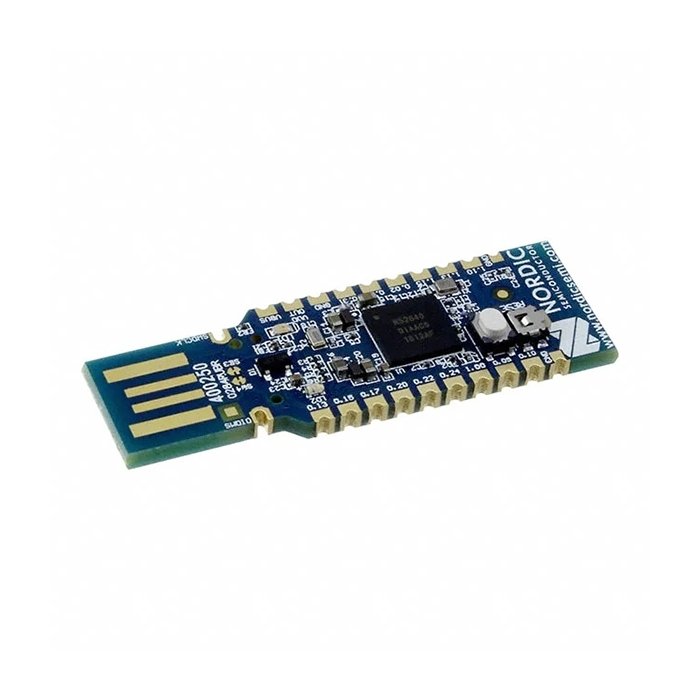
The host-stack tools (§2.2–§2.4) show you what your controller reported, after the controller’s own filtering and de-duplication. A dedicated sniffer shows you what is actually on the air — every advertising PDU on every advertising channel — and dissects it in Wireshark. The standard, cheap, well-supported option is a Nordic nRF52840 dongle (about $10) flashed with Nordic’s nRF Sniffer for Bluetooth LE firmware, which presents itself to Wireshark as an extcap capture interface.
   nRF52840 sniffer → Wireshark dissection pipeline
   ════════════════════════════════════════════════

   ┌───────────────┐   nRF Sniffer fw     ┌──────────────────┐
   │ nRF52840      │   captures EVERY     │  Wireshark /     │
   │ USB dongle    │──►PDU on adv ch      │  tshark          │
   │ (~$10)        │   37/38/39 + RSSI    │  (extcap iface)  │
   └───────────────┘   over USB-CDC       └────────┬─────────┘
        ▲                                          │ display filter:
        │ flashed with                             │  company_id == 0x004c
        │ nrf_sniffer_for_bluetooth_le             │  AND data[0] == 0x12
        │ (nrfutil DFU, §6 Vol 10 toolchain)       ▼
        │                                  ┌──────────────────┐
        └── same dongle class Vol 13 uses  │ per-PDU: addr,   │
            as a Flipper/host accessory    │ Apple bytes,RSSI │
                                           │ Nordic metadata  │
                                           └──────────────────┘
Setup is the Vol 10 nRF toolchain: flash the dongle over USB DFU with nrfutil (the nRF Sniffer firmware ships as part of the nRF Sniffer for Bluetooth LE package), drop the bundled Wireshark extcap plugin and its SnifferAPI/capture script into Wireshark’s extcap directory, and the dongle appears in Wireshark’s interface list as “nRF Sniffer for Bluetooth LE”. Select it, start the capture, and every BLE advertisement in range arrives as a dissected packet with a Nordic metadata header (which carries the per-PDU RSSI and the channel) wrapping the standard BLE link-layer dissection.
Why bother, when btmon already decodes adverts? Because the sniffer:
- sees every PDU on all three advertising channels, with no host-stack de-duplication — so a tag that advertises every ~2 seconds gives you ~2-second-resolution RSSI samples, ideal for the RSSI-walk (§5);
- gives you the full Wireshark display-filter and statistics machinery to isolate the Find My signature and watch one tag’s address/key across the capture (§3.3, §4);
- is the same nRF52840-as-accessory class of hardware that Vol 13 drives from a Flipper/host for the owned-gear workflow — so the skills transfer directly.
It is the sniffer-grade rung of the toolchain: more setup than bluetoothctl, far more fidelity, and the right tool when you want a recorded, filterable, RSSI-stamped capture of a sweep rather than a live glance.
12.2.6 Tool comparison
The required tool-comparison table — the five capture options across the axes that matter for a sweep: platform, whether it shows live RSSI for the warmer/colder walk, whether it exposes the raw manufacturer-data bytes you classify on, whether it is sniffer-grade (every PDU on the air vs. host-stack-filtered), and rough cost.
Table 1 — 2.6 Tool comparison
| Tool | Platform | Live RSSI? | Sees raw mfr data? | Sniffer-grade? | Cost | Best for |
|---|---|---|---|---|---|---|
| nRF Connect for Mobile | Android / iOS | Yes (live graph) | Yes (raw field) | No (phone radio, host-filtered) | Free (have a phone) | Fast phone-in-hand triage + RSSI-walk |
| bluetoothctl | Linux (BlueZ) | Yes (per-report) | Yes (info → ManufacturerData) | No (host stack) | Free | Supported Linux scan + warmer/colder |
| btmon | Linux (BlueZ) | Yes (per report) | Yes (full decode) | No (host stack, byte-faithful) | Free | Byte-exact decode + recorded captures |
| hcitool + hcidump | Linux (legacy) | Marginal | Yes (raw) | No (host stack) | Free | Recognition only — deprecated |
| nRF52840 + Wireshark | Win / Linux / macOS | Yes (Nordic metadata) | Yes (full dissection) | Yes (all 3 adv channels) | ~$10 dongle | Highest fidelity, filterable RSSI-stamped capture |
The decision is simple: a phone with nRF Connect for a quick check; btmon when you want byte-exact decode on a Linux box you already have; the nRF52840 sniffer when you want a recorded, every-PDU, RSSI-stamped capture you can filter and replay (§3.3). All of them feed the same classification (§3) and correlation (§4) logic.
12.3 Identifying a Find My advertisement
Capturing adverts is the easy half; the air around you is full of BLE. The discriminating half is recognizing which of those adverts is a Find My tag in the separated state — the only state a hidden, unwanted tag lives in (Vol 4 §4.1) — and filtering out everything else. This section is the byte-level recipe, built directly on Vol 2’s payload anatomy and Vol 4’s status byte. It does not re-derive that layout; it applies it.
12.3.1 The bytes to match on
From Vol 2 §2.4 and §3.1, the Find My fingerprint is a three-part signature inside the advertisement’s Manufacturer-Specific Data (AD type 0xFF):
- Apple company identifier
0x004C. Transmitted little-endian, so on a raw hexdump it appears as the byte pair4C 00— never00 4C. (BlueZ surfaces it as0x004c;btmonprints it as the decimal(76).) This is the company-ID demultiplexer. - Apple type byte
0x12. The byte immediately after the company ID.0x12is the Find My / offline-finding sub-protocol — the AirTag separated-state advert. - Apple length
0x19(25 decimal), then the status byte, then the split public key (Vol 2 §3.2).
So the literal on-air sequence inside the 0xFF AD structure is FF 4C 00 12 19 …, and the minimal classifier is “company is 0x004C and the first Apple data byte is 0x12.” That is the filter every tool in §2 keys on, and the tshark and bleak filters below are just that test written in two syntaxes.
The critical false-positive trap is that matching only 0x004C is not enough. Apple stuffs an entire zoo of sub-protocols behind the 0x004C company ID — iBeacon (0x02), AirDrop (0x05), AirPods / proximity pairing (0x07), Handoff (0x0C), Nearby (0x10), and Find My (0x12) — and they are everywhere (Vol 2 §2.4). Every iPhone, iPad, Mac, AirPods case, and Apple Watch within range is emitting 0x004C manufacturer data constantly. If your filter stops at the company ID, your sweep lights up like a Christmas tree in any populated space and tells you nothing.
Every nearby Apple device emits
0x004C— you must filter to the Find My type0x12, not just the company ID. This is the number-one mistake in a DIY tracker sweep. A filter of “company == Apple” matches the iPhone in every pocket around you, the AirPods on the next desk, the Mac across the room, the Apple Watch on your own wrist — dozens of hits, none of them a hidden tracker. The Find My / AirTag advert is specifically Apple type0x12; the proximity/Nearby/Handoff chatter is types0x07,0x10,0x0C, etc., and must be discarded. And even0x12is not enough on its own — a0x12advert from a tag sitting with its owner (the “maintained / nearby” status) is somebody’s keys in their own pocket, not a threat. The real filter is company0x004CAND type0x12AND status byte = separated (§3.2). Skip any of the three gates and you drown in false positives — exactly the flood the OS-native alerts spend their whole design budget suppressing (Vol 11 §2.3).
12.3.2 The separated-state status byte
The third gate is the status byte at payload offset 6 (Vol 2 §3.2), the byte that immediately follows the Apple length 0x19. Vol 4 §4.2 decoded it: the high two bits are a coarse battery level, a maintained/owner-connected hint sits around bit 5, and the separated condition the detectors key on is reflected lower in the byte. The bit assignment is spec-sourced (OpenHaystack / PETS-2021-class reverse engineering), partly inferred, and firmware-tweaked across iOS releases — treat the structure as solid and individual bits as advisory until a bench capture confirms, exactly as Vol 4 cautions.
Table 2 — 3.2 The separated-state status byte
| Bits (of the status byte) | Field | Meaning for the sweep |
|---|---|---|
| 7–6 (high 2 bits) | Battery level | coarse battery (full / medium / low / critical) — passive triage of a found tag |
| ~5 | Maintained / owner-connected hint | set when the tag is with its owner → ignore (not a threat) |
| ~2 | Separated / unwanted-tracking flag | reflects the separated condition → alert candidate |
| others | reserved / mode | not needed to classify |
Reusing Vol 4 §4.2’s decoder verbatim (do not invent a different one — the bit positions are shared across the series):
# Decode the Find My status byte (advert payload offset 6).
# Reused from Vol 4 §4.2 — OpenHaystack / PETS-2021-class RE, bit positions
# inferred + firmware-dependent; battery (high bits) is the most-agreed field.
# In a captured advert the status byte is the 3rd byte of the Apple data:
#   Apple data = [0x12 type][0x19 len][STATUS][key...]   ← STATUS is index 2

def decode_status(status_byte):
    battery    = (status_byte >> 6) & 0b11             # 0..3 : coarse battery
    maintained = bool(status_byte & 0b0010_0000)       # owner recently near?
    separated  = not maintained                        # ~ away-from-owner condition
    return {
        "battery_level": ["critical", "low", "medium", "full"][battery],
        "maintained":    maintained,   # with/near owner  -> do NOT flag
        "separated":     separated,    # away from owner  -> alert candidate
    }
The point for the sweep: a tag advertising 0x12 with the maintained flag set is someone’s tracked property near you and must be ignored; a tag advertising 0x12 in the separated state that also persists as you move (§4) is the thing you are hunting. The status byte is what turns the noisy 0x12 population into the short list of alert candidates.
12.3.3 The tshark and Wireshark display filter
With a Wireshark/tshark capture from the nRF52840 sniffer (§2.5), the signature of §3.1 becomes a display filter. Wireshark dissects manufacturer-specific data under btcommon.eir_ad.entry.company_id, and the raw Apple bytes under btcommon.eir_ad.entry.data. The filter for “Apple company and Find My type byte”:
# Wireshark / tshark DISPLAY FILTER for separated-state Find My adverts.
# company_id 0x004c == Apple; data[0:1] == 12 is the Apple type byte (Find My).
# (data[2:1] is the status byte — see §3.2 to gate on separated.)
#
# NOTE: verify field names against your Wireshark version — the btcommon.*
# field names and slice syntax have shifted across releases. This is the
# single most version-sensitive snippet in the volume.

DISPLAY_FILTER='btcommon.eir_ad.entry.company_id == 0x004c && btcommon.eir_ad.entry.data[0:1] == 12'

# In the Wireshark GUI: paste $DISPLAY_FILTER into the filter bar.

# Headless / live off the nRF Sniffer extcap interface, printing RSSI +
# the rotating advertising address + the raw Apple bytes per matching PDU:
tshark -i "nRF Sniffer for Bluetooth LE" \
       -Y "$DISPLAY_FILTER" \
       -T fields \
       -e frame.time_relative \
       -e nordic_ble.rssi \
       -e btle.advertising_address \
       -e btcommon.eir_ad.entry.data

# Read an offline btmon/btsnoop or pcapng capture the same way:
tshark -r sweep.pcapng -Y "$DISPLAY_FILTER" -T fields -e nordic_ble.rssi -e btcommon.eir_ad.entry.data
That -T fields output — a stream of time, rssi, address, apple-bytes rows — is exactly the input the RSSI-walk (§5) and the single-session correlation (§4) consume: you watch the RSSI column climb as you move toward the tag, and you watch whether one separated advert persists across the capture. The nordic_ble.rssi field comes from the Nordic metadata header the sniffer prepends; on a host-stack capture (a btmon btsnoop) the RSSI lives under a different field, which is another reason to flag the field names as version- and source-dependent. Treat the filter string as a starting point to validate against your own Wireshark build, not as a guaranteed-stable incantation.
12.3.4 The Find My advertisement dissection table
The required dissection table — byte offsets within the advertising-data payload → field → meaning — reproduced consistent with Vol 2 §3.2 (the authoritative layout; this table applies it, it does not contradict it). Offsets are within the advertising-data payload, after the BLE PDU header / advertising address. The annotated frame underneath shows where each byte lands in a real capture.
Table 3 — 3.4 The Find My advertisement dissection table
| Offset | Len | Field | Value / contents | What the sweep does with it |
|---|---|---|---|---|
| 0 | 1 | AD length | 0x1E (30 bytes follow) | frame sanity |
| 1 | 1 | AD type | 0xFF (Manufacturer Specific Data) | locate the mfr-data block |
| 2–3 | 2 | Company ID | 4C 00 (Apple 0x004C, little-endian) | gate 1 — is it Apple? |
| 4 | 1 | Apple type | 0x12 (Find My / offline finding) | gate 2 — is it Find My (not AirPods/Nearby)? |
| 5 | 1 | Apple length | 0x19 (25 bytes follow) | frame sanity |
| 6 | 1 | Status byte | battery (high bits) + maintained/separated flag | gate 3 — separated? (§3.2) |
| 7–28 | 22 | Public key bytes [6…27] | bulk of the rotating EC key | rotates — do not track on this (§4) |
| 29 | 1 | Public key byte 0, bits 6–7 | key[0] >> 6 | (key reconstruction — Vol 2 §3.3) |
| 30 | 1 | Hint byte | 0x00 in the standalone separated case | advisory |
# A captured separated-state Find My frame, annotated (filler key bytes).
# Layout per Vol 2 §3.2; status byte per Vol 4 §4.2.

  PDU type : ADV_NONCONN_IND (0b0010)        # non-connectable (Vol 2 §2.2)
  AdvA     : E1 A2 0B 2C 5E 88               # "address" = key[0]-top-bits + key[1..5]
             ▲▲  └───────────────► key[1..5] ride here (rotates every session)
             └┴── top 2 bits = 0b11 random-static marker; low 6 = key[0] bits 0..5

  1E                       # [0]    AD length = 30
  FF                       # [1]    AD type   = Manufacturer Specific Data
  4C 00                    # [2-3]  Company ID = 0x004C  (Apple, little-endian)   ← GATE 1
  12                       # [4]    Apple type = 0x12  (Find My)                  ← GATE 2
  19                       # [5]    Apple length = 25
  00                       # [6]    Status byte → decode_status() → separated?    ← GATE 3
  bb bb bb bb bb bb bb bb  # [7-28] public key bytes 6..27 (22 bytes)  ── ROTATES
  bb bb bb bb bb bb bb bb
  bb bb bb bb bb bb
  02                       # [29]   key[0] bits 6..7
  00                       # [30]   Hint byte (standalone separated case)

  # CLASSIFY: gate1 (4C 00) AND gate2 (12) AND gate3 (status=separated) → CANDIDATE
  # then: does this CANDIDATE persist + climb in RSSI as I move?  (§4, §5)
Reading that frame is the whole passive-classification primitive: three gates (4C 00, then 12, then a separated status byte) qualify an advert as a candidate, and from there it is a correlation-and-localization problem, not an identification one — because, as §4 explains, the bytes that look like an identifier (the address and the key) are exactly the bytes that rotate.
12.4 The key-rotation problem and how detection beats it
Here is the fact that makes DIY tracker detection genuinely hard, and the reason a naive “watch for a repeating MAC” sweep fails completely. It falls directly out of Vol 2 and Vol 4, and getting the cadence right matters — so this section cites their numbers rather than inventing its own.
12.4.1 Paired cadence versus the separated long-lived key
There are two different rotation behaviors, and conflating them is the classic error. Vol 4 §4.4 reconciled them explicitly, and this volume follows that reconciliation exactly:
- Paired / in-range (tag with its owner): the advertised public key — and therefore the BLE address, because the address is part of the key (Vol 2 §2.3, §3.3) — rotates ~every 15 minutes (Vol 2 §4.3). About 96 keys per day. This is the privacy-against-third-party-tracking cadence.
- Separated (tag away from its owner — the state a hidden, unwanted tag actually lives in): the key does not churn every 15 minutes. Per the PETS-2021 baseline cited in Vol 4 §4.4, a separated tag held the same public key for a much longer period — on the order of ~24 hours — so that the Find My network could consistently relocate it. Current firmware may differ — Apple does not publish the constant, and the DULT effort further shapes it — so quote this as the PETS-2021 ~24 h baseline and hedge it, never as a fixed current number.
That difference is not a footnote; it is the entire basis of why detection is possible at all. Do not restate “the separated key rotates every 15 minutes” — that is the paired cadence, and the separated state is precisely the one where the key is long-lived.
Table 4 — 4.1 Paired cadence versus the separated long-lived key
| Property | Paired / in-range | Separated (PETS-2021 baseline) |
|---|---|---|
| Key / address held for | ~15 min (Vol 2 §4.3) | ~24 h order — much longer (Vol 4 §4.4) |
| Keys per day | ~96 | ~1 (and stable for hours) |
| Why this cadence | privacy vs. third-party tracking of the owner | consistent network relocation of a lost tag |
| Detector leverage | weak (signature + motion only) | strong — the real key/address is stable across a sweep |
| Current firmware | tuned, unpublished | tuned, unpublished — hedge the number |
Key rotation defeats a naive MAC scan — but the separated state hands detection its handle back. The obvious first idea — “log BLE addresses, alarm if the same address follows me” — fails outright against a paired tag: the address is the rotating key, so it changes ~96 times a day with nothing stable underneath it (Vol 2 §8.2), and an address-tracking heuristic sees ~96 strangers and raises zero alarms. But a hidden, unwanted tag is not paired — it is separated from its planter, and in the separated state the key is long-lived (~24 h PETS-2021 baseline, Vol 4 §4.4). So within a single sweep — minutes to an hour or two — the separated tag’s address and key are effectively constant, and you can correlate on them for the duration of that session. The trick is to stop trying to track identity across rotations (impossible, and unnecessary) and instead correlate persistence + RSSI within one session (§4.3). The long-lived separated key is the design property that makes a lost tag findable by Apple and, line-for-line, the same property that makes a planted tag catchable by you.
12.4.2 Why you cannot track by address across a session
Two consequences for how you write the detection logic. First, never key your alarm on a stable MAC — for a paired tag there isn’t one, and even for a separated tag the address will eventually rotate (just not within your sweep window). Address-based correlation is the foundation of naive BLE tracking and of every “block the MAC” defense, and it is defeated by construction. Second, the constant thing across all rotations is the Find My service-data signature itself — the FF 4C 00 12 triplet (Vol 2 §2.4) never changes, paired or separated, because it is the protocol identifier, not an instance identifier. So the durable matcher is the signature plus the separated flag, and the instance you track is whichever separated advert persists during the session.
Concretely, what a fixed logger sees from one separated tag over a short sweep — stable, because the separated key is long-lived — versus what it would see if it (wrongly) expected the paired 15-minute churn:
   One SEPARATED tag in your bag, logged over a 40-minute sweep
   ════════════════════════════════════════════════════════════
   t (min)   address seen          RSSI    looks like
   ───────   ──────────────────    ─────   ────────────────────────
   00        E1:A2:0B:2C:5E:88     -71     candidate #1
   05        E1:A2:0B:2C:5E:88     -66     SAME (separated key is long-lived)
   12        E1:A2:0B:2C:5E:88     -69     SAME  ── persists as I move room→car
   25        E1:A2:0B:2C:5E:88     -58     SAME, WARMER  ── I'm closing on it
   40        E1:A2:0B:2C:5E:88     -49     SAME, WARMEST ── ~within a metre

   ► ONE address persists across the whole session + tracks my motion in RSSI
   ► THAT persistence-plus-motion is the alarm — not the address value itself
   ► (a paired tag, by contrast, would show ~3 different addresses in 40 min
      and you'd correctly IGNORE the churn — it's not following you)
12.4.3 Match the signature, then track persistence over one sweep
The detection logic, then, is a single-session accumulator: gate every advert on the §3 signature (0x004C + 0x12 + separated), and within the session score each candidate on how persistently it stays with you and whether its RSSI tracks your motion. This is exactly the co-travel logic Vol 4 §6.5 and Vol 11 §2.3 describe the OS-native alerts implementing — reimplemented here in the open, on your own gear, with no by-design delay because you decide the threshold. The skeleton, reusing the Vol 4 decoder:
# Single-session tracker accumulator — the DIY co-travel gate (Vol 4 §6.5).
# Keys on the LONG-LIVED separated address/key (§4.1): stable within one
# sweep, so persistence + RSSI trend are a clean signal. NOT a cross-session
# identity tracker — that is impossible (and unnecessary) by §4.2.

APPLE_COMPANY_ID = 0x004C
FINDMY_TYPE      = 0x12

def is_findmy_separated(apple_data):
    # apple_data = bytes AFTER the 0x004C company id:  [type][len][status][key...]
    if not apple_data or apple_data[0] != FINDMY_TYPE:   # GATE 2: Find My type 0x12
        return False
    if len(apple_data) < 3:
        return False
    return decode_status(apple_data[2])["separated"]      # GATE 3: separated (§3.2)

def update(seen, address, rssi, now):
    # seen: address -> list of (timestamp, rssi)  — within THIS sweep only
    track = seen.setdefault(address, [])
    track.append((now, rssi))
    span     = track[-1][0] - track[0][0]                 # how long it's stayed with me
    n        = len(track)
    trend    = track[-1][1] - track[0][1]                 # RSSI climb (warmer = +)
    # Persisted across most of the sweep AND signal is strong/rising → suspect.
    if span >= PERSIST_MIN_SECONDS and n >= MIN_SIGHTINGS and track[-1][1] >= NEAR_RSSI:
        return ("SUSPECT", address, span, trend, track[-1][1])
    return ("watch", address, span, trend, track[-1][1])
The load-bearing assumption is that address is stable across the sightings list, and §4.1 is why that holds: within one sweep the separated key is long-lived, so every sighting of the same tag lands under the same address and the accumulator builds real evidence. If you tried this against a paired tag (15-minute churn) it would scatter across addresses and never accumulate — which is correct, because a paired tag is with its owner and is not the threat. The separated-state design that makes a lost tag findable is the design that makes this accumulator work.
12.5 RSSI-walk localization
Once the accumulator (§4.3) has a SUSPECT — one separated Find My advert that persists and is getting stronger — the next job is physical: where is it? The only handle a passive listener has is signal strength, and turning RSSI into “warmer / colder” is the RSSI-walk. It is a crude instrument, and the first thing to internalize is exactly how crude.
12.5.1 Why RSSI is ordinal, not metric
RSSI (Received Signal Strength Indicator, in dBm) falls off with distance, so closer is generally stronger — but the relationship is ordinal, not metric: you can reliably tell “warmer vs. colder” as you move, but you cannot turn a dBm reading into a distance in metres. Three physics reasons, all of which apply hard at 2.4 GHz indoors:
- Multipath. Indoors, the signal arrives via many reflected paths (walls, metal, your car’s body). Constructive and destructive interference make RSSI jump tens of dB over a few centimetres of movement, unrelated to net distance. A reading can drop as you step closer because you walked into a null.
- Body-shadowing. Your own body (and the tag’s surroundings — under a seat, inside a bag, behind a bumper) attenuates 2.4 GHz heavily, easily 10–20 dB. Which way you face changes the reading. This is annoying for distance — and useful for bearing (§5.2).
- TX-power variance. You do not know the tag’s transmit power, antenna orientation, or how its enclosure and placement attenuate it, so you have no fixed reference to convert RSSI to range even in free space. A weak reading can be a close tag in a metal void or a distant tag in the open.
A rough free-space intuition (BLE at ~0 dBm TX, line-of-sight) — with the explicit caveat that real indoor readings deviate from this by ±20 dB and the bands overlap heavily:
Table 5 — A rough free-space intuition (BLE at ~0 dBm TX, line-of-sight) — with the explicit caveat that real indoor readings deviate from this by ±20 dB and the bands overlap heavily
| RSSI (dBm) | Very rough LoS band | Why you cannot trust it |
|---|---|---|
| −40 to −55 | within ~1 m | but a shadowed close tag can read this weak |
| −55 to −70 | ~1–5 m | multipath nulls/peaks swamp the trend |
| −70 to −85 | ~5–15 m | body orientation alone moves it 10–20 dB |
| below −85 | >15 m or heavily shadowed | could be a close tag in a metal void |
RSSI is ordinal, not metric — it tells you warmer/colder, never metres. Do not read a dBm number as a distance, and do not trust a single reading. Indoors, multipath can make the signal stronger as you step away and weaker as you step closer over short moves; body-shadowing shifts it 10–20 dB depending only on which way you turn; and you do not know the tag’s TX power or how its hiding spot attenuates it. The RSSI-walk works only as a trend over many readings while you move — average across the three advertising channels and across several seconds, take many samples, and follow the gradient (consistently getting stronger) rather than any single value. Treat “−49 dBm” as “warmer than −58 was,” never as “1.2 metres away.” The same ordinal-only caveat governs the camera-finding RSSI-walk in the
Nyan Box/deep dive.
12.5.2 The RSSI-walk procedure
Given an ordinal signal, the procedure is a hill-climb: isolate the suspect advert, then move through the space watching the RSSI trend, using your own body as an RF shield to get a bearing. The geometry:
   RSSI-walk: gradient hill-climb + body-shield bearing
   ════════════════════════════════════════════════════

   (1) ISOLATE      lock onto ONE separated advert (its current address);
                    log only its RSSI (filter, §3.3 / §5.3).

   (2) HILL-CLIMB   move; keep the direction whenever RSSI TRENDS up.
                    sample many readings per step (multipath needs averaging).

        cold ····· warmer ····· WARM ····· WARMEST (tag)
        -84        -71          -58         -47 dBm
         ●──────────●────────────●───────────◎
         start      "this way"   "closer"    here — search by hand

   (3) BODY-SHIELD BEARING   when RSSI is strong but the tag is hidden,
       turn slowly through 360°. Your torso attenuates 2.4 GHz ~10-20 dB,
       so the signal is WEAKEST when your body is between the phone and
       the tag → the tag is BEHIND you at the minimum.

                    tag ●
                         \  (blocked: RSSI dips)
                          \
                  phone ▢──🧍──   ← you; rotate until RSSI bottoms out;
                                    tag is on the far side of your body
                          /
                         /  (clear: RSSI peaks when you face the tag)
                    (open path)

   (4) CLOSE-IN      at WARMEST, do a fine hand search of the obvious
                     hiding spots for that space (§7.2): under seats,
                     wheel wells, bag linings, furniture undersides.
The body-shield step is the one non-obvious trick: because your body is a reliable ~10–20 dB attenuator at 2.4 GHz, rotating in place turns your torso into a crude directional antenna — the bearing to the tag is wherever the signal dips (body between phone and tag) or, equivalently, peaks when you face it. It will not give you a precise angle, but it resolves “which side of the room / which end of the car” when the raw RSSI gradient has gone ambiguous in the near field. Note the hard limit versus the real product: this is BLE RSSI only — there is no Ultra-Wideband (UWB) Precision Finding here (that is Apple’s U1/U2 inch-level homing, Vol 3, and it is owner-only), so the RSSI-walk gets you to “within a metre or so, now search by hand,” not to an arrow pointing at the tag.
12.5.3 A bleak RSSI-logger
The required RSSI-logger code block. bleak is the cross-platform Python BLE library (Windows, Linux, macOS), and it surfaces both the per-advert manufacturer data (so you can apply the §3 gates) and the RSSI (so you can log the walk). This script scans continuously, filters for separated Find My adverts, and prints address + RSSI + decoded status over time — the data you watch climb during the walk, and the same stream the §4.3 accumulator consumes.
#!/usr/bin/env python3
# bleak RSSI-logger for separated Find My adverts — a DIY RSSI-walk instrument.
# Gates per §3 (Apple 0x004C + type 0x12 + separated status). RSSI per advert.
# Cross-platform (Win/Linux/macOS).  pip install bleak
#
# API NOTE: on bleak >= 0.20 the RSSI is advertisement_data.rssi (device.rssi
# is deprecated). Verify against your bleak version — this is the most likely
# line to need adjusting.

import asyncio
from datetime import datetime
from bleak import BleakScanner

APPLE_COMPANY_ID = 0x004C        # Apple — the Find My company id (little-endian 4C 00)
FINDMY_TYPE      = 0x12          # Apple type byte = Find My / offline finding

def decode_status(status_byte):  # reused from Vol 4 §4.2 / §3.2
    battery    = (status_byte >> 6) & 0b11
    maintained = bool(status_byte & 0b0010_0000)
    return {"battery": ["crit", "low", "med", "full"][battery],
            "separated": not maintained}

def detection_callback(device, adv):
    # bleak's manufacturer_data maps company_id -> bytes AFTER the company id,
    # i.e. apple_data = [type][len][status][key...]
    apple = adv.manufacturer_data.get(APPLE_COMPANY_ID)
    if not apple or apple[0] != FINDMY_TYPE:        # GATE 1 + GATE 2
        return
    if len(apple) < 3:
        return
    st = decode_status(apple[2])                    # GATE 3 input (status byte)
    if not st["separated"]:                         # ignore tags WITH their owner
        return
    rssi = adv.rssi                                 # the RSSI-walk reading (dBm)
    print(f"{datetime.now():%H:%M:%S}  {device.address}  "
          f"RSSI={rssi:>4} dBm  batt={st['battery']:>4}  SEPARATED  "
          f"apple={apple.hex()}")

async def main(seconds=3600):
    scanner = BleakScanner(detection_callback=detection_callback)
    print("scanning for SEPARATED Find My adverts — move slowly, watch RSSI climb")
    await scanner.start()
    try:
        await asyncio.sleep(seconds)
    finally:
        await scanner.stop()

if __name__ == "__main__":
    asyncio.run(main())
Run it, then do the §5.2 walk: the printed RSSI= column is your warmer/colder instrument, the SEPARATED gate has already discarded every tag that is with its owner and every non-Find-My Apple device, and the device.address lets you confirm you are tracking one persistent tag (stable within the session, §4.1) rather than chasing the room’s churn. Two version-sensitive lines to verify against your bleak: adv.rssi (newer API; older code used device.rssi), and the exact shape of manufacturer_data values (company-id-keyed bytes after the company ID, so apple[0] is the Apple type byte). Both are flagged in the comments because they are the two things most likely to have drifted by the time you run it.
12.6 NFC read of a found tag
The RSSI-walk (§5) ends with the tag physically in your hand. Now you switch radios: the BLE side is anonymous by construction (the rotating key reveals nothing about the owner — Vol 2 §7), but the tag’s third interface, NFC, exposes the one durable identifier on the whole device — the serial number — and, if the planter enabled Lost Mode, partial owner contact. That serial is the evidence you hand to police. This section applies Vol 4 §2’s NFC mechanics; it does not re-derive them.
12.6.1 Tapping a found tag with a phone
The simplest read needs no special hardware: tap the found tag to the back of any NFC-capable phone — iPhone or Android, no app required (Vol 4 §2.4). The tag is a passive NFC Forum NDEF tag (Vol 4 §2.1), powered by the phone’s 13.56 MHz field, so it reads even if the CR2032 is dead — the BLE side may be silent but the NFC side still answers. The phone’s built-in NFC handler reads the tag’s single NDEF URI record and opens found.apple.com (Vol 4 §2.2, §2.3):
- Always shown: the tag’s serial number — the durable per-tag identifier, present on every tap regardless of mode (Vol 4 §2.2, §3.4). This is the datum for the police report.
- Shown only if the planter enabled Lost Mode: the owner’s chosen, often partially masked contact (e.g. the last digits of a phone number) and any message (Vol 4 §2.2). A tag not in Lost Mode shows only the serial.
Record the serial exactly (screenshot the found.apple.com page) before you do anything else — it is the link Apple can resolve to the purchasing account under law-enforcement legal process (Vol 4 §3.4), and it is the single most useful thing you can extract from a tag found on your own property.
12.6.2 Reading it with libnfc on a USB reader
If you would rather read the tag on a bench than tap it to your phone — or you want a logged, repeatable read — a libnfc-supported USB reader (e.g. an ACR122U) does the job. nfc-list confirms the tag is present and reports its type and UID; nfcpy (or ndeftool) then extracts the NDEF URI record that carries the found.apple.com URL and serial:
# 1. Confirm a tag is on the reader and see its low-level type/UID (libnfc).
$ nfc-list
nfc-list uses libnfc 1.8.0
NFC reader: ACR122U ... opened
1 ISO14443A passive target(s) found:
    ATQA (SENS_RES): 00  44
       UID (NFCID1): 04  ab  cd  ef  12  34  56      # tag UID (NOT the Apple serial)
      SAK (SEL_RES): 00

# 2. Read the NDEF message — the URI record with found.apple.com + serial.
#    nfcpy is the cleanest NDEF extractor:
$ python3 -m nfc                      # nfcpy: shows the tag and its NDEF records
** found SCL3711 / ACR122U on usb ...
Type2Tag 'NXP ...' ID=04abcdef123456
NDEF Capabilities:
  ...
  readable  = yes
record 1
  type   = 'urn:nfc:wkt:U'                          # RTD-URI (Vol 4 §2.3)
  name   = ''
  data   = 'https://found.apple.com/airtag?...'     # serial carried in the query

# (libnfc-only alternative: dump the Type-2 pages and parse the NDEF TLV by hand;
#  nfcpy/ndeftool is far less fiddly for pulling the URI + serial out.)
Note two distinctions. The nfc-list UID/NFCID1 is the NFC chip’s low-level identifier — it is not the Apple serial number; the Apple serial is carried in the found.apple.com URL inside the NDEF URI record, which is why you read the NDEF (step 2), not just the UID. And exactly as Vol 4 §2.3 notes, the precise URL/query format is spec-sourced and would be confirmed by a bench read against a real tag; the structure (a single https:// RTD-URI record pointing at found.apple.com with the serial in the query) is the standards-defined part you can rely on.
12.6.3 What the read exposes
A precise accounting of the NFC read’s exposure surface — the evidence trail, from Vol 4 §2.2 and §3.4:
Table 6 — A precise accounting of the NFC read's exposure surface — the evidence trail, from Vol 4 §2.2 and §3.4
| Datum | When exposed | Evidentiary value |
|---|---|---|
| Serial number | every tap (any mode, even dead battery) | the durable tag ID; Apple resolves it to the purchasing account under LE legal process — your police-report number |
| Owner contact (masked) | only if Lost Mode is on | partial phone/email the planter chose to expose; record it |
| Owner message | only if Lost Mode is on | any text the planter set |
| NFC chip UID (NFCID1) | every read (via nfc-list) | low-level chip ID — note it, but it is not the Apple serial |
| Owner identity / location | never | the NFC side never exposes who or where the owner is |
The same serial-on-tap property that lets you identify and report a tag planted on you is, deliberately, the only identity the system gives up to a finder — the BLE side stays anonymous (Vol 2 §7), and that asymmetry is by design (Vol 4 §2.2). For the sweep, the takeaway is procedural: NFC-read the serial before you disable the tag (§7.3), because a serial in hand plus your RSSI-walk/timestamp documentation is the evidence chain, and a tag with the battery already pulled still reads over NFC but a discarded tag does not.
12.7 The reproducible sweep procedure
Everything above assembles into one repeatable workflow: sweep your car, your bag, or your room for a tracker someone else may have planted on you. This decision tree is the centerpiece deliverable of the volume — the thing to run end-to-end — and it threads the §3 classification, the §4 single-session correlation, the §5 RSSI-walk, and the §6 NFC read into a sequence with explicit decision points and the false-negative caveat front and center.
12.7.1 The sweep decision tree
   SWEEP YOUR OWN SPACE FOR A HIDDEN TRACKER  (car / bag / room / person)
   ═════════════════════════════════════════════════════════════════════

   START a background scan (§2): nRF Connect (phone) | btmon | bleak logger
   | nRF52840+Wireshark.  Move through / with the space for a while.
        │
        ▼
   Any advert with the Find My signature?   ── no ──► no Find My tag seen in
   (company 0x004C  AND  Apple type 0x12)             this window.  NOT "clean":
   (§3.1)                                             see the caveat box below.
        │ yes
        ▼
   Is its STATUS byte = SEPARATED?          ── no ──► IGNORE — it's a tag WITH
   (§3.2)                                             its owner (a bystander's
        │ yes                                         keys), not a threat.
        ▼
   Within THIS sweep, does ONE separated    ── no ──► keep scanning / keep moving.
   advert PERSIST as you move + change       (one-off    A passing stranger's tag
   location?  (single-session correlation,    proximity   won't persist across your
   §4.3 — the separated key is stable          ≠ threat)  whole route.
   for the session, §4.1)
        │ yes  → SUSPECT
        ▼
   RSSI-WALK to it (§5): isolate that advert, hill-climb on the RSSI trend,
   body-shield for bearing, close in to "within ~a metre, search by hand."
   (ordinal only — trend over many samples, not a distance, §5.1)
        │
        ▼
   Found the physical tag?                  ── no ──► widen the search of that
        │ yes                                         space's usual hiding spots
        ▼                                             (§7.2); re-walk.
   DOCUMENT BEFORE TOUCHING (§7.3): photograph it in place; note time +
   your location + how long it persisted.
        │
        ▼
   NFC-READ the serial (§6): tap with any phone → found.apple.com →
   record SERIAL (always) + owner contact (only if Lost Mode).
        │
        ├──► genuine stalking concern?  ── YES ──► STOP. Preserve. Contact law
        │                                          enforcement BEFORE removing
        │                                          (Vol 11 §7.2 evidence posture).
        ▼
   DISABLE if safe (pull the CR2032) + REPORT with the serial + your
   documentation.  (_shared/legal_ethics.md, Vol 14.)

   ─────────────────────────────────────────────────────────────────────
   CAVEAT (§4, Vol 11 §6.4): a quiet sweep means "no separated Find My tag
   seen in THIS window" — NOT "no tracker present." A paired-state tag, a
   non-Find-My / non-DULT beacon, or a cellular GPS tracker (no BLE advert
   at all) will not appear here.  Absence of a hit ≠ proof of safety.
   ─────────────────────────────────────────────────────────────────────
Every gate in that tree is a false-positive filter, exactly mirroring the OS-native logic of Vol 4 §6.5 and Vol 11 §2.3 — the signature gate drops non-Find-My BLE, the separated gate drops tags with their owners, and the persistence gate drops the momentary proximity of strangers — but reimplemented in the open on your own gear, with the threshold under your control and no by-design alert delay. The single hardest gate is persistence (§4.3), and the only reason it is tractable is the long-lived separated key (§4.1).
12.7.2 Sweeping your car, bag, and room
The decision tree is space-agnostic; the physical search at the RSSI-walk’s end depends on where you are sweeping. The common hiding spots, per space — these are where to focus the close-in hand search of the tree’s “found the physical tag?” step, and where to keep moving while the background scan runs so a planted tag has to either persist with you or drop out:
Table 7 — The decision tree is space-agnostic; the physical search at the RSSI-walk's end depends on where you are sweeping. The common hiding spots, per space — these are where to focus the close-in hand search of the tree's "found the physical tag?" step, and where to keep moving while the background scan runs so a planted tag has to either persist with you or drop out
| Your space | Common hiding spots to hand-search | Sweep movement (to force persistence) |
|---|---|---|
| Your car | wheel wells, behind bumpers, inside the spare-tire well, under/between seats, glovebox, trunk liner, tow-hitch, exhaust shielding, under floor mats | drive a normal route while logging — a planted tag persists across locations; a roadside stranger’s does not |
| Your bag / purse | inner linings, zip pockets, seams, the bottom panel, inside a pen sleeve or a rarely-used pocket, sewn into padding | carry it through several rooms/errands while scanning; a tag in the bag stays at constant strong RSSI as everything else changes |
| Your room / home | under furniture, behind/inside upholstery, picture frames, plant pots, under drawers, inside or behind appliances, coat pockets | walk the room and adjacent spaces; the planted tag stays strong, transient neighbors’ tags fade |
| Your person / coat | jacket and coat pockets, bag you always carry, a gift or item recently given to you | the tag that follows you everywhere — strong RSSI across every location change — is the suspect; the OS co-travel alert (Vol 11) keys on exactly this |
The movement column is the operational heart of the single-session correlation (§4.3): you are deliberately changing location so that the one advert that stays with you separates itself from the room’s churn. A tag in your own bag reads at a constant, strong RSSI no matter where you walk; a stranger’s tag you passed in a shop fades as you leave. Persistence-under-motion is the discriminator, and you create the motion on purpose.
12.7.3 Documenting and reporting
The end of a successful sweep is an evidence-handling problem, not a tech problem, and it mirrors Vol 11 §7.1–§7.2 (the off-the-shelf side) one-for-one — the DIY toolchain just got you to the same place. The order matters:
- Document before touching. Photograph the tag in place before you move it — placement is evidence. Note the time, your location, and how long the advert persisted (your
bleaklog or sniffer capture is a timestamped record — keep it). - NFC-read the serial (§6) before disabling. The serial is the law-enforcement referral number (Vol 4 §3.4); a discarded tag yields none. Record any Lost-Mode contact too.
- Preserve before you disable. In a genuine stalking situation, do not immediately destroy the tag — an intact tag with a recorded serial and placement photos is far stronger grounds for an account-lookup order (Vol 11 §7.2). If you are in immediate danger, your safety comes first: disable (pull the CR2032) and leave; an earlier serial read still has value.
- Report. File with local law enforcement; the serial resolves to the planter’s account through legal process. The reporting path and jurisdiction notes are in
_shared/legal_ethics.mdand Vol 14.
This sweep is of your own space, against a tracker someone else may have planted — and stalking with a tracker is a crime. Everything in this volume detects a tag used against you; none of it is a method for tracking another person, and reading a rotating key off the air reveals nothing about anyone’s identity by design (Vol 2 §7). The only identity this workflow extracts is the serial of a tag you have physically found on your own car, bag, room, or person, read over NFC, to give to police. Keep strictly inside that line: sweep what is yours, preserve and report what you find, never surveil a person. Planting a tracker on someone without consent is criminal stalking in essentially every jurisdiction (Vol 4 §5.3, Vol 11 §1) — this is the defensive counterpart, and the bright line is
_shared/legal_ethics.mdand Vol 14. The sibling sweep for hidden cameras — the other find-the-hidden-emitter problem — is theNyan Box/deep dive, drawn against the same posture.
12.8 Cheatsheet updates
This volume’s contributions to the Vol 15 laminate-ready cheatsheet — the DIY-detection facts to carry without re-reading:
- The detection job is passive listening. A separated tag is non-connectable (
ADV_NONCONN_IND, Vol 2 §2.2) — you cannot interrogate it over BLE; you read its advertising bytes and its RSSI, then decide. The only active read is NFC, on a tag you have physically found (§6). - The toolchain: nRF Connect (phone — fastest triage + live RSSI), bluetoothctl (Linux scan +
infofor ManufacturerData), btmon (Linux, byte-exact HCI decode — the modern workhorse), hcitool/hcidump (legacy, deprecated since BlueZ5.44 — recognition only), nRF52840 + Wireshark ($10, true sniffer, every PDU + per-PDU RSSI). - The signature = three gates. Company
0x004C(Apple; little-endian4C 00on the wire) AND Apple type0x12(Find My — NOT0x07/0x10AirPods/Nearby) AND the status byte = separated (Vol 4 §4.2). Matching only0x004Clights up every nearby iPhone/AirPods/Mac — the #1 false-positive trap. - The dissection (Vol 2 §3.2):
1E FF 4C 00 12 19 [status] [22 key bytes] [key0-hi] [hint]. Status byte at offset 6: battery in high bits, maintained/separated flag.decode_status()is shared with Vol 4 — do not invent a different one. - The rotation reconciliation (carry this exactly). Paired/in-range: key+address rotate ~15 min (Vol 2 §4.3), ~96/day — a naive MAC scan sees ~96 strangers and fails. Separated (the hidden-tag state): key is long-lived, ~24 h PETS-2021 baseline (Vol 4 §4.4) — firmware-dependent, Apple doesn’t publish it, hedge the number. Do NOT say the separated key rotates every 15 min.
- How detection beats rotation. Don’t track identity across rotations (impossible). Match the constant
FF 4C 00 12signature + separated flag, then correlate persistence + RSSI within ONE sweep session — the separated key is stable for the session, so the tag that stays with you as you move is the suspect. - RSSI is ordinal, not metric. Warmer/colder only — never metres. Multipath, body-shadowing (±10–20 dB), and unknown TX power defeat any distance estimate. Follow the trend over many samples; body-shield (turn until RSSI dips → tag is behind you) for bearing. No UWB Precision Finding in DIY (that’s owner-only, Vol 3).
- The
bleaklogger (cross-platform Python) gates onmanufacturer_data[0x004C][0]==0x12+ separated status and printsadv.rssiper advert — your RSSI-walk instrument and the §4.3 accumulator’s input. (Verifyadv.rssivs. olderdevice.rssifor your bleak version.) - NFC read = the evidence. Tap a found tag with any phone (iPhone or Android, no app) →
found.apple.com→ serial number always (even on a dead battery), owner contact only if Lost Mode.nfc-list(UID, not the serial) +nfcpy(the NDEF URI with the serial) on alibnfcreader. The serial is your police-report number (Vol 4 §3.4). - The sweep (centerpiece): background scan → filter to separated Find My adverts → does one persist as you move? → RSSI-walk to it → NFC-read the serial → document, preserve, report. Move on purpose (drive your route, carry the bag through rooms) so the tag that follows you separates from the churn.
- A quiet sweep ≠ safe. “No separated Find My tag in this window” misses paired-state tags, non-Find-My/non-DULT beacons, and cellular GPS trackers (no BLE advert at all). Absence of a hit is not proof of absence (Vol 11 §6.4).
- Posture: sweep your own car/bag/room/person; the rotating key is anonymous and useless for tracking a person (Vol 2 §7); the only identity you extract is a found tag’s serial for police. Stalking with a tracker is a crime — this is the defensive half. See
_shared/legal_ethics.md, Vol 14, and the siblingNyan Box/(hidden cameras). - Owned-gear version is Vol 13. Running these exact techniques on the Flipper Zero, ESP32 Marauder modules (AWOK Dual Touch V3, Ruckus Game Over), Nyan Box, the nRF52840 sniffer, and HackRF (UWB receive, research-only) is Vol 13; the off-the-shelf detector products are Vol 11.
This is Volume 12 of a fifteen-volume series. Where Vol 11 mapped the off-the-shelf detectors, this volume reimplemented the same detection in the open — raw BLE scanning with bluetoothctl/btmon/a sniffer, the FF 4C 00 12 separated-state signature, single-session persistence-plus-RSSI correlation in place of impossible cross-rotation tracking, a bleak RSSI-walk, and the NFC serial read that turns a found tag into an evidence trail. Next, Vol 13 takes this exact toolkit to the owned Hack Tools bench — the Flipper Zero BLE apps, the ESP32 Marauder BLE scan on the AWOK Dual Touch V3 and Ruckus Game Over modules, the Nyan Box, the nRF52840 sniffer as a host/Flipper accessory, and HackRF for the UWB band (receive-only, research) — with an honest matrix of what each can and cannot do against a modern separated Find My beacon. The posture, legal constraints, and evidence handling for all of it are Vol 14 and _shared/legal_ethics.md; the sibling counter-surveillance topic is the Nyan Box/ hidden-camera deep dive.
Comments (0)