AirTags · Volume 7
AirTags Volume 7 — Varieties I: Apple AirTag & Samsung SmartTag/SmartTag2
The two ecosystem-native UWB trackers side by side: AirTag specification recap, the three Samsung SmartTag generations (BLE-only baseline → UWB-augmented SmartTag+ → IP67 SmartTag2 with ~700-day battery), SmartThings Find vs Find My at network scale, head-to-head spec and feature matrices, the Galaxy-device registration lock, and the programmable-button feature the AirTag never had
7.1 About This Volume
Vols 2 through 5 covered the theory: how BLE offline finding works, how UWB Precision Finding works, how the NFC contact path and anti-stalking behavior work, and the hardware teardown of the AirTag itself. Vol 6 walked the AirTag’s full operational lifecycle. This volume begins the varieties survey — a device-by-device look at the tracker market, starting with the two most ecosystem-coupled tracker families: the Apple AirTag and the Samsung Galaxy SmartTag family. UWB hardware for short-range precision finding is present in the AirTag and in the SmartTag+ and SmartTag2 (the UWB-equipped members of the SmartTag line); the base SmartTag (EI-T5300) is BLE-only and carries no UWB.
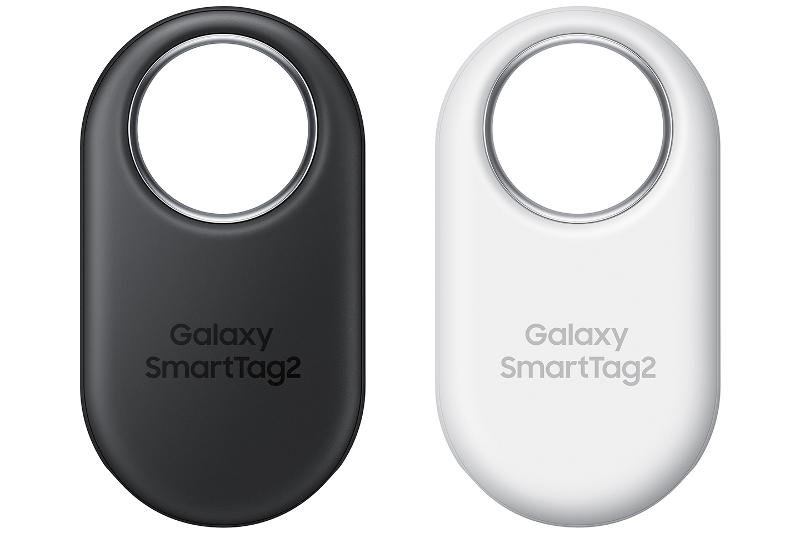
Why these two together. The AirTag and the SmartTag line are the two trackers for which phone-ecosystem lock-in is not a caveat buried in the fine print but the dominant design decision. An AirTag requires an iPhone to pair and own; a SmartTag requires a Samsung Galaxy phone to register. Both embed UWB for short-range precision finding — but only on the models that include that silicon, and only when used with a phone that also carries the matching UWB radio. A buyer who does not yet own the right phone is buying an expensive paperweight. That’s the honest engineering picture this volume presents.
What this volume covers. Section §3 recaps the AirTag’s specification (the teardown is Vol 5; the lifecycle is Vol 6 — this section is a compact spec table for head-to-head comparison). Section §4 introduces the three Samsung SmartTag generations and the arc from 2021’s BLE-only card-body form to the redesigned 2023 SmartTag2. Section §5 dives into the SmartTag hardware. Section §6 examines SmartThings Find — the Samsung-device crowdsourced network that backs the SmartTag. Sections §7–§9 are the head-to-head content: the master spec table, the feature matrix, the finding-experience comparison, and the UWB-capable phone guide. Section §10 covers anti-stalking provisions.
What this volume defers. The UWB theory (802.15.4z HRP, two-way ranging, angle-of-arrival, the Apple U1/U2) is Vol 3 — cross-referenced throughout, not re-derived here. The full AirTag operational lifecycle is Vol 6. The cross-platform network picture (who can locate which tag on which phone) is Vol 9. Tile, Chipolo, and Pebblebee — the cross-network trackers — are Vol 8; they appear here only as a one-line reference so the scope boundary is clear.
Spec-sourced. As of 2026-06-25 neither AirTags nor SmartTags are on the bench. Specification figures are from Apple’s published product pages, Samsung’s product pages and press materials, and published teardowns; battery-life claims are attributed to the vendor rather than asserted as bench-measured results.^[Apple, AirTag Technical Specifications — https://www.apple.com/airtag/specs/. Samsung, Galaxy SmartTag product page (EI-T5300) and Galaxy SmartTag2 product page (EI-T5600) — Samsung.com. Galaxy SmartTag+ (EI-T7300) specifications from Samsung’s 2021 launch materials. Prices listed are approximate at time of product launch and are subject to change; current retail pricing should be verified against Apple.com and Samsung.com.]
7.2 The Ecosystem-Native UWB Tracker Category
7.2.1 What “ecosystem-native” means
The item-tracker market divides along a fundamental axis: some trackers are cross-network (they work on any smartphone via a dedicated app — Tile being the archetype), and some are ecosystem-native (they are designed to live inside one phone-maker’s ecosystem and use that ecosystem’s infrastructure for finding). The AirTag and the Samsung SmartTag family are the two dominant ecosystem-native trackers; both are designed by the OS maker, both ship in their creator’s retail channel, and both register against that maker’s cloud account system.
The distinction matters for three practical reasons:
-
Registration lock. You must own the right kind of phone — and log into the right kind of cloud account — to register, pair, and own these trackers. This is not a software limitation that can be worked around; it is the design. An AirTag paired to an Apple ID cannot be moved to a Samsung account. A SmartTag registered on a Samsung account cannot be managed from an iPhone.
-
Finding network. Both trackers rely on the crowdsourced finding network that the ecosystem OS maker operates. The AirTag relies on Apple’s Find My network (~1 billion Apple devices; see §3.2 and Vol 2 §8.1). The SmartTag relies on Samsung’s SmartThings Find network (Samsung Galaxy devices; see §6). The size and density of these networks differ substantially and differ by region.
-
UWB — hardware and software pairing. The UWB-based precision homing feature on both trackers requires both the tracker and the owner’s phone to carry compatible UWB silicon. Not every phone in either ecosystem has UWB; the feature’s availability is therefore per-model, not per-ecosystem.
Cross-network trackers (Tile, Chipolo, Pebblebee) trade the ecosystem-tightness for broader phone compatibility and therefore smaller — but phone-model-agnostic — finding networks. That tradeoff is the subject of Vol 8; it is mentioned here only to anchor where the ecosystem-native devices sit on the spectrum.
7.2.2 UWB in the tracker context
Both the AirTag and the UWB-capable SmartTag models (SmartTag+ and SmartTag2, not the base SmartTag) use UWB as a short-range precision homing radio, layered on top of BLE for everything else. The theory — the 802.15.4z HRP PHY, channel 5 and 9 in the 6–8 GHz band, two-way time-of-flight ranging, and angle-of-arrival geometry — is Vol 3. What this volume adds is a comparative view: how the two manufacturers have implemented UWB homing at the product level, which hardware is required on each end, and how the user experiences differ in practice. See §8 for the SmartTag-specific UWB section and §8.3 for the head-to-head with AirTag Precision Finding.
The key architectural similarity: in both cases the phone, not the tracker, carries the expensive geometry silicon (multiple UWB antennas, AoA DSP). The tracker is the responder — it answers the phone’s UWB poll with a timestamped response, and the phone computes range and bearing. This means the per-tracker UWB cost is small (a single UWB antenna, a small UWB die), while the per-phone cost is the multi-antenna array. Both Apple (U1/U2) and the UWB silicon Samsung uses in its Galaxy phones implement this same split; see Vol 3 §5.2 and §4.1 for the AirTag’s U1 responder role.
7.2.3 Varieties in scope — and what this volume defers
This volume covers exactly two tracker families:
- Apple AirTag (§3 — recap of the device from Vol 5/Vol 6)
- Samsung Galaxy SmartTag family — three generations: SmartTag (2021), SmartTag+ (2021), SmartTag2 (2023)
Tile, Chipolo, and Pebblebee are Vol 8. Google Find My Device network tags are the Vol 9 network-map volume. Do not expect analysis of those trackers here beyond a one-line mention as context.
7.3 Apple AirTag — Specification Recap
This section is a compact spec table and ecosystem summary for head-to-head comparison purposes. The full teardown (nRF52832, Apple U1, NXP NT3H2111 NTAG I²C plus, CR2032 power budget, antenna topology) is Vol 5. The full operational lifecycle (pairing, Find My Items tab, Precision Finding, Lost Mode, sharing, battery replacement, Apple-ID binding) is Vol 6. Cross-reference those volumes for depth; the material here is the comparison-table extract.
7.3.1 Mechanical and electrical specification
Table 1 — 3.1 Mechanical and electrical specification
| Parameter | Apple AirTag | Source |
|---|---|---|
| Form factor | Disc / puck | — |
| Diameter | 31.9 mm | Apple product page^[Apple, AirTag Technical Specifications — https://www.apple.com/airtag/specs/. All AirTag dimensional, mass, IP, and radio specs in this table are from this page.] |
| Height (thickness) | 8.0 mm | Apple product page |
| Mass | 11 g | Apple product page |
| Ingress protection | IP67 (IEC 60529) — 1 m, ≤ 30 min | Apple product page |
| Battery | CR2032 coin cell, user-replaceable | Vol 5 §8.1 |
| Battery life (vendor-stated) | ~1 year (typical use) | Apple product page |
| BLE | Yes — Nordic nRF52832, BLE 5 | Vol 5 §4 |
| UWB | Yes — Apple U1 responder, 802.15.4z | Vol 3, Vol 5 §5 |
| NFC | Yes — NXP NT3H2111 NTAG I²C plus, ISO 14443-A Type-2 | Vol 4, Vol 5 §6 |
| Speaker | Yes — voice coil, 2 functions (locate chirp + anti-stalking) | Vol 5 §7 |
| Approximate retail price | ~$29 USD (single tag at launch) | Apple |
| Finding network | Apple Find My — crowdsourced, ~1B+ Apple devices | Vol 2 §8 |
| Registration requirement | iPhone, iOS 14.5+, Apple ID | Vol 6 §2.1 |
| UWB finding requirement | iPhone 11 or later (U1/U2 chip) | Vol 6 §6.3 |
| Apple-ID binding | One tag, one Apple ID, at a time | Vol 6 §10 |
The AirTag’s dominant differentiator in the ecosystem-native segment is network scale: ~1 billion Apple devices worldwide act as anonymous finders (Vol 2 §8.1), giving it unmatched urban coverage in markets where iPhones are prevalent. Its dominant constraint is the hard Apple-ecosystem lock — no Android ownership, no sharing across accounts not signed in to the same Apple ID (pre-iOS 17), and no recovery if the tag gets bound to a lost or locked account.
7.3.2 The Find My network and its scale
Apple’s Find My crowdsourced network is the largest offline-finding network by device count. As of 2024, Apple’s active iPhone install base is estimated to exceed 1 billion devices globally (Vol 2 §8.1), and every device running iOS 14.5+ contributes as an anonymous finder. The density in major markets (North America, Western Europe, Japan, South Korea, Australia) is extremely high — a separated AirTag in a typical urban environment may receive dozens of finds per hour from passing iPhones, each contributing an encrypted, owner-only-decryptable location report.
The network’s architecture and the rotating-key cryptography that makes it privacy-preserving for both the tag owner and the anonymous finders are covered in Vol 2 §5–§8. The cross-platform network density comparison (Apple vs SmartThings Find vs Google vs Tile) is the Vol 9 map. For this volume the comparison point is stated plainly in §6.3.
7.3.3 Ecosystem requirements and lock-in
The AirTag’s ecosystem requirements, condensed:
- To register/own: iPhone (not iPad, not Android, not Mac alone) running iOS 14.5+, signed into an Apple ID with two-factor authentication enabled, with Bluetooth and internet active at pairing time. One AirTag, one Apple ID, simultaneously.
- To use Precision Finding (UWB): iPhone 11 or later (the U1 or U2 UWB chip is required; no exception for other hardware — see Vol 6 §6.3 for the full per-model table).
- To share with family members: iOS 17+ on both owner and co-owners (up to 5 people — Vol 6 §8).
- Android role: Android devices contribute anonymously to the Find My network as finders but cannot register or own an AirTag, cannot use Find My to locate it, and cannot trigger Precision Finding. Vol 9 covers this in full.
The lock-in is hard and intentional. An AirTag purchased without an iPhone to pair it to is unusable until one is obtained. A tag previously owned by someone else and not explicitly released from their account cannot be adopted by a new owner — there is no hardware-level reset (Vol 6 §10).
7.4 The Samsung Galaxy SmartTag Family
7.4.1 Family overview and three-generation arc
Samsung has released three distinct SmartTag product generations since 2021. The family arc is a clear engineering trajectory: BLE-only baseline → UWB added (sacrificing little else) → complete redesign with better IP rating, dramatically longer battery life, and a new form factor. Understanding the three generations is essential because the model names are confusingly similar (“SmartTag” vs “SmartTag+” vs “SmartTag2”), the UWB availability splits the family, and the original SmartTag is still sold alongside the SmartTag2 in some markets.
   Samsung Galaxy SmartTag family — generation timeline
   ══════════════════════════════════════════════════════

   2021 Q1 launch               2021 Q1 launch            2023 Q3 launch
         │                            │                        │
         ▼                            ▼                        ▼
   ┌─────────────────┐    ┌─────────────────────┐   ┌─────────────────────┐
   │  Galaxy         │    │  Galaxy             │   │  Galaxy             │
   │  SmartTag       │    │  SmartTag+          │   │  SmartTag2          │
   │  EI-T5300       │    │  EI-T7300           │   │  EI-T5600           │
   │  ─────────────  │    │  ─────────────────  │   │  ─────────────────  │
   │  BLE only       │    │  BLE + UWB          │   │  BLE + UWB          │
   │  No IP rating   │    │  No IP rating       │   │  IP67 rated         │
   │  Card-body form │    │  Card-body form     │   │  Ring/loop form     │
   │  ~6 months bat. │    │  ~6 months bat.     │   │  ~500–700 days bat.*│
   │  CR2032         │    │  CR2032             │   │  CR2032             │
   │  ~$29.99 USD    │    │  ~$39.99 USD        │   │  ~$29.99 USD        │
   └─────────────────┘    └─────────────────────┘   └─────────────────────┘
          │                      │                          │
          │ Original card-body    │ UWB adds AR               │ Redesigned: ring/loop
          │ form factor           │ Compass homing;           │ form factor; IP67;
          │ (SmartThings Find     │ requires Galaxy           │ NFC Lost Mode;
          │ required)             │ UWB phone to use it       │ dramatically longer battery
   * Samsung vendor claim
The transition from “SmartTag” (2021) to “SmartTag2” (2023) also coincided with a renaming: what Samsung called “SmartTag” in 2021 uses a card-body form factor; the “SmartTag2” in 2023 uses a ring/loop body. Both carry a programmable button for SmartThings automations — the signature feature no AirTag equivalent exists. Samsung skipped the “SmartTag2+” name; the 2023 model is simply “SmartTag2,” and it has UWB built in across the line (there is no BLE-only SmartTag2 variant analogous to the 2021 BLE-only SmartTag).
7.4.2 Galaxy SmartTag (2021, EI-T5300) — the BLE-only baseline
The original Galaxy SmartTag launched alongside the Galaxy S21 in January 2021 as Samsung’s entry into the dedicated item-tracker market. Its defining characteristic — and its principal limitation compared to every other device in this volume — is that it has no UWB radio. It is a pure BLE tracker, relying on BLE proximity for close-range finding and on the SmartThings Find crowdsourced network for location when out of direct range.
Key specification:^[Samsung, Galaxy SmartTag (EI-T5300) product page — Samsung.com. All SmartTag 2021 specification data in this section are from Samsung’s published product page and launch press materials unless otherwise noted.]
Table 2 — 4.2 Galaxy SmartTag (2021, EI-T5300) — the BLE-only baseline
| Parameter | Galaxy SmartTag (EI-T5300) |
|---|---|
| Model number | EI-T5300 |
| Form factor | Card body with center hole (clip/keyring attachment) |
| Radio | BLE only — no UWB, no NFC |
| Battery | CR2032 coin cell, replaceable |
| Battery life (vendor-stated) | Approximately 6–7 months (Samsung product page) |
| IP rating | None stated (not IP-rated) |
| Button | Yes — single programmable button |
| Finding network | Samsung SmartThings Find |
| Registration requirement | Samsung account + Galaxy smartphone |
| UWB finding | Not available (no UWB silicon) |
| Approximate launch price | ~$29.99 USD (Samsung, 2021) |
The programmable button is the detail that distinguishes every SmartTag from the AirTag. The SmartTag’s button can be configured in the SmartThings app to trigger a SmartThings automation — for example, pressing the button once can turn off the lights in a room, arm a Samsung SmartThings-connected alarm, or trigger any other SmartThings scene. This makes the SmartTag a dual-function device: a tracker and a portable IoT remote. The AirTag has no button at all. See §5.5 for the full button-capability discussion.
The no-UWB limitation on this model means that close-range finding relies entirely on BLE RSSI — the SmartThings app shows a “signal strength” proximity indicator, not a directional arrow or accurate distance figure. This is functionally similar to the “Find Nearby” mode that pre-iPhone-11 iPhones offer for AirTags (Vol 6 §6.3), except that iPhone 11+ users have the UWB upgrade path; SmartTag users do not.
7.4.3 Galaxy SmartTag+ (2021, EI-T7300) — UWB introduced
The Galaxy SmartTag+ launched alongside the original SmartTag in January 2021 alongside the Galaxy S21 Ultra. It is physically similar to the base SmartTag in form factor — card body with a center hole — but adds a UWB radio, enabling Samsung’s AR Compass Finding feature when paired with a UWB-capable Galaxy phone. Note that Samsung’s first shipping UWB phone was the Galaxy Note 20 Ultra (August 2020), approximately five months before the S21 Ultra and SmartTag+ arrived; the S21 Ultra was the high-profile companion for the SmartTag+ launch, but it was not Samsung’s UWB debut.
Key specification:^[Samsung, Galaxy SmartTag+ (EI-T7300) product page — Samsung.com. All SmartTag+ specification data are from Samsung’s published product page and launch press materials.]
Table 3 — 4.3 Galaxy SmartTag+ (2021, EI-T7300) — UWB introduced
| Parameter | Galaxy SmartTag+ (EI-T7300) |
|---|---|
| Model number | EI-T7300 |
| Form factor | Card body with center hole (same as EI-T5300) |
| Radio | BLE + UWB |
| UWB-guided finding | AR Compass Finding (requires UWB Galaxy phone) |
| Battery | CR2032 coin cell, replaceable |
| Battery life (vendor-stated) | Approximately 6–8 months (Samsung product page) |
| IP rating | None stated (not IP-rated) |
| Button | Yes — single programmable button |
| Finding network | Samsung SmartThings Find |
| Registration requirement | Samsung account + Galaxy smartphone |
| UWB finding requirement | Galaxy phone with UWB (see §8.2) |
| Approximate launch price | ~$39.99 USD (Samsung, 2021) |
The SmartTag+ proved that Samsung could put UWB in a coin-cell tracker, but the compatible UWB Galaxy phone lineup was small — primarily the Note 20 Ultra (Samsung’s first UWB phone, 2020) and the S21 Ultra (January 2021, co-launched with the SmartTag+). The base Note 20 (non-Ultra) did not have UWB. Many SmartTag+ buyers owned a non-UWB Galaxy phone and therefore never experienced the AR Compass Finding feature they paid the premium for — the tag fell back to BLE-only proximity guidance, the same experience as the cheaper base SmartTag. The SmartTag2 (§4.4) resolved this by rolling UWB into the mass-market price point and coinciding with a much larger UWB Galaxy phone install base.
7.4.4 Galaxy SmartTag2 (2023, EI-T5600) — the current generation
The Galaxy SmartTag2 launched in 2023 and represents Samsung’s mature take on the category. It is not simply an incremental upgrade — it is a complete redesign on multiple axes simultaneously: form factor, waterproofing, battery life, and Lost Mode capability.
Key specification:^[Samsung, Galaxy SmartTag2 (EI-T5600) product page — Samsung.com. Battery life claims, IP rating, NFC capability, and dimensional data are from Samsung’s official product page. Battery life figures are stated as Samsung vendor claims; bench verification not available as of 2026-06-25.]
Table 4 — 4.4 Galaxy SmartTag2 (2023, EI-T5600) — the current generation
| Parameter | Galaxy SmartTag2 (EI-T5600) |
|---|---|
| Model number | EI-T5600 |
| Form factor | Ring / loop body (redesigned; integrated loop replaces the hole-and-keyring) |
| Radio | BLE + UWB |
| NFC | Yes — for Lost Mode contact path (see §9.2) |
| UWB-guided finding | AR Compass Finding (requires UWB Galaxy phone) |
| Battery | CR2032 coin cell, replaceable |
| Battery life (vendor-stated) | Up to ~500 days (normal mode) / ~700 days (Power Saving mode) — Samsung vendor claim |
| IP rating | IP67 (IEC 60529) |
| Button | Yes — single programmable button |
| Finding network | Samsung SmartThings Find |
| Registration requirement | Samsung account + Galaxy smartphone |
| UWB finding requirement | Galaxy phone with UWB (see §8.2) |
| Approximate launch price | ~$29.99 USD (Samsung, 2023) |
Battery life claim — read as vendor claim, not bench fact. Samsung’s stated figures for the SmartTag2 — up to approximately 500 days in normal mode and up to approximately 700 days in Power Saving mode — are extraordinary claims for a CR2032-powered device and must be treated as Samsung’s vendor-stated maximums under favorable conditions. Real-world battery life depends on beacon interval, network participation, button presses, temperature, and individual cell capacity. These numbers have not been independently bench-verified as of this writing. The departure from the 6–8 month lifetime of the 2021 models suggests a significant reduction in average current draw through beacon-interval tuning and radio-on-time optimization — plausible on a CR2032 (~225 mAh; see Vol 5 §8.2 for the AirTag’s comparable analysis) but the specific claim should be accepted provisionally until third-party verification. For comparison: Apple’s AirTag achieves ~1 year (~10–15 µA average) through aggressive BLE duty cycling (Vol 5 §8.2). Reaching 700 days (~21 months) on the same cell class at Samsung’s stated figures would imply a mean current well under 15 µA — demanding but not physically impossible with aggressive firmware tuning.
The IP67 rating is the most practically significant addition from an engineering standpoint. Neither 2021 SmartTag model was rated for water immersion; the SmartTag2 survives 1 m of fresh water for up to 30 minutes (the same IEC 60529 IP67 definition as the AirTag). This matters for everyday key-ring use (rain, laundry, puddles) and makes the SmartTag2 competitive with the AirTag on ruggedization.
The NFC Lost Mode feature (§9.2) is the other major addition: a finder who picks up a separated SmartTag2 can now tap it with any NFC phone and receive owner-contact information, mirroring the functionality Apple has offered since the AirTag’s 2021 launch.
7.5 SmartTag Hardware Deep-Dive
7.5.1 Form factor and mechanical packaging
The three generations split into two physical form factors:
   SmartTag form-factor comparison (not to scale)
   ════════════════════════════════════════════════

   SmartTag (2021)                SmartTag+ (2021)            SmartTag2 (2023)
   EI-T5300                       EI-T7300                    EI-T5600

   ┌──────────────────┐           ┌──────────────────┐         ┌────────────────────────┐
   │ ┌──────────────┐ │           │ ┌──────────────┐ │         │                        │
   │ │              │ │           │ │              │ │         │  ┌──────────────────┐  │
   │ │   ○          │ │           │ │   ○          │ │         │  │                  │  │
   │ │  (hole)      │ │           │ │  (hole)      │ │         │  │  BODY + BUTTON   │  │
   │ │              │ │           │ │              │ │         │  │                  │  │
   │ │ [button]     │ │           │ │ [button]     │ │         │  └──────────────────┘  │
   │ └──────────────┘ │           │ └──────────────┘ │         │          │             │
   │   card body      │           │   card body      │         │         ┌┴┐            │
   └──────────────────┘           └──────────────────┘         │    RING/LOOP           │
                                                               │   (integrated)         │
   no keyring hardware             no keyring hardware         └────────────────────────┘
   needed: use center hole         needed: use center hole      loop IS the attachment
   with a split ring or            with a split ring or         mechanism; no separate
   silicone holder                 silicone holder              hardware needed
The ring/loop redesign on the SmartTag2 is a meaningful ergonomic improvement. The center-hole design on the 2021 models requires a split ring or a silicone case to attach to a keychain, which adds bulk and can snag. The integrated loop on the SmartTag2 clips directly onto a keyring without accessories. The downside is that the ring body is slightly more visible on a keychain than the card body’s flatter profile.
Samsung’s published approximate dimensions:^[Samsung Galaxy SmartTag2 product page: dimensions approximately 29 mm × 42 mm × 9 mm, mass approximately 13.6 g. SmartTag (2021) dimensions approximately 53.5 mm × 29 mm × 7.9 mm, mass approximately 15.1 g. SmartTag+ (2021) similar to SmartTag. Exact dimensions should be confirmed against the current Samsung product page as packaging specs may vary by market. These values are from Samsung’s listed specifications at launch.]
Table 5 — 5.1 Form factor and mechanical packaging
| Dimension | SmartTag (EI-T5300) | SmartTag+ (EI-T7300) | SmartTag2 (EI-T5600) | AirTag (Apple) |
|---|---|---|---|---|
| Approx. L × W (or diameter) | ~53.5 × 29 mm | ~53.5 × 29 mm | ~29 × 42 mm | 31.9 mm Ø |
| Approx. thickness | ~7.9 mm | ~7.9 mm | ~9 mm | 8.0 mm |
| Approx. mass | ~15.1 g | ~15.1 g | ~13.6 g | 11 g |
| Form | Card body + center hole | Card body + center hole | Ring body + integrated loop | Disc / puck |
| IP rating | None | None | IP67 | IP67 |
The AirTag is the smallest and lightest device in this comparison. The SmartTag2’s ring body is closer in profile to the AirTag than the 2021 card-body models.
7.5.2 BLE radio and SmartThings beacon behavior
All three SmartTag generations use Bluetooth LE for their primary offline-finding broadcast. The BLE advertisement carries a Samsung-specific service payload that the SmartThings Find crowdsourced network recognizes — in the same structural role that the FF 4C 00 12 … Find My service data (Vol 2 §2.3) plays for AirTags.
The SmartTag’s BLE beacon is not publicly documented at the protocol level the way Apple’s Find My advertisement is (the TU Darmstadt reverse-engineering that produced the Vol 2 §2–§4 theory does not extend to the Samsung format). What is documented is the functional behavior: when a SmartTag is out of its owner’s Bluetooth range and in SmartThings Find coverage, nearby Samsung Galaxy devices (running SmartThings Find in the background) detect the BLE beacon, report an encrypted location record to Samsung’s servers, and the owner can query the location through the SmartThings app on their Galaxy phone.
The rotation behavior of the SmartTag’s BLE address — whether and how frequently the Bluetooth address and payload rotate for privacy — is not publicly documented by Samsung to the same degree Apple’s key-rotation system is. The functional privacy architecture is that the finding reports go to Samsung’s servers and are accessible only to the account owner, but the cryptographic specifics are not publicly specified by Samsung.
7.5.3 UWB on the SmartTag+ and SmartTag2
UWB is only on the SmartTag+ (EI-T7300) and SmartTag2 (EI-T5600). The base SmartTag (EI-T5300, 2021) has no UWB radio. This distinction matters because all three models look superficially similar and carry the same “SmartTag” brand name. A buyer who wants AR Compass Finding must specifically choose the SmartTag+ or SmartTag2, and additionally must own a UWB-equipped Galaxy phone to actually use that feature (see §8.2). Purchasing a SmartTag+ or SmartTag2 with a non-UWB Galaxy phone results in BLE-proximity-only finding — the same experience as the cheaper base SmartTag.
The UWB silicon used in Samsung’s trackers is not publicly identified at the silicon level in the same manner the AirTag’s U1 has been (the AirTag teardown by iFixit named the U1 die; no comparable teardown detail is widely published for the SmartTag+ or SmartTag2 UWB front-end). Functionally, the system behaves similarly to Apple’s: the tag is a UWB responder, and the Galaxy phone’s UWB radio (the Qorvo / NXP-class UWB front-end found in the Galaxy S21 Ultra and later UWB Galaxy phones) is the interrogator and geometry engine. Range, signal flow, and the 802.15.4z HRP PHY are common ground with Vol 3 — the implementation differences are in the application layer (Samsung’s AR Compass Finding UI vs Apple’s Precision Finding UI) rather than in the air interface. See §8 for the side-by-side usage comparison.
7.5.4 Battery architecture and life expectations
All three SmartTag generations use a CR2032 coin cell (3 V, ~225 mAh, user-replaceable), the same cell class as the AirTag (Vol 5 §8.1). The dramatic battery-life difference between the 2021 models (~6–8 months) and the SmartTag2 (Samsung claims up to ~500–700 days) implies a very different power management architecture — likely a much lower BLE beacon duty cycle in the SmartTag2’s default operating modes.
   SmartTag family battery-life comparison (CR2032 baseline)
   ══════════════════════════════════════════════════════════

   AirTag (Apple)
     ████████████████████████  ~1 year (Apple-stated)    ← bench-validated by
     Apple's own power budget analysis (Vol 5 §8.2)          third parties

   SmartTag (2021, EI-T5300)
     █████████████           ~6–7 months (Samsung-stated)

   SmartTag+ (2021, EI-T7300)
     ██████████████          ~6–8 months (Samsung-stated)

   SmartTag2 (2023, EI-T5600)
     ███████████████████████████████████████████████████████  ~500 days / Normal (Samsung vendor claim)
     ██████████████████████████████████████████████████████████████████████████████████  ~700 days / Power Saving (Samsung vendor claim)

   ← All bars: CR2032 (225 mAh nominal). All Samsung SmartTag2 figures are vendor claims.
The plausibility envelope for the SmartTag2 claim: a 225 mAh cell lasting 700 days (16,800 hours) implies an average current draw of ~13.4 µA — consistent with the AirTag’s ~10–18 µA range (Vol 5 §8.2), and therefore physically plausible if Samsung has optimized the beacon interval and power management comparably. The claim is extraordinary relative to the 2021 models but is in the right order of magnitude for an aggressively duty-cycled BLE beacon on a CR2032. State as vendor claim; a bench-measured current budget would confirm.
Battery replacement on the SmartTag family: the CR2032 is accessible by pressing a small release on the tag body and sliding out the battery tray (the exact mechanism varies by model — confirm on the specific unit). The cell inserts positive (+) side up (same orientation as the AirTag). The bitterant-coating issue documented for the AirTag (Vol 5 §8.3, Vol 6 §9.3) applies to any CR2032-powered device that uses spring contacts with a small contact area — a thick bitterant coating on the + terminal can prevent reliable contact. Use a Panasonic, Maxell, or Sony CR2032 if contact issues arise.
7.5.5 The programmable button — SmartTag’s unique capability
Every SmartTag generation carries a programmable hardware button on the tag body. This is the single most significant capability differentiator between the SmartTag family and the AirTag — and it is consequential enough to warrant its own section.
The AirTag has no button. There is no user-accessible button, switch, or input on an AirTag. The only user-initiated physical interaction is twisting the stainless cover to replace the CR2032 battery. All AirTag control happens through the Find My app on an iPhone. The SmartTag’s programmable button is therefore not a marginal feature — it is a capability class the AirTag categorically lacks.
What the button does. Through the SmartThings app, the button can be configured to:
Table 6 — What the button does. Through the SmartThings app, the button can be configured to
| Button action | Example SmartThings automation |
|---|---|
| Single press | Turn off all smart lights in a room |
| Double press | Run a specific SmartThings scene (“Movie mode” — dim lights, lower blinds, turn on TV) |
| Long press | Arm or disarm a SmartThings-connected security system |
| Single press | ”Find my phone” — ring the paired Galaxy phone even if it is on silent |
| Double press | Lock a compatible Samsung smart lock |
| Any press | Trigger any arbitrary SmartThings automation |
The SmartThings automation platform connects to a large ecosystem of third-party smart-home devices (Philips Hue, LIFX, Arlo, Ring, Nest via Matter/Thread integration, and hundreds of others via SmartThings-compatible hubs). The button therefore integrates the SmartTag into a home-automation workflow that the AirTag simply has no equivalent for.
The “find my phone” use case deserves special mention. Every SmartTag user can configure a button press to ring their paired Galaxy phone — the reverse of the normal tracker workflow. For someone who frequently misplaces their phone (not their keys), the SmartTag on the keychain becomes the phone finder, not the key finder. The AirTag offers no reverse-finding because it has no button.
The constraint: the button automations require the SmartThings app and a Samsung account. Without a Galaxy phone and SmartThings, the button does nothing beyond being a physical artifact on the tag. An Android user (non-Samsung) or an iPhone user who received a SmartTag as a gift cannot configure the button.
7.6 SmartThings Find — The Samsung Crowdsourced Network
7.6.1 Architecture: how SmartThings Find works
SmartThings Find is Samsung’s answer to Apple’s Find My crowdsourced network. The architecture is parallel in design:
   SmartThings Find crowdsourced location architecture
   ═════════════════════════════════════════════════════

   ┌──────────────────────────────────────────────────────────────────┐
   │  SEPARATED SMARTTAG                                              │
   │  • BLE advertising at duty-cycled intervals                      │
   │  • Samsung-format beacon payload                                  │
   └────────────────────────────────┬─────────────────────────────────┘
                                    │ BLE advertisement (~tens of meters)
                                    ▼
   ┌──────────────────────────────────────────────────────────────────┐
   │  ANONYMOUS GALAXY FINDER DEVICE                                  │
   │  (Samsung Galaxy phone with SmartThings Find enabled)            │
   │  • detects the SmartTag BLE beacon in the background             │
   │  • records its own GPS position at that moment                   │
   │  • encrypts the observation (owner-only decryptable)             │
   │  • uploads encrypted report to Samsung servers                   │
   └────────────────────────────────┬─────────────────────────────────┘
                                    │ HTTPS (encrypted report)
                                    ▼
   ┌──────────────────────────────────────────────────────────────────┐
   │  SAMSUNG SERVERS (SmartThings cloud)                             │
   │  • stores encrypted location reports indexed to the tag          │
   │  • associates reports with the tag's Samsung account registration│
   └────────────────────────────────┬─────────────────────────────────┘
                                    │ Owner query (Samsung account auth)
                                    ▼
   ┌──────────────────────────────────────────────────────────────────┐
   │  OWNER'S GALAXY PHONE — SmartThings app                         │
   │  • queries Samsung servers for reports for the owner's tags      │
   │  • decrypts reports (owner holds the decryption key)             │
   │  • displays last-known location on the SmartThings map           │
   └──────────────────────────────────────────────────────────────────┘
This structure is functionally identical to Find My’s architecture (Vol 2 §5–§6) with one substitution at every node: Apple devices → Samsung Galaxy devices; Apple ID → Samsung account; iCloud → Samsung cloud; Find My app → SmartThings app. The end-to-end privacy guarantee is analogous: anonymous finders never know what tag they found or who owns it; the owner never knows who the anonymous finder was; Samsung servers hold only encrypted ciphertext that neither Samsung nor the anonymous finder can decrypt without the owner’s keys.
7.6.2 Registration requirements — the Galaxy lock
SmartTags require a Samsung account and a Galaxy smartphone. There is no path to register, pair, or use a SmartTag without both a Samsung account and a Samsung Galaxy phone running the SmartThings app. This is the SmartTag’s version of the AirTag’s iPhone requirement — and it is equally hard.
- An iPhone user cannot register or use a SmartTag.
- An Android user with a non-Samsung phone (Pixel, OnePlus, etc.) cannot register a SmartTag.
- A Samsung Galaxy tablet (without a Galaxy phone as the primary device) may have limited functionality — the SmartThings app runs on Galaxy tablets but tag registration is documented as requiring a Galaxy phone.
- The SmartTag’s button automations require the SmartThings app on the Galaxy phone.
If the user is not in the Samsung Galaxy ecosystem, the SmartTag is the wrong product. Vol 8 covers the cross-network trackers (Tile, Chipolo) that work with any phone via a dedicated app.
The registration flow for a SmartTag:
   SmartTag registration flow
   ══════════════════════════

   [New SmartTag: install CR2032; hold button until LED blinks — tag enters pairing mode]
              │
              ▼
   Open SmartThings app on Galaxy phone
   → "Find" tab → "+" (add device)
   → Select "Galaxy SmartTag" from device type list
              │
              ▼
   SmartThings scans BLE for a SmartTag in pairing mode
   → Connect sheet appears when tag is found
   → Tap "Connect"
              │
              ▼
   Name the tag (user-defined label: "Keys," "Bag," custom text)
   → Registration writes the tag to the Samsung account
   → Tag appears in SmartThings Find "Find" tab
              │
              ▼
   Tag is now active.
   Owner can see last-known location, ring the tag (BLE range),
   use AR Compass Finding (if phone and tag both have UWB).
The Samsung-account binding is analogous to Apple-ID binding: once a SmartTag is registered to a Samsung account, it cannot be paired to a different account without first removing it from the original account. Samsung does not publish whether the binding mechanism prevents hardware-level reset the way the AirTag’s Apple-ID lock does (Vol 6 §10.1), but the functional effect is the same: a second-hand SmartTag that the original owner did not release is effectively inoperable for the new user.
7.6.3 Network scale and regional density vs Find My
This is the honest comparison the engineering reader needs. The SmartThings Find network and the Apple Find My network differ substantially in scale, and that difference directly determines how quickly a separated tag will receive a location fix.
Table 7 — 6.3 Network scale and regional density vs Find My
| Network metric | Apple Find My | Samsung SmartThings Find |
|---|---|---|
| Participating device pool | ~1 billion+ Apple devices (all iOS 14.5+ iPhone / iPad / Mac / iPod touch) | Samsung Galaxy smartphones with SmartThings app enabled (estimated tens to low hundreds of millions globally as of 2024) |
| Geographic density (highest) | North America, Western Europe, Japan, Australia (very high iPhone market share) | South Korea, select Southeast Asian markets (Samsung-dominant regions), and regions where Samsung has strong Galaxy share |
| Geographic density (lowest) | Developing markets with lower Apple penetration | North America, Western Europe (lower Samsung Galaxy share relative to Apple) |
| Network opt-in | Automatic for iOS 14.5+ devices (opt-out is possible but rare) | SmartThings app must be installed and Find participation enabled — not on by default for all Galaxy phones |
| Device types as finders | iPhone, iPad, iPod touch, Mac | Samsung Galaxy smartphones (primarily) |
| Relative density in a major US city | Extremely high — most iPhone owners participate | Moderate — significant Galaxy user base but smaller than iOS |
| Relative density in Seoul, South Korea | High — large iPhone presence + dense coverage | Very high — Samsung-dominant market, SmartThings Find has strong penetration |
The practical implication: an AirTag lost in New York, London, or Tokyo will likely receive a location fix within minutes because every iPhone in the vicinity participates. A SmartTag lost in the same city will receive fixes only from the subset of those passers-by who own Samsung Galaxy phones with SmartThings Find enabled — a meaningfully smaller pool.
Conversely, in Samsung-dominant markets (South Korea being the extreme case), the SmartThings Find network is dense and the SmartTag’s network disadvantage relative to Find My may be modest or even reversed. The network-density comparison is regional, not absolute.
The engineering-honest summary: for a user in North America or Western Europe, the AirTag’s Find My network provides significantly better crowdsourced find coverage in most scenarios. For a user in a Samsung-dominant market, the gap narrows or reverses. The choice of tracker should incorporate the regional network picture, not just the device price and spec table. Vol 9 maps the per-region cross-network density picture in full.
7.7 Head-to-Head: AirTag vs the SmartTag Family
7.7.1 Master specification comparison table
This is the primary reference table for the volume — four products, every material specification.
Table 8 — 7.1 Master specification comparison table
| Specification | Apple AirTag | Galaxy SmartTag (EI-T5300) | Galaxy SmartTag+ (EI-T7300) | Galaxy SmartTag2 (EI-T5600) |
|---|---|---|---|---|
| Year launched | 2021 | 2021 | 2021 | 2023 |
| Approx. price (launch) | ~$29 USD | ~$29.99 USD | ~$39.99 USD | ~$29.99 USD |
| Form factor | Disc / puck | Card + center hole | Card + center hole | Ring / loop body |
| Approx. size | 31.9 mm Ø × 8 mm | ~53.5 × 29 × 7.9 mm | ~53.5 × 29 × 7.9 mm | ~29 × 42 × 9 mm |
| Approx. mass | 11 g | ~15.1 g | ~15.1 g | ~13.6 g |
| IP rating | IP67 | None stated | None stated | IP67 |
| Battery | CR2032 | CR2032 | CR2032 | CR2032 |
| Battery life (vendor-stated) | ~1 year | ~6–7 months | ~6–8 months | ~500 days (Normal) / ~700 days (PS)* |
| BLE | Yes | Yes | Yes | Yes |
| UWB | Yes (Apple U1) | No | Yes | Yes |
| NFC | Yes (Type 2 / 14443-A) | No | No | Yes |
| Speaker | Yes (voice coil) | Yes (built-in) | Yes (built-in) | Yes (built-in) |
| Programmable button | No | Yes | Yes | Yes |
| Finding network | Apple Find My | SmartThings Find | SmartThings Find | SmartThings Find |
| Network size | ~1B+ devices | Galaxy install base | Galaxy install base | Galaxy install base |
| Registration requirement | iPhone + Apple ID | Galaxy phone + Samsung account | Galaxy phone + Samsung account | Galaxy phone + Samsung account |
| UWB finding requirement | iPhone 11+ (U1/U2) | N/A — no UWB | Galaxy phone with UWB | Galaxy phone with UWB |
| UWB precision homing name | Precision Finding | N/A | AR Compass Finding | AR Compass Finding |
| Lost Mode / NFC contact path | Yes (found.apple.com) | No | No | Yes (Samsung analog) |
| Anti-stalking alert | Yes (iOS + Android DULT) | Yes (Galaxy SmartThings) | Yes (Galaxy SmartThings) | Yes (Galaxy SmartThings) |
*Samsung vendor claim; not bench-verified.
7.7.2 Finding experience comparison
How the actual end-user finding experience compares when trying to locate a separated tag.
Table 9 — 7.2 Finding experience comparison
| Finding mode | Apple AirTag | SmartTag (BLE-only) | SmartTag+ / SmartTag2 (UWB) |
|---|---|---|---|
| Long-range (tag not in BLE range) | Find My map: last-known location from crowdsourced network reports | SmartThings map: last-known location from crowdsourced network reports | SmartThings map: last-known location |
| Medium-range (within BLE range, ~10–30 m) | Play Sound: command tag to chirp. BLE proximity indicator. | Play Sound: command tag to chirp. BLE proximity indicator (signal bars). | Play Sound + AR Compass Finding (UWB; Galaxy UWB phone required) |
| Short-range homing (tag nearby, ~0–10 m) | Precision Finding: UWB directional arrow + distance (cm accuracy) + haptic escalation + “Here” confirmation. iPhone 11+ only. | BLE signal-strength proximity only — no directional arrow, no distance readout | AR Compass Finding: UWB directional arrow + distance + on-screen compass heading. Galaxy UWB phone only. |
| Sound command | Owner can trigger speaker from app (BLE range); speaker also sounds on anti-stalking / alert trigger | Owner can trigger speaker from app (BLE range) | Owner can trigger speaker from app (BLE range) |
| Directional arrow in homing mode | Yes (Precision Finding, iPhone 11+) | No | Yes (AR Compass Finding, Galaxy UWB phones) |
| Distance readout in homing mode | Yes (Precision Finding, iPhone 11+) | No (BLE signal strength only) | Yes (AR Compass Finding, Galaxy UWB phones) |
| Haptic feedback during homing | Yes — escalates as distance decreases; “Here” haptic | No | Yes — escalates with proximity (Samsung’s implementation) |
| Maximum practical homing range | ~10–30 m (UWB), falls to BLE proximity beyond | ~10–30 m (BLE signal, imprecise) | ~10–30 m (UWB), falls to BLE beyond |
The finding experience is effectively equivalent at the technology level between the AirTag’s Precision Finding and the SmartTag+/SmartTag2’s AR Compass Finding — both are 802.15.4z UWB two-way ranging with angle-of-arrival in the phone. The practical differences are in the phone requirements and the UI. See §8.3 for the side-by-side deep dive.
7.7.3 Feature matrix
A full capability matrix across the four devices, using a simple Y/N/Partial convention:
Table 10 — A full capability matrix across the four devices, using a simple Y/N/Partial convention
| Capability | AirTag | SmartTag | SmartTag+ | SmartTag2 |
|---|---|---|---|---|
| Crowdsourced BLE finding network | Y | Y | Y | Y |
| UWB precision homing | Y (iPhone 11+) | N | Y (Galaxy UWB) | Y (Galaxy UWB) |
| NFC Lost Mode / contact path | Y | N | N | Y |
| Speaker for owner-triggered locate | Y | Y | Y | Y |
| Anti-stalking sound (separated-state alert) | Y | Y | Y | Y |
| IP67 water resistance | Y | N | N | Y |
| Programmable hardware button | N | Y | Y | Y |
| IoT / smart-home button trigger | N | Y (SmartThings) | Y (SmartThings) | Y (SmartThings) |
| Reverse-find (ring the phone from the tag) | N | Y (button) | Y (button) | Y (button) |
| Multi-account sharing | Y (iOS 17+, up to 5) | Limited (SmartThings) | Limited (SmartThings) | Y (SmartThings sharing) |
| User-replaceable CR2032 | Y | Y | Y | Y |
| Works with iPhone (owner) | Y | N | N | N |
| Works with Android, non-Samsung (owner) | N | N | N | N |
| Works with Samsung Galaxy (owner) | N | Y | Y | Y |
| Android detection (as potential victim) | Y (native alerts, AirGuard) | Y (SmartThings-based alerts) | Y | Y |
7.7.4 The ecosystem-choice decision
The choice between an AirTag and a SmartTag family device is first and foremost a phone-ecosystem choice. The decision tree:
   "Which ecosystem-native tracker should I buy?"
   ═══════════════════════════════════════════════

   Do you own an iPhone (iOS 14.5+)?
               │
      ┌────────┴──────────────────────────────────────┐
      │ Yes                                           │ No
      ▼                                               ▼
   AirTag is the correct choice.          Do you own a Samsung Galaxy phone?
   Largest finding network in most               │
   regions. UWB (Precision Finding)     ┌────────┴──────────────────┐
   with iPhone 11+.                     │ Yes                       │ No
                                        ▼                           ▼
                             SmartTag family.             Neither ecosystem-native
                             Choose the right             tracker fits your setup.
                             model:                       → See Vol 8 for Tile and
                                  │                         Chipolo (work with any
                                  ▼                         phone via dedicated app).
                      Do you need UWB homing
                      AND own a UWB Galaxy phone?
                               │
                     ┌─────────┴────────────┐
                     │ Yes                  │ No
                     ▼                      ▼
              SmartTag+ (2021)      SmartTag (2021):
              or SmartTag2 (2023).  BLE only.
                     │
                     ▼
             SmartTag2 strongly preferred
             over SmartTag+ for new purchase:
             IP67 + much longer battery life
             + NFC Lost Mode + same price.
             SmartTag+ is only relevant if
             you find it on clearance and
             accept its older form factor.
The secondary choice dimensions within the SmartTag family:
- SmartTag2 over SmartTag+ for new purchases: the SmartTag2 adds IP67, dramatically longer battery life (vendor-claimed), NFC Lost Mode, and a better form factor, at roughly the same price point as the SmartTag+ was at launch. The SmartTag+ is the older generation and should be purchased only as a cost-conscious clearance buy with the understanding of its limitations.
- SmartTag vs SmartTag2: if UWB homing matters (and you have a compatible Galaxy phone), the SmartTag2 is the choice. If all you need is BLE tracking and the SmartThings button feature, the base SmartTag is adequate and may be found at a lower price.
- Button matters to you: the programmable button is the same across all SmartTag generations. If IoT-automation integration is a priority, any SmartTag beats the AirTag on this dimension regardless of generation.
7.8 UWB on the SmartTag+ and SmartTag2 — Practical Notes
7.8.1 AR Compass Finding — the UWB-guided homing mode
Samsung’s UWB-based homing feature is called AR Compass Finding (the name has varied slightly across SmartThings app releases — it has also appeared as “Compass” or “Find Nearby” in different UI versions; the underlying technology is UWB directional ranging^[Samsung, SmartThings app documentation and Galaxy SmartTag+ product page: the AR Compass Finding / Compass feature uses UWB ranging between the tag and a compatible Galaxy phone to provide directional guidance in the SmartThings app, branded as “AR” because the directional indication is displayed with the camera view as an overlay in some implementations. UI label wording subject to app version changes.]). The functional elements are similar to Apple’s Precision Finding (Vol 6 §6.2):
- Directional arrow or compass indicator: the SmartThings app opens a UWB-guided homing screen that indicates the direction toward the tag. In AR mode this may be overlaid on the camera feed; in non-AR mode it may be a compass-style heading indicator.
- Distance readout: a numeric distance estimate, updated at UWB cadence.
- Proximity audio / haptic: escalating audio or haptic feedback as the tag is approached.
- Sound button: accessible from the homing screen to trigger the tag’s speaker.
The SmartThings implementation does not always include the “Here” point-confirmation (the AirTag Precision Finding’s “Here” label and strong haptic when within arm’s reach) in the same form; this depends on the SmartThings app version. The camera AR overlay — pointing the phone’s camera at the environment and seeing a directional arrow overlaid on the live view — is a Samsung-specific UI choice not present in Apple’s implementation, which uses a conventional on-screen arrow without camera AR.
7.8.2 Compatible Galaxy phones for UWB Compass Finding
UWB Compass Finding requires a Samsung Galaxy phone with a UWB radio. Not every Galaxy model has UWB. The following table lists the primary UWB-capable Galaxy models as of this writing; it is not exhaustive — verify against Samsung’s current compatibility page, as UWB phone coverage has expanded with each generation.^[Samsung’s SmartTag+ and SmartTag2 product pages list compatible phones for the AR Compass Finding feature. UWB chip availability and SmartThings Find UWB compatibility by model should be verified against Samsung’s current documentation, as the list grows with each Galaxy generation and may not be accurate at the time of reading. Models listed here are those documented as UWB-capable at or before publication date.]
Table 11 — 8.2 Compatible Galaxy phones for UWB Compass Finding
| Galaxy model | UWB chip | AR Compass Finding (SmartTag+ / SmartTag2) | Notes |
|---|---|---|---|
| Galaxy S21 Ultra | Yes | Yes | First widely-available Galaxy with UWB; launched with SmartTag+ |
| Galaxy S22 Ultra | Yes | Yes | — |
| Galaxy S23 Ultra | Yes | Yes | — |
| Galaxy S24 series (S24, S24+, S24 Ultra) | Yes | Yes | Launched with improved UWB support |
| Galaxy Z Fold 3 / 4 / 5 | Yes | Yes | Fold series includes UWB |
| Galaxy Z Flip 4 / 5 | Varies by market | Partial (market-dependent) | Some regional variants lack UWB |
| Galaxy S20 (all) | No | No | Pre-UWB Galaxy S series |
| Galaxy S21 / S21+ (non-Ultra) | No | No | UWB only in the Ultra variant at S21 gen |
| Galaxy S22 / S22+ | No | No | UWB only in the Ultra for this generation |
| Galaxy A series (all current) | No | No | No Galaxy A model has UWB as of 2024 |
| Non-Samsung Android (any) | N/A | No | Cannot register SmartTag at all |
| iPhone (any) | N/A | No | Cannot register SmartTag at all |
The critical practical point: UWB on Galaxy phones has been concentrated in Ultra-tier flagship models through the S23 generation. The S24 generation expanded UWB more broadly, but the Galaxy A series (Samsung’s volume-segment phones) has not received UWB. A large fraction of Galaxy users own A-series phones and would receive BLE-proximity-only finding from a SmartTag+ or SmartTag2 — the same experience as the base SmartTag, despite paying for a device with UWB hardware.
7.8.3 Comparison with AirTag Precision Finding
The UWB homing feature on the SmartTag+ / SmartTag2 (AR Compass Finding) and the AirTag (Precision Finding) share the same physics but differ in implementation scope, hardware prerequisites, and UI.
Table 12 — 8.3 Comparison with AirTag Precision Finding
| Comparison axis | AirTag Precision Finding | SmartTag+/SmartTag2 AR Compass Finding |
|---|---|---|
| Underlying technology | UWB (802.15.4z HRP, Apple U1/U2) — Vol 3 | UWB (802.15.4z HRP, Samsung/third-party UWB) |
| Phone hardware required | iPhone 11 or later (U1 or U2 chip) | Galaxy phone with UWB (Ultra-tier, see §8.2) |
| Directional arrow | Yes | Yes |
| Distance readout | Yes | Yes |
| Haptic feedback | Yes — escalates to strong “Here” haptic | Yes — escalates with proximity |
| ”Here” point confirmation | Yes — label + strong haptic at ~0.5–1 m | Varies by app version |
| Camera AR overlay | No — dedicated arrow UI | Yes — optional AR camera-overlay mode |
| Sound accessible from homing screen | Yes | Yes |
| BLE handshake required to enter UWB mode | Yes — UWB initiates after BLE contact | Yes — similar architecture |
| UWB band (Vol 3 §2) | Ch 5 and/or Ch 9 (6.5–8 GHz) | Ch 5 and/or Ch 9 (same 802.15.4z PHY) |
| Maximum useful range | ~10–30 m open air | ~10–30 m open air (similar physics) |
| Wall / obstruction performance | UWB attenuates; multipath degrades angle | Same physics, same limitations |
| Fraction of ecosystem’s phones with UWB | High — every iPhone 11+ (released since 2019; majority of active iPhones) | Moderate — Ultra-tier Galaxies primarily; expands with S24+ gen |
The key asymmetry is phone-hardware availability. Apple put UWB in the iPhone 11 (2019) and every subsequent model, including mid-range iPhones. As of 2024, the majority of active iPhones in use are iPhone 11 or later, meaning Precision Finding is available to most AirTag owners. Samsung’s UWB phones are concentrated in Ultra-tier flagships through the S23 generation; the S24 generation broadened this somewhat, but the Galaxy A series (a large share of Samsung’s unit volume) still lacks UWB. An AirTag owner is more likely to actually use UWB homing than a SmartTag+ / SmartTag2 owner, not because of any difference in the trackers themselves, but because the phone prerequisite is more widely met on the Apple side.
7.9 Lost Mode and NFC Contact Paths
7.9.1 AirTag Lost Mode — found.apple.com recap
The AirTag’s Lost Mode and NFC contact path are covered in depth in Vol 4 §3 (the NFC mechanics — the NXP NT3H2111 I²C-writable NTAG, the found.apple.com URI, the NDEF format) and Vol 6 §7 (the operational walkthrough — enabling, the finder’s experience, owner notification, disabling). This section is the compact comparison-table extract.
When a good Samaritan finds an AirTag with Lost Mode active and NFC-taps it with any NFC phone (iPhone or Android), the NFC interaction redirects the finder’s browser to found.apple.com, a server that knows the tag’s Lost Mode state and the owner’s chosen contact information. The contact is stored in Apple’s servers, not on the tag — the tag carries only the URL and the serial number in its NDEF record. The result: the finder sees the owner’s phone number or email (possibly partially masked) and a custom message, enabling direct contact without the AirTag owner’s information being publicly accessible without Lost Mode activation.
The Lost Mode NFC path requires iOS 14.5+ on the AirTag owner’s device to enable Lost Mode. Any NFC phone can read the lost-item NDEF on the found tag (no app required on the finder’s side — it is a standard NFC Type-2 browser redirect). The interaction works even when the AirTag’s CR2032 is dead, because the NXP NTAG is RF-powered by the phone’s NFC field (Vol 4 §2.1, Vol 5 §6.3).
7.9.2 SmartTag2 Lost Mode — the NFC analog
The Galaxy SmartTag2 adds an NFC-based Lost Mode contact path that Samsung has designed as a structural analog to the AirTag’s found.apple.com system. The 2021 SmartTag and SmartTag+ did not have NFC; this feature is SmartTag2-only in the Samsung family.
When a SmartTag2 is placed in Lost Mode through the SmartThings app, a finder who NFC-taps the tag is directed to a Samsung landing page (analogous in function to found.apple.com) that displays the owner’s chosen contact information and a custom message. The owner activates Lost Mode through SmartThings, provides a phone number or email and optional message, and the server-side state is written — not a contact stored on the NFC tag itself, mirroring the AirTag architecture.^[Samsung, SmartThings Find documentation and Galaxy SmartTag2 product page: the Lost Mode NFC contact feature for SmartTag2 was launched as part of the SmartTag2’s 2023 introduction, explicitly added as a response to the AirTag’s equivalent feature. Exact URL and server behavior are per Samsung’s current implementation; the functional description is from Samsung’s published feature documentation.]
SmartTag family NFC: where available:
Table 13 — SmartTag family NFC: where available:
| NFC capability | SmartTag (EI-T5300) | SmartTag+ (EI-T7300) | SmartTag2 (EI-T5600) | AirTag |
|---|---|---|---|---|
| NFC radio hardware present | No | No | Yes | Yes |
| NFC Lost Mode contact path | N/A | N/A | Yes (Samsung landing page) | Yes (found.apple.com) |
| NFC tap for serial/owner info (non-Lost-Mode) | N/A | N/A | Partial (serial) | Yes |
| Works on dead battery (RF-harvested) | N/A | N/A | Depends on NFC IC type† | Yes (NXP NTAG is passive) |
| Works on Android NFC phones (as finder) | N/A | N/A | Yes (standard NFC redirect) | Yes |
†The passivity of the SmartTag2’s NFC (whether the NFC front-end is a fully passive, RF-harvested IC like the AirTag’s NXP NT3H2111, or a host-powered NFC radio requiring the tag’s CR2032 to be functional) is not confirmed in publicly available Samsung documentation as of this writing. The AirTag’s dead-battery NFC is specifically enabled by the passive NTAG architecture (Vol 5 §4.3, §6.3). Whether the SmartTag2 shares this property should be treated as unconfirmed without a bench teardown.
7.9.3 Cross-device contact path comparison
Table 14 — 9.3 Cross-device contact path comparison
| Contact path feature | AirTag | SmartTag (2021) | SmartTag+ (2021) | SmartTag2 (2023) |
|---|---|---|---|---|
| Lost Mode to enable contact path | Yes | No | No | Yes |
| Contact method | NFC tap → found.apple.com | N/A | N/A | NFC tap → Samsung landing page |
| Finder needs an app | No (NFC browser redirect, any phone) | N/A | N/A | No (standard NFC redirect) |
| Contact info stored on the tag | No (server-side) | N/A | N/A | No (server-side) |
| Works on dead battery | Yes (passive NTAG) | N/A | N/A | Unconfirmed (see §9.2†) |
| Works on Android finder | Yes | N/A | N/A | Yes |
| Owner hides contact if not in Lost Mode | Yes (no contact shown without Lost Mode) | N/A | N/A | Yes |
7.10 Anti-Stalking Provisions
7.10.1 AirTag anti-stalking framework
The AirTag’s anti-stalking system is covered in full in Vol 4 §5–§7. The key provisions for the comparison:
- Unwanted-tracking alert: an iPhone (iOS 14.5+) that detects an AirTag traveling with it whose owner is not the current phone’s Apple ID will raise an “Item Found Moving With You” notification after a delay. The alert goes to the phone’s notification center; the owner of the iPhone (the potential victim) can tap the notification to see the tag’s last seen time and location, and can play a sound to locate it.
- Android alerts: Apple and Google co-authored the DULT (Detecting Unwanted Location Trackers) specification, which defines an interoperable standard for unwanted-tracker alerts across Android 6.0+. Android 6+ phones running Google Play Services receive native unwanted-tracking alerts for AirTags detected moving with them.
- Audible alert: after an AirTag has been separated from its owner for a defined period while moving with a stranger, it plays an audible tone from its voice-coil speaker. This is the audible anti-stalking countermeasure — it can be defeated by a “silent AirTag” modification (Vol 5 §7.3) but the digital alert (phone notification) cannot be defeated by that modification.
- Full treatment: Vol 4 §5–§7 (the DULT spec, the timing windows, the separated-state behavior, the alert decision tree). Vol 14 covers the operational posture for both sides.
7.10.2 SmartTag family anti-stalking behavior
Samsung implemented anti-stalking provisions for the SmartTag family, and these have evolved alongside Apple’s in the industry-wide push toward consistent standards.
Table 15 — 10.2 SmartTag family anti-stalking behavior
| Anti-stalking feature | Samsung SmartTag family | AirTag |
|---|---|---|
| Alert if traveling with a Galaxy phone not the owner’s | Yes — SmartThings Find raises an alert on a nearby Galaxy phone if an unknown SmartTag is detected moving with it | Yes |
| Alert on non-Samsung Android phones | Yes — via Android’s native DULT-aligned alerts (Google Play Services, Android 6+) | Yes |
| Alert on iPhone | Partial — iPhone users receive AirTag alerts natively but SmartTag alerts depend on the DULT standard’s iPhone implementation via Apple’s native unwanted-tracker detection | Yes (AirTag); SmartTag detection on iPhone via DULT integration |
| Audible alert from the tag (separated state) | Yes — all SmartTag generations sound an alert after a separation-from-owner period | Yes |
| Alert suppression for known co-owners | Yes (SmartThings sharing exempts registered shared users) | Yes (iOS 17 sharing exempts co-owners — Vol 6 §8.3) |
| DULT specification participation | Samsung participated in DULT working group | Apple co-authored DULT with Google |
DULT alignment — both Apple and Samsung have committed to the interoperable standard. The DULT (Detecting Unwanted Location Trackers) IETF draft defines a common BLE advertisement format and alert-triggering protocol so that any tracker — regardless of manufacturer — can be detected by any phone. When DULT is fully deployed across phone operating systems and tracker firmware, a SmartTag traveling with an iPhone will trigger an alert on the iPhone just as naturally as an AirTag does, and vice versa. The full DULT coverage is Vol 4 §7 and Vol 14 (posture and legal). As of 2024–2025, DULT implementation is actively rolling out and interoperability coverage is improving but not yet universal across all phone–tracker combinations.
7.10.3 DULT alignment
The industry-level standard for cross-network anti-stalking alerts is the DULT (Detecting Unwanted Location Trackers) IETF working group specification. Apple and Google co-developed it; Samsung has participated. The goal is an interoperable BLE signature format that any phone OS can parse to detect any tracker, regardless of manufacturer, when it is traveling with a non-owner. Vol 4 §7 covers the DULT spec in detail. Vol 14 covers the full posture implications for detected and detecting devices.
From the Vol 7 scope’s perspective: both the AirTag and all three SmartTag generations are on the path to DULT compliance. As DULT rolls out, the practical anti-stalking coverage becomes more symmetric — an iPhone user receives alerts for SmartTags as well as AirTags, and a Galaxy user receives alerts for AirTags as well as SmartTags. This convergence is still in progress as of publication, so the practical experience today may differ from the target architecture.
7.11 Cheatsheet Updates
This volume’s contributions to the Vol 15 laminate-ready cheatsheet.
AirTag quick-reference (recap from Vol 6):
- ~$29 USD, 31.9 mm Ø × 8 mm, 11 g, IP67, CR2032 (~1 year), BLE + UWB (U1) + NFC (found.apple.com).
- Requires iPhone (iOS 14.5+) + Apple ID to pair and own. One tag, one Apple ID.
- Precision Finding (UWB directional arrow + distance) requires iPhone 11 or later (U1/U2 chip).
- Find My network: ~1B+ Apple devices — highest urban density in North America, Western Europe, Japan.
- Lost Mode: NFC tap → found.apple.com → owner contact info (server-side; works on dead battery).
- No programmable button. No IoT integrations.
Samsung SmartTag family quick-reference:
- SmartTag (EI-T5300, 2021): ~$29.99 USD at launch. Card body. BLE only — no UWB. CR2032 (~6–7 months). No IP rating. Programmable button for SmartThings automations. SmartThings Find network (Samsung Galaxy phones).
- SmartTag+ (EI-T7300, 2021): ~$39.99 USD at launch. Card body. BLE + UWB. CR2032 (~6–8 months). No IP rating. AR Compass Finding (UWB) requires a UWB-capable Galaxy phone. Programmable button.
- SmartTag2 (EI-T5600, 2023): ~$29.99 USD at launch. Ring/loop body. BLE + UWB + NFC. CR2032 (~500 days Normal / ~700 days Power Saving — Samsung vendor claim). IP67. AR Compass Finding. NFC Lost Mode contact path. Programmable button. Preferred new-purchase choice in the SmartTag family.
Galaxy lock — the single most important SmartTag constraint:
- Requires Samsung account + Samsung Galaxy phone to register, pair, and use.
- iPhone users: cannot own a SmartTag.
- Non-Samsung Android users: cannot own a SmartTag.
- Galaxy A-series users: can own and use SmartTag, but cannot use UWB Compass Finding (no UWB on A-series).
UWB in the SmartTag family — model split:
- Base SmartTag (EI-T5300): NO UWB. BLE proximity only for finding.
- SmartTag+ (EI-T7300): YES UWB. AR Compass Finding when paired with a UWB Galaxy phone.
- SmartTag2 (EI-T5600): YES UWB. AR Compass Finding when paired with a UWB Galaxy phone.
- Required phone: Galaxy S21 Ultra and later UWB-equipped Galaxy phones. Galaxy A series: no UWB.
Programmable button (all SmartTag generations):
- Configurable via SmartThings app: single press / double press / long press → any SmartThings automation.
- Use case: turn off lights, trigger scenes, ring the paired Galaxy phone, lock a smart lock.
- The AirTag has no button at all — this is a category differentiator.
Network scale (honest comparison):
- AirTag → Apple Find My → ~1B+ devices → densest in iPhone-dominant markets (US, UK, Japan, Australia).
- SmartTag → SmartThings Find → Samsung Galaxy install base → densest in Galaxy-dominant markets (South Korea, select Southeast Asia).
- For most North American / Western European users: AirTag has substantially better crowdsourced coverage.
Lost Mode / NFC contact path:
- AirTag: all generations → found.apple.com → works on dead battery (passive NXP NTAG).
- SmartTag (2021) and SmartTag+ (2021): NO NFC → no Lost Mode contact path.
- SmartTag2 (2023): NFC Lost Mode → Samsung landing page → analogous to found.apple.com.
Anti-stalking:
- Both AirTag and all SmartTag generations sound an audible alert if traveling with a non-owner.
- Both participate in DULT (Detecting Unwanted Location Trackers) — converging toward cross-platform interoperable alerts.
- Full anti-stalking coverage: see Vol 4 §5–§7 (AirTag-specific) and Vol 14 (cross-device posture).
See also:
- Vol 3: UWB ranging theory (802.15.4z, two-way ranging, angle-of-arrival) — applies to both AirTag U1 and SmartTag+ / SmartTag2 UWB.
- Vol 5: AirTag hardware teardown (nRF52832, Apple U1, NXP NT3H2111, power budget).
- Vol 6: Full AirTag operational lifecycle (pairing, Find My app, Precision Finding walkthrough, Lost Mode, sharing, battery, Apple-ID binding).
- Vol 8: Tile, Chipolo, Pebblebee — the cross-network alternatives that work with any phone.
- Vol 9: The full phone-network compatibility matrix (who can locate which tracker on which phone).
- Vol 14: Operational posture, legal envelope, and the ethics of the tracker / counter-surveillance dual-use.
This is Volume 7 of a fifteen-volume series. Vol 8 covers the cross-network trackers — Tile, Chipolo, and Pebblebee — which trade the ecosystem-lock for compatibility with any phone and typically operate across multiple finding networks simultaneously. Vol 9 maps the full cross-platform picture: which tracker works on which phone, what “works” means for each (register / locate / be-found-by), and the regional network density that determines real-world finding performance. The detection half of this series — Vol 11 (commercial detectors and phone apps), Vol 12 (DIY BLE-scan and RSSI-walk methods), Vol 13 (turning owned Hack Tools gear into tracker finders), Vol 14 (posture and legal) — follows.
Comments (0)