DSTIKE Hackheld · Volume 12
DSTIKE Hackheld Volume 12 — Workflows, Comparison, Legal/Ethics, Cheatsheet
Operational recipes, cross-tool decision matrix, legal posture, laminate-ready reference
12.1 Workflow recipes
Six end-to-end workflows that cover ~95% of typical Hackheld use in the field or lab. Each recipe references the deeper-detail volume for the steps it skips over.
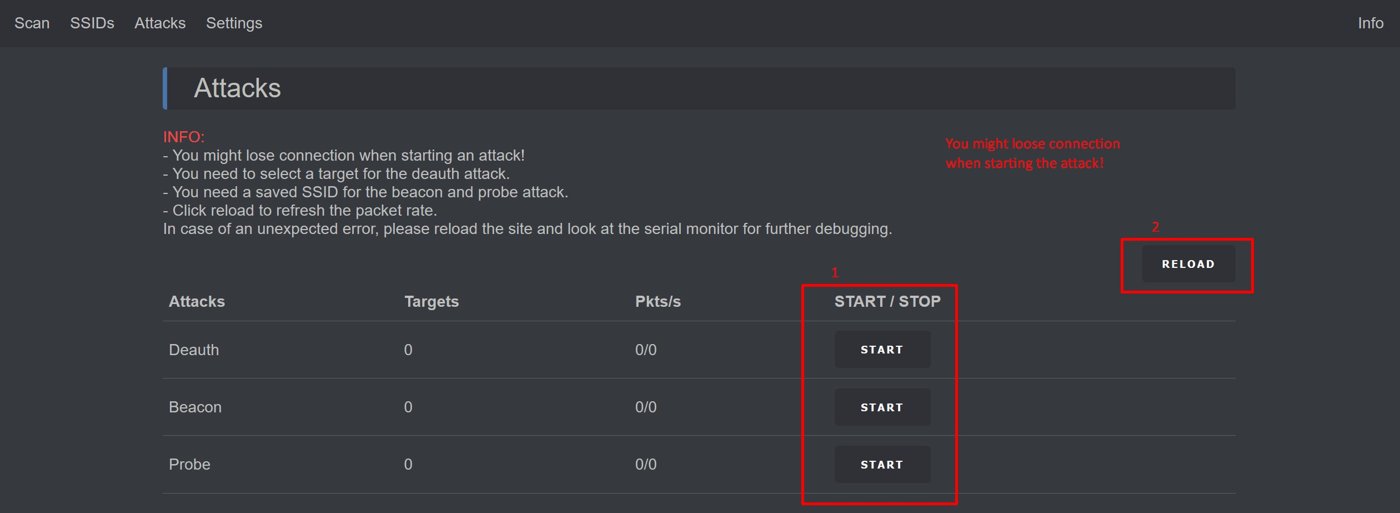
Figure 12.1 — The Deauther web UI Attack page. Source: docs.spacehuhn.com.
12.2 Recipe — first-boot setup
The very first thing to do after unboxing or after re-flashing. ~5 minutes.
- Plug the Hackheld into USB-C. Wait for the OLED boot banner.
- From a laptop or phone, connect to Wi-Fi
pwned/ passworddeauther. - Open
http://192.168.4.1in Chrome / Edge. - Settings page:
- Change SSID from
pwnedto something less-obviously-malicious (e.g.,lab-test-net-3). - Change Password from
deautherto a 12+ character random string. - Set Channel to 6 (less channel-1-spectrum-collision in dense Wi-Fi environments).
- Set Web UI password (the admin-PW field) — second-tier authentication for the UI itself.
- Hit Save.
- Change SSID from
- Reconnect with the new credentials. Confirm web UI loads.
- Names page: pre-populate any test-target MACs (your own AP, your own laptop, etc.).
- SSIDs page: clear the default list; add only SSIDs you intend to spam.
- Charge fully: USB-C plugged in, ~2 hours. The OLED status line shows battery voltage.
You now have a configured, charged, ready-to-use Hackheld.
12.3 Recipe — authorized lab deauth
Test that deauth-spam works against your own equipment. Only your own equipment.
Equipment:
- Hackheld (charged)
- Test AP (one you own, ideally an old retired router) on WPA2-Personal, MFP-disabled
- Test client (a phone, a laptop) connected to that AP
Steps:
- Boot the Hackheld; open the web UI.
- Scan page → Mode: AP → Start scan → 10 seconds.
- Find your test AP in the result list. Tick it.
- Save to Names with a clear label like
LAB-TEST-AP. - Stations page → Start station scan (slower; 30 seconds). Should find the test client.
- Save the test client to Names as
LAB-TEST-CLIENT. - Attack page → Deauth tab → select
LAB-TEST-APandLAB-TEST-CLIENT. - Frame rate: Medium. Start.
- Watch the test client — it should disconnect within a few seconds. Wi-Fi icon flashes; reconnect attempts fail while attack is running.
- Stop after ~30 seconds. Test client reconnects.
- Confirm in the web UI’s status that 0 attacks are running.
Document everything — the attack target list (MACs), the timestamp range, the test results. Lab notebook entry.
12.4 Recipe — beacon-spam demo
Visual demo for classes / talks / “what does a deauther do?”.
- Boot the Hackheld.
- Web UI → SSIDs page → clear → Random SSID click 30 times. Save.
- Attack page → Beacon tab → all selected → frame rate Fast → Start.
- On a phone in the room, open Wi-Fi settings. The phone’s Wi-Fi list will rapidly fill with 30 fake SSIDs.
- Stop the attack. The fake SSIDs disappear from the phone’s list within ~10 seconds.
This is the safest, most demo-friendly use of the Hackheld — it doesn’t deauth anyone, doesn’t connect to anything, just makes “noise” that a Wi-Fi-scan in the room can see.
12.5 Recipe — wardriving (sniff-only)
Just observe; do not transmit.
- Boot the Hackheld.
- Web UI → Scan page → Mode: Stations → channel-range 1-14 → time 60 seconds → Start.
- Walk through the area. The Hackheld is in scan-only mode — passive.
- After the scan time elapses, check the Stations page: list of MACs + their associated APs + signal strengths.
- Optionally save interesting MACs to Names with location-tagged labels (“coffee-shop-tablet-1”, “library-public-printer”).
The Hackheld’s 25-dBm PA is on the TX side; receive sensitivity is on the LNA side, which is standard ESP8266. Scan range in built environments: ~30 m through 1 wall.
For real wardriving (with GPS-tagged WiGLE-format output), the Hackheld is not the right tool — the AWOK Dual Touch V3 has GPS and is the lineup’s wardriving handheld. See ../AWOK Dual Touch V3/.
12.6 Recipe — handshake capture for offline crack
The Hackheld can capture the WPA2 4-way handshake; cracking it is a separate offline step on a real computer with hashcat.
- Identify the target AP (your own, with WPA2-PSK).
- Identify a station that’s connected to that AP.
- Two things happen in parallel:
- The Hackheld does a deauth-spam against the (AP, station) pair (forcing the station to reconnect, generating a fresh 4-way handshake).
- The Hackheld (or a separate sniffer) runs in promiscuous mode on the AP’s channel, capturing all frames.
- The handshake is logged to flash (LittleFS — needs a custom firmware variant; not present in stock Spacehuhn 2.6.1).
- Pull the capture file via serial or via the web UI.
- On a real computer:
hashcat -m 22000 capture.pcap wordlist.txt.
Spacehuhn 2.6.1 does not support handshake capture out of the box. Spacehuhn 2.7.x and the Marauder-ESP8266 fork do. To capture handshakes on this unit, either upgrade to Spacehuhn 2.7.x (Vol 9 § Upgrade) or switch to Marauder-ESP8266 (Vol 8 § Marauder).
12.7 Comparison vs the modern alternatives
Where the Hackheld fits in the lineup’s 2.4 GHz Wi-Fi platforms:
Table 1 — Where the Hackheld fits in the lineup's 2.4 GHz Wi-Fi platforms
| Aspect | Hackheld (this) | Flipper WiFi Devboard | AWOK Dual Touch V3 | Ruckus Game Over | AWOK ESP32 C5 (aspir.) | Banshee (aspir.) |
|---|---|---|---|---|---|---|
| Chip | ESP8266 (2014) | ESP32-S2 (2020) | 2× ESP32-WROOM (2017) | ESP32-S3 (2021) | ESP32-C5 (2024) | ESP32-C5 + ESP32-S3 |
| Standalone | Yes (OLED + 7 buttons + 1000 mAh) | No (needs Flipper or PC) | Mostly tethered to Flipper | Has OLED + joystick + battery option | TBD | Yes (dual-display) |
| 5 GHz | No | No | No | No | Yes | Yes |
| BLE | No | No (BLE 4.2 limited) | BLE 4.2 | BLE 5 | BLE 5 | BLE 5 |
| Open-source firmware ecosystem | Excellent (Spacehuhn MIT) | Good (Marauder, BMP) | Good (Marauder) | Decent (vendor fork; supply-chain caveat) | TBD | TBD |
| Programmable from Arduino | Trivial | Trivial | Trivial | Trivial | Trivial | Trivial |
| Default firmware quality | Polished | Good | Good | Good (with caveats) | n/a | n/a |
| Price (2026 retail) | ~$25 | ~$30 | ~$140 | ~$120 | TBD | ~$240 |
| Best at | Standalone education + custom code | Marauder via Flipper | Wardriving + GPS | Sub-GHz + 2.4 multi-radio | Multi-band wardriving | Flagship multi-modal |
| Worst at | 5 GHz / BLE / data-frame injection | Standalone use | Anything not WROOM-bounded | Closed-source firmware risk | (when shipped) | Price |
The Hackheld’s unique seats:
- Cheapest device in the lineup. $25 vs $120+ for the multi-radios.
- Best open-source code-learning target. ESP8266 is the friendliest substrate; the Spacehuhn firmware is the most-readable security-tool codebase. New embedded engineers learn the chip on the Hackheld then graduate to ESP32 hardware.
- Smallest and lowest-power. A 1000 mAh LiPo carries it for hours; the others (especially Game Over) drain faster under attack.
The Hackheld’s exclusions (when it’s the wrong tool):
- Modern enterprise Wi-Fi: WPA3 / MFP-protected → deauth doesn’t work. Switch to AWOK or Banshee for 5 GHz visibility.
- Bluetooth / BLE attacks: no BLE on ESP8266. Switch to any ESP32-based platform.
- Production handshake-cracking pipelines: Hackheld captures; you need a laptop / GPU for cracking. The “pipeline” is two-machine, not one-device.
- GPS-tagged wardriving: AWOK has the GPS chain. The Hackheld doesn’t.
12.8 Legal / ethics posture
This is the section worth re-reading every time you pick up the device.
Deauthentication of a Wi-Fi network you do not own is, in most jurisdictions:
- A federal-level crime in the US under 18 USC § 1030 (Computer Fraud and Abuse Act) — unauthorized interference with a protected computer.
- A breach of the Computer Misuse Act 1990 in the UK.
- An offence under the Cybercrime Convention (Budapest Convention) signatories worldwide.
- A potential violation of FCC rules on intentional radio interference (47 CFR Part 15).
The fact that WPA2 deauth is technically trivially forgeable does not make it legal to forge them against third-party networks. The protocol weakness is documented; the use of the weakness is regulated.
Beacon spam is less-clearly criminal but reliably gets you noticed by venue IT teams and federal radio enforcement. Beacon spam on regulated frequencies (channels 12-14 in the US/Canada) is straightforwardly a Part 15 violation regardless of intent.
Probe-request spam is the most-defensible — it’s nominally indistinguishable from legitimate client behaviour at the frame level. It still constitutes denial-of-service if it drowns out legitimate traffic.
Appropriate uses for the Hackheld:
Table 2 — Appropriate uses for the Hackheld
| Use | Posture |
|---|---|
| Bench-test against your own equipment | OK — fully legal |
| Demo at a class / talk, with audience phones in airplane mode | OK — no third-party interference |
| Demo at a class / talk with audience phones live | Risky — beacon spam may interfere with their networks; probably tolerable for short demos |
| ”Test” against a friend’s network with their explicit verbal permission | NOT OK without written authorization; verbal authority is not a legal defense |
| ”Test” against a coffee-shop / hotel / library network | Always illegal — never |
| Pentest engagement | OK only with a written scope-of-work / authorization letter |
When in doubt: don’t. The Hackheld is a $25 piece of hardware; the legal consequences of a misjudged use are not $25.
See ../_shared/legal_ethics.md for the project-wide convention.
12.9 Lab discipline
Five operational rules that flow from the legal section:
- Faraday cage or isolation room for any deauth testing. Eliminates the risk of leakage into neighbouring networks.
- Logged everything. Lab notebook entry per attack run: target MACs, frame rate, duration, observed effect, justification.
- Authorization document on file for any pentest engagement.
- The Vol 11 §11 hardcoded-allowlist firmware for non-trivial use. If you can put the allowed MACs in source code, do.
- Don’t carry the Hackheld in public spaces with attack firmware loaded. Even sitting in a backpack with the unit powered off, a deauth-loaded Hackheld is uncomfortable to explain to authority.
12.10 Cheatsheet
A laminate-ready single-page reference for the Hackheld. Print this; carry it.
=== DSTIKE HACKHELD V1 — CHEATSHEET ===

HARDWARE
  Chip       ESP8266 (DSTIKE WiFi+, PA = 25 dBm)
  Display    0.96" 128x64 SSD1306 OLED (I2C 0x3C)
  USB        USB-C (charge + serial via CH340)
  Battery    ZON.CELL 1000 mAh 3.7 V LiPo
  Stock FW   Spacehuhn esp8266_deauther v2.6.1

DEFAULT CREDENTIALS (CHANGE IMMEDIATELY)
  SSID       pwned
  Password   deauther
  Gateway    192.168.4.1

BUTTON LAYOUT
  RESET (top center), UP/DOWN/LEFT/RIGHT (diamond), A, B

BOOTLOADER ENTRY
  1. Hold FLASH (LEFT key)
  2. Tap RESET
  3. Release FLASH
  -> chip in UART boot mode

CLI ESSENTIALS (115200 8N1)
  help              show all commands
  scan -t 15        AP scan, 15 sec
  scan -m station   Station scan
  attack deauth -n "TARGET"
  attack beacon
  stop              kill all attacks
  set ssid "name"   change SoftAP SSID
  reboot            soft reboot
  chicken           ASCII art

WEB UI
  http://192.168.4.1/   home
  /scan.html            scan
  /attack.html          attack launcher
  /settings.html        config
  /api/scan/aps         JSON: ap list
  /api/attack/start     JSON POST: launch attack

FLASH PATHS
  Web flasher:   deauther.com/flash (Chrome/Edge)
  esptool:       esptool.py --port /dev/ttyUSB0 \
                    --baud 921600 write_flash 0 firmware.bin
  Backup:        esptool.py read_flash 0 0x400000 backup.bin

LEGAL POSTURE
  Own hardware OR written authorization only.
  Deauth/beacon/probe spam against third-party networks
  = federal crime in US/UK/EU. No exceptions.

EMERGENCY RECOVERY
  Erase + reflash:  esptool.py erase_flash
                    esptool.py write_flash 0 known_good.bin

REFERENCE
  Spacehuhn upstream:  github.com/SpacehuhnTech/esp8266_deauther
  DSTIKE store:        tindie.com/stores/lspoplove
  Arduino-ESP8266:     github.com/esp8266/Arduino
  Hack Tools project:  ../../HackToolsStartHere.html
12.11 Series-end references
External:
- Spacehuhn
esp8266_deauthersource — https://github.com/SpacehuhnTech/esp8266_deauther - DSTIKE Tindie store — https://www.tindie.com/stores/lspoplove/
- ESP8266 Marauder port — https://github.com/justcallmekoko/ESP8266Marauder
- Arduino-ESP8266 core — https://github.com/esp8266/Arduino
- PlatformIO ESP8266 platform — https://docs.platformio.org/en/latest/platforms/espressif8266.html
- Adafruit SSD1306 library — https://github.com/adafruit/Adafruit_SSD1306
- ESPAsyncWebServer — https://github.com/me-no-dev/ESPAsyncWebServer
- Espressif ESP8266 NONOS SDK reference — https://www.espressif.com/en/support/documents/technical-documents
- 802.11 frame format (general) — https://en.wikipedia.org/wiki/802.11_Frame_Types
Internal (other Hack Tools deep dives):
- Flipper Zero Vol 8 — WiFi Devboard chapter
- AWOK Dual Touch V3 deep dive
- Ruckus Game Over deep dive
- ESP32 Marauder Firmware deep dive
- Cross-tool decision matrix (
_shared/comparison.md) - the capability matrix
- Hack Tools top-level (
HackToolsStartHere.html) — full-text search across all deliverables
End of series.
Comments (0)