DSTIKE Hackheld · Volume 5
DSTIKE Hackheld Volume 5 — Spacehuhn WiFi Deauther Firmware
Architecture, packet-injection model, scan/attack engines, v2.6.1 specifics
5.1 About this firmware
The firmware running on the Hackheld out of the box is Stefan Kremser’s esp8266_deauther v2.6.1. The canonical upstream is github.com/SpacehuhnTech/esp8266_deauther, MIT-licensed, Arduino-IDE-buildable, ~5,000 lines of C++.
It is a single firmware — not a configurable shell. One binary, with web UI + CLI + display UI all baked in. The Arduino-IDE-builds-from-source workflow is the way you customise behaviour: edit A_config.h, recompile, re-flash.
Relevant versions:
Table 1 — Relevant versions
| Version | Released | Notable |
|---|---|---|
| 1.x | 2017 | Original. No web UI; CLI only. Don’t use in 2026. |
| 2.0 | 2018 | Full rewrite, web UI added. Codebase that lives today. |
| 2.5 | 2020 | Stability. Default channel-hop changed. |
| 2.6.1 | mid-2021 | Current on this unit. OLED improvements; more reliable probe spam. |
| 2.7.x | 2022 onward | Current line. Arduino-ESP8266 3.x core compatibility. |
Version 2.6.1 is feature-complete vs 2.7.x for everything in this document — the upgrade gain is library/core compatibility, not new attacks.
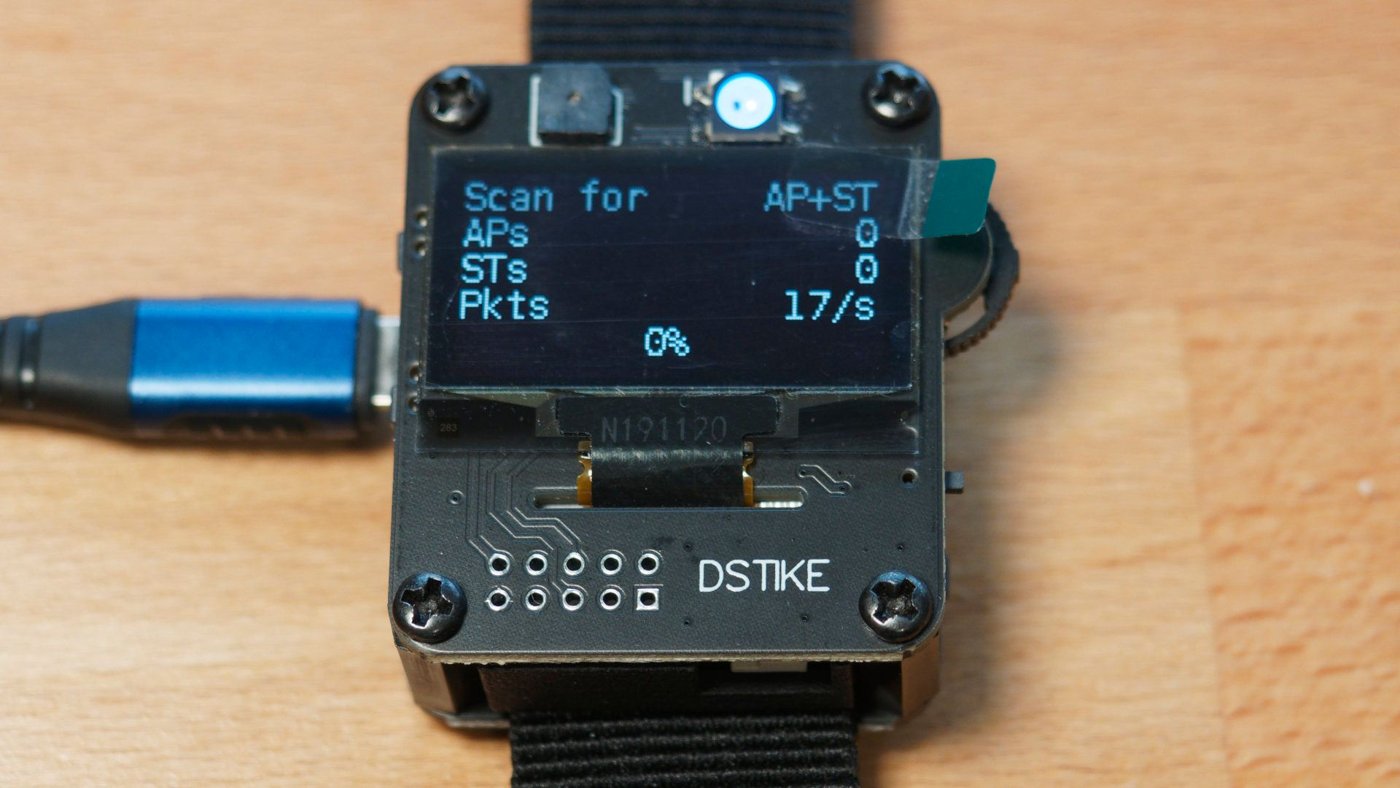
Figure 5.1 — The Deauther firmware’s OLED interface, mid-scan. Source: docs.spacehuhn.com.
5.2 Source code map
The source tree at top level:
esp8266_deauther/
├── A_config.h          ← pin map, button GPIOs, OLED address, board variant gates
├── esp8266_deauther.ino  ← Arduino sketch entry point (setup, loop)
├── functions.h         ← misc helpers (string handling, math)
├── Settings.h/cpp      ← persistent-storage layer (SPIFFS-backed key/value)
├── Names.h/cpp         ← persistent target-list storage
├── SSIDs.h/cpp         ← persistent SSID-list storage (for beacon spam)
├── Scan.h/cpp          ← scan-engine (the AP scanner + station sniffer + name resolver)
├── Attack.h/cpp        ← attack-engine (deauth, beacon, probe)
├── CLI.h/cpp           ← serial CLI parser + command dispatcher
├── DisplayUI.h/cpp     ← the on-device OLED UI (button navigation, screens)
├── webfiles/           ← embedded web UI HTML/CSS/JS (served as static files from SPIFFS)
└── data/               ← extra data files (default SSID list, OUI MAC vendor list)
The architecture is event-loop driven — loop() polls each subsystem in turn and yields to FreeRTOS / NONOS via delay(0). Vol 11 §2 has the full call graph for custom-firmware authors.
5.3 Boot sequence
When power is applied or RESET is pulsed:
- ROM bootloader — checks GPIO 0 strap. If HIGH (FLASH button not pressed): boot from flash. If LOW: enter UART bootloader and wait for esptool.py protocol.
- Bootloader stub (in flash sector 0) — loads the main firmware image from flash into iRAM + initialises the SPI flash cache for the rest.
setup()runs:- Initialise serial (
Serial.begin(115200)). - Initialise SPIFFS and load persistent settings.
- Initialise OLED via I²C.
- Initialise buttons.
- Configure Wi-Fi → SoftAP mode with the saved SSID and password (default:
pwned/deauther). - Start the web server on port 80.
- Start the CLI parser.
- Boot banner appears on OLED and on serial:
[deauther v2.6.1].
- Initialise serial (
loop()runs forever:- Poll buttons.
- Update OLED.
- Process any Wi-Fi events (clients joining/leaving the SoftAP).
- Process any HTTP requests.
- Process any serial CLI input.
- Tick the scan-engine state machine (if a scan is active).
- Tick the attack-engine state machine (if an attack is active).
The boot-to-ready interval is ~3 seconds on the Hackheld V1. The first thing the OLED shows is the firmware version + boot banner, then the home menu.
5.4 Memory budget
A typical free-heap snapshot at the various states on v2.6.1 (recorded via Serial.println(ESP.getFreeHeap()) in a custom build):
Table 2 — A typical free-heap snapshot at the various states on v2.6.1 (recorded via Serial.println(ESP.getFreeHeap()) in a custom build)
| State | Free heap |
|---|---|
Just after setup() | ~30 KB |
| Web UI loaded, no client connected | ~28 KB |
| Web UI active, 1 client browsing | ~22 KB |
| Scan running (full sweep) | ~20 KB |
| Deauth attack running | ~18 KB |
| All three pages active + attack running + 2 web clients | ~12 KB |
The 8 KB floor is non-negotiable — below that, the Wi-Fi stack runs out of internal buffers and starts dropping things. Spacehuhn has tuned the firmware to keep ~10 KB headroom in the worst case; custom builds that add features need to keep that discipline.
5.5 The scanner
The scan engine has three sub-modes:
Table 3 — The scan engine has three sub-modes
| Sub-mode | What it does |
|---|---|
| AP scan | Sets Wi-Fi to STA mode, uses the SDK’s wifi_scan() to walk channels 1–14 (regulatory clip applies) collecting beacons. ~200 ms per channel. Result: list of (SSID, BSSID, channel, RSSI, encryption type). |
| Station scan | Sets Wi-Fi to promiscuous mode, walks channels, watches for client → AP communication. Builds a “stations seen” list with (client MAC, associated AP BSSID, RSSI, last-seen timestamp). Slower — needs to observe actual traffic, not just beacons. |
| Name resolution | Cross-references collected MACs against the OUI database (first three bytes of MAC → vendor). The default OUI list is baked into the firmware; ~10,000 entries covering all major vendors. |
The scanner output feeds three persistent lists in SPIFFS:
ssids.txt— SSID list (for beacon spam — “make these SSIDs visible to anyone who scans for Wi-Fi”)names.txt— named target list (you can give a friendly name to a MAC; appears in the web UI and the attack target picker)- (stations and APs are kept in RAM only — gone on reboot unless you save them via the web UI)
Scan timing on v2.6.1:
- AP scan: 14 channels × 200 ms = ~3 seconds for a full sweep, returns ~10–30 visible APs in a typical residential setting.
- Station scan: best-effort — needs traffic to observe. ~30 seconds of running typically catches the active clients on busy APs.
5.6 Access points, stations, names
The firmware’s data model is three tables:
Table 4 — The firmware's data model is three tables
| Table | What’s in it | Persistence |
|---|---|---|
| Access Points (APs) | BSSID, SSID, channel, encryption, RSSI, vendor | RAM (cleared on reboot unless you “save” to names) |
| Stations | MAC, associated BSSID, RSSI, vendor | RAM |
| Names | MAC + user-given name (friendly label) | SPIFFS (persistent) |
The Names table is the user’s bookmark file. After scanning, you “save” interesting APs or stations to Names with a friendly label (“My TV”, “Living room laptop”). The attack picker then lets you select by name rather than by MAC — much easier to remember and resume across reboots.
Capacity (v2.6.1 defaults):
- Max APs in RAM: 60 (the menu shows them; older ones are evicted on overflow)
- Max stations in RAM: 60 (same eviction policy)
- Max named targets in SPIFFS: ~200 (limited by SPIFFS partition size; you’ll run out of partition space before the hard limit)
5.7 The three attacks
The three attacks the SDK’s freedom-packet hook enables, as exposed by the Spacehuhn firmware:
5.7.1 Deauth
For each (AP BSSID, station MAC) pair in the selected target list, emit one 802.11 deauthentication frame to the station (claiming to be from the AP) and one to the AP (claiming to be from the station). Both directions are necessary to fully tear down the association; the firmware does both per cycle.
Table 5 — 7.1 Deauth
| Parameter | Default | Configurable from |
|---|---|---|
| Frames per second per target | ~10 | Web UI → Attack → Speed |
| Targets | Selectable from Stations or APs | Web UI Targets tab |
| Reason code | 7 (Class 3 frame received from non-associated station) | Hardcoded; not user-configurable in v2.6.1 |
Effect on a target client: depending on the client’s Wi-Fi driver, it’ll experience either (a) continuous disconnect-reconnect cycles, (b) “weak signal” indicators, or (c) inability to reconnect until the attack stops. iOS / Android devices typically show “couldn’t join network” prompts; Windows shows “connecting…” indefinitely; Linux gives explicit deauth messages in dmesg.
5.7.2 Beacon spam
For each entry in the SSID list, emit a fake beacon every 100 ms that advertises that SSID. The fake beacon includes:
- Forged source MAC (random or sequential, per firmware setting).
- The SSID being spammed.
- A specified channel (the firmware rotates through channels by default).
- Encryption type configurable (open, WPA2, etc.).
Effect: the SSID appears in every Wi-Fi-scan list in the area. Used to:
- Make “noise” — fill up the user’s Wi-Fi picker with 50 fake SSIDs.
- Test client behavior — see how a client UI handles 50 SSIDs.
- Honeypot — advertise common SSIDs (
xfinitywifi,attwifi) and observe what tries to connect (a real attacker would then SoftAP one and snoop; the Spacehuhn firmware does not do the SoftAP step — it just spams).
5.7.3 Probe spam
Emit fake probe requests searching for SSIDs in the list. Each request looks like a real client’s “is this SSID around?” query.
Table 6 — 7.3 Probe spam
| Use | Effect |
|---|---|
| Disrupting MAC randomization-based tracking systems | Real clients send probe requests with their MAC; spammers flooding probes with random source MACs make per-MAC tracking unreliable |
| Smoke-testing IDS rules | Triggers any “watch for probes” detection rules |
| Stress-testing the local Wi-Fi spectrum | High packet rate; effective at congesting weak channels |
5.8 Channel-hopping logic
Wi-Fi scans and attacks operate on one channel at a time. The radio physically can’t be on multiple channels simultaneously. The firmware’s channel-hop logic depends on the operation:
- AP scan: walks 1 → 14 sequentially, ~200 ms per channel.
- Station scan: same sequential walk, longer dwell (~1–2 s per channel) to give time to observe traffic.
- Deauth attack: locks to the channel the targeted AP is on. If multiple targeted APs are on different channels, the firmware time-slices — ~1 s on each, then moves. This is suboptimal for attack effectiveness; if you have multiple targets, prefer launching separate per-channel attacks one at a time.
- Beacon spam: cycles through channels 1, 6, 11 by default (the non-overlapping channels). ~200 ms per channel. Each fake beacon goes out on whatever channel is current.
- Probe spam: ditto.
The 14-channel walk respects the firmware’s regulatory configuration — US builds clip at channel 11, EU/JP builds go to 13, JP-only goes to 14. The Spacehuhn upstream lets you change this via A_config.h (the USE_CH14 define).
5.9 The Web UI subsystem
Vol 6 is the dedicated users-guide chapter for the web UI. The architecture is:
webfiles/index.html,style.css,bundle.jsare baked into SPIFFS at build time.- The ESP8266 runs an HTTP server on port 80 that serves these files when a client hits
http://192.168.4.1/. - The JS frontend makes JSON-over-HTTP calls to API endpoints (
/scan/aps,/attack/start, etc.) on the same server. - The server’s response is also JSON; the JS renders it into the UI.
Memory footprint of the web UI: ~6 KB at idle, ~8 KB with a connected client. Multiple simultaneous clients are supported but memory pressure scales — keep it to one or two browsers connected at a time.
5.10 The CLI subsystem
Vol 7 is the dedicated CLI command reference. The architecture is:
- Each
loop()iteration reads any pending bytes fromSerial. - A line buffer accumulates until newline.
- The line is tokenised and dispatched to the matching command handler.
- The handler may produce output to
Serialand/or modify firmware state.
The CLI is the same underlying command set as the web UI — the web UI’s JSON endpoints internally call into the same dispatcher. Anything the web UI can do, the CLI can do, and vice versa.
5.11 Persistent storage in SPIFFS
The ESP8266 Arduino core provides SPIFFS — a small filesystem in the unused portion of SPI flash. On the Hackheld with 4 MB flash and the standard partition map:
Table 7 — The ESP8266 Arduino core provides SPIFFS — a small filesystem in the unused portion of SPI flash. On the Hackheld with 4 MB flash and the standard partition map
| Partition | Size |
|---|---|
| Bootloader + sketch (program) | 1 MB |
| OTA staging | 1 MB |
| SPIFFS (filesystem) | ~2 MB |
| EEPROM emulation | 4 KB |
Files the Deauther firmware writes:
Table 8 — Files the Deauther firmware writes
| File | Contents |
|---|---|
/settings.json | Configurable settings (SSID, password, channel range, etc.) |
/names.txt | Named target list |
/ssids.txt | SSID spam list |
/log.txt | Optional event log (if logging enabled in settings) |
webfiles/* (built-in) | The web UI assets |
LittleFS is the replacement for SPIFFS in newer ESP8266 Arduino cores; Spacehuhn 2.7.x can be built with either. v2.6.1 (the version on this unit) is SPIFFS-only.
5.12 v2.6.1 specifics
What’s different in 2.6.1 vs 2.7.x (current):
- 2.6.1: SPIFFS-only.
- 2.6.1: Arduino-ESP8266 core 2.x build.
- 2.6.1: Wi-Fi scan + attack timing tuned for slower OLED redraw.
- 2.7.x: optional LittleFS; faster OLED I²C; bug fixes in the SoftAP DHCP.
Considerations when deciding whether to upgrade:
Table 9 — Considerations when deciding whether to upgrade
| Reason to stay on 2.6.1 | Reason to upgrade to 2.7.x |
|---|---|
| It’s working; nothing’s broken; SPIFFS state is intact | New LittleFS storage; cleaner filesystem |
| Custom modifications already pinned to 2.6.1 source | Upstream bug fixes |
| Field history with this exact build is a known-good baseline | Better Arduino-ESP8266 3.x compatibility for if you want to build a custom fork |
The upgrade procedure is in Vol 9 § Web flasher. The downgrade procedure (if 2.7.x doesn’t work for some reason) is also in Vol 9 — keep a known-good 2.6.1 binary file on hand before upgrading.
5.13 What’s next
→ Vol 6 — Web Interface — full users guide is the main users-guide chapter. Every page, every button, every JSON endpoint, default credentials, troubleshooting. This is the headline chapter for day-to-day operation of the device.
Comments (0)