HaleHound · Volume 5
HaleHound Volume 5 — Full Build: Classic
An exposed-SPI CYD, a Cinder Ferret carrier and a wiring harness — bench to first Radio Test pass, step by step
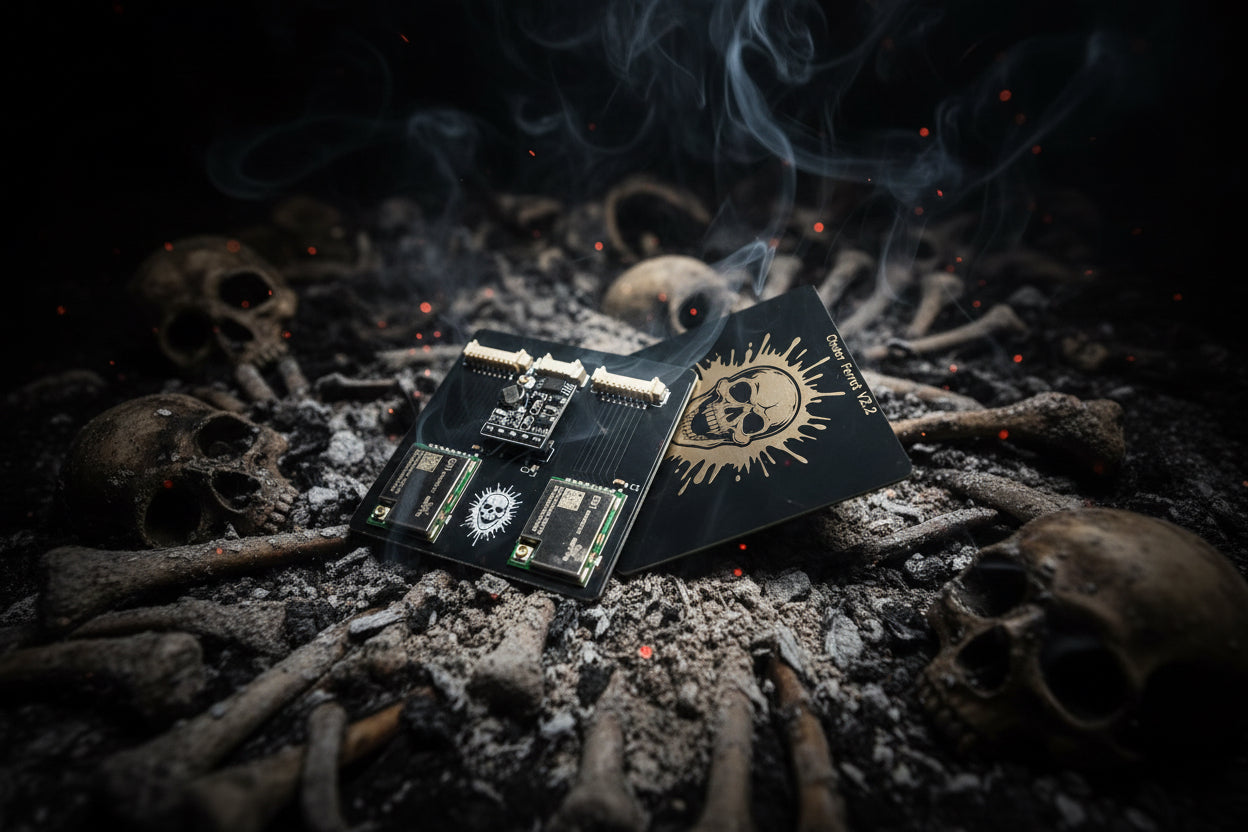
5.1 About this Volume
This is the end-to-end assembly walkthrough for the Classic HaleHound build path: a bare “exposed-SPI” Cheap Yellow Display, a Cinder Ferret carrier board that holds the four external radios, and a wiring harness that lands the carrier’s signal lines onto the CYD’s exposed SPI pins. It is the more hands-on of the two build paths; the integrated Fire Weasel build (Vol 6) does much of this wiring for you on a single PCB and shares the power section with this volume.
The electrical reference for every pin named here is Vol 3 (The Radios). This volume does not re-derive the pinouts — it tells you which wire goes where, in what order, with what checks between steps, and references the Vol 3 tables by section. If a pin assignment here looks surprising (the CC1101 CS on GPIO 27, the NRF24 reusing the RGB-LED pins), Vol 3 explains why; here it is simply the step.
The target end state of this volume is a built unit that passes every radio in Tools → Radio Test and fits its case. Flashing the firmware itself is covered in Vol 7; it is referenced at the one step where it is needed.
Warning — Authorized use only. A completed HaleHound is a full-power multi-band transmitter. Everything in this volume assumes it will be operated only on hardware and spectrum you own or are explicitly authorized to test, under the posture set out in Vol 9 and
../_shared/legal_ethics.md. Building it does not change that obligation.
5.2 What the Classic build is
The Classic build has three load-bearing parts plus power:
   ┌────────────────────┐      harness      ┌──────────────────────┐
   │  Exposed-SPI CYD    │◄─────(signal)────►│   Cinder Ferret      │
   │  (E32R28T / E32R35T │                   │   carrier board      │
   │   / 2.8" CYD)       │                   │  ┌────────────────┐  │
   │                     │                   │  │ CC1101 (sub-GHz)│  │
   │  VSPI 18/19/23      │                   │  │ NRF24 (2.4 GHz) │  │
   │  reclaimed GPIOs    │                   │  │ PN532 (NFC)     │  │
   │  P1 serial (GPS)    │                   │  │ GPS header      │  │
   └─────────┬───────────┘                   │  └────────────────┘  │
             │                               └──────────┬───────────┘
             │ 5V USB                                    │ PA VCC
             └──────────► 5V→3.3V BUCK ──────────────────┘ (E07/E01 only)
                          (independent, §9)
Figure 5.1 — The Classic architecture: a CYD, a Cinder Ferret carrier that holds the radios, a harness between them, and an independent buck for any amplified PA module.
“Exposed-SPI” means a CYD whose VSPI pins (18/19/23) and the reclaimed GPIOs are broken out to accessible pads or headers rather than buried — so the carrier’s harness can reach them without surgery on the board. HaleHound sells a 2.8” E32R28T exposed-SPI CYD for this purpose (about $15.85 as of 2026-10-16) and a 3.5” exposed-SPI board (about $18).
The Cinder Ferret is HaleHound’s carrier board. It exists in three revisions, all the same price class, differing in how many NRF24 sockets they carry:
Table 1 — same price class, differing in how many NRF24 sockets they carry
| Cinder Ferret | Price (2026-10-16) | What it adds |
|---|---|---|
| V1 | ~$30 | Original single-NRF carrier |
| V2 | ~$40 | Revised single-NRF carrier |
| V2.2 “DOUBLE NRF” | ~$40 | Two NRF24 sockets — “the whole spectrum”; needs the matching firmware path |
The carrier holds the CC1101, the NRF24(s), the PN532 and a GPS header, and routes their signal lines to a harness that plugs the exposed-SPI CYD. The identical firmware runs on a Classic build and a Fire Weasel build; the only difference is the physical assembly.
Note — The V2.2 dual-NRF carrier needs its own firmware path. The double-NRF Cinder Ferret puts two 2.4 GHz radios on the carrier; the vendor notes its firmware support arrives separately from the base build. If you buy a V2.2 for the second NRF socket, confirm your flashed firmware build actually drives both sockets before wiring the second radio — a single-NRF firmware will only ever light one of them, and the second NRF24’s CSN has nowhere to land. For a first build, a single-NRF V2 is the lower-risk choice.
5.2.1 Classic vs Fire Weasel — which build this volume is for
This volume is the Classic path. The decision between it and the Fire Weasel (Vol 6) comes down to how much hand-wiring is acceptable:
Table 2 — down to how much hand-wiring is acceptable
| Dimension | Classic (this volume) | Fire Weasel (Vol 6) |
|---|---|---|
| Radio mounting | Hand-seated on a Cinder Ferret carrier | Integrated on one board |
| Inter-board wiring | Full signal harness, soldered/landed | Pre-wired; a “leash” connects board ↔ CYD |
| Independent buck | Source and wire it yourself (PA builds) | Supplied in the kit, on-board routing |
| Typical build time | Longer — every signal landed by hand | ~45 minutes with experience |
| What you still do | Solder harness, buck, cap, battery | Mostly assembly + solder the battery |
| Why choose it | Cheapest path; full control; repairable at the wire | Fastest, fewest wiring mistakes |
| Firmware / capability | Identical | Identical |
Both reach the same Radio-Test-green end state. Pick Classic for cost and control; pick Fire Weasel for speed and fewer places to get the wiring wrong.
5.3 Bill of materials
A Classic build can be bought as a DIY kit or sourced part by part. The kit path:
Table 3 — A Classic build can be bought as a DIY kit or sourced part by part. The kit path
| DIY kit (2026-10-16) | Price | Screen |
|---|---|---|
| DIY 2.8” HaleHound kit | ~$139 | 2.8” |
| DIY 3.5” HaleHound kit | ~$149 | 3.5” |
Sourced individually, a representative Classic BOM:
Table 4 — Sourced individually, a representative Classic BOM
| # | Part | Example / spec | Qty | ~Price |
|---|---|---|---|---|
| 1 | Exposed-SPI CYD | 2.8” E32R28T exposed-SPI (or 3.5”) | 1 | $15.85 / $18 |
| 2 | Cinder Ferret carrier | V2 (or V2.2 dual-NRF) | 1 | $30–40 |
| 3 | CC1101 | HW-863 (stock) or E07-433M20S (PA) | 1 | ~$3–12 |
| 4 | NRF24L01+PA+LNA | SMA-pigtail PA+LNA variant | 1 (2 on V2.2) | ~$3–6 |
| 5 | PN532 V3 | Elechouse, SPI-capable | 1 | ~$6–12 |
| 6 | GPS | GT-U7 / NEO-6M / ATGM336H + antenna | 1 | ~$6–12 |
| 7 | Wiring harness | Carrier-to-CYD signal harness + 4-pin GPS lead | 1 | in kit / ~$5 |
| 8 | 5 V→3.3 V buck | AMS1117-3.3 / MP2307, 500 mA+ (only if E07/E01 PA) | 1 | ~$1–3 |
| 9 | 10 µF capacitor | Electrolytic or MLCC, across NRF24 VCC/GND | 1–2 | <$1 |
| 10 | microSD card | FAT32, any size | 1 | ~$5 |
| 11 | 1S LiPo + charger/boost | see Vol 6 §power | 1 | ~$8–20 |
| 12 | Case | 2.8” case ( | 1 | $30–45 |
| 13 | Antennas | 2.4 GHz (Bolton Dart) + sub-GHz (ANT700) | 2 | buyer’s choice |
Not in any kit: firmware (web-flashed, Vol 7), battery, antennas, the independent buck (it comes in the Fire Weasel kit but is a source-it-yourself item for a Classic build using PA modules), and — on current SKUs — the PN532. Confirm the PN532 is in your kit; several current HaleHound SKUs no longer bundle it.
5.3.1 All-in cost, kit vs sourced
The DIY kit trades a modest premium for a known-good parts set and a harness that already fits. Sourcing individually is cheaper on paper but adds shipping from several vendors and the risk of a part that does not drop in. Rough 2.8” all-in comparison (2026-10-16 USD, excluding antennas and battery, which neither path includes):
  2.8" Classic — approximate all-in (USD)
  DIY 2.8" kit           ████████████████████████████ $139
  Sourced (no PA)        ████████████████ ~$80
  Sourced (+E07 PA/buck) ████████████████████ ~$95
                         0      40      80     120    160
Figure 5.2 — The kit premium buys a matched parts set, a fitting harness and the case; sourced builds are cheaper but multi-vendor. Add antennas and a battery to either.
A fully-built, tested unit (the “Complete Build” SKUs) sits far above both — ~$245 for the 4” and ~$235 for the 3.5” — and exists for buyers who want zero assembly. The Classic DIY path is the middle ground: you do the work, you keep the cost and the repairability.
5.4 Tools and bench setup
Table 5 — 4. Tools and bench setup
| Tool | Use |
|---|---|
| Temperature-controlled soldering iron, fine tip | Header pins, harness, the 10 µF cap, battery pads |
| 60/40 or lead-free solder, flux | Joints; flux makes the LED-pin reclaim pads behave |
| Fine side cutters + wire strippers | Harness prep |
| Multimeter (continuity + DC volts) | The non-negotiable step — continuity and the buck output |
| Tweezers / helping hands | Holding the cap and small modules |
| Small Phillips driver + M3 hardware | Case assembly (M3×10 in the kits) |
| Isopropyl alcohol + brush | Flux cleanup before closing the case |
| USB data cable (not charge-only) | Flashing and first power |
5.4.1 Time and difficulty
A Classic build is a wiring project, not a precision-SMD one — every joint is a through-hole pin or a landed wire, so the skill bar is “confident with a soldering iron,” not “rework QFNs.” Rough time budget for a first build with the DIY kit:
Table 6 — QFNs." Rough time budget for a first build with the DIY kit
| Phase | First build | With experience |
|---|---|---|
| Inventory + dry-fit (§6) | 20–30 min | 10 min |
| Mount carrier + seat radios (§7) | 20 min | 10 min |
| Harness + wiring (§8) | 45–75 min | 30 min |
| Buck + cap (PA builds, §9–§10) | 20 min | 10 min |
| Continuity + smoke test (§11) | 15 min | 10 min |
| Flash + Radio Test (§12) | 15 min | 10 min |
| Case fit (§13) | 15 min | 10 min |
| Total | ~2.5–3 h | ~1.5 h |
The honest comparison: the Fire Weasel kit (Vol 6) is advertised at ~45 minutes because most of the harness is pre-wired. The Classic build’s extra time is almost entirely the harness in §8 and the per-radio verification in §12 — which is also where its repairability comes from.
Bench discipline that pays off on this build specifically:
- Work on ESD-safe surface and ground yourself. The ESP32 and the NRF24 front end are both static-sensitive.
- Keep the LiPo off the bench until §12. There is no reason for a charged pouch cell to be near a hot iron. Solder everything, test on USB, add the battery last.
- Label the harness ends before you solder. The whole build hinges on the right signal reaching the right GPIO; a mislabelled harness is the most common and most frustrating fault.
5.5 The exposed-SPI CYD and the Cinder Ferret
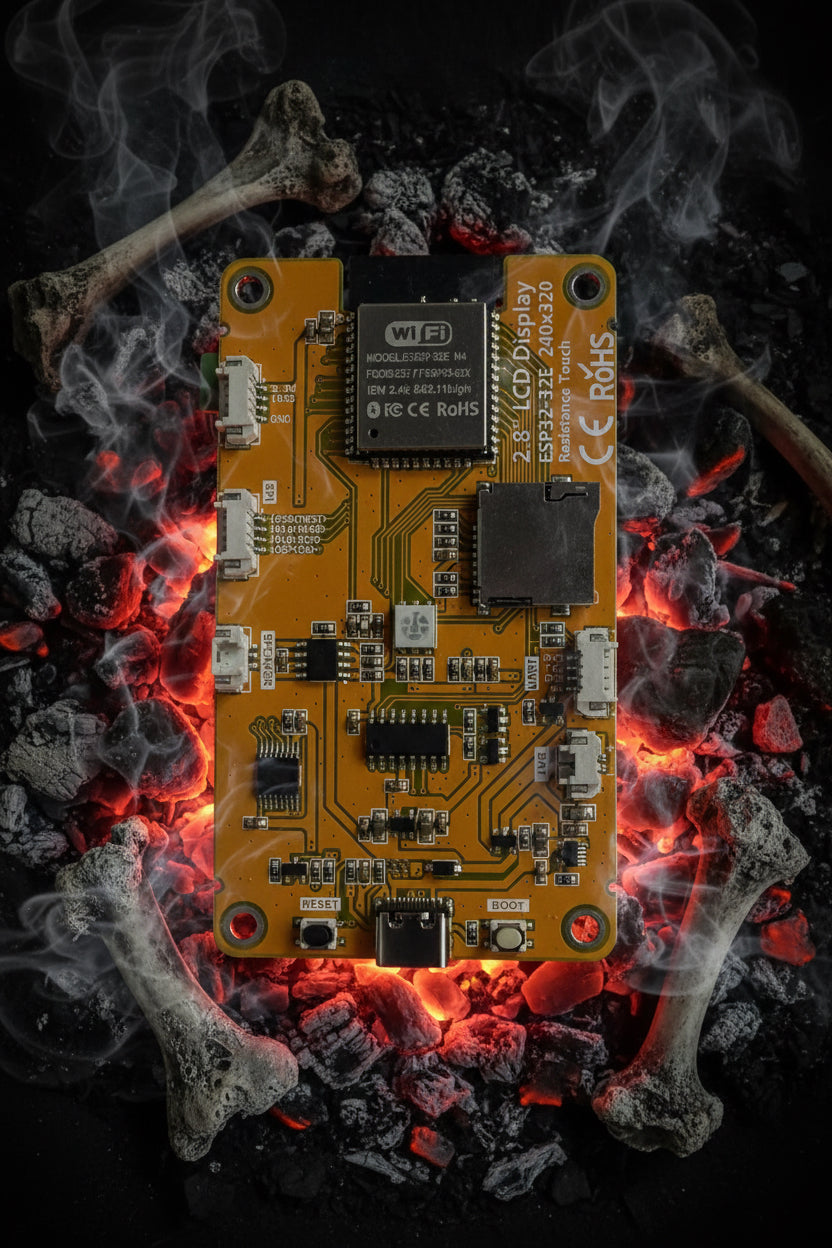
Figure 5.3 — The exposed-SPI CYD: a standard E32R28T with the SPI bus and reclaimed GPIOs brought to accessible pads so the carrier harness can reach them. Photo: HaleHound.com.
Confirm two things about your board before any soldering:
- It is the exposed-SPI variant for your screen size. A non-exposed CYD will run the firmware but gives the harness nowhere convenient to land, which turns the build into fine-pitch rework.
- The build target matches the board. The 2.8” E32R28T flashes
esp32-e32r28t; the 3.5” E32R35T flashesesp32-e32r35t; a plain 2.8” ESP32-2432S028 flashesesp32-cyd. The build target decides which CS pins the firmware drives — critically, the CC1101 CS is GPIO 27 on a 2.8” board but GPIO 21 on a 3.5” (Vol 3 §4.3). Wire for the board you have.
Figure 5.4 — The Cinder Ferret V2.2 (dual-NRF) carrier. The single-NRF V1/V2 carriers are the same idea with one 2.4 GHz socket. Photo: HaleHound.com.
If you are using a stock HW-863 CC1101 and a plain NRF24 (no Ebyte PA), you can skip the independent buck (§9) entirely and power everything from the CYD 3.3 V rail with only the 10 µF cap on the NRF24. The buck is only mandatory when you fit an E07-433M20S or E01-2G4M27SX PA module. Decide this now, because it changes the harness.
5.6 Prep and dry-fit
Do the whole mechanical layout before heating the iron. The goal is to know exactly where every module and wire will sit inside the chosen case, so nothing has to be unsoldered later.

Figure 5.5 — A 2.8” DIY kit spread out for inventory. Confirm every part against §3, and in particular whether a PN532 is included. Photo: HaleHound.com.
- Inventory against the BOM (§3). Confirm the PN532 is present (or decide to omit NFC). Confirm the carrier revision matches your firmware intent (V2.2 needs the dual-NRF path).
- Dry-fit the CYD and carrier into the case. Note which way the carrier faces, where the two SMA antenna leads exit, and where the GPS antenna wants clear sky.
- Plan the harness runs. Shortest practical routes for the VSPI trio (18/19/23) and the reclaimed GPIOs; keep the 2.4 GHz NRF24 RF pigtail away from the GPS antenna and the sub-GHz whip where you can.
- Set the PN532 DIP switches now while the board is accessible: CH1 OFF, CH2 ON for SPI mode (Vol 3 §6.2). This is the single most-missed step; do it before the board is buried.
- Format the microSD FAT32 and set it aside. It is optional for the firmware to boot but
you want it ready for loot,
.subfiles and OTA (Vol 7, Vol 8).
  Dry-fit checklist (before any solder)
  ┌─────────────────────────────────────────────┐
  │ [ ] Board is exposed-SPI, right screen size   │
  │ [ ] Cinder Ferret revision matches firmware   │
  │ [ ] PN532 DIP: CH1 OFF / CH2 ON               │
  │ [ ] SMA leads + GPS antenna exits planned      │
  │ [ ] Harness runs measured, ends labelled       │
  │ [ ] microSD formatted FAT32                    │
  │ [ ] Buck decided (needed only for E07/E01 PA)  │
  └─────────────────────────────────────────────┘
Figure 5.6 — The pre-solder dry-fit gate. Nothing gets heated until every box is ticked.
5.7 Mounting the carrier
Seat the external radios onto the Cinder Ferret first, then mount the populated carrier relative to the CYD. Working carrier-first keeps the fine module pins accessible.
- Seat the CC1101 in its carrier position. If it is the stock HW-863, it can share the CYD 3.3 V rail; if it is the E07 PA, mark its VCC for the buck feed (§9) and do not bridge it to the rail.
- Seat the NRF24 in its socket (sockets, on the V2.2). The PA+LNA board is the taller module; make sure it clears the case lid in the dry-fit orientation.
- Seat the PN532 with its DIP switches already set (§6 step 4).
- Fit the GPS header on the carrier, and route the GPS antenna toward its planned exit.
- Secure the carrier mechanically — standoffs or the case’s own carrier mounts, with M3 hardware in the kit. It should not rely on the harness wires for mechanical support; a carrier hanging on its signal wires is how joints crack in the field.
Once the carrier is populated and secured, the only remaining work is electrical: the harness (§8), power (§9–§10), and verification (§11–§12).
5.8 Wiring the radios
This is the heart of the build. Every wire below traces to a Vol 3 table; the GPIO numbers are the 2.8”/E32R28T assignments. On a 3.5” E32R35T, change the CC1101 CS from GPIO 27 to GPIO 21 and the NRF24 CSN from GPIO 4 to GPIO 26 (Vol 3 §9) — those are the only two moves.
Wire and verify one radio at a time, in this order, so a bus fault is isolated to the module that introduced it (Vol 3 §11).
5.8.1 Shared VSPI bus (all three SPI radios)
Land these three once; every SPI radio taps them:
Table 7 — Land these three once; every SPI radio taps them
| Carrier signal | CYD pin |
|---|---|
| SCK | GPIO 18 |
| MOSI | GPIO 23 |
| MISO | GPIO 19 |
5.8.2 CC1101
Table 8 — 8.2 CC1101
| CC1101 pin | CYD pin (2.8”) | CYD pin (3.5”) |
|---|---|---|
| CS | GPIO 27 | GPIO 21 |
| GDO0 (TX) | GPIO 22 | GPIO 22 |
| GDO2 (RX) | GPIO 35 | GPIO 35 |
| VCC | 3.3 V (stock) / buck (E07) | 3.3 V / buck |
| GND | GND | GND |
Warning — GDO0 is TX, GDO2 is RX. HaleHound corrects the swap in CiferTech’s parent firmware (Vol 3 §4.2). If you carry a harness or pin map from an ESP32-DIV build, verify this pair. A swapped GDO pair inits the radio fine and then silently fails to transmit or capture.
5.8.3 NRF24
Table 9 — 8.3 NRF24
| NRF24 pin | CYD pin (2.8”) | CYD pin (3.5”) |
|---|---|---|
| CSN | GPIO 4 | GPIO 26 |
| CE | GPIO 16 | GPIO 16 |
| IRQ (optional) | GPIO 17 | GPIO 17 |
| VCC | 3.3 V (plain) / buck (E01) | 3.3 V / buck |
| GND | GND | GND |
GPIO 17 is shared between the NRF24 IRQ and the PN532 SS. In an all-module build, leave the NRF24 IRQ unconnected (it is optional) so GPIO 17 is free for the PN532 (Vol 3 §9). Add the 10 µF cap at the NRF24 now (§10) while the module pins are accessible.
5.8.4 PN532
Table 10 — 8.4 PN532
| PN532 pin | CYD pin |
|---|---|
| SS | GPIO 17 |
| VCC | 3.3 V |
| GND | GND |
| (SCK/MOSI/MISO on the shared VSPI, §8.1) | 18 / 23 / 19 |
DIP switches CH1 OFF / CH2 ON (set in §6). The PN532 is a light load; the CYD 3.3 V rail is fine for it.
5.8.5 GPS
The GPS does not touch the SPI bus. It lands on the P1 serial header:
Table 11 — The GPS does not touch the SPI bus. It lands on the P1 serial header
| GPS pin | CYD P1 pin |
|---|---|
| TX | GPIO 1 (P1 “TX”) |
| RX (unused) | GPIO 3 (P1 “RX”) — leave open |
| VCC | VIN |
| GND | GND |
On a 3.5” board, the GPS locks only on GPIO 1 (Vol 3 §7.2). The firmware detaches UART0
(Serial.end()) while GPS runs, so expect no USB serial output during wardriving — that is
designed behaviour.
   Wiring sequence (verify Radio Test between each):
   VSPI 18/19/23 ─► CC1101 ─► NRF24(+cap) ─► PN532 ─► GPS ─► (E07/E01 PA + buck)
        §8.1        §8.2       §8.3/§10      §8.4     §8.5        §9
Figure 5.7 — Land the bus, then add radios one at a time. The PA modules and buck go last because they add power complexity on top of a known-good base.
5.8.6 Consolidated harness pin map
The whole harness on one sheet, for building against directly. Signal columns omit the shared VSPI trio (SCK 18 / MOSI 23 / MISO 19), which every SPI radio taps once:
Table 12 — shared VSPI trio (SCK 18 / MOSI 23 / MISO 19), which every SPI radio taps once
| Module | Pin | 2.8” / E32R28T | 3.5” / E32R35T | Header / source |
|---|---|---|---|---|
| CC1101 | CS | GPIO 27 | GPIO 21 | CN1 / — |
| CC1101 | GDO0 (TX) | GPIO 22 | GPIO 22 | P3 |
| CC1101 | GDO2 (RX) | GPIO 35 | GPIO 35 | P3 (input-only) |
| NRF24 | CSN | GPIO 4 | GPIO 26 | reclaimed LED-R |
| NRF24 | CE | GPIO 16 | GPIO 16 | reclaimed LED-G |
| NRF24 | IRQ (opt) | GPIO 17 | GPIO 17 | reclaimed LED-B — leave open if PN532 fitted |
| PN532 | SS | GPIO 17 | GPIO 17 | reclaimed LED-B |
| GPS | TX in | GPIO 1 | GPIO 1 only | P1 “TX” |
| E07 PA | TX_EN | GPIO 4 | GPIO 4 | (NRF24 CSN then moves to 26) |
| E07 PA | RX_EN | GPIO 0 | GPIO 0 | — |
| All SPI | SCK/MOSI/MISO | 18 / 23 / 19 | 18 / 23 / 19 | VSPI (shared with SD) |
Two conflicts to internalise before soldering: GPIO 17 is shared by the NRF24 IRQ and the PN532 SS (leave IRQ open in an all-module build), and GPIO 4 is the NRF24 CSN on a stock 2.8” build but the E07 PA’s TX_EN when a PA is fitted — which is why the NRF24 CSN moves to GPIO 26 on the E32 boards. Both are explained in Vol 3 §9.
5.9 The independent 3.3 V buck and common ground
Skip this section entirely if you are running a stock HW-863 CC1101 and a plain NRF24 — the CYD 3.3 V rail handles both (with the 10 µF cap on the NRF24, §10). This section is only for builds with an E07-433M20S or E01-2G4M27SX PA module.
The rule (Vol 3 §8): a 20 dBm-class PA pulls a current transient the CYD’s small on-board LDOs cannot source without the rail sagging — brown-outs, random resets, failed radio init. The fix is a separate supply.
   USB 5V (VBUS, before the CYD regulator)
        │
        ├──────────────► CYD (its own LDOs → ESP32 + TFT)
        │
        └──► 5V→3.3V BUCK ──► 3.3V ──┬──► E07 VCC
             (AMS1117-3.3 /           └──► E01 VCC
              MP2307, ≥500 mA)        ALL GROUNDS COMMON
Figure 5.8 — The PA supply: 5 V tapped from VBUS ahead of the CYD regulator, stepped to 3.3 V by an independent buck, feeding only the PA modules’ VCC. Signal lines still go to GPIO.
Build steps:
- Tap 5 V from USB VBUS, before the CYD’s regulator.
- Set the buck output to 3.3 V and verify with a meter before connecting anything. A buck left at 5 V will destroy a 3.3 V radio.
- Feed only the PA VCC from the buck — E07 VCC and E01 VCC. Nothing else.
- Tie all grounds together: buck GND, CYD GND, module GND. Without a common ground the SPI logic levels have no reference and the bus fails even though power looks correct.
- Wire the E07 control lines per Vol 3 §8.3: TX_EN → GPIO 4, RX_EN → GPIO 0 (E32 boards). Note GPIO 4 is the NRF24 CSN on the base 2.8” layout — which is exactly why the NRF24 CSN moves to GPIO 26 on the E32 boards when a PA is fitted.
Warning — Fit the antenna before keying a PA. A 20 dBm PA keyed into an open SMA can reflect enough power to damage its final stage. Antennas on, then enable PA mode (Settings → CC1101 Module → E07), then transmit.
5.10 The 10 µF NRF24 cap
Whether or not you use a PA, solder a 10 µF capacitor across the NRF24 module’s own VCC and GND pads, as close to the chip as possible. It is a local charge reservoir for the PA/radio key-up transient and it cures the single most common NRF24 fault — random resets (Vol 3 §5.3).
        NRF24 module
   VCC ─●──────┬───────
             10µF        solder AT the module pads,
            ═╪═          not at the CYD end — the trace
   GND ─●──────┴───────  inductance between is what causes
                         the reset in the first place
Figure 5.9 — The 10 µF reservoir cap at the NRF24’s own pads.
On a plain NRF24 the cap alone usually cures resets. On the E01 PA it is necessary but not sufficient — fit the cap and the buck (§9), then test.
5.11 Continuity and smoke test
Do this before the first power-up. It is the step that saves boards. Everything in §8–§10 is soldered; nothing is powered yet; the LiPo is still off the bench.
5.11.1 Continuity (meter, no power)
With the multimeter on continuity, confirm each of these and confirm the opposite — that power and ground are not shorted:
Table 13 — power and ground are not shorted
| Check | Expect |
|---|---|
| VSPI SCK pad ↔ GPIO 18 | continuity |
| VSPI MOSI pad ↔ GPIO 23 | continuity |
| VSPI MISO pad ↔ GPIO 19 | continuity |
| CC1101 CS ↔ GPIO 27 (2.8”) / 21 (3.5”) | continuity |
| CC1101 GDO0 ↔ GPIO 22, GDO2 ↔ GPIO 35 | continuity, not swapped |
| NRF24 CSN ↔ GPIO 4 (2.8”) / 26 (3.5”) | continuity |
| NRF24 CE ↔ GPIO 16 | continuity |
| PN532 SS ↔ GPIO 17 | continuity |
| GPS TX ↔ GPIO 1 | continuity |
| 3.3 V ↔ GND (anywhere) | open — NO continuity |
| 5 V / VBUS ↔ GND | open — NO continuity |
| All module GNDs ↔ CYD GND | continuity (common ground) |
A single beep between a power rail and ground means a solder bridge; find it before you apply power.
5.11.2 Buck output (power on the buck only, if fitted)
If you built the PA supply (§9), power the buck from a bench supply or USB with the PA modules disconnected and meter its output: it must read 3.3 V, not 5 V. Only then connect the PA VCC.
5.11.3 First smoke test (USB, no battery)
Plug the CYD into USB. Watch and smell:
- Nothing should get hot, and nothing should smell. If anything heats, pull USB immediately and re-check §11.1.
- The display should light and show the firmware (if flashed) or boot normally. If you have not flashed yet, the board still enumerates on USB — proceed to Vol 7 to flash, then come back.
5.12 First power, flash, and Radio Test verification
With the smoke test clean:
- Flash the firmware (Vol 7) at flash.halehound.com, in Chrome or Edge, with the correct build target for your board. This is the one point in the build where flashing is required; the full flashing procedure, CH340 driver notes and first-boot touch calibration are in Vol 7.
- First boot: tap the four corner crosshairs for touch calibration; fix rotation in Settings → Rotation if the display is upside-down (no reflash needed).
- Open Tools → Radio Test. This is the verification gate for the whole build. Radio Test runs a hardware check on each radio and carries 4-page visual wiring diagrams on the device itself — the same diagrams reproduced in Vol 3.
   Tools → Radio Test — expected pass state
   ┌───────────────────────────────────────┐
   │  CC1101 ............... OK              │
   │  NRF24L01+PA+LNA ...... OK              │
   │  PN532 (SPI) .......... OK              │
   │  GPS .................. OK (sats: n)    │
   └───────────────────────────────────────┘
Figure 5.10 — The build’s acceptance test. Chase any non-OK line with the §14 table and the matching Vol 3 section before closing the case.
- Verify the GPS separately in Tools → GPS — it wants a clear sky view to lock; a first lock indoors may take minutes or never come. Take it to a window or outdoors.
- Only now add the LiPo. Solder the battery leads to the BAT+ / BAT− pads (the full power section — 1S LiPo, charger/boost, and the warnings — is shared with Vol 6 §power; follow it). The battery goes on last, after every radio passes on USB power.
If every radio reads OK and the GPS locks, the build is electrically complete. Close the case.
5.13 Case fit
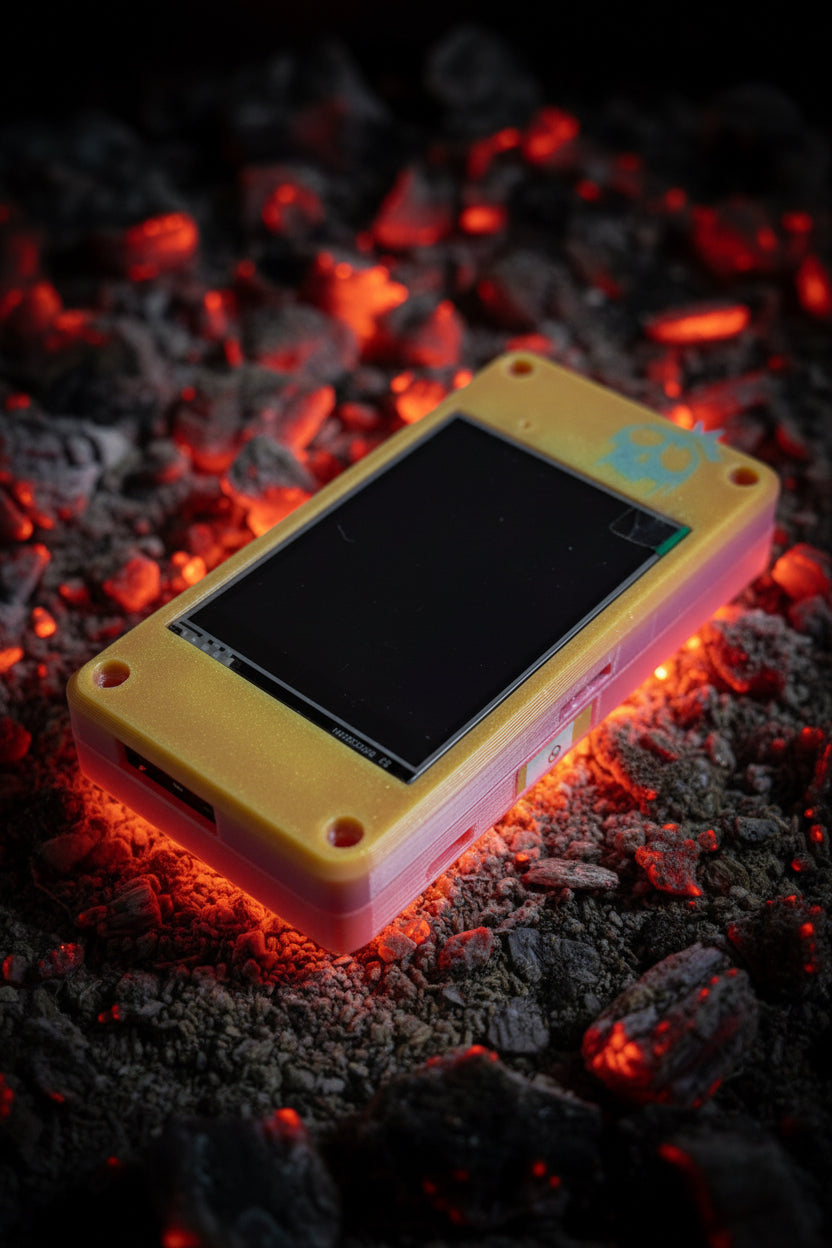
Figure 5.11 — The 2.8” case. The 3.5” build uses the larger “Talking Sasquatch” case. Photo: HaleHound.com.
Case options by screen size:
Table 14 — Case options by screen size
| Screen | Case | ~Price |
|---|---|---|
| 2.8” | 2.8” HaleHound case | ~$30 |
| 3.5” | 3.5” “Talking Sasquatch” case | ~$45 |
Fit sequence:
- Clean the flux with isopropyl and let it dry before closing — trapped flux under an antenna lead or on the SD contacts causes intermittent faults.
- Route the SMA leads and GPS antenna to their planned exits (from the §6 dry-fit). Do not pinch the NRF24 pigtail against the lid.
- Seat the carrier and CYD on their mounts; secure with the M3 hardware.
- Check the battery lead is not under mechanical strain and the BAT pads are not stressed as the case closes.
- Close and re-run Radio Test once more. Closing the case can shift a marginal joint; verifying after assembly catches it before the device goes in a bag.
5.14 Troubleshooting a Classic build
Faults on a Classic build are overwhelmingly wiring or power, not firmware — the firmware is identical to a known-good Fire Weasel unit. Work the table top-down.
Table 15 — 14. Troubleshooting a Classic build
| Symptom | Likely cause | Fix |
|---|---|---|
| Display blank / board dead on USB | Short, or power/GND bridge | Pull USB, re-check §11.1 continuity, find the bridge |
| Display upside-down / touch offset after flash | Normal first-boot state | Settings → Rotation; re-tap touch calibration (Vol 7) |
| CC1101 fails Radio Test | Wrong CS pin for the board, or GDO swap | 2.8” CS=27 / 3.5” CS=21; GDO0=TX, GDO2=RX (§8.2) |
| NRF24 random resets under TX | Missing / far 10 µF cap; PA on CYD rail | Cap at module pads (§10); PA on buck (§9) |
| NRF24 fails Radio Test | CSN on wrong pin; IRQ stealing GPIO 17 | 2.8” CSN=4 / 3.5” CSN=26; leave IRQ open so PN532 keeps 17 (§8.3) |
| PN532 not detected | DIP switches not in SPI mode | CH1 OFF / CH2 ON, power-cycle (§6) |
| GPS never locks | TX on wrong pin / no sky view | TX→GPIO 1 on a 3.5”; take it outdoors (§8.5) |
| Brown-out when the PA keys | PA sharing the CYD 3.3 V rail | Independent buck, common ground (§9) |
| SD logging drops mid-capture | VSPI bus contention under load | Expected under heavy simultaneous use (Vol 3 §2) |
| Works on USB, dead on battery | Battery pad / lead fault | Re-check BAT+/BAT− joints; see Vol 6 §power |
Tip — Rule out the harness before suspecting a module. Because every SPI radio shares one bus, a single stuck CS or a cold VSPI joint presents as several radios failing at once. If more than one radio fails Radio Test, suspect the shared bus (§8.1) or a power/ground fault (§9, §11) before condemning any individual radio.
   Classic build — acceptance checklist
   ┌─────────────────────────────────────────────────┐
   │ [ ] §11 continuity clean; no power↔GND short       │
   │ [ ] Buck meters 3.3 V before PA connected (if PA)  │
   │ [ ] USB smoke test: nothing hot, display boots     │
   │ [ ] Firmware flashed, touch + rotation calibrated  │
   │ [ ] Radio Test: CC1101 / NRF24 / PN532 all OK      │
   │ [ ] GPS locks outdoors (Tools → GPS)               │
   │ [ ] Battery soldered to BAT+/BAT− (Vol 6 §power)    │
   │ [ ] Antennas fitted before any PA transmit         │
   │ [ ] Case closed; Radio Test re-run and still green │
   └─────────────────────────────────────────────────┘
Figure 5.12 — The final gate. Every box ticked is a unit that will behave in the field; a skipped box is a fault that surfaces at the worst time.
With the case closed and Radio Test green, the unit is ready for flashing follow-ups (OTA, SD layout — Vol 7, Vol 8) and field use under the authorization boundary of Vol 9. The Fire Weasel path in Vol 6 reaches the same end state with less hand-wiring and shares this volume’s power section.
Comments (0)