LakeShark · Volume 8
LakeShark Volume 8 — Sub-GHz, NFC & the MIX-RF Tools
`.sub` capture/replay, the OOK decoders, the keyboard radios, and two apps that are not what their names suggest
8.1 About this Volume
This volume covers the “Sub-GHz and RF tools” menu group and the two surveillance-adjacent apps that sit near it. These are the features that most resemble a Flipper Zero or a dedicated pentest handheld, and they are the ones that most need their honesty ledger and legal framing kept in view.
The treatment here is deliberately descriptive. Menus are described in prose and by what they are for; this is a reference on capability, limits and provenance, not a procedure manual, and it does not give step-by-step instructions for operating any transmitter against any target. Two of the apps in this group — DETECTOR and CELL WATCH — have names that oversell what they do, and a large part of the volume’s job is to say plainly what each one actually is.
Two companion volumes: Vol 2 is the hardware reference for the MIX-RF add-on’s
chips and carries the canonical “where this firmware runs” supported-hardware
table; Vol 7 covers the other half of the RF menu (mesh, LoRa and the compass).
The sub-GHz decode lineage connects to the broader Hack Tools sub-GHz material —
the Flipper Zero deep dive covers the .sub format and OOK/FSK protocols at
length, and this volume leans on it rather than repeating it.
Note. Repo state: v2.15.0 (2026-10-15). Several features here carry the author’s own “experimental” or “not verified” labels. They are quoted, not softened. The decode ceiling in §4 is the single most honest number in the firmware and is treated as a feature, not a flaw.
8.2 The RF-tools menu group, in prose
The firmware groups its tools into five families. The one this volume lives in is “Sub-GHz and RF tools,” and the two apps most often mistaken for something more powerful (DETECTOR, CELL WATCH) sit in adjacent groups. The menu map, for orientation:
 LakeShark menu groups
 Radio & signal decoding: P25 · FM · ADS-B · FALLS · CELL WATCH
 Mesh & LoRa: MESH · LORA LABS (Vol 7)
 Sub-GHz & RF tools: SUB-GHZ · REC · MIX-RF · NFC ·
 DETECTOR · EXPERIMENTS (this vol)
 Mapping & navigation: MAP · COMPASS · GPS · NOTES (Vols 6–7)
 Media & system: MUSIC · FILES · UPDATE · SET ·
 RADIOS · LINK · DIAG · TERMINAL (Vol 9)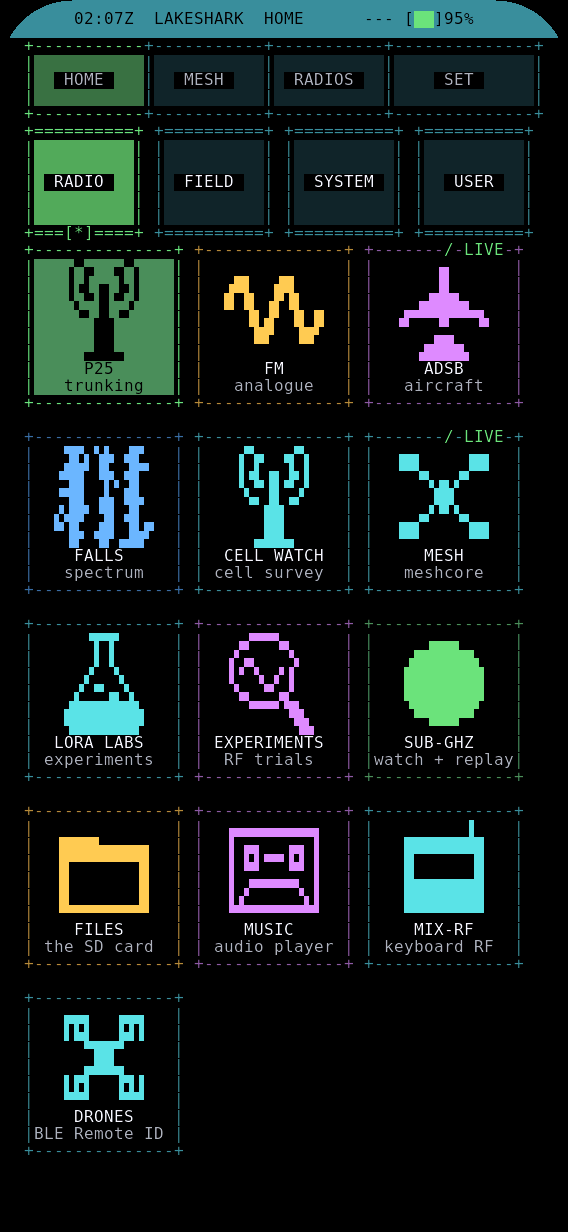
Note where CELL WATCH lives: in the radio/decoding group, with the scanners — not in a security or counter-surveillance group. Its placement is a hint to its real nature (§8). The sub-GHz and MIX-RF apps are the ones that key a transmitter or read a credential; the rest of this group is receive and analysis.
A quick orientation on which apps in this volume transmit, read, or only listen — because the posture of each follows directly from that one property:
Table 1 — because the posture of each follows directly from that one property
| App | TX / Read / RX | Needs MIX-RF? | Posture |
|---|---|---|---|
| SUB-GHZ / REC | RX + experimental TX (replay) | No | Transmit when replaying |
| MIX-RF (CC1101/nRF24) | RX survey (+ TX capable) | Yes | Sensing; TX governed |
| NFC (ST25R3916) | Read | Yes | Credential read |
| DETECTOR | RX (passive) | No | Defensive |
| CELL WATCH | RX (survey) | No | Survey only |
Everything that keys a transmitter or reads a credential is in the top three rows; the bottom two only listen. That split is the fastest way to reason about the legal envelope in §9.
8.3 SUB-GHZ and REC: capture, .sub, and replay
LakeShark’s sub-GHz handling splits across two apps that share a file format with the Flipper Zero.
SUB-GHZ is the analysis and library app: a reader, an analyzer, a browser of saved captures, raw recording, a “learning” mode, and settings. It is the place where a signal is examined and catalogued. The sub-functions map roughly as:
Table 2 — where a signal is examined and catalogued. The sub-functions map roughly as
| SUB-GHZ function | Role |
|---|---|
| Read | Live receive on a tuned sub-GHz frequency |
| Analyzer | Measure/inspect a signal (timing, modulation guess) |
| Saved captures | Browse the .sub library on SD |
| Raw record | Capture edge timings to a .sub RAW file |
| Learning | Associate a captured signal for later recognition/replay |
| Settings | Frequency, modulation preset, defaults |
REC is the capture-and-playback app: signal capture, .sub export, playback,
and — on the LR2021 board only — raw I/Q recording and replay. The on-disk format
is the Flipper .sub RAW format, which is why captures move between a
LakeShark and a Flipper Zero without conversion. The SD card holds the library
(Vol 9 §4).
The replay side carries explicit, load-bearing caveats from the author:
OOK/FSK replay is experimental. At 433 MHz I/Q replay, OOK is verified, but “FSK replay is not yet verified over the air.”
That is the honest state: a captured OOK signal can be replayed and has been confirmed on air at 433 MHz; FSK replay exists in the code path but has not been shown to work over the air. This is a receive-and-analysis tool that can retransmit a raw capture, not a polished sub-GHz attack platform — and the distinction is the author’s, not an editorial hedge.
Table 3 — 3. SUB-GHZ and REC: capture, .sub, and replay
| App | Does | Notes |
|---|---|---|
| SUB-GHZ | read · analyze · browse · raw record · learn · settings | Analysis + library |
| REC | capture · .sub export · playback · (LR2021) I/Q rec/replay | OOK replay verified; FSK not |
| Format | Flipper .sub RAW | Interchangeable with a Flipper Zero |
Warning. Replaying a captured sub-GHz signal transmits. Many of the signals one might capture — garage doors, gate remotes, TPMS, keyfobs — belong to devices you may not own, and retransmitting them can be a crime even as a test. The legal envelope in §9 is not optional reading for this app.
The .sub RAW format, briefly. The interchange that makes LakeShark and the
Flipper Zero talk to each other is the Flipper .sub file — a plain-text header
(frequency, preset/modulation, protocol name) followed, for a RAW capture, by a
RAW_Data: list of signed microsecond durations: positive for carrier-on,
negative for carrier-off. A RAW capture records the timing of the edges rather
than any decoded meaning, which is why it round-trips a signal the protocol
decoders (§4) cannot interpret — the edges are preserved even when the semantics
are not. That is also why a RAW replay is modulation-agnostic at capture time but
bounded at replay time by what the transmitter can faithfully reproduce (OOK
verified, FSK not, §3).
.sub RAW (schematic)
 Filetype: Flipper SubGhz RAW File
 Frequency: 433920000
 Preset: FuriHalSubGhzPresetOok650Async
 Protocol: RAW
 RAW_Data: 320 -160 320 -480 160 -320... (µs on/off edge list)
The EXPERIMENTS entry in the same menu group is the firmware’s holding pen for work-in-progress RF tools — the place where features that are not yet promoted to a first-class app live. Its contents move with the near-daily releases (Vol 10 §8); treat anything there as explicitly unfinished, which is what the menu name is telling you.
8.4 The two integer decoders, and the honest decode ceiling
Beyond raw .sub capture, LakeShark carries two fixed-point protocol decoders
that try to turn a raw OOK capture into a meaning — a button code, a device ID —
rather than just a waveform to replay. They are integer-only (no floating point),
which is what lets them run on the P4 without stealing cycles from the receive
task.
Table 4 — 4. The two integer decoders, and the honest decode ceiling
| Decoder | Protocols | Modulation |
|---|---|---|
subghz_pwm | EV1527, PT2262, HT12E | OOK, pulse-width-coded |
subghz_nrz | NRZ-coded remotes | OOK, non-return-to-zero |
The subghz_pwm decoder handles the classic fixed-code OOK families — the
EV1527/PT2262/HT12E encoders behind a huge fraction of cheap garage, gate and
alarm remotes, which encode bits as wide-vs-narrow pulses. subghz_nrz handles
the NRZ-coded variants where a bit is a level over a bit period rather than a
pulse shape.
A little framing detail, because it explains both what the decoders can do and
why they are integer-only. The PWM family encodes each bit as a pulse whose
width ratio carries the value — a short-high/long-low versus long-high/short-low
pattern around a base timing element (Te). The decoder’s job is to measure edge
timings, quantise them against Te, and read out the bit string plus the fixed
address/data split those chips use:
 EV1527/PT2262-class OOK bit (schematic)
 '0': ▁█▁▁▁ short high, long low
 '1': ▁███▁ long high, short low (ratios vary by chip family)
 frame: [ preamble ][ 20-bit address ][ data bits ][ sync gap ]...repeat
That is pure integer edge-timing arithmetic — no FFT, no floating point — which is
exactly why it fits in spare MCU cycles without starving the receive task.
subghz_nrz does the level-per-bit-period equivalent for NRZ-framed remotes. The
two together cover the fixed-code OOK world; everything with a cipher or a hopping
counter is out of scope by construction, which is the subject of the ceiling
below.
Now the honest part, and it is the most honest number in the whole firmware: against a test corpus of 41 unseen captures, the decoders cleanly decode about 15. That is roughly a third.
 Decode outcome over 41 unseen OOK captures (schematic)
 decoded ███████████████ ~15
 not ██████████████████████████ ~26
 └── rolling-code & LiftMaster excluded by design ──┘
Why only a third, and why that is honest rather than broken:
- Rolling-code remotes are excluded by design. KeeLoq, LiftMaster/Security+, and any hopping-code system change their code every press. There is nothing to “decode” to a reusable value, and the firmware does not pretend otherwise. A large share of the undecoded captures are these — correctly undecoded.
- The corpus is unseen. The ~15/41 is measured against captures the decoders were not tuned on, which is the only number that means anything. Many sub-GHz tools quote decode rates against their own training set; this one does not.
- Fixed-code is the honest target. The two decoders cover the fixed-code OOK families well; everything outside that — FSK protocols, proprietary framing, rolling codes — is out of scope and shows up as a miss.
To put the ~15/41 figure in context against the rest of the sub-GHz world: a
Flipper Zero with its full protocol library and years of community decoders
recognises far more named protocols, and a Proxmark-grade bench with a PC behind
it more still. LakeShark’s two integer decoders are a deliberately small, honest
subset — the fixed-code OOK families that matter most and run cheapest on the MCU.
The right mental model is “a scanner that can also name common fixed-code remotes,”
not “a sub-GHz protocol workbench.” For the latter, the Flipper Zero deep dive in
this hub is the reference, and the shared .sub format (§3) means a capture made
on LakeShark can be carried to a Flipper for a deeper decode attempt.
Note. A missed decode is not a failed capture. Even a signal the decoders cannot interpret is still captured as raw
.suband can be examined in the analyzer or replayed (subject to §3’s OOK-only caveat and §9’s legal envelope). The decoder’s job is to name the signal; capture happens regardless.
The honesty of the ~15/41 figure is a feature of this dive: a tool that tells you it decodes a third of unseen captures and excludes rolling codes on purpose is more trustworthy than one claiming near-universal decode. It sets correct expectations before a purchase.
8.5 The MIX-RF keyboard: CC1101, nRF24 and a power trap
The MIX-RF keyboard (~$74, optional) is a physical-keyboard add-on that is also a three-radio expansion. It clips LakeShark’s capability up toward Flipper/pentest territory by adding dedicated sub-GHz and 2.4 GHz front ends plus an NFC reader.
Table 5 — 5. The MIX-RF keyboard: CC1101, nRF24 and a power trap
| MIX-RF radio | Band | LakeShark role |
|---|---|---|
| CC1101 | sub-GHz (~300–928 MHz) | Energy monitoring / activity scans |
| nRF24 | 2.4 GHz | Activity scans |
| ST25R3916 | 13.56 MHz NFC | MIFARE reads (§6) |
In the MIX-RF app the firmware describes these as keyboard CC1101 energy monitoring, nRF24 activity scans, and NFC detection. The framing is telling: these are survey/scan functions — is there energy here, is there 2.4 GHz activity there — not a turnkey replay or injection suite. The CC1101 adds a second sub-GHz path alongside whatever the onboard radio and an RTL-SDR already provide; the nRF24 adds a 2.4 GHz activity sense the rest of the board lacks.
A word on what “energy monitoring” and “activity scans” mean, because the verbs are deliberately modest. The CC1101 is a sub-GHz transceiver (roughly 300–928 MHz) with a received-signal-strength readout; “energy monitoring” is using that RSSI to sense whether a channel is occupied — a crude sub-GHz spectrum-occupancy sense, not a decoder. The nRF24 is a 2.4 GHz transceiver whose “activity scan” sweeps channels looking for the short bursts that nRF24-based peripherals (and some other 2.4 GHz traffic) emit. Neither is a turnkey replay or injection tool in the MIX-RF app; they extend LakeShark’s sensing across bands the onboard radio and the RTL-SDR do not naturally cover — the CC1101 giving a second, independent sub-GHz path and the nRF24 giving a 2.4 GHz sense the rest of the board lacks entirely.
Table 6 — 5. The MIX-RF keyboard: CC1101, nRF24 and a power trap
| MIX-RF chip | Band | ”What it does here” | What it is NOT |
|---|---|---|---|
| CC1101 | ~300–928 MHz | Channel-occupancy sense (RSSI) | A polished sub-GHz replay suite |
| nRF24 | 2.4 GHz | Burst/activity scan | A 2.4 GHz attack framework |
| ST25R3916 | 13.56 MHz | MIFARE reads (§6) | A cloner/emulator |
And now the trap, which is severe enough that the author documents it as a hardware hazard, not a tip:
Warning. The MIX-RF keyboard has a 5 V USB output. Do not feed it back into the P4. Doing so caused repeated power cycling (reboot loops) in testing. Power the P4 only from its own USB-C. The add-on augments the board; it must not become a second power source into it.
This is the same class of pitfall as the shared-battery problem noted elsewhere in the dive (Vol 9 §6): the P4’s power tree does not tolerate being back-fed, and the MIX-RF’s convenient 5 V rail is exactly the wrong thing to route into it. Wire the add-on for data and let the P4 power itself.
8.6 NFC on the ST25R3916
The NFC reader is the ST25R3916 on the MIX-RF add-on (the chip is not named in the UI, but it is the part fitted). The NFC app targets 13.56 MHz MIFARE Classic:
Table 7 — the UI, but it is the part fitted). The NFC app targets 13.56 MHz MIFARE Classic
| NFC capability | Status |
|---|---|
| MIFARE Classic 4K reads | Supported |
| Block maps | Supported |
| Key entry (hex) | Supported |
| Hex / ASCII viewing | Supported |
| Saved dumps (to SD) | Supported |
| MIFARE Mini / 1K full reads | Experimental |
The shape of this is a reader: present a 13.56 MHz MIFARE Classic card, walk its blocks, supply keys by hand, view and save the dump. There is no claim of cloning or emulation here — that is the Proxmark3 / iCopy-X / Chameleon Ultra domain in this hub, and those tools do the credential-research job properly. LakeShark’s NFC is a convenience read on a card you can physically present, not a security-lab NFC platform.
The MIFARE Classic structure the app exposes, for context: a Classic 4K card is a grid of sectors, each split into blocks, with the last block of every sector holding two keys (A and B) and the access conditions. Reading a block requires authenticating to its sector with a correct key — which is why the app has a hex key-entry field and a block map. The ST25R3916 does the RF and anticollision; LakeShark supplies the keys and renders the returned blocks as hex/ASCII, saving the dump to SD. What it deliberately does not do is run the Crypto1 key-recovery attacks (nested, darkside, hardnested) that a Proxmark3 or Chameleon Ultra uses to derive unknown keys — you bring the keys, or you read only the sectors whose keys are default/known.
Table 8 — 6. NFC on the ST25R3916
| MIFARE Classic 4K | Figure |
|---|---|
| Sectors | 40 (32 × 4-block + 8 × 16-block) |
| Key per sector | A and B (6 bytes each) |
| Cipher | Crypto1 (broken since 2008) |
| LakeShark’s role | Authenticate with supplied keys, read, dump |
| LakeShark does NOT | Recover unknown keys, clone, or emulate |
The “Mini/1K full reads are experimental” note is worth flagging for anyone expecting uniform behaviour across MIFARE Classic sizes: the 4K read path is the supported one, and the smaller variants (Mini, 1K) are flagged as not fully validated. In practice the geometry differs — sector counts and the 4-block vs 16-block split — and the app’s maturity is on the 4K case. Expect the 4K read to be solid and the smaller cards to be hit-or-miss until the note clears in a later release (Vol 10 §8).
Note. MIFARE Classic’s Crypto1 cipher is long broken, and reading a 4K card whose keys you hold is routine. Reading a card you do not own or control is a different matter — the legal envelope (§9) governs access-control credentials as firmly as it governs RF.
8.7 DETECTOR: drone Remote ID and the rules file
DETECTOR is a background-alerting app. It watches for two things and raises a notice when it sees them:
- Drones broadcasting Remote ID. Under FAA Remote ID (and equivalent regimes), many drones broadcast an identity-and-location beacon over Wi-Fi or Bluetooth. DETECTOR listens for these broadcasts — via the C6’s Wi-Fi/BT (Vol 9 §7) — and alerts on a drone in the area. It is receiving a beacon the drone is required to transmit; it is not defeating, jamming or tracking the aircraft.
- SWEEP categories. DETECTOR also raises alerts for the categories its SWEEP rules define, and a screenshot caption notes SWEEP finds nearby trackers — i.e. it can flag item-trackers (AirTag-class beacons) and similar advertised devices in the vicinity.
What the two watch streams cover, side by side:
Table 9 — What the two watch streams cover, side by side
| Watch | Emission class | Transport | What it flags |
|---|---|---|---|
| Remote ID | Mandated drone beacon | Wi-Fi / BT | A drone broadcasting RID nearby |
| SWEEP | Advertised BLE/Wi-Fi devices | BT / Wi-Fi | Trackers + rule-defined categories |
Remote ID itself is worth a sentence of context, because it is what makes this feature possible at all. Under the FAA’s Remote ID rule (and the EU’s equivalent under EASA), most drones must broadcast an unencrypted identity-and-telemetry message — a serial or session ID, the drone’s position and altitude, and the control-station position — over Wi-Fi (NaN/Beacon) or Bluetooth so that anyone nearby can receive it. DETECTOR is simply a receiver for that mandated broadcast. It is not defeating, spoofing, jamming or tracking the aircraft in any adversarial sense; it reads a beacon the drone is legally required to send in the clear.
The useful engineering detail is that DETECTOR is rules-driven: it ships with built-in rules but will load your own rules file from the SD card. That makes it extensible without a reflash — the signatures it alerts on are data, not baked-in code. An operator who knows the advertisement pattern of a device class can add a rule for it.
 DETECTOR
 ├── Remote ID watch: drone RID beacons (Wi-Fi / BT via C6)
 ├── SWEEP: nearby trackers + rule-defined categories
 └── Rules: built-in OR user rules file on SD card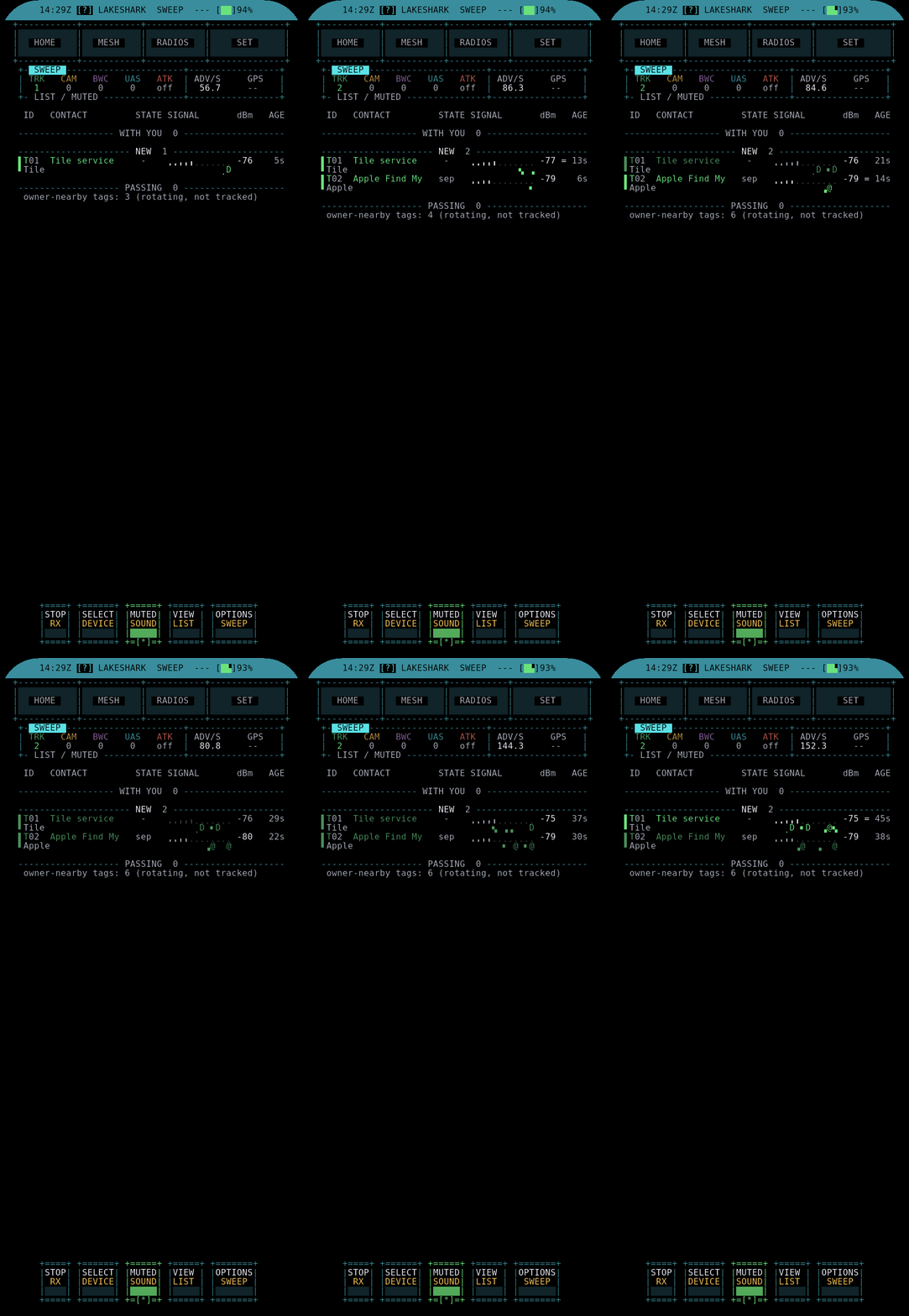
The rules-file design is worth dwelling on, because it is what makes DETECTOR more than a fixed gimmick. Remote ID beacons and BLE/Wi-Fi advertisements carry recognisable fields — manufacturer data, service UUIDs, name patterns — and a “rule” is essentially a signature matched against those fields. Shipping the signatures as an SD-card data file (rather than compiled into the firmware) means:
- the alert set can be extended without a reflash or a source build;
- an operator who characterises a new device class (a new tracker, a new drone’s RID format) can add a rule and share the file;
- the firmware stays small and the churn (Vol 10 §8) does not have to touch the signature set on every release.
 DETECTOR rule flow
 C6 Wi-Fi/BT scan ──► advertisement fields ──► match against rules ──► alert
 ▲
 built-in rules + /sd/<your rules file>
Note. DETECTOR is a passive, defensive feature — it listens for things that are broadcasting and tells you they are there. It aligns with the counter-surveillance topic dives elsewhere in this hub (the hidden-camera and item-tracker material). Its value is situational awareness, not interdiction. It receives beacons that devices are required by regulation to transmit (Remote ID) or that they advertise openly (BLE trackers) — there is no interception of anything private in what it does.
8.8 CELL WATCH, and what it is not
CELL WATCH is the feature most likely to be misread, so this section exists mainly to say what it is not.
What it is: a cellular-band RF survey. The firmware lists it as a “Cellular band survey,” and the release notes describe an “LTE cell monitor.” It measures RF energy and activity across cellular bands and presents a baseline of what is on the air. It supports only the RTL-SDR as its radio (not the HackRF or LR2021). That is the whole of it: a spectrum-occupancy readout for the cellular bands.
What it is NOT — and this is the load-bearing statement of the section:
CELL WATCH is not an IMSI-catcher detector. It does not decode cellular protocol, does not read IMSIs, and cannot distinguish a legitimate base station from a rogue one. It is an RF baseline survey of the cellular bands — nothing more.
The distinction matters because a tool that merely shows cellular-band energy is sometimes mistaken for a Stingray/IMSI-catcher detector (the EFF Rayhunter class of tool, tracked separately in this hub). Those tools decode the cellular control channel and reason about base-station behaviour; CELL WATCH does not touch the protocol layer at all. Reading its output as “there is/ isn’t an IMSI catcher here” is a category error. It answers “what cellular RF is present,” and only that.
What a cellular-band survey can legitimately tell you is still useful in its own right: which bands carry energy at a location, roughly how strong, and how that changes as you move — a coverage/occupancy picture. LTE (and the lower NR bands) sit across a scattered set of frequency blocks, and an RTL-SDR’s tuning range reaches a meaningful subset of them. The survey is a scanner’s-eye view of that spectrum, bounded by the dongle: it supports only the RTL-SDR (not the HackRF or LR2021), because the band plan and the sample-rate requirements of a useful sweep were validated on that radio. It is a receive-only occupancy survey, full stop — no demodulation, no identity, no base-station fingerprinting.
Table 10 — 8. CELL WATCH, and what it is not
| CELL WATCH (LakeShark) | An IMSI-catcher detector | |
|---|---|---|
| Layer | RF energy / band survey | Cellular protocol / control channel |
| Reads IMSIs | No | — (detects anomalous behaviour) |
| Decodes cellular | No | Yes |
| Radio | RTL-SDR only | Dedicated cellular RX |
| Answers | ”What RF is on these bands" | "Does this cell look rogue” |
Note. The honest framing is the point. CELL WATCH sitting in the radio/decoding menu group (§2), beside the scanners, is consistent with what it is: another receive-and-survey view, not a security verdict engine.
8.9 The legal envelope for everything in this volume
LakeShark is an RX-focused scanner, and its overall posture is milder than an
attack platform (Vol 1, Vol 10). But the features in this volume are the
exceptions — several of them transmit or read credentials — so the legal envelope
is stated here in full. The governing rules for every tool in this hub are in
../_shared/legal_ethics.md; this is the volume-specific application.
Table 11 — 9. The legal envelope for everything in this volume
| Feature | Posture | The rule |
|---|---|---|
| SUB-GHZ / REC capture | Receive | Listening is generally permissible; recording others’ remotes is not neutral |
| OOK/FSK replay | Transmit | Retransmitting a captured remote can be a crime; test only against gear you own |
| MIX-RF CC1101 / nRF24 | Survey / scan | Passive sensing; keying a TX is governed as above |
| NFC (ST25R3916) | Read | Read only cards you own or are authorized to read |
| DETECTOR | Receive (passive) | Listening for required beacons — low-risk, defensive |
| CELL WATCH | Receive (survey) | RF survey only; do not interpret as a security verdict |
Jurisdiction shapes every row of that table, and the variation is wide enough that no single rule travels. A few of the fault lines a user should know they are near:
- Scanner listening is unrestricted in some places, licensed or limited in others, and in a few it is lawful to own a scanner but unlawful to act on what you hear. LakeShark’s receive features sit under whichever of these applies where it is used.
- Sub-GHz retransmission touches both radio law (unauthorised emission) and, if the target is an access-control device, computer-misuse/property statutes. “I only replayed my own capture” is not a defence if the device was not yours.
- NFC/credential reads of cards you do not control can be an offence on their own, independent of what you do with the data.
Three principles cover all of it:
- Own the hardware or hold written authorization. Every transmit and every credential read is against something; make sure it is yours or you are allowed.
- Transmit is where the law bites. Replaying a sub-GHz capture, keying the CC1101, or any RF emission puts you under the regional radio rules and, potentially, computer-misuse and access-control statutes. Receiving is far safer than transmitting almost everywhere.
- Know what the tool actually does before you trust its output. The CELL WATCH and DETECTOR sections exist because a mislabelled capability leads to bad decisions — operational and legal.
The through-line of this volume is that LakeShark’s RF toolbox is capable but honest about its edges, and that the two apps with the most imposing names — DETECTOR and CELL WATCH — are the most modest in what they actually do. DETECTOR listens for beacons that are broadcast in the clear by regulation or by design; CELL WATCH is a band-occupancy survey and nothing more. The features that genuinely warrant caution are the quiet ones: sub-GHz replay, which transmits, and the MIX-RF radios and NFC reader, which touch other people’s devices and credentials. Matching the caution to the capability — rather than to the name — is the correct way to carry this toolbox, and it is why §9 sorts the whole group by transmit-versus-receive rather than by how dramatic each app sounds.
Vol 9 leaves the RF features behind and covers getting the firmware onto the hardware: the web installer, the two-slot OTA, the SD-card roles, the ESP-IDF source build, and the genuinely fiddly C6 co-processor reflash.
Comments (0)