M5Stack Cardputer ADV · Volume 1
Dual-Screen Clamshell Mod — Volume 1: Overview, Provenance, and the Three Things That Will Bite You
Adding a 2.8\" external ILI9341 in a 3D-printed clamshell, driven by Talking Sasquach's M5PORKCHOP_DualScreen firmware — what the build is, where it came from, and the constraints to settle before you pick up a soldering iron
1.1 About this sub-project
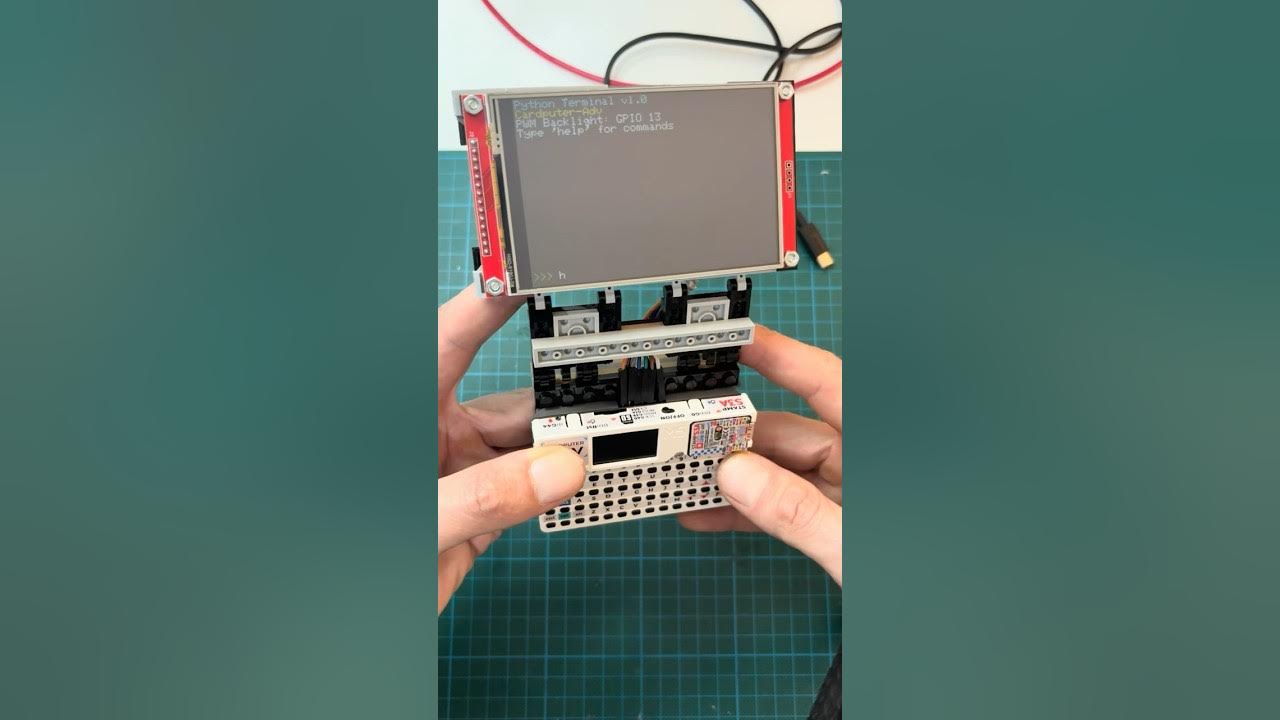
This is a build deep dive, not a reference deep dive. The Cardputer ADV reference (12 volumes) covers what the stock device is — the ESP32-S3 hardware, the EXT bus, the Cap LoRa-1262, the firmware ecosystem, flashing and recovery. This sub-project covers one specific physical modification: bolting a second, larger screen onto a Cardputer ADV and running a firmware that drives both displays at once.
The motivation is simple. The Cardputer’s built-in 1.14″ 240×135 LCD is fine for a status line and a menu, but it is cramped for anything that wants to show you something — a spectrum waterfall, a packet ticker, an animated avatar, a map. Talking Sasquach’s answer was to hinge a 2.8″ 320×240 panel onto the device in a printed clamshell and split the UI across the two screens: the big panel becomes the show, the built-in screen stays the controller.
Volume 1 sets the table: what the parts are, where the design came from (so you can credit it and find the files), how the two-screen split works at a high level, the wiring in one paragraph, and — most important — the three constraints that determine whether this build is even viable on your particular ADV. Settle those before you buy a screen.
1.2 What the mod is, in one paragraph
A 2.8″ ILI9341 SPI TFT (320×240) is mounted in a 3D-printed clamshell shell that hinges over the Cardputer ADV, wired into the device’s 14-pin EXT bus. A custom firmware — M5PORKCHOP_DualScreen — renders full-screen “action” views (the recon waterfall, the animated piglet, file transfer, etc.) on the external panel, scaled to fit with thin letterbox bands, while the built-in LCD always shows the current view natively: menus, settings, captures, stats. The external panel shares the SPI bus the microSD card already uses. No PSRAM is involved; the firmware scales each frame live and degrades gracefully if heap runs low.
1.3 Provenance — credit where it’s due, and where the files live
Two layers, two authors:
-
The firmware is
M5PORKCHOP_DualScreenby skizzophrenic (Talking Sasquach) — a fork of 0ct0’s M5PORKCHOP, a Pwnagotchi-style ESP32-S3 firmware (passive Wi-Fi/BLE recon with an XP/achievement/avatar layer). Sasquach added the dual-screen split (thesrc/ui/ext_display.*driver and thedisplay.cpphooks). It is MIT-licensed (© 2025 0ct0). A read-only snapshot is cached in this project at05-resources/M5PORKCHOP_DualScreen/(upstream commitf292b5c, v0.95_SQUACH; provenance in that folder’sPROVENANCE.md). The dual-screen design notes the firmware author left behind are inEXT_DISPLAY_NOTES.mdthere — read them; they are the primary source for §4 and §5 below. -
The physical build — the clamshell shell, the screen mount, the hinge — is not in the firmware repo. It comes from the MakerWorld model “Cardputer ADV XL External 2.8 Display Mod” (model 2795834). The printed parts, the exact screen module to buy, and the assembly are documented there and in Sasquach’s video walkthrough; capture that bill of materials when you order parts. (We deliberately keep no copy of the print files here — fetch them from MakerWorld at build time.)
This sub-project is a build journal and engineering reference around those two upstreams, plus the changes needed to run them cleanly on a Cardputer ADV specifically. It does not redistribute their files.
1.4 How the dual-screen split works
The firmware treats the two panels as having two different jobs:
- External 2.8″ ILI9341 (320×240, landscape) = the main show. The “action” modes render full-screen here, scaled to fit with thin black letterbox bars top and bottom. Those bands aren’t dead space — they run switchable effects (a Matrix rain, a live AP ticker, a channel spectrum, fire that reacts to packet traffic, and so on), cycled from the keyboard.
- Built-in 1.14″ LCD = the controller, always live. Every menu and text screen — settings, captures, stats, achievements, diagnostics — renders here natively. While you are in a menu, the external panel keeps showing a live animated backdrop rather than freezing.
The split is what makes the device usable two-handed: you drive with the keyboard while watching the built-in screen, and the big panel is glanceable output. Because the ESP32-S3FN8 has no PSRAM, the firmware scales the three on-device canvases straight to the panel each frame (it dropped an earlier 32 KB composite buffer to relieve heap pressure) and falls back to a centered 1:1 clone if an allocation ever fails — so a low-heap moment degrades the picture instead of crashing.
1.5 The wiring, in one paragraph
The panel hangs off the EXT header: CS = GPIO5, RST = GPIO3, DC = GPIO6, MOSI = GPIO14, SCK = GPIO40, MISO unwired, plus 3V3 and GND. It runs on SPI2 / FSPI — the same bus the microSD card uses — with bus_shared = true at a 27 MHz write clock. (The full EXT pinout and the bus-sharing rules are in the reference dive, Vol 3 — Pinout and Expansion Buses.) The detailed bring-up, the ILI9341 init sequence, and the rotation/RGB-order settings are Volume 2’s job; this paragraph is here so the wiring is visible before the constraints below, which depend on those exact pins.
1.6 The three things that will bite you
Before you buy a screen, settle these. Each one can make the build not work — or quietly conflict with something else you wanted from the ADV.
1.6.1 Constraint 1 — Build for the ADV, not the original Cardputer
The upstream platformio.ini targets board = m5stack-stamps3 (the generic StampS3 / original-Cardputer target). This project’s standing rule is to build for m5stack-cardputer-adv — different pinout, partition layout, and bus support; binaries are not interchangeable. The firmware author’s own header comment says the dual-screen code was run on a Cardputer ADV, so it does work there — but verify the EXT 14-pin pinout (GPIO 5/3/6/14/40) maps the same on your ADV before trusting the wiring. Getting this wrong is the difference between a working panel and a dark one. (Volume 2 walks the board-target change and the pin verification.)
1.6.2 Constraint 2 — You can’t run the screen and the LoRa/GNSS Cap at the same time
This is the big one. The dual-screen notes say plainly: turn GPS off before flashing, because GPS drives GPIO 3 / 5 / 6 — which are exactly the panel’s RST / CS / DC lines. On the Cardputer ADV those same pins are Cap LoRa-1262 / GNSS territory. So the external display and the LoRa/GNSS Cap contend for the same EXT pins and cannot both be active. If Meshtastic / off-grid mesh / GPS is why you bought the ADV, decide now whether this device is your screen build or your radio build — one ADV can’t be both at once on these pins. (A second ADV — which is the premise of this whole sub-project — is the clean way to have both.)
1.6.3 Constraint 3 — Flash to OTA, never to factory
The firmware ships its own 8 MB partitions.csv. As always on this device, flash a custom build to an OTA slot, never the factory/app0 partition — that is M5Launcher’s home and your recovery lifeline (hold Esc at power-on to force-boot back to the launcher if a flashed firmware crash-loops). Volume 5 covers flashing and the partition/M5Launcher coexistence in full; the rule is stated here so it’s in your head before the first flash.
1.7 What’s coming in this build (forward map)
This overview is Volume 1. The rest of the sub-project (authored as the physical build proceeds — these volumes fill in with real bench photos once the second ADV is modified):
- Vol 2 — The external panel + EXT-bus bring-up. The exact 2.8″ ILI9341 module, the init sequence and rotation/RGB-order settings, the shared-SD-SPI bus configuration, and verifying the pinout on the ADV.
- Vol 3 — The clamshell. The MakerWorld print (parts, filament, settings), the screen mount and hinge, and routing the wires into the EXT header without fouling the lid.
- Vol 4 — The firmware deep dive.
ext_displayarchitecture, the dual-screen push path, the letterbox band effects, and what to change vs. upstream for the ADV. - Vol 5 — Build for
m5stack-cardputer-adv, flash, and recover. The board-target fix, OTA flashing, M5Launcher coexistence, and backing out cleanly. - Vol 6 — Assembly + operation. Full assembly walkthrough, the keymap, the band-effect cycle, and living with the two-screen device day to day.
The adapted firmware that ships to this project’s second Cardputer ADV will live in
code/firmware/(per the project’s code-tree convention), kept separate from this research material.
1.8 Resources
- Cached upstream firmware:
05-resources/M5PORKCHOP_DualScreen/(commitf292b5c, MIT © 2025 0ct0) — see itsEXT_DISPLAY_NOTES.mdandPROVENANCE.md. - Upstream:
https://github.com/skizzophrenic/M5PORKCHOP_DualScreen· basehttps://github.com/0ct0-glitchM5PORKCHOP. - Physical build (print files + screen BOM): MakerWorld model 2795834 — “Cardputer ADV XL External 2.8 Display Mod.”
- Cardputer ADV reference deep dive: overview + decision tree, pinout + EXT bus, Cap LoRa-1262 + GNSS, flashing + recovery.
Comments (0)