M5Stick S3 · Volume 8
M5Stack M5StickS3 Volume 8 — Flashing and Updating Firmware
Web flashers + M5Burner + esptool.py + native USB-CDC discovery + OTA + recovery
8.1 About this volume
Vol 8 covers flashing on M5StickS3. The mechanics parallel the Cardputer ADV (Vol 8 there); two M5StickS3-specific items deserve special treatment:
- Native USB-CDC discovery — M5StickS3 enumerates as
/dev/ttyACM0(Linux), NOT/dev/ttyUSB0. § 8 covers this. - OPI PSRAM build flag mandatory for custom builds (cross-ref Vol 7 § 8).
The M5StickS3 is essentially un-brickable by firmware mistakes thanks to the ESP32-S3’s mask-ROM bootloader. The recovery story (§ 7) walks the process.
8.2 Web flashers (zero-install)
Requirements: Chromium-family browser (Chrome / Edge / Brave / Arc). Web Serial API. Firefox / Safari do NOT support Web Serial — they will show Connect buttons but they won’t work.
Major web flashers for M5StickS3 (as of 2026-05-13; verify each supports M5StickS3 in its board dropdown):
Table 1 — Major web flashers for M5StickS3 (as of 2026-05-13; verify each supports M5StickS3 in its board dropdown)
| Firmware | URL | M5StickS3 support |
|---|---|---|
| M5Stack UiFlow | https://uiflow.m5stack.com/ | Yes |
| Bruce installer | https://bruce.computer/ | TBD — verify |
| Evil-M5Project (Spooks4576 / 7h30th3r0n3) | linked from https://github.com/7h30th3r0n3/Evil-M5Project | TBD — verify |
| ESP Web Tools | https://esphome.github.io/esp-web-tools/ | Generic; works if firmware author publishes manifest |
Process:
- Plug M5StickS3 via USB-C.
- Open web flasher URL in Chrome / Edge.
- Click Connect — browser pops a serial-port picker. Select the M5StickS3’s port (
/dev/ttyACM0or similar). - Select board variant: “M5StickS3” or “M5StackS3-K150” — if not in dropdown, web flasher may not support M5StickS3 yet.
- Pick firmware version.
- Click Flash / Install. Wait ~2 minutes.
- Device reboots into freshly flashed firmware.
Tip: bookmark M5Stack’s UiFlow flasher. UiFlow firmware can serve as a known-good fallback if other firmwares misbehave.
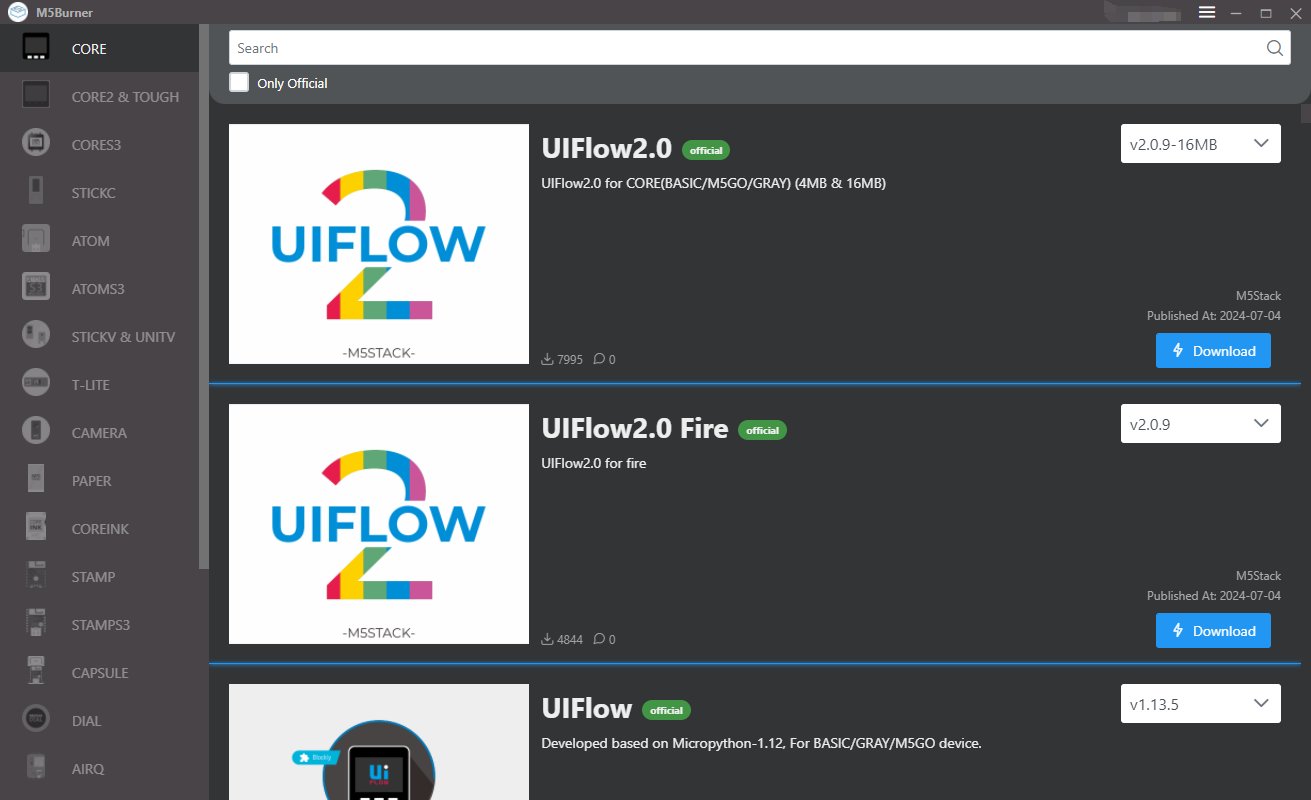
8.3 M5Burner desktop
Download: https://docs.m5stack.com/en/download. Windows / macOS / Linux.
Process:
- Plug M5StickS3 via USB-C.
- Open M5Burner.
- Hold Button A while connecting USB (or while clicking Connect in M5Burner). Release Button A after connection. ESP32-S3 enters download mode.
- M5Burner’s left sidebar → “StickS3” category. (Future M5Burner releases may add dedicated M5StickS3 entry.)
- Search firmware: “M5StickS3 factory” (restore), “UIFlow Code” (block coding), “Evil-M5Project” (pentest), etc.
- Click Download → Burn.
- COM port: auto-detect or pick manually
- Baud rate: 1500000 default; some hardware drops to 921600
- Wait ~3-5 minutes.
- Device reboots.
Use cases for M5Burner over web flasher:
- Fleet flashing (multiple M5StickS3s in sequence)
- When Web Serial isn’t available (Firefox-only system)
- Factory firmware restore (M5Burner has the official factory build)
- Specific firmware versions not in any web flasher
8.4 esptool.py CLI
Setup: pip install esptool.
Read flash (backup):
esptool.py --chip esp32s3 -p /dev/ttyACM0 -b 1500000 \
    read_flash 0 0x800000 m5sticks3_backup.bin
Reads the entire 8 MB flash. Save this as your factory-state baseline.
Write a single binary:
esptool.py --chip esp32s3 -p /dev/ttyACM0 -b 1500000 \
    --before default_reset --after hard_reset \
    write_flash -z 0x0 firmware.bin
The -z flag enables compression (faster).
Write a complete M5-style install (bootloader + partitions + app):
esptool.py --chip esp32s3 -p /dev/ttyACM0 -b 1500000 \
    --before default_reset --after hard_reset \
    write_flash -z \
        0x0 bootloader.bin \
        0x8000 partitions.bin \
        0xe000 boot_app0.bin \
        0x10000 firmware.bin
Note: ESP32-S3 boots from offset 0x0, not 0x1000 (which is the classic ESP32 address). Common new-user mistake.
Erase entire flash (nuclear option):
esptool.py --chip esp32s3 -p /dev/ttyACM0 erase_flashAfter erase, device is in “no firmware” state. Reboot → enter download mode → flash something via esptool / M5Burner / web flasher.
Use cases for esptool over web flasher / M5Burner:
- Scripting / CI / automation
- Recovery when other tools fail
- Firmware development (
pio run -t uploaduses esptool internally) - Flashing custom binaries not in any catalog
8.5 Factory firmware backup (do this before anything)
First-time discipline: before flashing anything new to a fresh M5StickS3, back up the original factory firmware:
esptool.py --chip esp32s3 -p /dev/ttyACM0 -b 1500000 \
    read_flash 0 0x800000 m5sticks3_stock_$(date +%Y%m%d).bin
Stash on NAS / cloud backup / external drive. If anything subsequently goes wrong:
esptool.py --chip esp32s3 -p /dev/ttyACM0 -b 1500000 \
    write_flash 0x0 m5sticks3_stock_YYYYMMDD.bin
The backup takes ~30 seconds. Skipping this step is a regret-creator. Don’t.
8.6 OTA over the air
Most community firmwares support OTA. The M5StickS3 connects to Wi-Fi and updates without USB cable.
Three OTA paths:
- Captive web server — firmware hosts a web UI; upload
.binvia browser. Common for Marauder, NEMO. - Firmware-author’s OTA endpoint — firmware checks a URL for new version, downloads, applies. Common for Bruce.
- GitHub Releases auto-pull — firmware fetches the latest release from GitHub and applies.
OTA partition discipline: OTA writes to the inactive OTA slot. Then otadata is updated to switch the active slot at next boot. If the new firmware crash-loops, the bootloader can rollback to the previous OTA slot (some firmwares enable this; others don’t).
M5StickS3 OTA caveat: 8 MB flash is split between bootloader + factory + ota_0 + ota_1 + nvs + spiffs. Each OTA slot is ~2-3 MB. Firmwares larger than the slot size won’t OTA-flash — must be flashed via USB.
8.7 Recovery from crash-loop
If a flashed firmware is crash-looping, broken, or otherwise stuck:
Step 1 — M5Launcher Esc-on-boot recovery (if M5Launcher is on factory partition):
The M5StickS3 doesn’t have an Esc key like the Cardputer ADV — but if M5Launcher supports M5StickS3, it should use Button A held during boot as the equivalent recovery trigger. Verify on M5Launcher repo.
Step 2 — Manual mask-ROM download mode:
- Power off (toggle side switch / power button long-press).
- Hold Button A while plugging USB-C.
- Release Button A after ~1 second.
- ESP32-S3 mask-ROM is active — esptool / M5Burner / web flasher will see the device.
Step 3 — Nuclear option:
esptool.py --chip esp32s3 -p /dev/ttyACM0 erase_flash
esptool.py --chip esp32s3 -p /dev/ttyACM0 -b 1500000 \
    write_flash 0x0 m5sticks3_stock_YYYYMMDD.bin
Erase + restore from factory backup. Worst case ~5 minutes.
The ESP32-S3’s mask-ROM bootloader is unkillable — bootloader entry always works regardless of flash state. M5StickS3 is essentially un-brickable by firmware mistakes alone.
8.8 Native USB-CDC vs USB-serial — common confusion
Critical operator note:
Table 2 — Critical operator note
| Device | USB enumeration | Linux path | macOS path | Windows |
|---|---|---|---|---|
| M5StickS3 | Native USB-CDC | /dev/ttyACM0 | /dev/cu.usbmodem-* | COM-N |
| M5StickC Plus 2 | UART bridge (CP2104 / CH340) | /dev/ttyUSB0 | /dev/cu.usbserial-* | COM-N |
| Cardputer ADV | Native USB-CDC | /dev/ttyACM0 | /dev/cu.usbmodem-* | COM-N |
If you copied a flash command from a M5StickC Plus 2 tutorial that uses /dev/ttyUSB0, it won’t find the M5StickS3. Update the path to /dev/ttyACM0.
Why this is confusing: M5StickC Plus 2 and M5StickS3 share the “Stick” form factor and similar product names. Tutorials online (especially older ones) reference the classic-ESP32 path. Always verify the device path matches the silicon class:
- ESP32-S3 (M5StickS3, Cardputer ADV):
/dev/ttyACM0(native USB-CDC) - Classic ESP32 (StickC Plus 2, Marauder Dev Board Pro):
/dev/ttyUSB0or/dev/ttyACM0depending on bridge chip
8.9 Bootloader-mode entry walkthrough
Detailed steps for entering ESP32-S3 download mode:
- Power off the M5StickS3 (long-press power button > 2 sec).
- Press and hold Button A (top-front).
- Plug in USB-C while holding Button A.
- After ~1 second, release Button A.
The ESP32-S3 mask-ROM is now active. esptool.py / M5Burner / web flashers will see the device as a USB-JTAG / serial-debug device in download mode.
Alternative auto-reset method (works for most operations): esptool.py + M5Burner + PlatformIO can use DTR/RTS-based auto-reset to enter download mode without manual button holding. The Arduino USB-CDC interface on ESP32-S3 exposes DTR/RTS lines that drive BOOT and EN pins. PlatformIO and esptool handle this automatically.
When auto-reset doesn’t work (occasionally fails on the first attempt), manual Button A hold during USB plug-in is the reliable fallback.
8.10 Common flash gotchas
Triage table for issues that most frequently bite M5StickS3 operators:
Table 3 — Triage table for issues that most frequently bite M5StickS3 operators
| Symptom | Cause | Fix |
|---|---|---|
/dev/ttyUSB0 not found | M5StickS3 uses ttyACM0 (native USB-CDC) | Change device path |
| Device not enumerating on USB | Charge-only cable; or device sleeping | Use data-capable cable; press button to wake |
No chip detected in esptool | Not in download mode | Hold Button A during USB plug-in |
| Web flasher won’t connect | Wrong browser (Firefox / Safari) | Chrome / Edge / Brave |
| Flash succeeds, BLACK SCREEN | Wrong silicon target (used StickC Plus 2 binary) | Reflash with explicit M5StickS3 / ESP32-S3 binary |
| Reboot loop with “Brownout triggered” | Inadequate USB power | Better cable; fresh battery; relax brownout threshold |
arduino-esp32 version conflict | Mismatched core version | pio platform update espressif32 |
PSRAM getFreePsram() returns 0 | Missing board_build.arduino.memory_type = qio_opi | Add OPI PSRAM build flag |
Build OOMs with arm-none-eabi-cc1: out of memory | Insufficient RAM during compile | -j1 to limit parallelism |
| Display works but corrupted colors | Wrong color-order setting | Toggle in M5Unified config or TFT_eSPI setup |
| USB Serial output empty on ESP32-S3 | Missing -DARDUINO_USB_CDC_ON_BOOT=1 build flag | Add to build_flags |
| Side switch position unclear | M5StickS3 has button-based power, not slide switch | Long-press power button for off; short-press for wake |
8.11 Resources
Tools
- esptool: https://github.com/espressif/esptool
- M5Burner: https://docs.m5stack.com/en/download
Web flashers
- M5Stack UiFlow: https://uiflow.m5stack.com/
- ESP Web Tools (generic): https://esphome.github.io/esp-web-tools/
- Bruce installer (if S3-stick supported): https://bruce.computer/
- Evil-M5Project flasher (linked from): https://github.com/7h30th3r0n3/Evil-M5Project
ESP32-S3 download mode docs
Cross-references
- M5Launcher catalog system in detail: Cardputer ADV Vol 6 § 3.4 (if M5Launcher supports M5StickS3, the catalog mechanism is identical)
- Programming environments (which compile to the binaries you flash): Vol 7
- Build errors (compile-side issues): Vol 10 § 9
- Recovery story (briefer): Vol 11 § 9
This is Volume 8 of a twelve-volume series. Next: Vol 9 collects end-to-end use-case recipes — wearable pentest, IR universal remote with learning, audio bug recording, gesture-triggered actions, walkie-talkie, internet radio.
Comments (0)