SquachWatch · Volume 9
SquachWatch Volume 9 — SquachMesh, Updates and the Watch
What two boards say to each other and what it costs, the five-word squad key, pushing an update to a whole squad, and the T-Watch's LoRa ears and GPS log
9.1 SquachMesh in one page
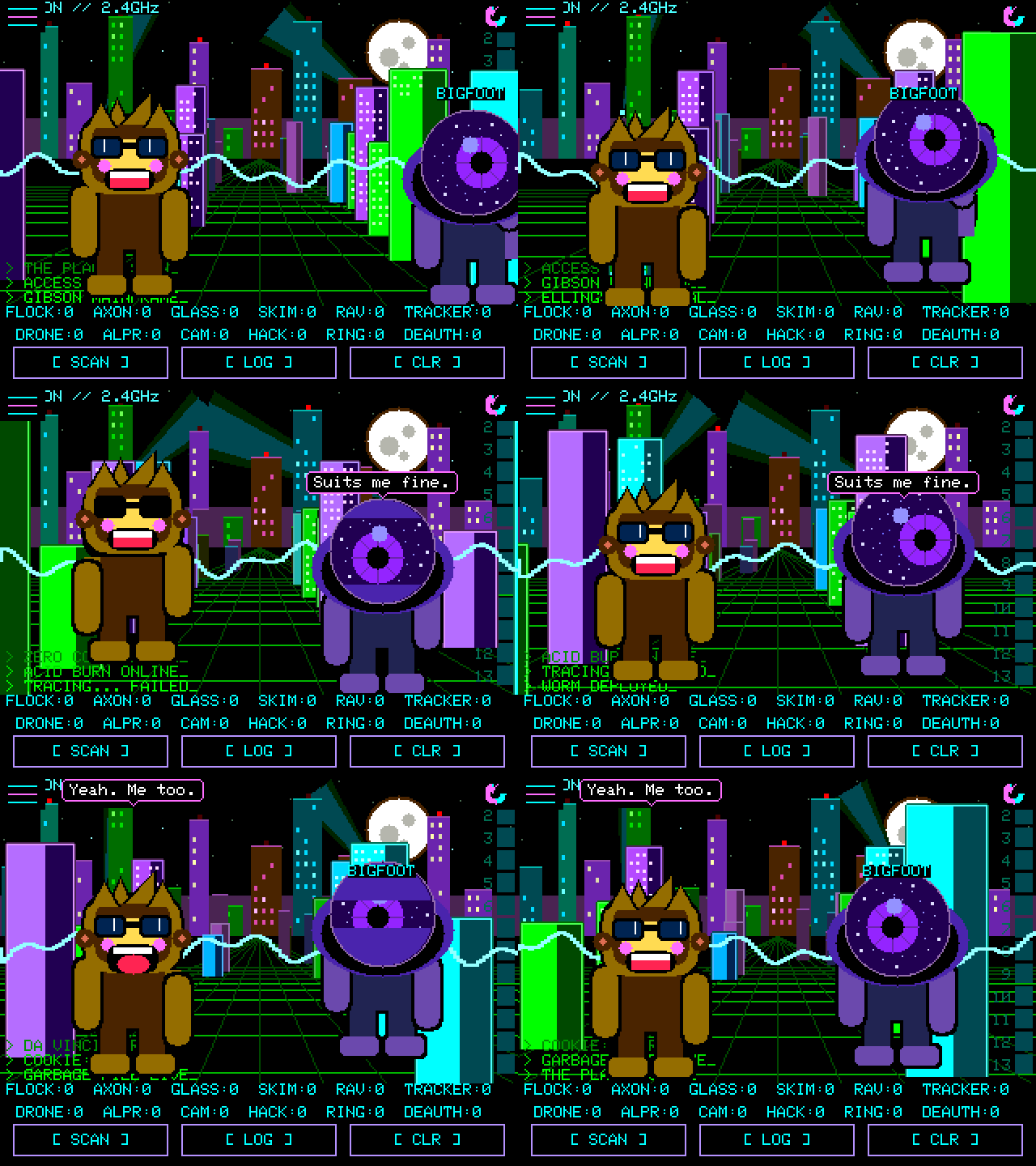
SquachMesh lets SquachWatches notice each other. Two boards in range each draw the other’s Squachy as a visitor; boards that share a five-word phrase form a squad and can exchange short encrypted messages, serious-catch banners, clock settings and update nudges. The README introduces it with a warning box: “Work in progress. It is in this release because it works … but it has had days of testing, not months. Both halves are off until you turn them on, and one of them costs you something.”
It is deliberately not a network: “No pairing, no connection, no acknowledgement, no retry — a broadcast that says who is here, and anybody in earshot may or may not catch it.” Every frame rides in BLE legacy advertising or scan-response data; nothing ever connects.
                       Settings → SQUACHMESH  (asks first)
                 ┌───────────────────────┴────────────────────────┐
             DETECT (receive)                               TRANSMIT (send)
   sees other boards' Squachys,                    advert every 1.5 s, FIXED address,
   broadcasts NOTHING                              name + outfit  →  "THIS MAKES YOU
                 │                                  TRACKABLE" warning, must choose YES
                 │                                                 │
                 └─────────────── both on + same 5-word phrase ────┘
                                            │
                                         SQUAD
       ┌──────────────┬──────────────┬──────┴───────┬──────────────┬───────────────┐
    messages       HEADS-UP       roster (16)     fox hunt     UPDATE SQUAD    clock/zone
   (canned or     (serious       + read         (HUNT gauge   (nudge + opt.   from any
    48 chars)      catches)       receipts       on a board)   WiFi share)     member's hello
A peer is recognised inside the BLE scan callback and returns before the signature tables ever see it, so two SquachWatches cannot set each other off as detections (Vol 7 §3.2).
9.2 What goes on the air
9.2.1 The presence advert
The whole visitor protocol is in include/squachmesh.h. Because Squachy’s appearance is a set of indices into tables both boards ship identically, only the indices need to travel:
Table 1 — The whole visitor protocol is in include/squachmesh.h. Because Squachy's appearance is a set of indices into tables both boards ship identically, only the indices need to travel
| Field | Size | Value / meaning |
|---|---|---|
| AD type | — | Manufacturer-specific data |
| Company ID | 2 | 0xFFFF — reserved by the Bluetooth SIG for non-production use; “the honest choice for a project with no registration of its own” |
| Magic | 4 | 'S' 'Q' 'M' '1' (53 51 4D 31); checked before anything else is believed, because 0xFFFF is shared with every other hobby project |
| Version | 1 | 1; an unrecognised version refuses the whole payload |
| Appearance word | 2 | Bit-packed, below |
| Flags | 1 | Must be zero for a board; 0x01 marks a phone (see the note below) |
| Name | 0 or 12 | ASCII, NUL-padded; present only when the owner typed a custom name |
| Total payload | 8 or 20 | (12 or 24 with a phone identity) |
  Appearance word (16 bits)
  15      12 11       8 7   6  5   4   3   2   0
 ┌──────────┬──────────┬─────┬───┬───┬───┬──────┐
 │ nickname │ outfit   │shade│ C │ O4│ A │spare │
 │ (10 used)│ low 4    │(4)  │   │   │   │      │
 └──────────┴──────────┴─────┴───┴───┴───┴──────┘
   C = custom-name flag   O4 = outfit bit 4 (seventeenth+ outfit)   A = Legend's aura lit
Indices are clamped on decode rather than rejected — “drawing the wrong hat is a better failure than refusing the peer.” Size is deliberately not sent, since both Squachys are drawn small while meeting.
Note — The header also defines a phone variant: “The companion app visits boards exactly like a board does,” carrying a four-byte random identity because Android hides a phone’s own Bluetooth address from apps, and a
FIXframe kind lets a phone share its position with the squad. Neither the README nor the FAQ mentions a companion app, and no app is linked from the repository or squachwatch.com as of v1.36.0. Its existence and status could not be confirmed.
9.2.2 The cost, in the firmware’s own words
TRANSMIT sits behind a full-screen warning headed THIS MAKES YOU TRACKABLE. Its text, verbatim from src/ui_meshwarn.cpp:
“TRANSMIT broadcasts a Bluetooth advert every 1.5 seconds, carrying a fixed address that never changes and your Squachy’s name and outfit.”
“Anyone nearby with a scanner can log that address with a time and a place. Because it never changes, those sightings join up into a record of where you have been.”
“The same trick this device warns you about.”
“Messages are encrypted. That you sent one is not.”
“DETECT only listens. It broadcasts nothing.”
The README’s justification for the warning: “Broadcasting a stable identifier at strangers is the exact behaviour this device exists to catch other people’s hardware doing. Offering it is defensible; switching it on quietly would not be.” The source also records an earlier experiment that advertised without consulting the setting, measured the cost of transmitting on the scanner (68.7 vs 68.6 adverts/s — none), and was torn out because it broadcast without permission.
Table 2 — 2.2 The cost, in the firmware's own words
| Parameter | Value | Source |
|---|---|---|
| Advert interval | 1500 ms | src/mesh.cpp |
| Peer considered gone after | 20 s unheard | src/mesh.cpp, PEER_STALE_MS |
| Boards tracked as nearby | 8 (RAM only) | src/mesh.cpp, SQUAD_N |
| Boards drawn at once (CROWD) | up to 8 | README |
| Squad HELLO | one sealed byte “now and then”, roughly every couple of minutes | include/meshmsg.h |
9.3 Squads and the five-word phrase
9.3.1 From phrase to key
A squad is the set of boards holding the same five-word phrase. Settings → SQUACHMESH → MESSAGES → PHRASE: one person ROLLs five words and reads them aloud; the other ENTERs the same five. The phrase is the membership: “leaving somebody out means a new phrase on every board.”
Table 3 — 3.1 From phrase to key
| Stage | Detail |
|---|---|
| Word list | 314 words, capitals only, 3–8 letters; no two share their first three letters; no letter has more than 18; no sound-alikes (“FREQ and PHREAK are the same word” read across a table) |
| Phrase entropy | Five words rolled by the hardware RNG with rejection sampling: about 41.5 bits |
| Key derivation | PBKDF2-HMAC-SHA256, salt "SquachWatch/msg/v1", 20,000 iterations → 16-byte key |
| Cost | 2753 ms measured on an ST7789 CYD (the deliberate ~3 s freeze when a phrase is set); paid once, then the key is stored |
| Cipher | AES-128-CCM, 13-byte nonce, 8-byte tag (mbedtls on the device) |
| Self-test | At every boot the board must reproduce golden frames made by an independent implementation (Python cryptography) byte for byte before it sends or reads a message |
  "WORD WORD WORD WORD WORD"  ──PBKDF2-HMAC-SHA256 (salt "SquachWatch/msg/v1", 20,000 it.)──►  K (128 bit)
                                                                                                 │
  nonce = sender BT address (6) ‖ counter (3, LE) ‖ 00 00 00 00                                   │
  AAD   = 6-byte frame header                                                                    ▼
  plaintext ─────────────────────────────── AES-128-CCM(K) ──────────────────────► ciphertext ‖ tag(8)
The nonce includes the sender’s Bluetooth address because the whole squad shares one key: two boards on the same counter would otherwise reuse a nonce, “which does not weaken AES-CCM, it ends it.” It also binds each frame to its sender — the same bytes replayed from another address fail authentication. The counter never wraps; a sender refuses instead.
9.3.2 The sealed frame
Legacy BLE advertising gives 31 bytes per packet; the ESP32 has no extended advertising. After length, type and the 0xFFFF company ID, a frame has 27 bytes. Messages ride in the scan response.
 offset  0      2       3        6                     6+n          6+n+8
        ┌──────┬───────┬────────┬─────────────────────┬────────────┐
        │ 'ST' │ver|knd│counter │ ciphertext (n)       │  tag (8)   │   ≤ 27 bytes
        │magic │ 2 | k │ 3 B LE │                      │            │
        └──────┴───────┴────────┴─────────────────────┴────────────┘
          └──────── header, authenticated as AAD ───────┘
The presence advert’s magic begins 'S','Q' and the message frame’s is 'S','T', so the two cannot collide.
9.3.3 Frame kinds
Table 4 — 3.3 Frame kinds
| Kind | Name | Sealed? | Replay-recorded? | Carries |
|---|---|---|---|---|
| 1 | CANNED | Yes | Yes | Index of one of 24 ready-made lines |
| 2 | TEXT | Yes | Yes | One of up to 3 parts of 16 six-bit characters (48 total) |
| 3 | EMOTE | Yes | not stated | One of the thirty-five emotes |
| 4 | NUDGE | Yes | not stated | ”Install the version I am running” |
| 5 | WIFI | Yes | not stated | Up to 6 parts: SSID (≤32) + password (≤38), used once, never stored |
| 6 | UPDATED | Yes | not stated | The version a nudged board now runs |
| 7 | INVITE_PUB | No (plain SHA-256 tag) | — | X25519 public key, role, target address |
| 8 | INVITE_KEY | Yes, one-time session key | Yes | The phrase |
| 9 | HELLO | Yes | No | ”I hold the phrase”; since v1.7.8 the sender’s version, and in newer forms its clock |
| 10 | READ | Yes | No | The counter of the message that was opened |
| 11 | HEADSUP | Yes | Yes | Detection type, signal, last three bytes of its address |
| 12 | FIX | Yes | No | A phone’s latitude/longitude (degrees × 10⁷) and accuracy |
All twelve kinds are defined in include/meshmsg.h; the replay column records only what that header’s comments state. The README adds that the hello carries the sender’s clock and zone.
What is protected and what is not. Encrypted: messages, read receipts, heads-ups, hellos, update nudges and any shared WiFi password. Not encrypted: the presence advert (fixed address, name, outfit), and “the fact that you sent something and when.” Anyone holding the five words reads the squad’s traffic — “share them like a house key.”
9.4 Joining without typing
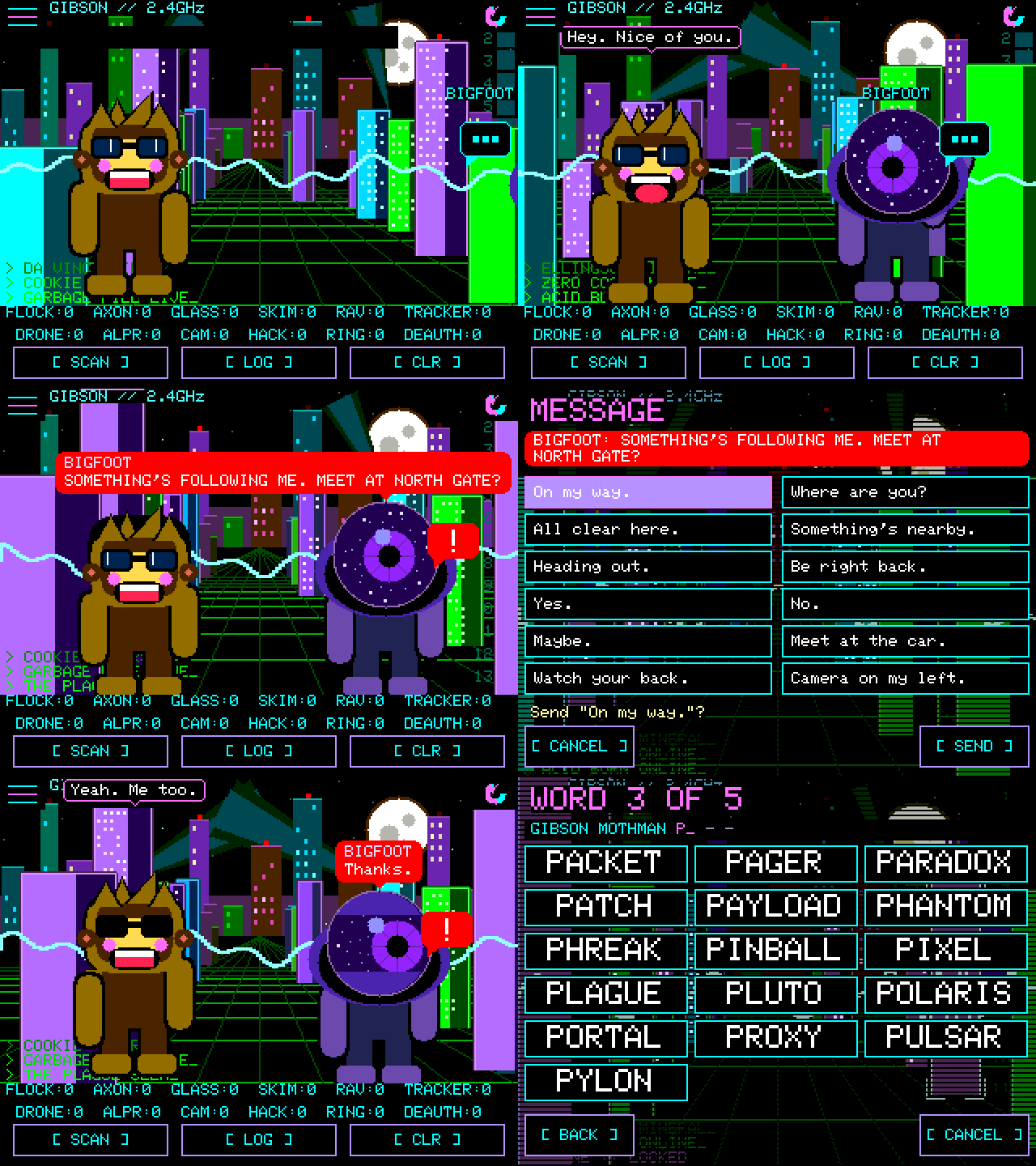
The typed phrase “is the reliable way in and always will be.” The convenient way is ADD on the SQUAD screen (the +N beside a visitor):
   Inviter (in squad)                                     Invitee (stranger, nearby)
   ─────────────────                                      ─────────────────────────
   tap ADD → pick board
   INVITE_PUB {target, role 0, X25519 pubA} ───────────►  "Join squad?"  → accept
                                            ◄───────────  INVITE_PUB {role 1, X25519 pubB}
   both compute shared secret; both screens show the SAME FOUR DIGITS (from both public keys)
   people compare digits aloud ── mismatch? say NO, nothing was sent ──
   INVITE_KEY {phrase} sealed under one-time session key ──►  stores phrase, derives K
                                            ◄───────────  sealed HELLO (proves it holds K)
   screen: ADDED → both return to main screen
   (no answer → inviter offers to show the phrase for typing)
The four digits are a short authentication string: a third board in the middle presenting its own key to each side “leaves the two screens disagreeing.” The INVITE_PUB parts carry only a plain hash tag — “integrity against the air, nothing against a forger” — so the digits comparison is the actual defence. SHOW PHRASE (on by default) can be switched off, after which the words become dashes, the board never prints them, and the squad grows only by ADD, in person.
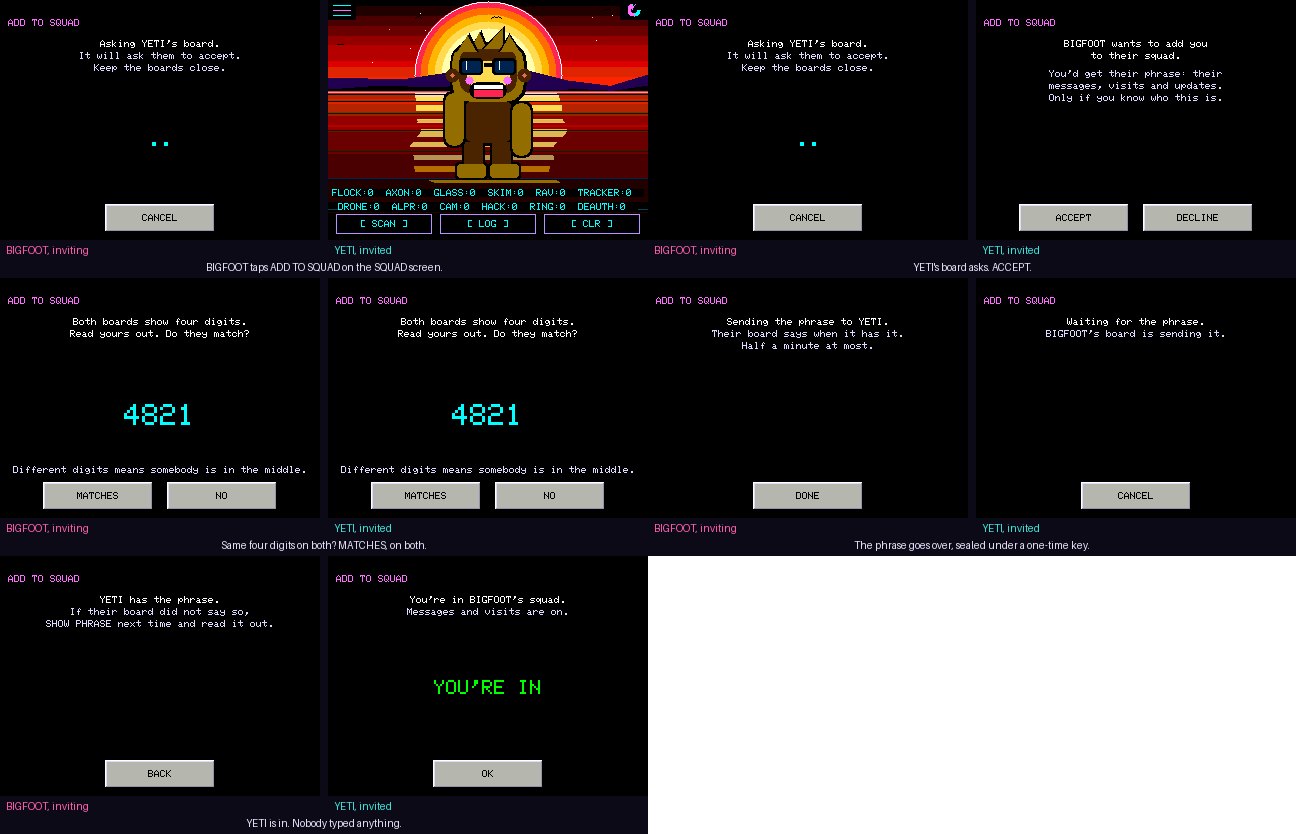
Caution — The digits comparison only works if the two people actually compare them. Accepting an invite without checking reduces the exchange to an unauthenticated key agreement, and a squad phrase handed to an interloper exposes every past and future message under that phrase until a new one is rolled on every board.
9.5 Messages, heads-ups, the roster and the fox hunt
Table 5 — 5. Messages, heads-ups, the roster and the fox hunt
| Feature | Behaviour | Where |
|---|---|---|
| Messages | One of 24 canned lines (grouped in six tabs) or up to 48 typed characters on the payphone keypad or QWERTY keyboard; arrives as a red bubble with the sender’s name; nothing sends until confirmed | SEND on the SQUAD screen |
| FILL | Eight openings ending in a blank — MEET AT, I’M AT, BACK IN … — that open the keyboard pre-typed | Message screen |
| Emotes | Thirty-five, sendable from the message screen; the pair also break into them spontaneously | Message screen |
| Read receipts | A READ toast with the reader’s name; a reader with TRANSMIT off cannot send one, “so you see sent and never read, which is the truth” | Automatic |
| HEADS-UP | A serious catch on one board shows on the squad’s screens as an amber banner for eight seconds, at most once a minute: Flock, Axon, skimmer, Raven, plate reader, deauth flood, evil twin or hacking gear — never trackers. Carries the last three address bytes so a board that caught the same device stays quiet | On by default; HEADS-UP in the SquachMesh menu |
| Roster | Everyone ever heard holding the phrase, up to sixteen, kept across restarts; outfit, number of separate meetings, in-range first; INVITE, AWAY, FORGET | Settings → SQUACHMESH → SQUAD |
| Fox hunt | HUNT on the SQUAD screen aims the HUNT gauge (Vol 8 §4) at a squad board; CAUGHT! at arm’s length, Squachy bounces, light flashes green | SQUAD screen |
| Clock sharing | Every hello carries the sender’s clock and zone; a board with neither takes them from the first member it hears | Automatic |
| Tutorial | A seven-card tutorial the first time MESSAGES is enabled; ? replays it; it never transmits | Message screen |
Sources: README “SquachMesh”, “Your squad”, “Fox hunt”, “Smaller things”; docs/FAQ.md; include/meshmsg.h.
The fox needs TRANSMIT on; the hunters need DETECT. A new phrase clears the roster, “because a new phrase is a new squad.”
9.6 Updates, and updating a squad
Vol 5 covers the three update paths in full. The security properties that make a squad update safe are the same ones that protect a single board:
Table 6 — Vol 5 covers the three update paths in full. The security properties that make a squad update safe are the same ones that protect a single board
| Property | Implementation |
|---|---|
| Signature | ECDSA P-256 over SHA-256("SQWOTA1\n" + build name + "\n" + image); public key compiled in; private key held as a GitHub Actions secret |
| Board binding | The build name is inside the signed message, so a correctly signed image for a different board is refused — “a wrong display driver is a white screen, and a white screen cannot be navigated to switch back” |
| No downgrade | An older release is refused; reinstalling the same one is allowed as a repair |
| Probation | A new image runs on trial and confirms itself after ~30 s; a crash or power cut before then returns to the old slot. SWITCH TO goes back by hand |
| Settings | PIN, squad and settings survive any update path |
Knowing there is an update happens two ways without installing anything: the boot check against squachwatch.com when a network is saved (turned off by UPDATE CHECK), and squad hellos, which carry each board’s version so a board that hears a newer member knows “without touching WiFi.”
UPDATE SQUAD (Settings → SYSTEM → UPDATE FIRMWARE) tells every in-range board holding the phrase to install the version this board is running:
 board A (already updated by hand)                 boards B, C … (squad, in range)
 ───────────────────────────────                  ───────────────────────────────
 UPDATE SQUAD ──► NUDGE {A's version}  ────────►   REMOTE UPDATE on?  locked?  newer than mine?
           (+ optional WIFI parts: A's saved            │ no → ignore
            network, sealed with the phrase)             ▼ yes
                                                   30 s countdown (NOW / SKIP)
                                                   join WiFi (own saved, or A's — used once, forgotten)
                                                   download signed release for MY board from squachwatch.com
                                                   install → restart → probation
                                 ◄────────────────  UPDATED {new version}  → A shows who reported back
There is no “whatever is newest”: the nudge names the sender’s version, because “a receiver has to be able to refuse without joining WiFi, since leaving WiFi update mode costs a restart.” A locked board ignores the nudge regardless. The README’s release-day order: “update one board by hand, then UPDATE SQUAD from it.”
Note — Each board downloads its own build from squachwatch.com; the nudge carries no firmware. The trust a squad member extends is therefore “install the project’s signed release, version X, now” — not “run what I send.” REMOTE UPDATE under SECURITY switches even that off.
9.7 The T-Watch S3 and S3 Plus
The LilyGo T-Watch S3 and S3 Plus (BETA) run the whole firmware on a 240×240 screen, built from the twatch-s3 environment (ESP32-S3, 16 MB flash, PSRAM, RadioLib 7.7.1, SQUACH_LORA and SQUACH_MESH enabled). Watch-only controls live under WATCH SETTINGS, the first row in Settings.
[FIGURE SLOT — Vol 9 §7] A LilyGo T-Watch S3 Plus on a wrist running SquachWatch, screen lit on the main screen or an alert card, crown visible; ideally a second shot of the LORA CHATS screen.
Table 7 — 7. The T-Watch S3 and S3 Plus
| WATCH SETTINGS row | Function |
|---|---|
| BATTERY | Charge state from the power chip |
| WARDRIVE | S3 Plus only: GPS and wardrive log on together (§9) |
| TAGS + RINGS | LOG ONLY (default) or ALERT — “A day out otherwise means a lot of AirTags in passing cars” |
| LORA CHATS | Opens the chats, shows how many are new |
| LORA | BOTH (default), MESHTASTIC, MESHCORE, OFF |
| RADIOS | How much of the time WiFi gets; Bluetooth is always on by default |
| BLE LISTEN | BLE listening duty |
| SLEEP CPU | CPU clock while idle |
| BUZZ | OFF, HIGH, MED (default), LOW |
| CHIP TEMP | The chip’s temperature |
Table 8 — 7. The T-Watch S3 and S3 Plus
| Watch behaviour | Detail |
|---|---|
| Crown | Screen off; only the crown turns it back on (POCKET MODE) |
| Buzz patterns | Double tap per alert (at most one every 10 s); three long buzzes for a watched device; one buzz per new LoRa message (at most one every 30 s) |
| POWER SAVER | On by default; on battery the screen times out regardless; on the charger it stays lit like a desk clock |
| Clock | Set from GPS on the S3 Plus when it has a fix; the web flasher sets it after install |
| Still-watch AUTO SNOOZE | On a still watch a device’s allowance returns only when it was really gone for 30 min (Vol 8 §3.2) |
| Update over Bluetooth (BETA) | Available on the S3 boards; see Vol 5 |
9.8 LoRa, receive only
Since v1.26.0 both watches listen to LoRa as well as WiFi and Bluetooth. “Receive only: the watch never transmits.” The radio driver and every decoder came from DH5DAX’s CrowPanel 7 work, and on the bench the watch “caught 26 of 26 test messages across both networks.”
Table 9 — 8. LoRa, receive only
| Band (picked from the time zone) | Meshtastic (LongFast) | MeshCore |
|---|---|---|
| US 915 — US zones incl. Alaska and Hawaii, and the rest of the Americas | 906.875 MHz | 910.525 MHz |
| EU 868 — everywhere else | 869.525 MHz | 869.618 MHz |
With both networks enabled the radio takes turns between the two presets. The console command LORA REGION AUTO|EU|US overrides the band at the next restart; LORA, LORA NODES and LORA MSGS report status.
Table 10 — 8. LoRa, receive only
| Heard and read | Not read |
|---|---|
| Meshtastic default LongFast channel | Private Meshtastic channels |
| MeshCore Public and hashtag channels | Direct messages on either network |
| Sender and channel per message, one tab per network in LORA CHATS | Anything on other presets or frequencies |
A pink LORA n NEW pill on the main screen announces new traffic; PRIVACY MODE covers the chats. Public channels on both networks use well-known default keys, which is why they read in full; private channels stay unread because the watch does not have their keys.
docs/LORA.md is a 1,659-line research document, written on 2026-09-26 for the CrowPanel 7’s LoRa module, that catalogues what an SX1262 can hear (LoRaWAN, LoRa APRS, MeshCom, FANET, OGN and more), proposes a future LORA_TRACKER detection for LoRa GPS trackers that follow someone, and discusses transmitting and the law. Those proposals are research, not shipped features. A bench-only twatch-s3-loratx environment adds a console LORA TX command so one watch can send a test frame to another; the platformio.ini comment marks it “BENCH ONLY … Never released.”
9.9 Wardriving and the WiGLE file
Wardriving is separate from detection on purpose: detection keeps “the handful of things worth an alert,” while the wardrive log keeps “everything the radios hear while a GPS has a fix,” written as WiGLE’s CSV for upload to wigle.net.
Table 11 — 9. Wardriving and the WiGLE file
| Item | T-Watch S3 Plus | CYD GPS builds (cyd-gps, cyd-ili9341-gps) |
|---|---|---|
| Released on the flasher | Yes (BETA) | No — “not in the flasher, CI or releases”; awaits a hardware test |
| GPS | Built in | ATGM336H wired to the CYD (Vol 4) |
| Storage | ~7.5 MB of raw flash after the coredump partition; up to 125,000 sightings across restarts | Straight to SD as /wigle-YYYYMMDD-HHMM.csv |
| Record | 64 bytes: kind, flags, MAC, RSSI, channel, auth/company ID, lat/lon ×10⁷, altitude, accuracy, epoch, name (≤32), CRC | Same record and CSV formatter |
| Logged | WiFi networks with security (RSN/WPA parsed), Bluetooth devices with name and company ID, only while the fix is fresh | Same |
| Export | DOWNLOAD WIGLE FILE on the web flasher, desktop Chrome or Edge, as WigleWifi-1.6 CSV | Copy from the card |
| Clearing | Stays until cleared; a duress wipe takes it | Delete files |
[FIGURE SLOT — Vol 9 §9] The web flasher’s DOWNLOAD WIGLE FILE control in desktop Chrome with a T-Watch S3 Plus connected, or the resulting WigleWifi-1.6 CSV open beside a wigle.net upload map.
The README lists two more boards that wardrive to SD: the Marauder V8 (using jotra7’s CYD GPS work) and the LilyGo T-Deck Plus. The FAQ adds a status note: wardriving “was marked not road-tested when it shipped in v1.25.0, so treat it as new.” Rows written against a fake bench fix are flagged and never uploaded.
Caution — A wardrive file is a geotagged record of other people’s networks and devices. WiGLE’s uploads are public. The legal and ethical envelope in Vol 10 §3 applies; on SquachWatch the log also holds the owner’s own movements, which is why the duress PIN erases it.
9.10 Everything the device transmits
The FAQ opens this topic with a correction: “Older versions of this FAQ said ‘100% receive-only’. That stopped being true a while ago.” The complete list, with how to stop each:
Table 12 — The FAQ opens this topic with a correction: "Older versions of this FAQ said '100% receive-only'. That stopped being true a while ago." The complete list, with how to stop each
| What | When | Visible to an observer as | How to stop it |
|---|---|---|---|
| BLE scan requests (active scanning) | While detecting, only when the room is quiet enough (Vol 7 §3.1) | The board’s own BLE address asking nearby devices for scan responses | No menu switch |
| Boot WiFi visit | Each boot, only with a saved network and UPDATE CHECK on | Association to the saved network; a request to squachwatch.com; NTP | UPDATE CHECK off, or remove networks under WIFI NETWORKS |
| WiFi for an update | Only on UPDATE OVER WIFI or an accepted squad update | Association; download from squachwatch.com | Don’t start one; REMOTE UPDATE off |
| Bluetooth update server | S3 boards only, only while UPDATE OVER BLUETOOTH is open | A connectable BLE peripheral | Leave that screen |
| SquachMesh adverts | Only with TRANSMIT on (off by default, behind the warning) | Fixed address every 1.5 s, name, outfit; sealed squad frames in scan responses | TRANSMIT off |
| LoRa | Never on released builds | — | — |
| Status light, screen, speaker, buzzer | Per settings | Optical and acoustic, not RF — but visible across a room | STATUS LIGHT, POCKET MODE, SOUND/BUZZ |
   Least visible ◄──────────────────────────────────────────────────────────► Most visible
   DETECT only,             default:                  + saved WiFi            + TRANSMIT on
   no saved WiFi,           occasional BLE scan       boot check              fixed BLE address
   STATUS LIGHT off,        requests in quiet rooms   (one association        every 1.5 s —
   POCKET MODE                                         per boot)               trackable over time
9.11 Cheatsheet updates from this volume
┌──────────────────────── SQUACHWATCH — MESH, UPDATES, WATCH ──────────────────────────────┐
│ MESH     DETECT = listen only.  TRANSMIT = fixed BLE addr every 1.5 s (TRACKABLE). Both off│
│ ADVERT   company 0xFFFF · 'SQM1' · v1 · 16-bit appearance word · opt. 12-char name (8/20 B)│
│ SQUAD    5 words from 314 (~41.5 bit) → PBKDF2-SHA256 ×20,000 → AES-128-CCM, 8-byte tag   │
│          nonce = sender addr + counter.  Sealed: msgs, read, heads-up, hello, nudge, WiFi │
│          NOT sealed: the advert itself, and THAT/WHEN you sent                            │
│ ADD      X25519 + 4 digits — COMPARE THEM ALOUD.  SHOW PHRASE off = in-person ADD only     │
│ HEADS-UP 8 s amber banner, ≤1/min, serious types only, never trackers                     │
│ UPDATE   ECDSA P-256 signed, per-board, no downgrade, 30 s probation, SWITCH TO = rollback│
│ SQUAD UP update one board by hand → UPDATE SQUAD.  Receivers: REMOTE UPDATE on, unlocked  │
│ WATCH    crown = pocket mode · BUZZ OFF/HIGH/MED/LOW · TAGS + RINGS = LOG ONLY default    │
│ LORA     RX only. US 906.875 (Mt) / 910.525 (MC) · EU 869.525 / 869.618 · public chans    │
│ WARDRIVE S3 Plus: ≤125,000 sightings in flash → DOWNLOAD WIGLE FILE (Chrome/Edge desktop) │
│ TX LIST  BLE scan requests · boot WiFi check · updates · BLE update server · mesh adverts │
└────────────────────────────────────────────────────────────────────────────────────────────┘
Table 13 — 11. Cheatsheet updates from this volume
| Unconfirmed in this volume | Status |
|---|---|
Companion phone app referenced by FLAG_PHONE / KIND_FIX | Not documented or linked; status unknown |
| Exact HELLO interval | ”Now and then … every couple of minutes” in the header; no constant quoted |
| Wardriving accuracy in the field | Marked not road-tested at v1.25.0 |
Comments (0)