Wi-Fi Pineapple · Volume 6
Hak5 WiFi Pineapple Volume 6 — The Web UI and the Module Ecosystem
The browser-driven operating surface, how modules extend it, the community module landscape, and the Pager's on-device screen as the exception
6.1 About this volume
Volume 5 covered what’s under the hood — OpenWrt, the firmware stack, Campaigns, Cloud C2. Next is what you actually touch: the web UI that is the Pineapple’s operating surface, and the module ecosystem that extends it.
This is foundation-level — the web UI’s general shape and the module model are the same across Mark VII, +AC Tactical, and Enterprise. The per-model volumes (9-15) cover each model’s specific UI quirks and the Pager’s on-device screen, which is a genuine departure from the browser-only model (§ 7).
The research-baseline caveat applies hard here: web UIs get redesigned. The areas and the operating model described below are stable; exact menu names and layouts should be re-verified against the current firmware (a doc-audit job once hardware is in hand).
6.2 The web UI — the operating model
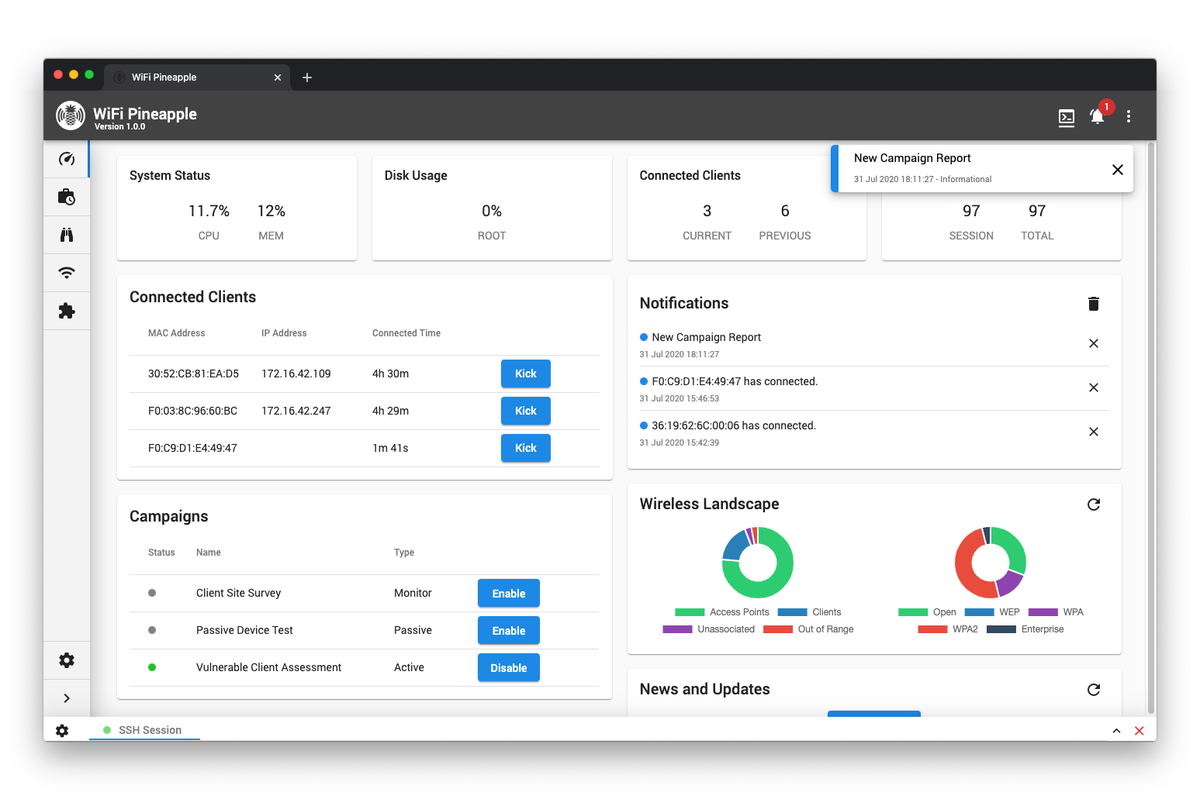
The defining fact: you operate a WiFi Pineapple from a web browser. You connect to the device’s management interface, browse to its web UI, and everything — recon, PineAP configuration, client management, Campaigns, modules, settings — happens in that browser.
   The operating model
   ════════════════════════════════════════════════

   Your laptop/phone          Pineapple
   ─────────────────          ─────────
   browser  ──── management ────►  web UI server
            ◄─── interface ─────   (runs on the device's
                                    modified OpenWrt)
                                         │
                                         ▼
                          drives: PineAP engine, recon,
                          Campaigns, modules, the radios

   You never "install software" to use it. The device
   serves its own control panel. (SSH — Vol 5 § 8 — is
   the power-user back door, not the front door.)
Why this model: it makes the Pineapple accessible. The whole Vol 3 technique catalog — KARMA, beacon response, deauth, handshake capture — is genuinely complex 802.11 manipulation, and the web UI is the abstraction that makes it operable without writing code or memorizing aireplay-ng flags. This is the single biggest reason the Pineapple is “the industry-standard WiFi pentest platform” rather than just “a patched OpenWrt box”: the box is patched and it has a real product UI on top.
The trade: accessibility vs. depth. The web UI exposes the common operations cleanly; the uncommon ones live in SSH + the OpenWrt layer (Vol 5 § 8) or in modules (§ 4). An engineer-level operator will use both — the UI for the 90% case, the shell for the rest.
6.3 The web UI surfaces, area by area
The web UI is organized into functional areas. Names and exact layout vary by firmware version; the functional areas are stable:
Table 1 — The web UI is organized into functional areas. Names and exact layout vary by firmware version; the functional areas are stable
| Area | What it does | Maps to |
|---|---|---|
| Dashboard | At-a-glance device state — what’s running, recent activity, client count, resource use | — |
| Recon | The interactive airspace view — APs, clients, who’s associated to whom, signal, channels. “Enhanced Recon” is the recent overhaul. | Vol 3 § 4 |
| PineAP | The attack engine’s control panel — Allow Associations, the daemon, beacon response, the SSID pool, capture-to-pool, the filters | Vol 3 § 6-8 |
| Clients | Connected/seen client devices — what each is, what SSID it’s on, the targeting hooks | Vol 3 § 5, § 9 |
| Campaigns | Define / schedule / review automated audits and their reports | Vol 5 § 4 |
| Modules | Browse, install, manage, and launch modules/apps | § 4-5 below |
| Settings / System | Networking, the management interface, the Management UI Firewall, firmware updates, Cloud C2 enrollment, the radios and their role assignment | Vol 5, Vol 7, § 8 |
| Logging / Reporting | The probe logs, association logs, capture artifacts, exports | Vol 3 § 5 |
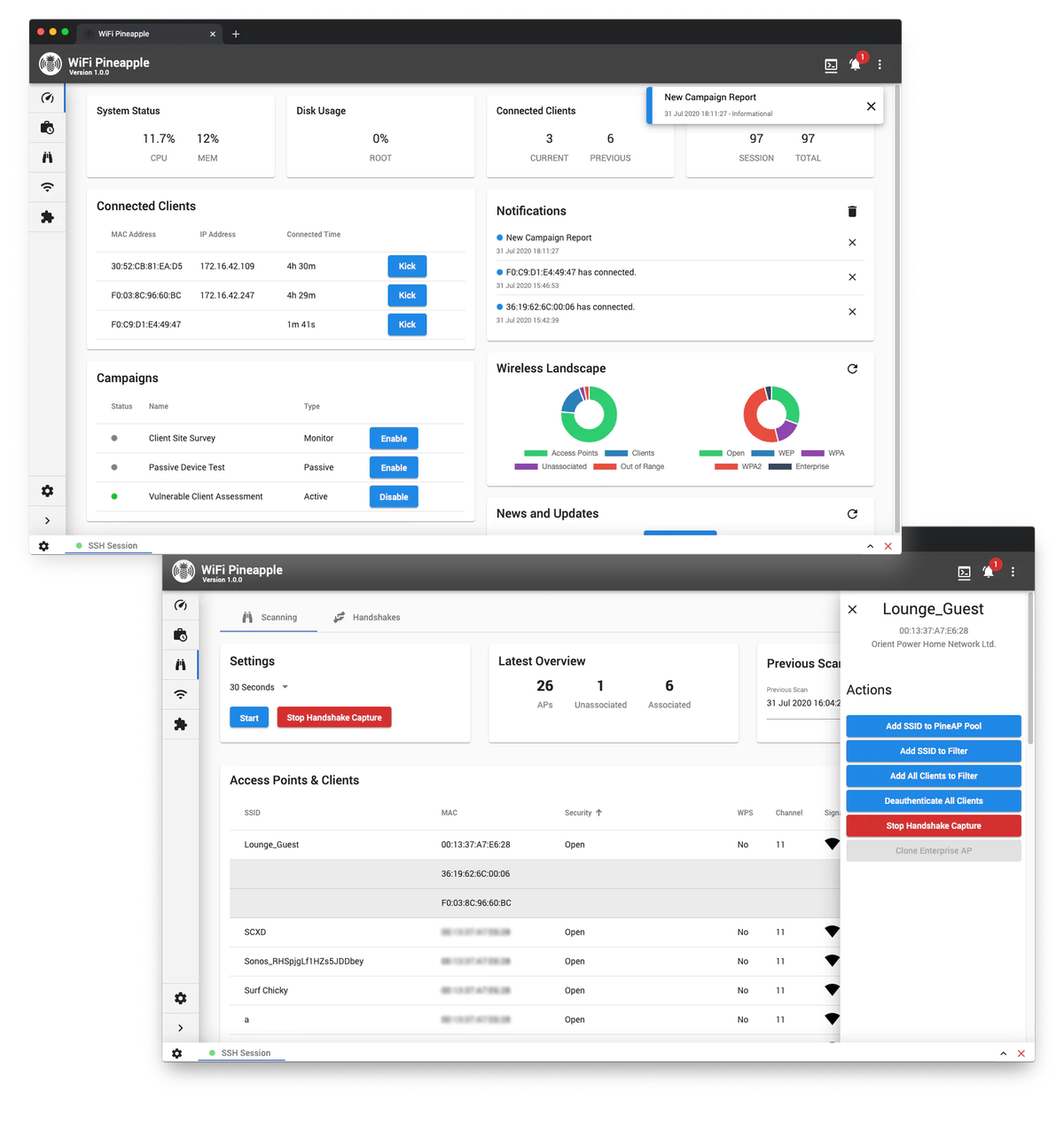
The Recon and PineAP areas are where the actual work happens; Campaigns is where it gets automated; Settings → radios is where you assign the role-based radios (Vol 7) that make the whole thing possible.
6.4 Modules — the extensibility layer
Modules (called “infusions” in the Mark IV/V era — Vol 2 § 6) are the Pineapple’s apps. A module installs onto the device and adds a new area or capability to the web UI.
What modules do: extend the Pineapple beyond the built-in PineAP/recon/Campaigns core. Typical module territory — additional recon visualizations, specific attack workflows, evil-portal page sets and captive-portal management, reporting/export tooling, integrations with other tools, quality-of-life utilities.
The model:
- Modules are browsed and installed from the Modules area of the web UI.
- They install onto the device (into the OpenWrt filesystem) and run with device privileges — this matters for § 8.
- They’re managed (enabled, updated, removed) from the same area.
Modules vs. the OpenWrt layer: a module is the sanctioned, web-UI-integrated way to extend the device. SSHing in and opkg install-ing a package (Vol 5 § 8) is the unsanctioned, power-user way. Both work; modules are the path that shows up in the UI and survives cleanly.
6.5 The community module landscape
The module ecosystem is where community contribution to the Pineapple lives (Vol 5 § 7 — the core firmware is closed, so the community builds at the module/OpenWrt/host-tooling/hardware layers).
The shape of it:
- There’s a body of community-written modules alongside Hak5’s official ones.
- Quality and maintenance vary — some modules are well-kept, some are abandoned, some target old firmware/old models and don’t work on current ones (the same cross-generation problem Vol 2 § 9 flagged for tutorials applies to modules).
- The per-model volumes (9-15) and Vol 18 (the mods catalog) inventory the current, working module set per model — that’s a research job best done against live hardware + the live catalog, so this foundation volume sets the model rather than enumerating modules that may be stale by the time hardware arrives.
The vetting rule (§ 8 expands it): a community module runs with device privileges on a device whose job is intercepting Wi-Fi. Treat installing one with the same caution as running an untrusted script as root — because functionally that’s what it is. Prefer modules that are current, maintained, and ideally source-visible.
6.6 Writing a module — the developer surface
For an engineer who could write a module — the foundation-level picture:
- Pineapple modules have a defined structure and API documented at docs.hak5.org. The module integrates into the web UI (a front-end surface) and can act on the device (a back-end that talks to the OpenWrt layer + the PineAP engine).
- A custom module is the right tool when: you have a repeatable workflow the built-in UI doesn’t expose, you want it in the UI rather than as an SSH script, and you want it to survive cleanly across reboots/updates.
- It’s the wrong tool when an SSH script or a host-side script (Vol 19) would do — don’t build a module for a one-off.
- The exact current module SDK, structure, and API are a research-baseline / verify-on-hardware item — Vol 10/15 (the per-model firmware volumes) and a future
doc-auditpass should pin the current API. This foundation volume flags that the developer surface exists and is documented; the per-model volumes carry the worked example.
6.7 The Pager exception — an on-device screen
Every Pineapple is browser-operated — except that the Pager has its own 2.4” full-color display (480×222) and physical buttons. This is a genuine departure from the operating model in § 2, and it’s significant enough to flag in the foundation:
- The Pager can be operated directly — recon, PineAP control, status — on the device itself, no browser, no second machine. That’s the entire point of the Pager (Vol 12-13): a Pineapple you run from your hand, walking around, in a short-window engagement.
- It still has the web UI (and an integrated ethernet adapter to reach it) — the on-device screen is additive, a second operating surface, not a replacement.
- The on-device UI is necessarily a streamlined view — a 2.4” screen can’t show the full web-UI Recon graph. It surfaces the operationally-essential subset.
The Pager’s screen, buzzer, vibration, and RGB LEDs together make it the only Pineapple that gives physical, glanceable feedback — which is exactly what the walk-around use case needs. Vol 13 is the full on-device-operation treatment.
6.8 Operating-surface security
The web UI and the module system are not just how you operate the device — they’re also the device’s own attack surface, and this volume has to say so plainly:
The web UI / management interface:
- It’s a web application on a device whose job is intercepting Wi-Fi. If an adversary reaches your Pineapple’s management interface, they own a wireless interception platform.
- Recent firmware ships a Management UI Firewall specifically to harden this — it constrains what can reach the management interface. Use it.
- Never expose the management interface (web UI or SSH) to untrusted networks. During an engagement the Pineapple is in hostile airspace — its own management surface has to be locked down.
Modules:
- A module runs with device privileges. An untrusted module is an untrusted root process on your interception device.
- Vet before installing: prefer Hak5-official or well-maintained, source-visible community modules. Treat an abandoned, opaque module the way you’d treat a random binary — because that’s what it is.
Cloud C2 (Vol 5 § 5):
- C2 is a remote path into the device. The C2 server, its enrollment tokens, and its network exposure are all part of the attack surface. A compromised C2 server is a compromised fleet.
Vol 8 carries the full operational posture — this section is the foundation-level “the thing you operate the Pineapple with is also a thing that can be turned against you.”
6.9 Resources
The operating surface
- Hak5 docs (web UI, modules): https://docs.hak5.org/wifi-pineapple/
- Hak5 module documentation + developer reference: https://docs.hak5.org/ (the module SDK section)
- Hak5 Cloud C2 docs: https://docs.hak5.org/cloud-c2
Within this series
- Vol 5 — what’s under the web UI (OpenWrt, the firmware stack, Campaigns, C2)
- Vol 3 — the PineAP engine the PineAP web-UI area drives
- Vol 8 — the full operational posture, incl. the device’s own attack surface
- Vol 12-13 — the Pager’s on-device screen as a full operating surface
- Vol 18 — the mods catalog (incl. the current per-model module inventory)
This is Volume 6 of a 21-volume series. Next: Vol 7 covers the generic hardware architecture — the SoC, the role-based radio model, the antennas, and the radio-chipset landscape (MediaTek MT76xx, Qualcomm IPQ4019) that underlies all four current models.
Comments (0)