Wi-Fi Pineapple · Volume 18
Hak5 WiFi Pineapple Volume 18 — Mods: Hak5 & Community
Official adapters and accessories, community modules, antenna and battery and case mods, and the vetting discipline
18.1 About this volume
Vol 18 is the mods catalog — the full inventory of how a Pineapple gets extended beyond stock, both Hak5-official and community. Vol 5 §7 established where the community can build (the core firmware is closed, so contribution lives at the module / OpenWrt / host-tooling / hardware layers); this volume enumerates what is actually out there.
A standing caveat for this volume: the community module catalog and the accessory list both change, and community modules in particular go stale across firmware/model generations (Vol 2 §9, Vol 6 §5). So this volume is structured as the categories and the discipline, not a frozen list of specific modules that would be wrong by the time the hardware is in hand. When a Pineapple is acquired, a doc-audit pass inventories the current, working module set against the live catalog — and §8’s vetting discipline is what makes that inventory safe to act on.
18.2 Hak5 official mods and accessories
The official, Hak5-supplied extensions, per model:
Table 1 — The official, Hak5-supplied extensions, per model
| Mod / accessory | For | What it does | Reference |
|---|---|---|---|
| MK7AC adapter | Mark VII | the big one — adds 5 GHz / 802.11ac monitor + injection (MT7612U). Also a standalone Linux Wi-Fi adapter. | Vol 11 §3 |
| +AC Tactical kit | Mark VII | the MK7AC + tactical case + field guide + decals, bundled — the recommended Mark VII package | Vol 11 |
| Tactical case | Mark VII | the field carry case (part of the +AC kit) | Vol 11 §5 |
| Field guide book | Mark VII | printed field reference (part of the +AC kit) | Vol 11 §5 |
| Antenna upgrades | all | higher-gain / directional antennas for the built-in radios | §4 below |
| Power accessories | Mark VII / Pager | USB-C power sources, battery options | §5 below |
| Carry accessories | Pager | belt-clip / carry options for the handheld | §6 below |
| Rack accessories | Enterprise | rack hardware, antenna arrays for the 5-radio array | §6 below |
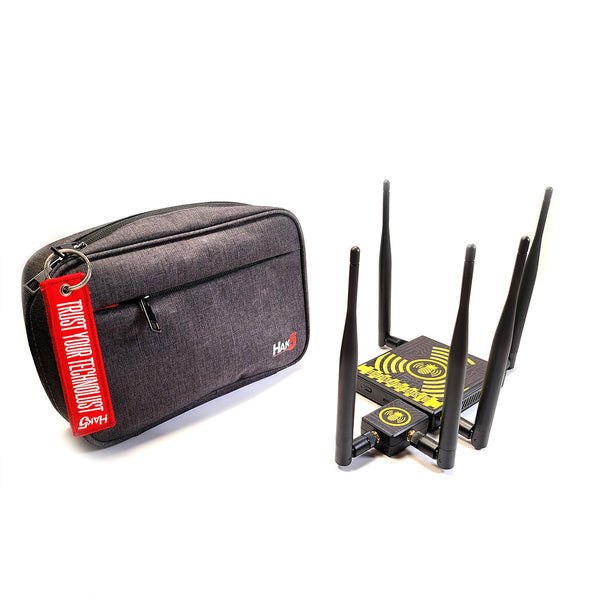
The single most important entry is the MK7AC (Vol 11): it is not really an “accessory,” it is the part that makes the Mark VII complete for modern Wi-Fi. Everything else in the official list is convenience or installation hardware. The full, current accessory inventory is on shop.hak5.org and should be checked at purchase.
18.3 The community module catalog
The module ecosystem is where community contribution to the Pineapple lives (Vol 5 §7, Vol 6 §4-5) — the core firmware is closed, so the community builds modules, browsed and installed from the web UI’s Modules area.
The shape of the catalog (categories, since specific modules go stale):
Table 2 — The shape of the catalog (categories, since specific modules go stale)
| Module category | What it adds |
|---|---|
| Recon visualisations | additional ways to see the airspace beyond the built-in Recon view |
| Evil-portal page sets | captive-portal page templates and management (Vol 3 references the evil-twin technique these support) |
| Attack workflows | packaged, specific attack sequences |
| Reporting / export tooling | turning captures and recon into deliverables |
| Integrations | bridges to other tools (Vol 19’s pairing tools) |
| Quality-of-life utilities | operator conveniences |
The staleness problem, made explicit:
   Why this volume does NOT list specific modules
   ════════════════════════════════════════════════════════

   Community modules vary in:
     • QUALITY      — some excellent, some abandoned
     • MAINTENANCE  — some current, some untouched for years
     • TARGET       — some written for OLD firmware / OLD
                      models; they may not run on a current
                      Mark VII / Pager / Enterprise at all

   A frozen list in this volume would be WRONG by the time
   hardware arrives. So: the CATEGORIES above
   are stable; the SPECIFIC working set is a doc-audit job
   against the LIVE catalog + the actual hardware + the
   current firmware version.
The per-model volumes (Vols 10 §7, 13 §7, 15 §7) each pointed here for the module catalog; this is the answer — the categories and the vetting discipline (§8), with the live inventory deferred to a doc-audit pass because that is the only way to get it right rather than stale.
18.4 Antenna mods
All four models have external, removable antennas (Vol 9 §5, Vol 12, Vol 14 §4), which makes antenna mods straightforward and useful:
- Higher-gain antennas — more range / sensitivity on a given radio. Useful on the monitor radio for wider recon, on the PineAP radio for broader reach.
- Directional antennas — focus a radio’s coverage in one direction. A directional antenna on the monitor radio aims recon at a specific area; on the PineAP radio it focuses the rogue-AP’s reach.
- Connector types — the standard SMA-class connectors of this device class (the MK7AC, for instance, ships with RP-SMA antennas — Vol 11 §3). Match the connector.
The legal note — antenna gain is a power decision (Vol 8 §5, Vol 20 §5): effective radiated power is regulated, and a higher-gain antenna raises it. “Transmissions don’t stop at the property line” (Vol 8 §5) applies harder with more gain — a high-gain antenna mod widens both your reach and your spill outside the authorized scope. An antenna mod is not a free capability upgrade; it is a capability-and-exposure-and-regulation trade. Choose it deliberately.
18.5 Battery and power mods
Per the per-model power treatments (Vol 9 §6, Vol 12 §5, Vol 14 §6):
- Mark VII / Mark VII + AC — USB-C powered, no integrated battery. The “mod” is USB battery-pack pairing for untethered operation: a power bank in the bag runs the device (and the MK7AC) in the field. The +AC Tactical kit is designed around this (Vol 11 §5).
- Pager — has an integrated 2000 mAh battery (~4 h, Vol 12 §5). The “mod” is a USB-C power source to extend past the battery clock for a longer engagement — and the discipline of planning to the battery (Vol 13 §5).
- Enterprise — mains-powered, no battery (Vol 14 §6). Not a battery-mod candidate; its power “mod” question is the install’s power provisioning, not portability.
The recurring point: power mods are about matching the device’s power model to the engagement’s duration — a power bank for the Mark VII’s field use, a power source for the Pager’s long engagement, deliberate provisioning for the Enterprise’s permanent install.
18.6 Case and carry mods
Form-factor-matched (Vol 9 §7, Vol 12 §8, Vol 14 §6):
- Mark VII — the tactical case (the +AC kit’s, Vol 11 §5), or third-party cases / organisers. Vehicle mounts for vehicle wardriving (Vol 17 §2). The Mark VII is carried, so carry mods suit it.
- Pager — belt clips, pocket carry, covert-carry considerations for red-team use (Vol 17 §4). The Pager is carried in-hand or on-body, so its carry mods are about body-worn discretion.
- Enterprise — rack hardware. The Enterprise is installed, so its “carry” mods are really install mods — rack mounting, the fixed-position hardware.
The pattern, again: the mod follows the form factor. Carried devices get carry mods; the installed device gets install hardware.
18.7 OpenWrt-layer mods
Beneath the web UI and the module system, every Pineapple is a modified OpenWrt (Vol 5), and SSH gets you to that layer (Vol 5 §8). The OpenWrt-layer “mods”:
opkgpackages — SSH in, install OpenWrt packages the web UI does not expose.- Config tweaks — OpenWrt-level configuration changes.
- The community’s OpenWrt-layer extensions — what the community builds below the module layer.
   Module layer vs OpenWrt layer — the two ways to extend
   ════════════════════════════════════════════════════════

   MODULE LAYER (§3)     the SANCTIONED, web-UI-integrated
                         way. Shows up in the UI, survives
                         cleanly, the intended extension path.

   OpenWrt LAYER (§7)    the UNSANCTIONED, power-user way.
                         SSH in, opkg install, edit configs.
                         Works — but it is below the product
                         surface, and it is on YOU to keep it
                         clean across firmware updates.

   Both are real. An engineer uses both — the module layer
   for the 90% case, the OpenWrt layer for the rest. But
   know which one you are on, because they have different
   maintenance and different risk.
The OpenWrt layer is the power-user escape hatch — and like any escape hatch, it is powerful and it is your responsibility. A opkg-installed package or a hand-edited config is not tracked by the web UI and not guaranteed across a firmware update. Use it deliberately; document what you changed.
18.8 Vetting discipline
The discipline that makes the whole catalog above safe to use — and the reason this volume exists as much as the catalog does:
   The vetting rule (Vol 6 §8, restated and expanded)
   ════════════════════════════════════════════════════════

   A community module runs WITH DEVICE PRIVILEGES on a
   device whose JOB is intercepting Wi-Fi.

   An untrusted module is therefore an untrusted ROOT
   PROCESS on your interception platform.

   Treat installing a community module EXACTLY as you would
   treat running an untrusted script as root — because,
   functionally, that is precisely what it is.
The vetting checklist for any community module:
   Before installing a community module
   ════════════════════════════════════════════════════════

   □ IS IT CURRENT? — written/maintained for the current
     firmware and your model? (the staleness problem, §3)
   □ IS IT MAINTAINED? — abandoned modules don't get fixed
   □ IS IT SOURCE-VISIBLE? — can you READ what it does?
     Prefer modules you can inspect.
   □ WHO WROTE IT? — Hak5-official, or a known/trusted
     community author, or an opaque stranger?
   □ WHAT DOES IT TOUCH? — a module that needs network,
     storage, and the radios is doing a lot with root.
   □ DO I ACTUALLY NEED IT? — the lowest-risk module is the
     one you don't install. The built-in PineAP/Recon/
     Campaigns core (Vols 3, 5, 6) covers most work.

   An opaque, abandoned, can't-read-the-source module gets
   treated like the random root binary it effectively is:
   do not run it.
The supply-chain caveat (Vol 2 §10): this discipline extends past modules. The hardware itself, the firmware images, the accessories — the whole supply chain into an interception device matters. Get firmware from Hak5’s official channels (downloads.hak5.org); get hardware and accessories from Hak5 or authorised resellers; treat anything that arrives by an unexpected path with suspicion. An interception platform is exactly the kind of device an adversary would want to compromise upstream of you.
Prefer, in order: Hak5-official → current/maintained/source-visible community → nothing. “Nothing” is a valid and often correct choice — the stock platform is capable, and every module not installed is an attack surface not added.
18.9 Resources
- Hak5 shop (accessories): https://shop.hak5.org/
- Hak5 docs (modules): https://docs.hak5.org/
- Mark VII firmware (official channel): https://downloads.hak5.org/pineapple/mk7
- Hak5 forums: https://forums.hak5.org
- Vol 5 §7-8 — where community contribution lives; the OpenWrt layer
- Vol 6 §4-6 — the module model and the developer surface
- Vol 11 — the MK7AC, the most important official mod
- Per-model mods sections: Vol 10 §6-7, Vol 13 §7, Vol 15 §7
- Vol 20 §6 — the device’s own attack surface (which §8’s discipline protects)
This is Volume 18 of a 21-volume series. Next: Vol 19 — Tooling, Integrations & Cloud C2 Fleet Ops: the host-side analysis pipeline, the tools the Pineapple pairs with, and running one or many units through Cloud C2.
Comments (0)