LakeShark · Volume 6
LakeShark Volume 6 — ADS-B, Waterfall & the Mapping Stack
1090 MHz Mode S, a touch-to-tune waterfall, and an offline map that needs no network

6.1 About this Volume
Volumes 4 and 5 were about voice — the hard, narrow-band, trunk-following side of the receiver. This volume is about the other half of what makes LakeShark feel like a complete situational-awareness instrument rather than a scanner: it receives aircraft, draws a waterfall you can tune by touch, and plots everything it hears onto a map that works with no network connection at all.
Three subsystems carry the weight. ADS-B turns the 1090 MHz Mode S downlink into a live aircraft picture with spoken callouts. FALLS is the waterfall — a spectral display you tap to tune. And the mapping stack — offline PMTiles vector tiles rendered by CartoTUI/ZeroMesh — is the canvas that aircraft, ships, APRS stations, mesh nodes, and GPX tracks all share. The unifying theme is offline: a device that assumes no internet, because the point is to carry it somewhere there is none.
As in the rest of this dive, the voice is impersonal reference, and anything that would be a field observation is marked rather than invented.
6.2 ADS-B: 1090 MHz Mode S from the ground up
ADS-B (Automatic Dependent Surveillance–Broadcast) is the system by which aircraft continuously broadcast their own identity, position, altitude, and velocity. In the version LakeShark receives — 1090 MHz Extended Squitter (1090ES) — each aircraft transmits short Mode S messages that any receiver in line of sight can decode. No interrogation, no handshake: the aircraft just talks, and the ground listens.
The physical layer is unusual and, for a microcontroller, demanding in a different way than C4FM:
Table 1 — The physical layer is unusual and, for a microcontroller, demanding in a different way than C4FM
| Property | 1090ES Mode S | Why it matters to LakeShark |
|---|---|---|
| Frequency | 1090 MHz | Within the RTL-SDR R820T2 tuning range; a wideband capture, not narrow-band |
| Modulation | Pulse Position Modulation (PPM) | Each bit is a pulse in one of two half-bit positions — a timing decode, not a frequency decode |
| Data rate | 1 Mbit/s | Fast; needs a wide sample rate, which is why ADS-B uses the RTL’s high-rate mode |
| Message | 56-bit (short) or 112-bit (extended) | 24-bit ICAO address + type code + payload + 24-bit CRC |
The decode problem is completely different from P25. There is no symbol clock to track and no vocoder — instead the firmware looks for the fixed preamble pulse pattern, then reads 56 or 112 bits of PPM, and validates each message with its 24-bit CRC. A message that fails CRC is dropped; a message that passes yields an ICAO address and, depending on type code, a callsign, an altitude, a velocity, or a (half of a) position.
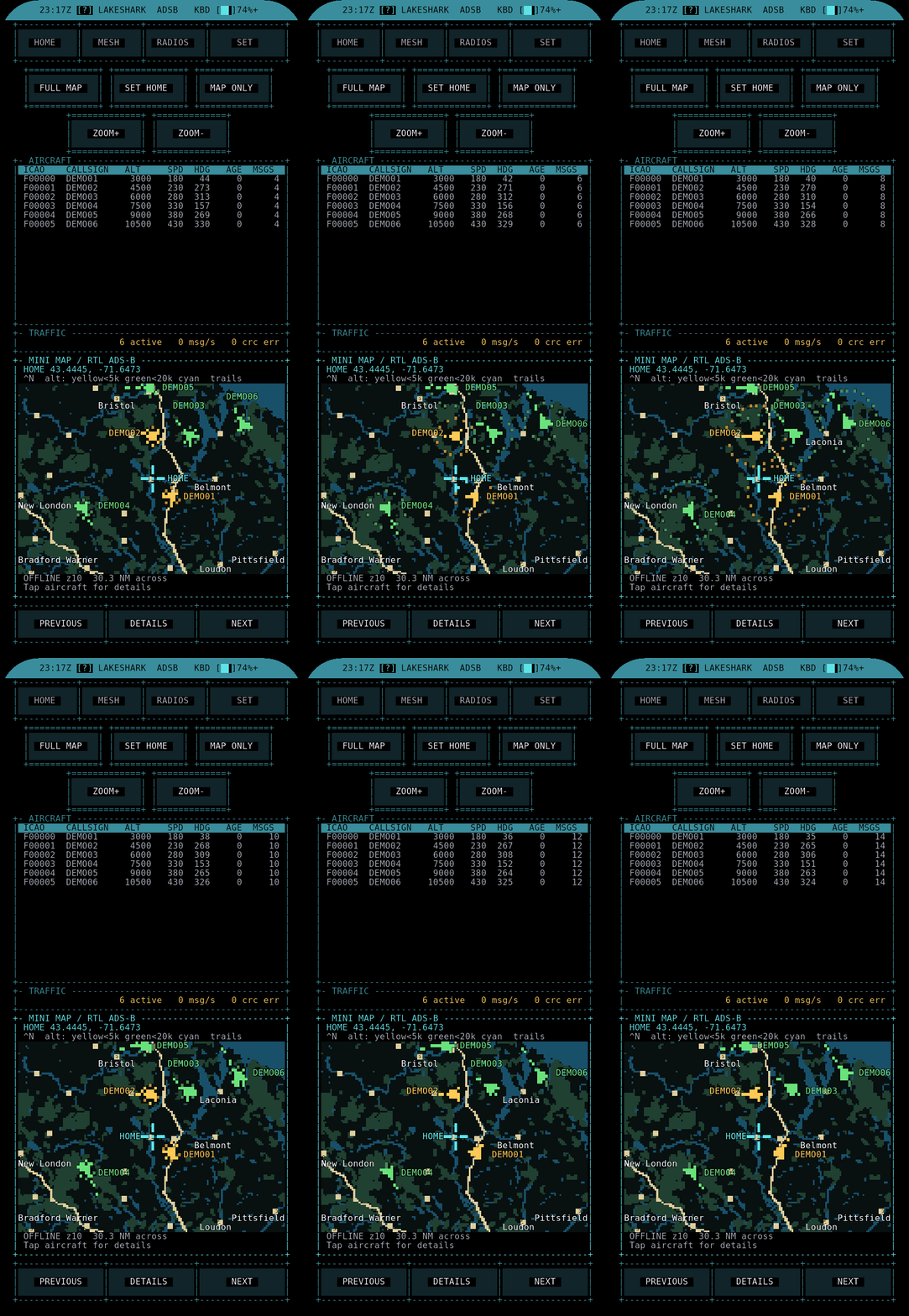
The LakeShark ADS-B app, per the project, covers “1090 MHz aircraft tracking,” traffic history, an offline mini-map, and spoken aircraft notifications. As of v2.15, the DETECTOR app also offers aircraft alerts — a second entry point that treats aircraft as alertable events alongside the drone Remote ID detection covered in Volume 8.
The information in a 112-bit Extended Squitter is split across message types identified by a 5-bit Type Code (TC) in the payload. A receiver assembles an aircraft’s full state from several different messages over time:
Table 2 — The information in a 112-bit Extended Squitter is split across message types identified by a 5-bit Type Code (TC) in the payload. A receiver assembles an aircraft's full state from several different messages over time
| Type Code | Message | Yields |
|---|---|---|
| 1–4 | Aircraft identification | Callsign (flight number), category |
| 5–8 | Surface position | Position (on ground) |
| 9–18 | Airborne position (barometric alt) | Lat/lon (CPR), altitude |
| 19 | Airborne velocity | Ground speed, track, vertical rate |
| 20–22 | Airborne position (GNSS alt) | Lat/lon (CPR), GNSS altitude |
This is why an aircraft’s row in the traffic list fills in progressively: the ICAO address and callsign arrive on an identification message, altitude and position on airborne-position messages, speed and heading on a velocity message. The device correlates them all by the 24-bit ICAO address, which is present in every message. A plane with a decoded callsign but no map dot has simply not yet delivered a position message (or its second CPR frame — §4).
Note — line of sight and range. 1090 MHz is line-of-sight; ADS-B range is set by antenna height and horizon, not by the receiver’s sensitivity alone. On a handheld at ground level the realistic catch is aircraft within tens of nautical miles and anything high overhead; a better antenna (the
../Antennas/reference is the hub’s home for this) and elevation extend it. This is a receiver-physics limit, not a LakeShark one.
6.3 The dump1090 / libmodes lineage
LakeShark did not reinvent the Mode S decoder any more than it reinvented the IMBE vocoder. The project credits a dump1090 / libmodes decoder lineage, with a single-frame CPR reference from ADS-B Scope.
Table 3 — The dump1090 / libmodes lineage
| Component | Upstream | Role in LakeShark |
|---|---|---|
| Mode S preamble detect, bit slicing, CRC | dump1090 / libmodes | The battle-tested open-source 1090ES decoder core |
| Single-frame CPR math | ADS-B Scope reference | Position reconstruction (see §4) |
| T-Display-P4 ADS-B port heritage | jstockdale’s T-Display-P4 ADS-B work (Volume 1 credit map) | The reference that proved 1090ES decode on this exact SoC |
This matters for the same reason the OP25 lineage mattered in Volume 4: dump1090 is the reference 1090ES decoder of the entire SDR hobby, run by thousands of ground stations feeding flight-tracking networks. Porting its decode core to the P4 means the algorithm is the proven one; the open question is only whether the MCU port keeps up with the 1 Mbit/s message rate across a busy sky. The high-rate RTL mode (Volume 3) and the dedicated decode path are what make that feasible.
The throughput concern is real and specific. Over a busy terminal area the air carries thousands of Mode S messages per second, each a 120 µs burst that must be detected, sliced, and CRC-checked before the next arrives. dump1090 on a desktop brute-forces this with a correlation over every sample; an MCU port has to be more economical, and the jstockdale T-Display-P4 ADS-B reference (Volume 1’s credit map) is significant precisely because it proved the decode runs on this exact SoC before LakeShark integrated it. The honest framing, consistent with Volume 5’s ledger: the decoder lineage is trusted, and the P4 has been shown to carry it — what a given operator sees still depends on antenna, location, and how dense the local traffic is.
6.4 CPR: turning two messages into a position
The one genuinely subtle piece of ADS-B is how position works, and it is worth a section because it explains why aircraft sometimes “pop in” to the map a beat after they first appear in the list.
ADS-B does not transmit a plain latitude and longitude. To fit a position into a short message, it uses Compact Position Reporting (CPR) — a scheme that encodes position relative to a grid, in two interleaved flavors called even and odd frames. The receiver needs either:
- Two frames (one even, one odd) received close together in time — globally unambiguous position, no prior knowledge needed; or
- One frame plus a known reference position (the receiver’s own location, or a recent fix for that aircraft) — the “single-frame” or “locally referenced” decode.
 even frame ──┐
 ├──▶ global CPR solve ──▶ unambiguous lat/lon
 odd frame ──┘ (needs both, close in time)

 one frame ──┬──▶ local CPR solve ──▶ lat/lon near a reference
 reference ───┘ (ADS-B Scope single-frame reference)
The ADS-B Scope single-frame CPR reference the project credits is the locally-referenced path: given the receiver’s own GPS position (from the L76K, §9) or a prior fix, a single CPR frame resolves to a usable position. This is why an aircraft shows up in the traffic list (identity and altitude decode from a single non-position message) slightly before it appears on the map (position may need the second CPR frame or a reference). It is normal behavior, not a bug.
6.5 Traffic history and spoken callouts
Two features turn the raw decode into something usable on the move.
Traffic history keeps a rolling record of the aircraft the device has seen — not just the current sky but what passed through, so the operator can scroll back. Combined with the offline mini-map, it means the device is a self-contained flight logger, not just a live display.
Spoken aircraft notifications are the standout usability feature. The device speaks aircraft events aloud through the same ES8311 codec and speaker that carry P25 voice (Volume 4’s audio path is shared). A callout lets the operator keep eyes up — on the sky, on a map, on the road — while the device announces new or notable traffic. The DETECTOR app’s v2.15 aircraft alerts extend this into a rules-driven alerting model.
The DETECTOR path is the more configurable of the two. Where the ADS-B app’s callouts announce traffic generally, DETECTOR treats aircraft as alertable events governed by a rules file on the SD card (the same rules mechanism that drives its drone Remote ID alerts, Volume 8). That lets the operator define which aircraft matter — by ICAO address, by callsign pattern, by proximity — and have the device stay quiet until one appears. The two entry points answer different questions: the ADS-B app answers “what is up there?”, DETECTOR answers “tell me when this shows up.”
There is also a distinction worth keeping straight between the ADS-B mini-map and the full MAP app (§7). The mini-map is an in-app, aircraft-focused view embedded in the ADS-B screen — a quick spatial glance without leaving the traffic list. The full MAP app is the fusion canvas that renders the PMTiles basemap and overlays every position-bearing mode (§8). Aircraft appear on both; the mini-map is the convenience, the MAP app is the whole picture.
Tip — shared audio path. The spoken callouts, P25 voice, and alert tones all funnel through the one I2S → ES8311 → speaker road (Volume 4 §7). There is a single audio sink; the firmware mixes or sequences what reaches it. That is why the audio behavior is consistent across every mode.
Note — offline by design. The entire ADS-B experience — decode, history, mini-map, callouts — runs with no network. Commercial flight-tracking apps are thin clients for a server; LakeShark is the whole station. That is the recurring design value of the device and the reason the mapping stack (§7) is built the way it is.
6.6 FALLS: the touch-to-tune waterfall
FALLS is LakeShark’s waterfall display — the scrolling spectrogram every SDR operator reaches for first. The project describes it as a waterfall view for live P25, FM, and LoRa signals, with touch-to-tune markers.
Two things make it more than eye candy:
- It spans multiple modes. The same waterfall shows P25, FM, and LoRa activity — it is a spectral overview across the receiver’s working ranges, not a single-mode scope.
- Touch-to-tune. On the 4.1” AMOLED’s capacitive touch surface, tapping a signal on the waterfall tunes the receiver to it. This is the PortaPack-style interaction (see the HackRF One deep dive) brought to a device that also decodes trunked digital voice — tap the trace, hear the call.
 freq ──────────────────────────────────────────────▶
 t │ ░░░░▓▓░░░░░░░░░▓▓▓▓░░░░░░░░░░░░░▓░░░░░░░░░░░░░░░
 i │ ░░░░▓▓░░░░░░░░▓▓▓▓▓▓░░░░░░░░░░░░▓░░░░░░░░░░░░░░░
 m │ ░░░░▓▓░░░░░░░▓▓▓▓▓▓▓▓░░░░░░░░░░░▓░░░░░░░░░░░░░░░ ◀── tap a trace
 e │ ░░░░▓▓░░░░░░░░▓▓▓▓▓▓░░░░░░░░░░░░▓░░░░░░░░░░░░░░░ to tune
 ▼ │ ░░░░▓▓░░░░░░░░░▓▓▓▓░░░░░░░░░░░░░▓░░░░░░░░░░░░░░░
 └──┬──┴────────┴──┴──────────────┴──────────────
 P25 ctrl FM voice LoRa beacon
The waterfall is fed by the same IQ front end as everything else — on the RTL path from the high-rate capture, and on the LR2021 path from the same SPI IQ stream that feeds the C4FM decoder (Volume 4: “the same stream feeds the waterfall”). So even the dongle-free LR2021 board gets a waterfall, bounded by its 125 kcomplex/s window.
Under the display, a waterfall is an FFT per row: the IQ stream is windowed, Fourier-transformed into a power spectrum, mapped through a color palette, and scrolled one line per update. The P4’s HP RISC-V core has the FPU and the clock to run the FFT in real time, and the 568×1232 AMOLED gives an unusually tall canvas — more vertical pixels means more scroll history visible at once, which is a genuine advantage of the board over the short, wide LCDs common on ESP32 scanners. The horizontal span of the waterfall is the capture bandwidth: wide on the RTL high-rate path (up to the 2 MSPS ceiling), a narrow slice on the LR2021 SPI window.
Table 4 — FALLS: the touch-to-tune waterfall
| Waterfall property | RTL-SDR path | LR2021 path |
|---|---|---|
| Source | USB IQ, high-rate capture | SPI IQ, 125 kcomplex/s |
| Span | Wide (up to ~2 MHz) | Narrow slice around tune freq |
| Band-scan reconnaissance | Yes | No |
| Modes shown | P25, FM, LoRa | P25, FM, LoRa (within slice) |
| Touch-to-tune | Yes | Yes |
Note — the waterfall on the LR2021. Because the LR2021’s IQ window is narrow (no band-scan), its waterfall is a view of a small slice around the tuned frequency, not the wide spectrum sweep the RTL-SDR’s up-to-2-MSPS mode can paint. For wide-spectrum reconnaissance, the RTL-SDR path is the one.
6.7 The offline mapping stack: PMTiles, CartoTUI, ZeroMesh
The MAP app is where LakeShark’s offline-first philosophy is most fully expressed. It renders offline maps with aircraft trails, mesh nodes, ships, APRS, and GPX routes, plus layers, markers, and eight palettes. Markers can be shared over MeshCore. The project names CartoTUI and ZeroMesh as rendering components, and labels the “Pixel field view” [EXPERIMENTAL].
The key technology is PMTiles — a single-file archive format for map tiles. Instead of thousands of individual tile files or a live tile server, a whole region’s vector map is one .pmtiles file on the SD card, from which the renderer reads exactly the tiles it needs for the current view. This is the format choice that makes genuinely offline mapping practical on an MCU:
Table 5 — The key technology is PMTiles — a single-file archive format for map tiles. Instead of thousands of individual tile files or a live tile server, a whole region's vector map is one .pmtiles file on the SD card, from which the renderer reads exactly the tiles it needs for the current view. This is the format choice that makes genuinely offline mapping practical on an MCU
| Approach | Storage | Network | Fit for LakeShark |
|---|---|---|---|
| Live tile server (web maps) | None local | Required | Wrong — defeats the offline premise |
| Thousands of PNG tile files | Huge, many files | None | Impractical filesystem load on an MCU |
| PMTiles single-file archive | One file per region | None | The choice — one SD file, random-access reads |
 SD card MAP renderer (CartoTUI / ZeroMesh)
 ┌──────────────┐ tile reads ┌─────────────────────────────┐
 │ region.pmtiles│───────────▶│ vector draw, 8 palettes │
 │ (one file) │ │ + live overlays: │
 └──────────────┘ │ aircraft trails │
 │ ships (AIS) │
 GPS (L76K) ─────────────────▶│ APRS stations │
 │ mesh nodes │
 MeshCore ───── markers ─────▶│ GPX routes, markers │
 └─────────────────────────────┘
Why PMTiles specifically earns its place is worth one more beat. The format is a single file with an internal directory that maps a tile coordinate (zoom, x, y) to a byte range inside the file. A renderer seeks to that byte range and reads only the tiles the current view needs — no server, no per-tile files, no unpacking. For an MCU with a FAT-formatted SD card that would choke on a directory of a hundred thousand little PNGs, a single random-access archive is the difference between workable and not. And because the tiles are vector (geometry plus attributes, drawn on the device) rather than pre-rendered raster, the same file re-colors through all eight palettes without re-downloading anything — the palette is applied at draw time.
 region.pmtiles
 ┌───────────────┬───────────────────────────────────────┐
 │ header + dir │ tile data (vector, zoom/x/y indexed) │
 └──────┬────────┴───────────────────────────────────────┘
 │ lookup (z,x,y) → byte range
 ▼
 seek + read one tile ──▶ vector draw ──▶ apply palette (×8)
CartoTUI and ZeroMesh are the companion projects (noted in Volume 1) that do the actual rendering — CartoTUI the terminal/offline PMTiles renderer, ZeroMesh the mesh-tied layer that carries the shared-marker and node overlays. They are separate repositories rather than code baked into LakeShark, which is both a strength (reusable, independently developed) and the source of the one honest caveat the project carries here: CartoTUI integration “has not been validated against recent firmware changes” — a near-daily-release artifact (Volume 1’s version-churn note), and a reminder to check current state before trusting the map’s freshness. The “Pixel field view” is explicitly [EXPERIMENTAL].
Preparing map data is an offline step the operator does once: a region is converted to a .pmtiles file (from OpenStreetMap-derived vector sources) and copied to the SD card. The project does not document a size or format spec for the SD layout (Volume 9 covers SD roles generally), so the practical workflow — which tools build the tiles, how large a region fits — is left to the current repo docs rather than claimed here.> Note — what the README does not say. The repository README does not mention range rings or FOLLOW/GO-TO navigation modes. Earlier project summaries listed them; this volume states only what the current README documents — layers, markers, eight palettes, MeshCore marker sharing, and the experimental pixel-field view. Treat range-rings/FOLLOW as unconfirmed against the current firmware.---
6.8 What rides on the map: aircraft, ships, APRS, mesh
The map’s value is that it is a fusion surface. Every position-bearing mode in the device plots onto the same canvas:
Table 6 — The map's value is that it is a fusion surface. Every position-bearing mode in the device plots onto the same canvas
| Overlay | Source mode | Volume |
|---|---|---|
| Aircraft + trails | ADS-B 1090 MHz | this volume §2 |
| Ships | AIS | Volume 5 §8 |
| APRS stations | APRS | Volume 5 §8 |
| Mesh nodes | MeshCore / LoRa | Volume 7 |
| GPX routes + markers | GPS / user | §9 |
| Own position | L76K GPS | §9 |
This is the payoff of piping APRS and AIS into the map rather than printing them (Volume 5): a single glance shows aircraft overhead, vessels offshore, amateur stations around, and mesh peers in range, all referenced to the operator’s own GPS fix, with no network. Markers can be pushed to other LakeShark/MeshCore nodes, turning the map into a shared tactical picture across a mesh — the ZeroMesh angle.
It is worth noting what this fusion is not. It is a receive-and-plot picture built entirely from signals the device hears plus its own GPS — there is no uplink to a tracking service, no account, no cloud correlation. That is a privacy and operational-security property as much as an offline-convenience one: the device leaks nothing by listening, and the mesh-marker sharing is an opt-in local link, not a broadcast to the internet. For the posture discussion in Volume 10 this matters — a passive plotting map is a very different thing from a connected tracker.
The map is also the place where several of the honesty caveats from Volume 5 become visually obvious. An AIS ship with no recent position fades; an aircraft that has sent identification but not position sits in the list without a dot; a mesh node’s position is only as good as its last beacon. The map does not invent certainty the signals did not provide — a design choice consistent with the rest of the firmware’s refusal to over-claim.
6.9 GPS and GPX
Position services are listed by the project as “Position, navigation and GPX track recording.” The onboard GNSS is the L76K receiver on a UART (Volume 2 covers the board); the README itself does not name the chip, so the L76K identification comes from the hardware specification rather than the feature page.
Two jobs:
- Own-position fix — feeds the map’s center/own-position marker and, importantly, the ADS-B single-frame CPR reference (§4): the receiver’s own latitude/longitude is the reference that lets a single CPR frame resolve to an aircraft position.
- GPX track recording — logs the device’s own track to the SD card for later review or re-import, and GPX routes load back onto the map as overlays.
 L76K GNSS ──UART──▶ own fix ──┬──▶ MAP center / own marker
 ├──▶ ADS-B local CPR reference
 ├──▶ SAME/EAS county relevance (Vol 5)
 ├──▶ Location-scanning channel filter (Vol 5)
 └──▶ GPX track → SD card
The L76K is a modest, low-power multi-constellation GNSS module (GPS/BeiDou-class) on a UART — appropriate for a battery device whose GPS job is “know roughly where I am,” not survey-grade positioning. Its fix threads into more of the firmware than a casual reading suggests: beyond centering the map, it is the reference position for single-frame ADS-B CPR (§4), the relevance filter for GPS-aware SAME/EAS and Location scanning (Volume 5), and the source for WiGLE-style geotagged Wi-Fi/BT survey (Volume 8). The GPX side closes the loop — the device records where it has been and can reload routes, so a planned walk or a prior survey track becomes a map overlay.
GPX is the lingua franca of handheld GPS: an XML track/route/waypoint format every mapping tool reads. Recording to it (rather than a proprietary log) means a LakeShark track drops straight into any desktop mapping or analysis tool, and third-party routes drop straight onto the device — the same interoperability instinct as the PMTiles choice for basemaps.
6.10 The Flipper control-head view
One ecosystem feature belongs in a volume about displays and situational awareness: the LakeShark-Flipper companion app (noted in Volume 1) lets a Flipper Zero act as a control head for LakeShark. The relevant artifact here is the ADS-B view surfaced on the Flipper’s screen — a compact readout of aircraft traffic driven by the LakeShark device over their link.
The design idea is that the 4.1” AMOLED is the full console, but a Flipper Zero — which many in this hub already carry — can be a pocket remote for the common cases: glance at traffic, trigger a function, read an alert, without pulling out the larger device. It is a nice expression of the hub’s cross-tool philosophy: the Flipper Zero deep dive treats the Flipper as a universal front-end, and LakeShark is one more thing it can front. Volume 9 covers the control-head and headless modes in full alongside flashing.
Tip — why a control head at all. A standalone scanner spends most of its battery lighting a 568×1232 AMOLED. Offloading the glance-and-go interactions to a Flipper’s monochrome display is both a power play and an ergonomics one — the big screen comes out only when the waterfall or the map is actually needed.
6.11 Takeaways
- ADS-B decodes 1090 MHz Mode S PPM (56/112-bit messages, 24-bit CRC) via a dump1090/libmodes lineage with an ADS-B Scope single-frame CPR reference; it offers traffic history, an offline mini-map, and spoken callouts through the shared ES8311 audio path. DETECTOR adds aircraft alerts in v2.15.
- CPR means position needs either an even+odd frame pair or a single frame plus a reference (the device’s own GPS fix) — which is why aircraft appear in the list before the map.
- FALLS is a touch-to-tune waterfall spanning P25, FM, and LoRa, fed by the same IQ front end — wide on the RTL path, narrow on the LR2021’s SPI window.
- The mapping stack is offline-first: PMTiles single-file regional archives on SD, rendered by CartoTUI / ZeroMesh, with eight palettes, markers shareable over MeshCore, and an experimental pixel-field view. CartoTUI integration is flagged as not re-validated against recent firmware; range-rings/FOLLOW are not in the current README.
- The map is a fusion surface — aircraft, ships (AIS), APRS, mesh nodes, GPX, and own GPS position all plot on one canvas with no network.
- GPS (L76K) provides the own-position fix, the ADS-B CPR reference, and GPX recording. A Flipper Zero can act as a control head (LakeShark-Flipper), surfacing an ADS-B view as a pocket remote — covered fully in Volume 9.
Volume 7 turns to the LoRa side of the board: MeshCore messaging and telemetry, and the tilt-compensated compass with RSSI-by-heading bearing — a fox-hunting aid the author is careful to say is “not a validated direction-finding system.”
Comments (0)