M5Stick S3 · Volume 3
M5Stack M5StickS3 Volume 3 — Pinout and Expansion Buses
GPIO map, Hat2 16-pin top header, Grove HY2.0-4P side port, USB-C OTG, bus sharing
3.1 About this volume
Vol 3 documents the expansion surfaces of the M5StickS3 — every pin you can touch from outside the enclosure, every bus that’s exposed, every pin assignment you need to write Arduino/PlatformIO code that wires to external hardware.
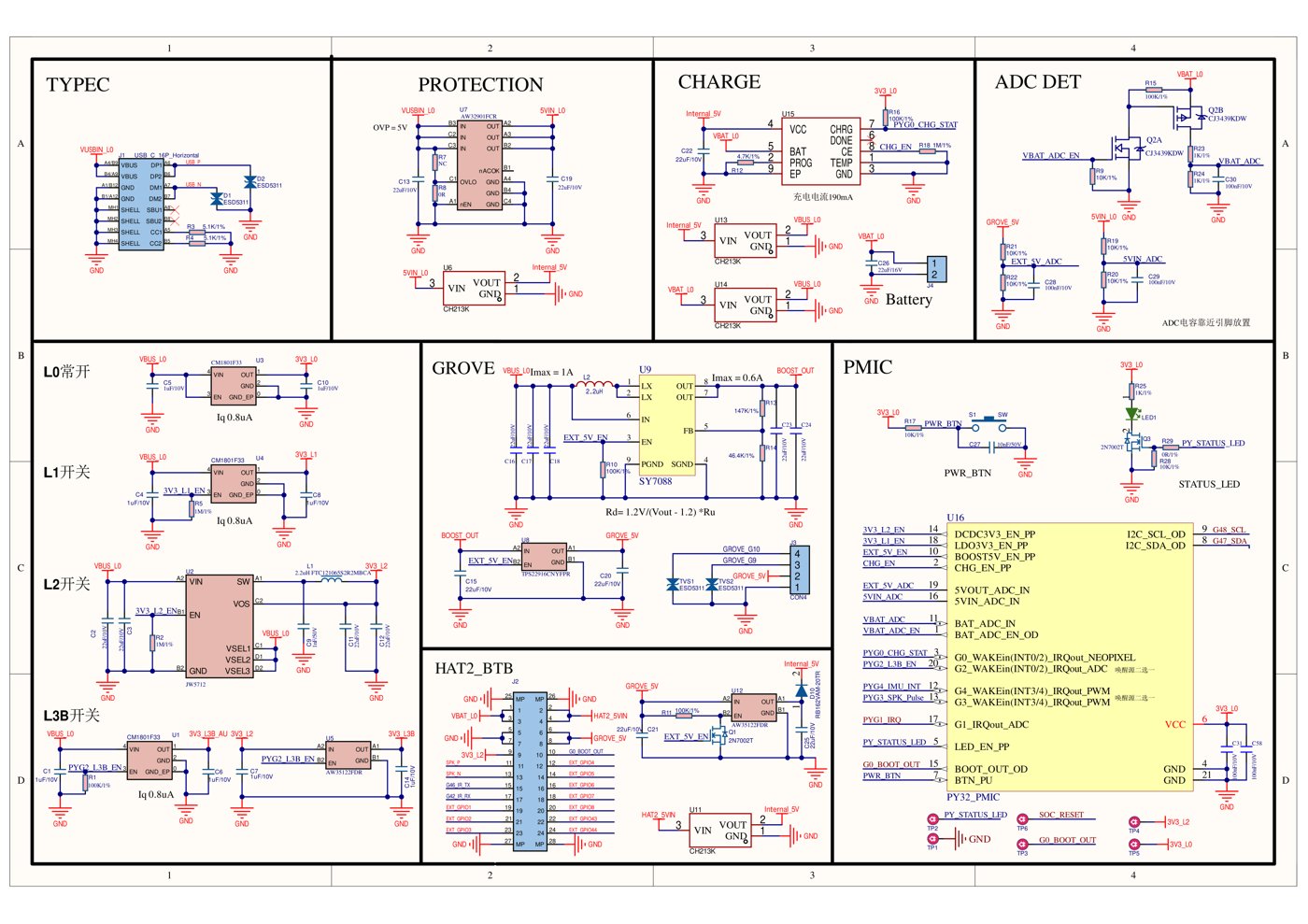
Three expansion paths: Grove HY2.0-4P (side, primary for quick I²C / UART sensors), Hat2 16-pin (top, primary for Hat-class accessories), USB-C OTG (side, for HID + mass-storage + serial console).
Honest disclosure about depth: as of project authoring (2026-05-13), the M5StickS3 Hat2 pinout PDF from M5Stack’s docs site may not be fully published. This volume describes the intended pinout based on:
- M5Stack’s vendor pinout conventions for similar devices (Cardputer ADV EXT, M5Atom HAT)
- M5Unified library source code (which encodes the pin assignments)
- Community teardowns and forum discussion
Verify against actual hardware on receipt before deploying any custom firmware that depends on specific pin numbers. The functional-block-level descriptions here are accurate; specific GPIO numbers may need adjustment.
3.2 GPIO map
The ESP32-S3-PICO-1-N8R8 SIP exposes ~47 GPIOs externally; the M5StickS3 routes them across the internal peripherals and the external expansion buses.
Likely GPIO assignments (subject to verification on hardware via M5Unified source or vendor pinout PDF):
Table 1 — Likely GPIO assignments (subject to verification on hardware via M5Unified source or vendor pinout PDF)
| GPIO | Function | Notes |
|---|---|---|
| 0 | BOOT button | Hold during USB plug-in for download mode |
| 1, 2 | Grove TX / RX (UART default) or I²C secondary (re-tasked) | Grove HY2.0-4P pins 3/4 |
| 3-4 | Hat2 pins or buttons | Verify |
| 5-7 | Hat2 control pins | Verify against M5Unified |
| 8, 9 | Primary I²C SDA / SCL (shared bus) | Codec + IMU + Hat2 I²C |
| 10 | Battery ADC / status | Voltage divider for battery telemetry |
| 11, 12 | Hat2 spare GPIOs | Verify |
| 13 | IR RX photodiode | TSOP-class receiver output |
| 14 | SPI MOSI (display) | Shared with Hat2 SPI |
| 15 | Display CS | Internal — not user-routable |
| 16, 17 | Display DC / RST | Internal — not user-routable |
| 18, 19 | USB D-/D+ | Native USB peripheral |
| 19 | IR TX LED drive | 940 nm consumer IR transmit |
| 21 | IR RX (alternate position — verify) | |
| 33-38 | Display backlight, LCD bus auxiliary | Internal |
| 39 | SPI MISO (display) | Shared with Hat2 SPI |
| 40 | SPI SCK | Shared |
| 41-43, 46 | I²S audio (codec) | ES8311 + AW8737 + speaker chain |
| Buttons | A, B, Power on dedicated GPIOs (verify) | Long-press power is HW-level shutdown |
Caveats:
- Many assignments are firmware-conventional rather than hardware-fixed. The M5Unified library establishes the canonical pin → peripheral mapping; custom firmware can re-task spare GPIOs.
- Internal-only GPIOs (display backlight, power management) are not exposed externally.
- Specific GPIO numbers may shift between hardware revisions — verify on the production unit.
For Arduino sketches, use M5Unified named constants rather than hardcoded GPIO numbers:
#include <M5Unified.h>
M5.begin(cfg);
// M5.Display, M5.Mic, M5.Speaker, M5.Imu, M5.BtnA, M5.BtnB
// All wired internally to the correct GPIOs by M5Unified at init.
Direct GPIO usage is only needed when wiring to Hat2 / Grove peripherals or writing bare-metal ESP-IDF code.
3.3 Grove HY2.0-4P port (side)
3.3.1 Default function — PortC UART
The Grove HY2.0-4P connector on the side of the M5StickS3 follows M5Stack’s standard PortC UART convention:
Table 2 — The Grove HY2.0-4P connector on the side of the M5StickS3 follows M5Stack's standard PortC UART convention
| Grove pin | Wire color | GPIO (verify) | Default function |
|---|---|---|---|
| 1 | Black | GND | Ground |
| 2 | Red | — | 5V boost output (USB or battery) |
| 3 | White | GPIO 2 (likely) | UART RX |
| 4 | Yellow | GPIO 1 (likely) | UART TX |
Standard wiring for serial peripherals — GPS modules, RS232/RS485 adapters, modems, etc. The 5 V rail powers small peripherals directly.
3.3.2 Re-tasking to I²C
Firmware can re-task G1 / G2 to I²C by switching the pin mux and using a separate Wire1 instance (not the default Wire which is on G8 / G9):
#include <Wire.h>

void setup() {
    Wire1.begin(2, 1);   // SDA = G2, SCL = G1 — verify color/pin mapping
    // ... use Wire1 for Grove I²C peripherals
}
Bruce and several M5StickS3 firmwares do this for Grove I²C peripherals — PN532 NFC readers, environmental sensors, etc.
Pin-direction caveat: verify the actual SDA/SCL pin assignment with a multimeter or the M5Unified source. Grove cables follow color conventions but variants exist.
3.3.3 Secondary I²C bus considerations
The Grove-rebound G1 / G2 secondary I²C is completely separate from the primary I²C bus (G8 / G9):
- Different
Wireinstances in Arduino —Wire1notWire - Different physical ESP32-S3 I²C peripheral — uses I²C1 not I²C0
- No address conflicts between primary and secondary buses — a device at 0x18 on Grove is independent of the ES8311 at 0x18 on the primary bus
Pull-up resistors: add 4.7 kΩ to 3.3 V on SDA and SCL if the Grove peripheral lacks integrated pull-ups (most modern breakouts include them).
Speed: 100 kHz or 400 kHz standard. Faster (1 MHz Fast Mode Plus) works on capable chips but verify per-chip.
3.3.4 Power rail (5V output)
Grove pin 2 outputs 5 V sourced from USB-C (when plugged in) or from a battery boost converter (when on battery).
Budget: ~250-500 mA shared with on-board peripherals. The M5StickS3’s 5V boost is smaller than the Cardputer ADV’s — drawing too much on Grove will brownout the device. Conservative estimate:
Table 3 — Budget: ~250-500 mA shared with on-board peripherals. The M5StickS3's 5V boost is smaller than the Cardputer ADV's — drawing too much on Grove will brownout the device. Conservative estimate
| Grove peripheral draw | Risk level |
|---|---|
| < 50 mA (typical sensor) | Safe |
| 50-150 mA (some actuators) | Borderline; tested OK on USB power |
| > 150 mA | Risky on battery; OK on USB |
| > 300 mA | Will brownout regardless of USB / battery |
For high-current Grove peripherals (servos, motors, high-current LEDs), use an external power supply rather than the M5StickS3’s 5V rail.
For 3.3 V-only peripherals, use a small linear regulator (AMS1117-3.3) between Grove 5V and the sensor’s VCC.
3.4 Hat2 16-pin header (top)
3.4.1 Pinout (TBD pending vendor PDF)
The Hat2 16-pin header is on top of the M5StickS3 — a 2.54 mm 2-row header (8 × 2 = 16 positions).
Likely pinout (based on M5Stack vendor conventions; verify against the M5StickS3-specific Hat2 PDF when published):
Table 4 — Likely pinout (based on M5Stack vendor conventions; verify against the M5StickS3-specific Hat2 PDF when published)
| Pin | Signal | Function |
|---|---|---|
| 1 | 3V3 | 3.3 V power rail (system rail) |
| 2 | 5V | 5V rail (USB or battery boost) |
| 3 | GND | Ground |
| 4 | GND | Ground |
| 5 | RESET | Hat2 reset (active-low) |
| 6 | INT | Hat2 interrupt input |
| 7 | I²C SDA (G8) | Shared primary I²C |
| 8 | I²C SCL (G9) | Shared primary I²C |
| 9 | UART TX | UART2 TX (for serial Hat2 modules) |
| 10 | UART RX | UART2 RX |
| 11 | SPI MISO (G39) | Shared SPI MISO |
| 12 | SPI MOSI (G14) | Shared SPI MOSI |
| 13 | SPI SCK (G40) | Shared SPI SCK |
| 14 | SPI CS | Hat2-specific CS |
| 15 | GPIO | Spare GPIO |
| 16 | GPIO | Spare GPIO |
(Verify pinout — this is an educated guess based on M5Stack conventions, not a vendor-confirmed mapping.)
3.4.2 Signal groups
The Hat2 bus is organized by functional groups:
- Power (pins 1, 2, 3, 4): 3V3 + 5V + 2× GND
- Control bundle (pins 5, 6): RESET + INT — for SPI peripherals that need reset and interrupt
- I²C (pins 7, 8): primary shared I²C bus
- UART (pins 9, 10): UART for serial Hat2 modules
- SPI (pins 11, 12, 13, 14): MISO + MOSI + SCK + dedicated CS
- Spare GPIOs (pins 15, 16): general-purpose for custom Hat2 designs
This organization is less specialized than the Cardputer ADV’s Cap LoRa-1262-optimized EXT bus — the Hat2 is more generic, supporting a wider variety of Hat2 modules.
3.4.3 Power budget
Table 5 — 4.3 Power budget
| Rail | Pin | Budget | Notes |
|---|---|---|---|
| 3V3 | 1 | ~100-200 mA | Low-current MCU-class chips |
| 5V | 2 | ~250-500 mA (shared with Grove) | Higher-current actuators, RF modules |
| GND | 3, 4 | — | Multiple ground pins reduce return-path noise |
Total Hat2 budget is shared with Grove and on-board peripherals. Drawing high current on Hat2 can brownout the M5StickS3 (Vol 11 § 4).
For low-current Hats (sensor breakouts, small displays, RTC modules): no issue. For high-current Hats (LoRa modules at +22 dBm TX, motor drivers, etc.): use USB-C-tethered operation.
3.5 USB-C OTG (side)
USB-C connector. Native ESP32-S3 USB peripheral. Two modes:
Device mode (default) — M5StickS3 is a USB peripheral to a host computer:
- USB CDC serial (
/dev/ttyACM0on Linux,COM-Non Windows,/dev/cu.usbmodem-*on macOS) - USB HID keyboard / mouse (when running BadUSB firmwares)
- USB Mass Storage (when explicitly configured)
Host mode (OTG) — with a USB-C-to-A adapter, M5StickS3 enumerates USB peripherals:
- USB keyboards (less useful here than on Cardputer ADV due to small screen)
- USB-to-Serial console adapters (FTDI / CH340 / CP210x / PL2303) — M5StickS3 becomes a portable serial console for field debugging
- USB mass-storage thumb drives — read/write
- USB MIDI controllers — feed audio codec
- USB HID inspection — BadUSB Hunter
Mode selection at build time:
build_flags =
    -DARDUINO_USB_MODE=1                  ; Device mode (most common)
    -DARDUINO_USB_CDC_ON_BOOT=1           ; Native USB-CDC at boot
    ; OR
    -DARDUINO_USB_MODE=0                  ; Host OTG mode
Power-budget caveat: M5StickS3 in host mode has limited 5V output (~250-500 mA budget). High-current USB peripherals (USB Wi-Fi, large external HDDs) will brownout. Use a powered USB-C hub for high-current setups.
3.6 SPI + I²C + I²S bus sharing
The M5StickS3 hosts three buses internally + the exposed Grove/Hat2 surfaces:
3.6.1 SPI bus
Shared between:
Table 6 — Shared between
| Peripheral | CS line | Notes |
|---|---|---|
| Display (ST7789P3) | Internal CS on SIP package | Not user-routable |
| Hat2 SPI peripherals | Hat2 pin 14 | When Hat2 modules present |
Bus arbitration via chip-select discipline. Long display refreshes don’t block Hat2 SPI peripherals (different CS lines).
3.6.2 Primary I²C bus (G8/G9)
Shared between:
Table 7 — Shared between
| Device | Address | Notes |
|---|---|---|
| ES8311 audio codec | 0x18 | Always present |
| IMU (BMI270 or MPU6886) | 0x68 (or 0x69) | Always present |
| Hat2 I²C peripherals | varies | When Hat2 modules present |
| Grove-I²C peripherals (when Grove is in I²C mode) | — | NO — Grove I²C is the secondary bus, not the primary |
The 400 kHz bus speed handles all three peripherals comfortably. Address-scan utility: M5Unified’s Wire.beginTransmission(addr); err = Wire.endTransmission(); pattern sweeps 0x03-0x77 to discover devices.
3.6.3 Secondary I²C bus (G1/G2 — Grove-only)
When Grove port is re-tasked from UART to I²C (Wire1.begin(2, 1)):
- Independent bus from primary
- No address conflicts with primary
- 100 kHz or 400 kHz speed
3.6.4 I²S audio bus
Dedicated to ES8311 codec:
- Pins 41-43 + 46 typically
- Sample rates 8-96 kHz, 24-bit
- Bidirectional: MEMS mic in, speaker out
I²S is not shared with other peripherals (not enough peripheral instances on ESP32-S3 for sharing).
3.7 Bus-conflict reference
Compatible combinations table for typical use cases:
Table 8 — Compatible combinations table for typical use cases
| Combination | Compatible? | Notes |
|---|---|---|
| Hat2 SPI peripheral + display | ✓ | Different CS lines |
| Hat2 I²C device + on-board codec/IMU | ✓ | Provided no address collision |
| Hat2 I²C device at 0x18 (collides with ES8311) | ✗ | Same primary I²C bus |
| Hat2 I²C device at 0x68 (collides with IMU) | ✗ | Same primary I²C bus — use 0x69 alternate or different address |
| Grove I²C peripheral + Hat2 I²C peripheral | ✓ | Different buses (secondary vs primary) |
| Grove UART + Hat2 SPI | ✓ | Independent peripherals |
| Grove UART + on-board I²C peripherals | ✓ | Independent |
| Grove I²C + USB-CDC console | ✓ | Independent |
| Hat2 module + USB OTG host | ✓ | Independent |
| USB-OTG to USB-MIDI keyboard + on-board ES8311 audio out | ✓ | MIDI data via USB → ES8311 → speaker (same data path, no conflict) |
| Audio playback at full volume + Wi-Fi TX | ⚠ | Both high-current — risk of brownout on weak battery |
For multi-functional builds: prefer Grove I²C for I²C peripherals (uses secondary bus, no primary-bus contention with on-board codec/IMU). Reserve Hat2 for higher-bandwidth modules (SPI peripherals, additional radios, accessories that need the extra GPIOs).
3.8 Practical wiring examples
3.8.1 Example A — Wiring a BME280 environmental sensor via Grove (I²C)
BME280 breakout         Grove HY2.0-4P (M5StickS3 side)
─────────────         ─────────────────────────────
VCC (3.3V)  ── via AMS1117-3.3 reg ── Red (5V)
GND         ─────────────────────── Black (GND)
SDA         ─────────────────────── White (G2)
SCL         ─────────────────────── Yellow (G1)

(Most modern BME280 breakouts have integrated pull-ups + 3.3V regulator;
 in that case wire VCC directly to Red, skip the AMS1117.)

Arduino code:
    Wire1.begin(2, 1);    // SDA=G2, SCL=G1 on Wire1
    bme.begin(0x76, &Wire1);
3.8.2 Example B — Wiring a PN532 NFC reader via Grove (I²C)
PN532 module            Grove HY2.0-4P
─────────────         ─────────────────
VCC (5V or 3.3V) ──── Red
GND               ──── Black
SDA               ──── White (G2)
SCL               ──── Yellow (G1)

(PN532 module DIP switches: I²C mode = Switch 0: ON, Switch 1: OFF.)

Use RFID-PN532-i2c-CARDPUTER firmware (Jojorel) or Adafruit_PN532 library
with Wire1.begin(2, 1) reroute.
3.8.3 Example C — Hat2 SPI peripheral (when using a custom Hat2 SD card holder)
SD card holder Hat2      M5StickS3 Hat2 header
──────────────────       ──────────────────────
VCC (3V3)        ────── Pin 1 (3V3)
GND              ────── Pin 3 or 4 (GND)
CS               ────── Pin 14 (Hat2 CS)
SCK              ────── Pin 13 (SCK)
MOSI             ────── Pin 12 (MOSI)
MISO             ────── Pin 11 (MISO)

Arduino code:
    SPI.begin(40, 39, 14);     // SCK, MISO, MOSI per Hat2 conventions
    SD.begin(14);              // CS pin
(Verify Hat2 pin numbers against actual hardware before deploying.)
3.8.4 Example D — Wearable battery monitor
Reading battery voltage (via internal G10 ADC):

    int raw = analogRead(10);
    float voltage = (raw / 4095.0) * 3.3 * (R1+R2)/R2;
    // For M5StickS3 voltage divider, (R1+R2)/R2 is the divider ratio.
    // Use M5.Power.getBatteryVoltage() for the M5Unified-calibrated value.

    int percent = M5.Power.getBatteryLevel();
    M5.Display.printf("Battery: %d%%", percent);
M5Unified’s M5.Power.getBatteryLevel() is calibrated for the M5StickS3’s specific voltage divider — prefer it over raw ADC reads unless you’ve calibrated the divider yourself.
3.9 Resources
- M5Stack M5StickS3 pinout PDF: https://docs.m5stack.com/ (search for M5StickS3 pinout once page exists)
- ESP32-S3 GPIO matrix: ESP32-S3 datasheet § 5
- HY2.0-4P connector spec: JST documentation
- M5Unified library (source of canonical GPIO mappings): https://github.com/m5stack/M5Unified
- Cardputer ADV pinout (sibling reference):
../../../M5Stack Cardputer ADV/03-outputs/Cardputer_ADV_Complete.htmlVol 3
Forward references
- Hat + Unit ecosystem (what plugs into these buses): Vol 4
- Custom Hat2 daughterboard design: Vol 10
- USB-OTG BadUSB use cases: Vol 9 § 6
This is Volume 3 of a twelve-volume series. Next: Vol 4 catalogs the Hat + Unit ecosystem — what fits the M5StickS3, the family-compatibility map across M5Stack form factors.
Comments (0)