OpenSourceSDRLab PortaRF · Volume 3
OpenSourceSDRLab PortaRF Volume 3 — External Interfaces
USB-C, antenna mount, microSD, audio jack, expansion (and lack thereof), bench-tethered vs handheld operation patterns
3.1 About this volume
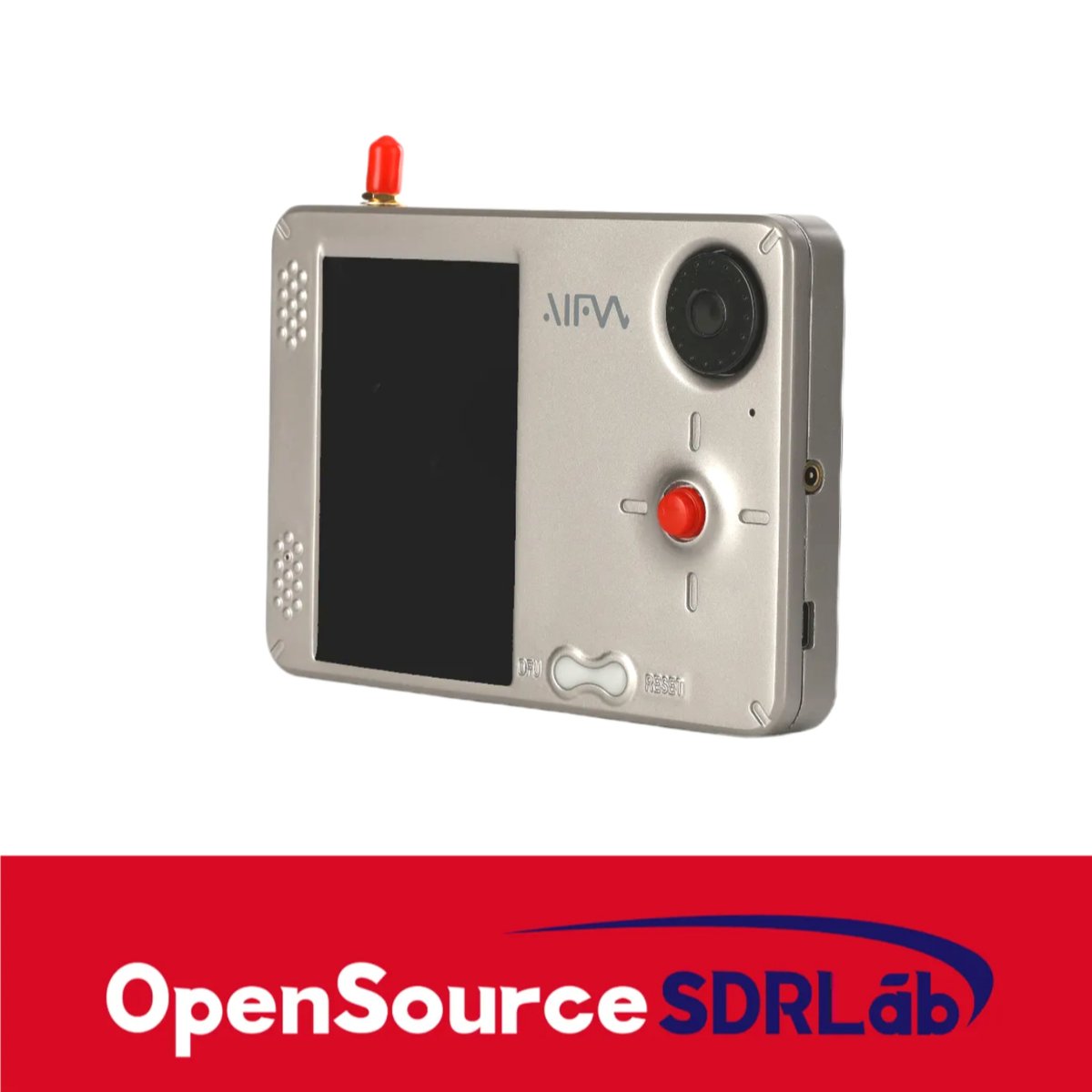
Vol 3 covers PortaRF’s external interfaces — everything you can touch from outside the enclosure. The PortaRF is mechanically simpler than a DIY HackRF + PortaPack stack: sealed enclosure means fewer ports exposed, but cleaner cable management. This volume is the reference for understanding what is and isn’t accessible without disassembly, and how operational workflows shift accordingly.
Most content cross-references HackRF One Vol 3 for the canonical interface discussion. PortaRF-specific deltas: USB-C (vs porta’s mini-B), single-antenna mount (no Operacake switch path), microSD performance under capture load in a thermally-constrained enclosure, no exposed GPIO header (no inline modifications without opening the case).
3.2 USB-C connector + capabilities
3.2.1 Physical + electrical
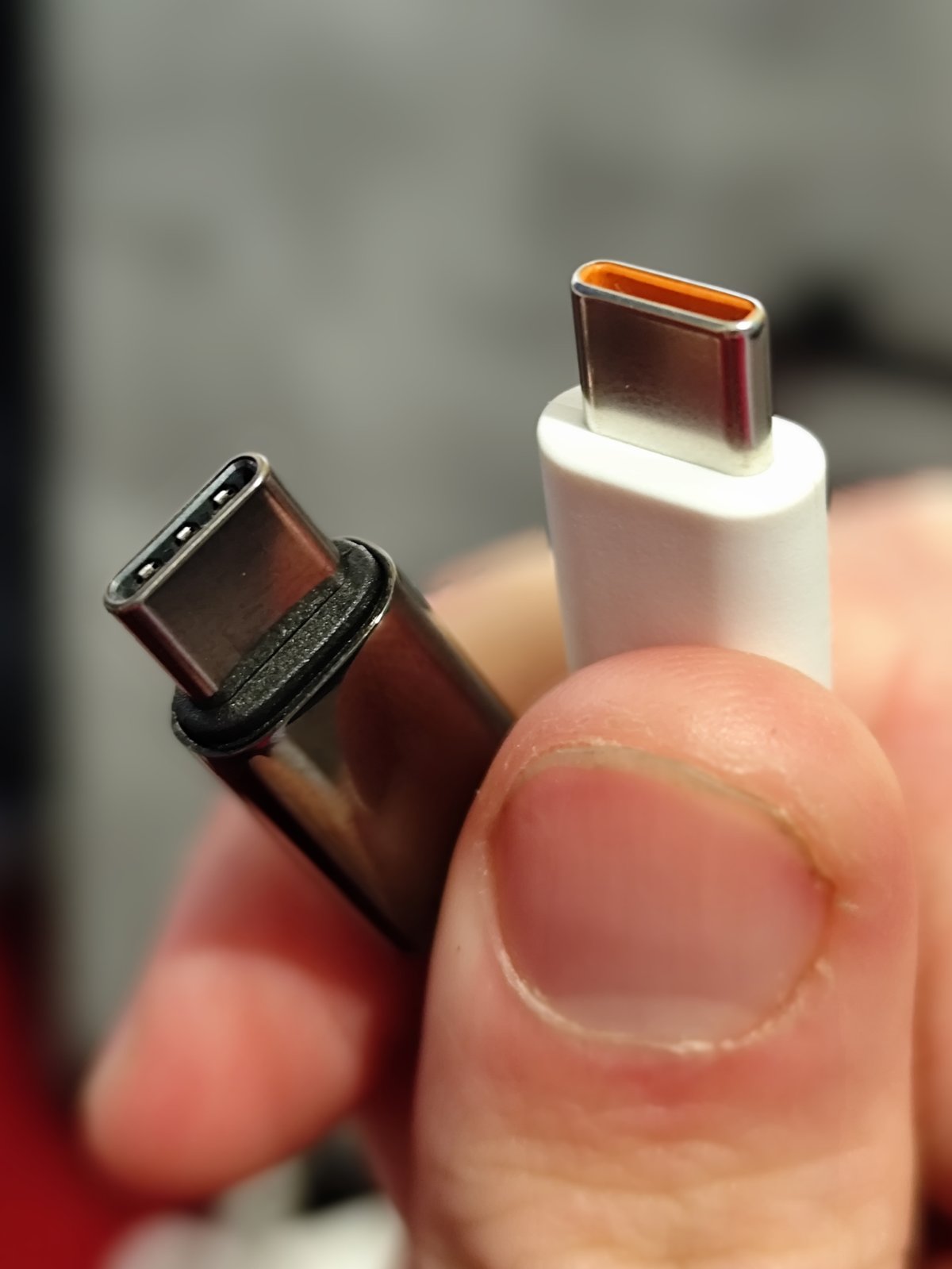
The PortaRF USB-C connector handles two distinct functions on the same socket:
- Charging input — 5 V DC from a USB-C power source feeds the TP4056-class charge controller (Vol 5 § 3)
- Data communication — USB 2.0 high-speed (480 Mbps) to a host PC for
hackrf_*tool access
Both functions are available simultaneously when tethered to a USB-C-equipped host — charge + data, no need to choose. This is the standard USB-C pattern for handheld devices in this class.
Cable requirements:
- Charging-only: any USB-C cable rated 5 V / 1 A or higher; cheap cables work
- Data + charging: cables marketed as “data + charging” or “USB 2.0 data” — most modern cables qualify
- Avoid: charge-only cables (some Apple / Anker cables omit data lines); will charge but won’t enumerate as a USB device
3.2.2 USB-PD considerations
USB Power Delivery (USB-PD) is the negotiated-power protocol. PortaRF’s TP4056-class charge controller does not support PD. Practical implications:
- A PD-capable charger / pack will fall back to 5 V mode automatically when PortaRF doesn’t negotiate higher voltage
- Some PD-only chargers (e.g., some MacBook 96 W chargers) refuse to output power without PD handshake — these may not charge PortaRF
- Test before relying — plug PortaRF into any new charger and confirm it charges (battery indicator should show charging within a few seconds)
For field deployment: a 5 V-fallback-capable USB-C battery pack (most modern packs work this way) is the safe choice. Anker, Nitecore, Charmast packs work; some pure-PD travel chargers may not.
3.2.3 USB 2.0 throughput for I/Q streaming
The 480 Mbps USB 2.0 link has overhead — practical sustainable throughput is ~35 MB/s. HackRF’s maximum I/Q stream rate is:
- 20 MS/s × 2 bytes/sample (8-bit I + 8-bit Q) = 40 MB/s
This is above the USB 2.0 practical limit. In practice, HackRF reduces sample rate slightly at maximum streaming or drops samples occasionally. Common workaround: cap sample rate at 8-10 MS/s for sustained tethered capture to ensure no sample loss.
For Mayhem standalone operation (no USB tether), the bottleneck shifts to the microSD card write speed (§ 4.4).
3.2.4 USB-C advantages over porta’s mini-B
Table 1 — 2.4 USB-C advantages over porta's mini-B
| Aspect | PortaRF (USB-C) | porta (mini-B) |
|---|---|---|
| Cable availability | Universal in 2026 | Increasingly rare |
| Cable durability | Robust connector | Mini-B is mechanically fragile; pins bend |
| Reversible | Yes | No (orientation matters) |
| Cable cost | Cheap; carried for phone anyway | Specific cable; backup carry recommended |
| Future-proofing | Will be relevant for years | Will become harder to source |
USB-C is the practical advantage that may eventually justify PortaRF over porta. As mini-B cables get harder to source (already happening in 2026), porta’s connector becomes a deployment friction point.
3.2.5 USB enumeration on the host
When PortaRF is connected to a host PC:
On Linux: lsusb shows
   ID 1d50:6089 OpenMoko, Inc. Great Scott Gadgets HackRF One

On Windows: Device Manager shows
   HackRF One (Libusb-1.0)

On macOS: system_profiler SPUSBDataType shows
   Product ID: 0x6089
   Vendor ID: 0x1d50 (Openmoko, Inc.)
The same vendor / product ID as a stock HackRF One — host-side drivers and tools see PortaRF as “a HackRF” with no special handling needed. All hackrf_* commands work identically.
3.3 Antenna — RP-SMA female + included whip
3.3.1 Connector
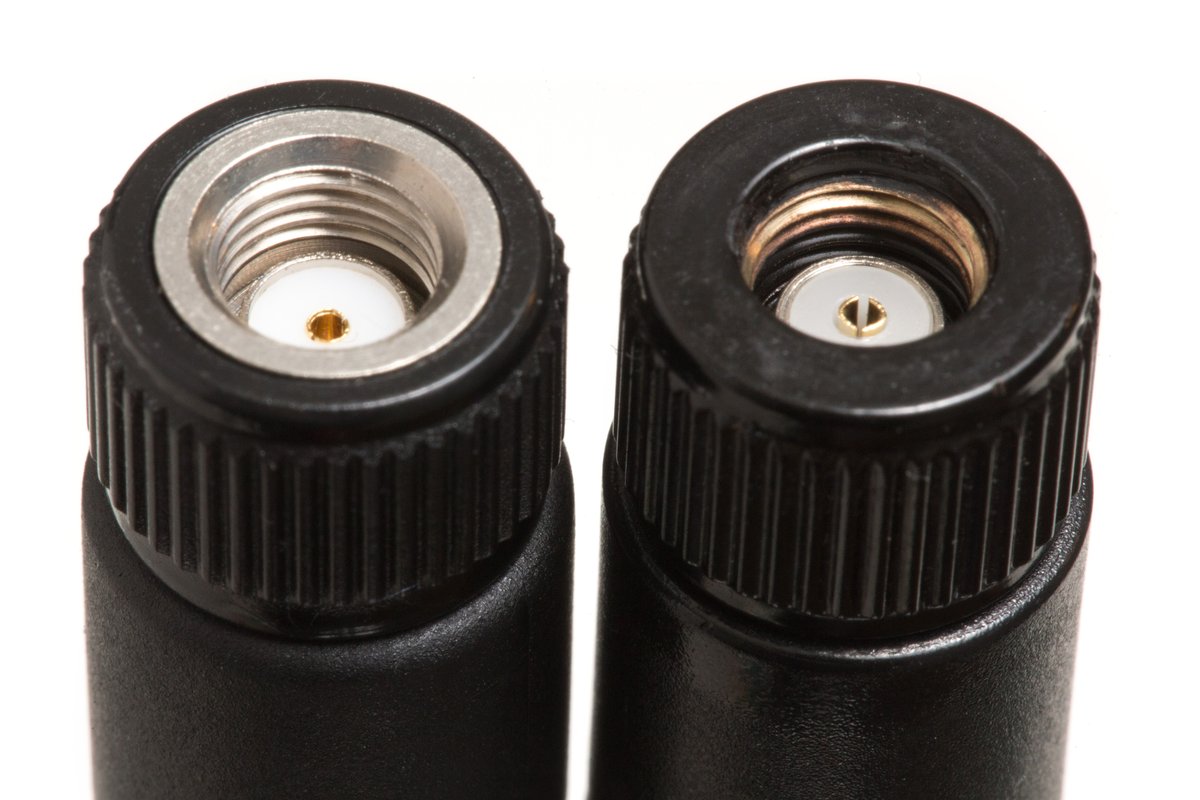
Standard HackRF convention: RP-SMA female (reverse-polarity SMA, female socket) on the top edge of the enclosure. This is what every HackRF One ships with, regardless of revision. SMA-to-RP-SMA adapters are commonly available if a particular antenna has the opposite gender.
The RP-SMA convention exists for FCC reasons — historically, RP-SMA was used to discourage end-users from attaching high-gain antennas. The reality in 2026 is that adapters are universal and the polarity is just a connector convention.
3.3.2 Included whip antenna
PortaRF likely ships with a telescoping whip antenna in the 3-5 dBi gain range covering ~700 MHz to ~6 GHz. The exact antenna depends on vendor sourcing; typical specs:
Table 2 — PortaRF likely ships with a telescoping whip antenna in the 3-5 dBi gain range covering ~700 MHz to ~6 GHz. The exact antenna depends on vendor sourcing; typical specs
| Parameter | Typical value |
|---|---|
| Coverage | 700 MHz - 6 GHz |
| Gain | 3-5 dBi |
| Length | 100-300 mm telescoping |
| Polarization | Vertical (linear) |
| VSWR | < 2:1 across band |
| Connector | RP-SMA male |
This is a compromise antenna — broad coverage at the expense of optimal performance in any single band. Adequate for general spectrum exploration; suboptimal for specific use cases (long-range ADS-B, weak-signal AIS, narrowband replay attacks).
3.3.3 Antenna upgrade path
For better performance in specific bands, swap the included whip for a band-tuned antenna:
Table 3 — For better performance in specific bands, swap the included whip for a band-tuned antenna
| Band of interest | Antenna recommendation | Approximate cost |
|---|---|---|
| 433 MHz (LPRF telemetry, garage doors) | 1/4-wave wire whip cut to 173 mm | $5-20 |
| 868 MHz (EU sub-GHz ISM) | 1/4-wave wire whip cut to 86 mm | $5-20 |
| 915 MHz (US sub-GHz ISM, LoRa) | 1/4-wave whip ~82 mm | $5-20 |
| 1090 MHz (ADS-B) | Dedicated ADS-B antenna (1/4-wave dipole or magnetic mount) | $20-50 |
| 1575 MHz (GPS) | GPS-tuned patch antenna (passive) | $20-40 |
| 2.4 GHz (Wi-Fi, BLE) | 1/4-wave whip ~31 mm; or dipole | $5-30 |
| 5 GHz (Wi-Fi-5/6/7) | 5 GHz omni or panel | $20-100 |
| Wideband survey | Discone antenna (TX/RX 25 MHz - 1.3 GHz) | $50-150 |
| HF (1.8-30 MHz) | HF upconverter + dipole / longwire | $100-300 |
The included whip is a starting point; build a small antenna kit for the bands you actually work in. Don’t TX through the wrong antenna — Vol 11 § 3.
3.3.4 Antenna safety inside the enclosure
The integrated form factor means the antenna is always close to the receiving circuitry. This has practical implications:
- Cable management: no long pigtail between SMA jack and antenna; no chance to add an inline LNA without an external arrangement
- Mechanical stress: heavy / long antennas put leverage on the SMA connector; consider right-angle adapter for off-axis loading
- Antenna swap cycles: each swap stresses the SMA connector; PortaRF’s connector wears faster than a bench HackRF’s
For high-cycle swap workflows: use a right-angle SMA-to-SMA pigtail (10-30 cm coax) and swap antennas at the pigtail’s far end rather than on the PortaRF itself. Preserves the integrated connector.
3.3.5 Spectrum analyzer mode considerations
PortaRF’s hackrf_sweep and Mayhem sweep apps see whatever the antenna picks up. The included broadband whip:
- Picks up strong FM broadcast, cellular, and Wi-Fi signals well — useful for sweeping
- Picks up weak signals (telemetry, AIS, ADS-B from distance) poorly — get a band-tuned antenna for those
- Has known response gaps — VSWR varies with frequency; some bands are 5-10 dB weaker than others
For accurate spectrum sweeps in unfamiliar territory, log the antenna used + the time/place — antenna response shapes the data.
3.4 microSD card slot
3.4.1 Function
The microSD card is the only persistent storage on PortaRF. Mayhem firmware uses it for:
- Firmware updates: drop new Mayhem
.binon SD root; reboot triggers self-flash - I/Q captures: raw RF recordings (
.cfile/.iqformats) - Replay files: captures intended for retransmission
- IR captures: infrared remote recordings
- Sub-GHz captures: pre-decoded sub-GHz signal captures
- Saved presets: per-protocol configurations (frequency, gain, modulation)
- Configuration files: persistent Mayhem settings
- Captured screenshots (if Mayhem supports — depends on build)
Without an SD card, PortaRF boots Mayhem (firmware lives in PortaPack flash) but loses capture/replay functionality.
3.4.2 SD card requirements
Table 4 — 4.2 SD card requirements
| Requirement | Value | Why |
|---|---|---|
| Filesystem | FAT32 (not exFAT, not NTFS) | Mayhem expects FAT32; exFAT may work on some builds but isn’t standard |
| Capacity | 8-128 GB | 32 GB is the sweet spot; >128 GB needs FAT32 with specific formatting |
| Speed class | Class 10 / U1 minimum | Sustained write at 10 MB/s; HackRF I/Q at 20 MS/s requires this |
| Application Performance | A1 or A2 preferred | A2 helps random I/O; A1 sufficient for sequential capture |
| Brand | SanDisk Extreme, Samsung Evo Plus, Kingston Canvas Select Plus | Avoid no-name aliexpress cards — counterfeits are common |
Critical: HackRF’s full 20 MS/s I/Q stream is 40 MB/s. This is near the practical limit of microSD write speed for cards rated U1 (10 MB/s sustained). Realistic capture sample rate for sustained I/Q-to-SD: 8-12 MS/s, depending on card. Higher rates may drop samples or fail entirely.
For tested capture rates:
- U1 / Class 10: ~10 MS/s sustained reliable
- U3 / V30: ~15-18 MS/s sustained reliable
- V60 / V90: full 20 MS/s sustained possible (but: ~$50+ cards)
3.4.3 SD card slot location + access
The slot is almost certainly side-mounted (PortaPack convention). Specific details to verify on the actual product:
- Push-push (insert + click to release) vs friction (slide in, pull out) — varies by vendor
- Eject button vs no — friction-fit usually has no button; push-push always does
- Cover / dust seal — better PortaPack designs have a small rubber flap
- Position relative to grip — ideally accessible without putting the unit down
3.4.4 FAT32 format gotchas
FAT32 has well-known size limits:
- Max single file size: 4 GB minus 1 byte (~4.29 GB)
- Max volume size: 2 TB (with 64 KB clusters; far exceeds any microSD)
- Files >4 GB: must be split or use exFAT (which Mayhem may not support)
For PortaRF I/Q capture at 10 MS/s: 4 GB ÷ 20 MB/s = ~3.4 minutes per file. Mayhem typically auto-splits captures into multiple files when approaching 4 GB. Check your Mayhem build’s behavior on the first long capture.
Formatting: Windows refuses to format >32 GB as FAT32 (Microsoft pushes exFAT). Use mkfs.vfat (Linux), diskutil (macOS), or third-party tools (Rufus, GUIformat) for FAT32 on larger cards.
3.4.5 SD card health + longevity
Flash storage wears out:
- Endurance is measured in TBW (Terabytes Written) or P/E cycles
- A typical 32 GB SanDisk Extreme is rated ~10,000 P/E cycles → ~320 TB lifetime writes
- Heavy capture work (100 GB/day) would reach TBW limit in ~10 years
- For most PortaRF use, the SD card outlives the unit
Signs of SD degradation:
- Increasing capture file corruption (last-block errors)
- Slower write speeds over time
- Mayhem reporting card errors
- Read errors on previously-written files
Replace at first sign of degradation — SD cards are cheap; engagement data is not.
3.5 Audio jack (if present — verify)
3.5.1 Likely configuration
Some PortaPack-class devices have a 3.5 mm TRS audio jack for demodulated receiver output. Whether PortaRF includes one is not confirmed as of 2026-05-13. Verify on vendor product page. If present:
- Output: line-level audio from Mayhem’s receive apps (FM, AM, SSB demodulation)
- Headphone use: works with standard headphones; impedance compatibility depends on driver design
- Speaker output: some PortaPack builds drive a small internal speaker via the same audio subsystem
3.5.2 Why this matters operationally
The audio jack matters for:
- Discreet field listening — headphones instead of an internal speaker for covert / quiet RX work
- Recording demodulated audio — connect to a separate recorder for transcript / analysis
- Real-time spectrum monitoring — audible FM broadcast or amateur radio reception while doing other work
Without an audio jack: Mayhem’s demodulation is still computed; you just have to view the spectrum/waterfall visually or rely on an on-screen indicator (some apps show “carrier present” without playback).
3.5.3 If absent
If PortaRF doesn’t have an audio jack, the alternatives:
- Use a USB-tethered host PC with
gqrxorgnuradioto demodulate and output audio - Use an external SDR receiver (RTL-SDR) in parallel for audio monitoring while PortaRF does TX work
- Save raw I/Q for later offline demodulation
- Accept that PortaRF is a “spectrum + capture/replay” tool, not an “audio scanner”
Verify on the vendor page before relying on an audio output capability.
3.5.4 Audio output quality (if present)
Typical PortaPack audio:
- DAC: shared with the SDR — likely 8-bit at modest rates
- Output level: line-level (~1 Vrms) with no headphone amp; works with sensitive headphones, struggles with high-impedance studio gear
- Signal-to-noise: limited by HackRF’s 8-bit ADC + Mayhem’s DSP; expect ~50-60 dB SNR on a clean signal
- Tone control: minimal (volume, possibly squelch); not a substitute for a dedicated radio
Adequate for monitoring purposes; not adequate for high-fidelity audio analysis.
3.6 Expansion — and the limits of a sealed enclosure
3.6.1 The fundamental tradeoff
PortaRF’s single-box mechanical design is its primary value proposition (single-unit-to-deploy) and also its primary limitation (no exposed expansion). Compare to porta:
Table 5 — PortaRF's single-box mechanical design is its primary value proposition (single-unit-to-deploy) and also its primary limitation (no exposed expansion). Compare to porta
| Aspect | porta (DIY HackRF + PortaPack) | PortaRF |
|---|---|---|
| Add a CC1101 daughter card | Possible via GPIO header | Requires opening case |
| Connect external LNA | Inline at SMA (easy) | Inline at SMA (still easy — external) |
| Attach Operacake antenna switch | Connects to internal GPIO via cable | Not accessible externally |
| Add an external amplifier (TX) | Inline at SMA (easy) | Inline at SMA (still easy — external) |
| Connect logic analyzer to RF debug pins | Direct probing on exposed boards | Requires opening case |
| Swap PortaPack revision | Lift one connector, install new board | Not user-serviceable |
The “still easy” rows are workarounds that work because the SMA jack is external — anything you can do at the antenna feedpoint is still possible. Everything else requires breaking the enclosure seal.
3.6.2 What external expansion is still possible
- Inline LNA between antenna and PortaRF SMA (for weak-signal RX)
- Inline TX amplifier between PortaRF SMA and antenna (for higher TX power — requires bias supply usually)
- Bias-T injector for phantom-powered active antennas (PortaRF’s built-in Bias-T may also do this)
- Antenna switch (manual A/B switch) for swapping between two antennas
- Filters (band-pass, band-stop) inline to reject out-of-band interference
- HF upconverter (NooElec Ham It Up, SpyVerter) to shift HF down into HackRF’s range
All of these go between the antenna and PortaRF’s SMA jack. They don’t require opening the case.
3.6.3 What requires opening the case
- Adding a sub-GHz daughter card (CC1101, NRF24L01+) on the HackRF’s GPIO header
- Modifying the PortaPack (replacing the display, adding new buttons)
- Adding an internal status LED
- Replacing the battery (when the time comes)
- Probing internal signals for debugging custom firmware
For these, factor in the cost of warranty void and the mechanical work involved. The PortaRF design choice trades modification flexibility for integration cleanliness.
3.6.4 If expansion matters
If your use case needs internal expansion (e.g., adding a CC1101 for narrowband sub-GHz that HackRF doesn’t reach well), PortaRF is the wrong choice. The alternatives:
- Keep porta — its stacked DIY design has the GPIO header exposed and is designed for expansion
- Choose a different integrated tool — Flipper Zero has a CC1101 built in; Ruckus Game Over has a CC1101 + NRF24 daughter slot
- Different SDR with native sub-GHz — RTL-SDR with HF upconverter, SDRplay RSPdx-R2, or USRP B200 each have different tradeoffs
In the lab lineup, PortaRF complements the existing CC1101-equipped tools (Flipper Zero, Ruckus) rather than replacing their function.
3.7 GPIO header — internal only
3.7.1 The HackRF GPIO header (P28)
The HackRF One PCB has a 20-pin GPIO header (P28) that exposes:
Table 6 — The HackRF One PCB has a 20-pin GPIO header (P28) that exposes
| Pins | Function |
|---|---|
| Power | 3.3 V (P28.1), GND (P28.20) |
| UART | TX (P28.10), RX (P28.11) — accessible to LPC4320 |
| SPI | MOSI, MISO, SCK, SS — for daughter cards |
| I²C | SDA, SCL — for daughter cards |
| Discrete I/O | ~10 GPIO lines (CPLD-mediated) |
| RF mode | TX_LED, RX_LED status outputs |
| Misc | Reset, boot select |
In a DIY HackRF + PortaPack stack, this header is stacked into by the PortaPack — taking up most of the lines. Daughter cards (CC1101, additional sensors) can sometimes piggyback if the PortaPack revision exposes a few pins.
3.7.2 In PortaRF
In PortaRF’s sealed enclosure:
- The GPIO header is presumably populated and connected to the PortaPack (this is required for the PortaPack to talk to the HackRF)
- The header is not exposed externally — to access, you’d need to open the case
- No daughter card slot exists in any documented PortaRF revision
If your workflow requires GPIO header access:
- For light debugging: open the case once, attach pigtail leads, route through a small case modification (epoxy-secured)
- For custom firmware development: use an emulator / debugger setup with porta instead (don’t modify PortaRF for development work)
- For permanent daughter card: not feasible without irreversible case modification
3.7.3 Implications for custom firmware development
PortaRF can run custom Mayhem firmware (Vol 10). What it cannot easily do:
- Add new I/O hardware that requires GPIO access (you’d be limited to whatever lines are routed to external connectors — typically just USB and microSD)
- Debug new firmware via SWD/JTAG without opening the case (the LPC4320 debug pins are on the GPIO header)
- Bring up custom protocol decoders that need additional hardware
For firmware-only modifications: PortaRF is fine. For hardware-firmware co-development: porta is the better target.
3.8 Bench-tethered vs handheld operation patterns
3.8.1 The two operational modes
PortaRF supports two distinct workflows:
Tethered: PortaRF connected to a host PC via USB-C. Mayhem is bypassed (or runs alongside as a display); hackrf_* tools and GNU Radio do the heavy lifting on the host.
Standalone (handheld): PortaRF runs Mayhem; all signal processing happens on-device; captures save to microSD; no host PC involved.
3.8.2 When tethered makes sense
- Lab work: complex signal processing pipelines requiring GNU Radio, MATLAB, Python-based decoders
- Custom protocol decoding: tools that don’t yet exist in Mayhem
- High sample-rate capture: when 12+ MS/s sustained is needed and microSD can’t keep up
- Long-running automation: scripted captures over hours/days; PC-driven scheduling
- Real-time analysis: spectrum displays, modulation analysis with PC-class compute
- Custom firmware development: building/testing Mayhem changes (requires PC for builds anyway)
In tethered mode, PortaRF is effectively a “bench HackRF with a built-in screen”. The screen still shows current RF state (Mayhem may run in parallel) but the host does the work.
3.8.3 When standalone makes sense
- Field deployment: walking a site, no laptop nearby
- Covert/discreet observation: laptop draws attention; handheld doesn’t
- Long-form capture sessions: leave PortaRF running, return to retrieve captures
- Replay attacks: Mayhem has all replay tooling on-device
- Quick signal identification: tune frequency on the encoder, observe waterfall, no laptop boot time
- Battery-only operation: where AC power for a laptop isn’t available
In standalone mode, PortaRF is the single-purpose handheld the form factor promises.
3.8.4 Hybrid patterns
Some workflows mix the two:
- Capture standalone, analyze tethered: walk a site capturing I/Q to SD; transfer SD card to host PC for offline GNU Radio analysis. The captures are large but offline analysis is unbounded in compute.
- Tethered TX, standalone monitoring: PortaRF transmits per host PC’s instructions while displaying TX status on its own screen. Useful for repeatable TX tests.
- Dual-mode demo: tether to a laptop to show GNU Radio block-diagram output on screen, while Mayhem on the handheld shows the same signal from the SDR’s “raw” perspective.
3.8.5 Cable management for tethered operation
When tethered:
- Cable length: short cables (15-30 cm) avoid tangling; long cables (1-3 m) give reach for laptop placement
- Cable orientation: PortaRF’s USB-C is on a fixed side — plan cable routing accordingly
- Strain relief: avoid cable hanging off PortaRF’s USB-C; supports the connector and prevents wear
- Disconnect protocol: stop Mayhem’s running app before unplugging USB; some operations may be in-flight
For long tethered sessions, consider a USB-C hub between PortaRF and the laptop, with a dedicated cable to each — distributes wear.
3.8.6 Power management interaction
Tethered operation charges the internal battery while running — the PortaRF stays at ~100% throughout. Standalone operation depletes the battery over the engagement duration (Vol 5).
For long sessions: tether for the duration, even if you have a USB-C battery pack — eliminates the runtime cliff and prevents battery thermal stress.
3.9 Resources
HackRF interface specs (cross-ref)
- HackRF One Vol 3 (external interfaces canonical reference):
../../../HackRF One/03-outputs/HackRF_One_Complete.html - HackRF schematic (public): https://github.com/greatscottgadgets/hackrf/tree/master/hardware/hackrf-one
USB
- USB-IF USB-C connector spec: https://www.usb.org/document-library/usb-type-cr-cable-and-connector-specification-release-21
- USB-IF USB Power Delivery spec: https://www.usb.org/document-library/usb-power-delivery
- libusb (host-side HackRF driver): https://libusb.info/
microSD
- SD Card Association: https://www.sdcard.org/
- SD speed-class hierarchy explanation: https://www.sdcard.org/developers/sd-standard-overview/speed-class/
Antennas
- ARRL Antenna Book: ARRL publications
- W3DZZ wideband whip antenna theory
- NanoVNA antenna characterization tutorials
Sibling references
- porta’s SMA + microSD setup:
../../../HackRF One/00-inventory/porta.md - Hack Tools comparison:
../../../_shared/comparison.md
End of Vol 3. Next: Vol 4 walks the display + buttons + encoder + (possibly) QWERTY keyboard — the PortaPack-class UI hardware that turns PortaRF into a standalone handheld.
Comments (0)