OpenSourceSDRLab PortaRF · Volume 6
OpenSourceSDRLab PortaRF Volume 6 — Firmware Ecosystem
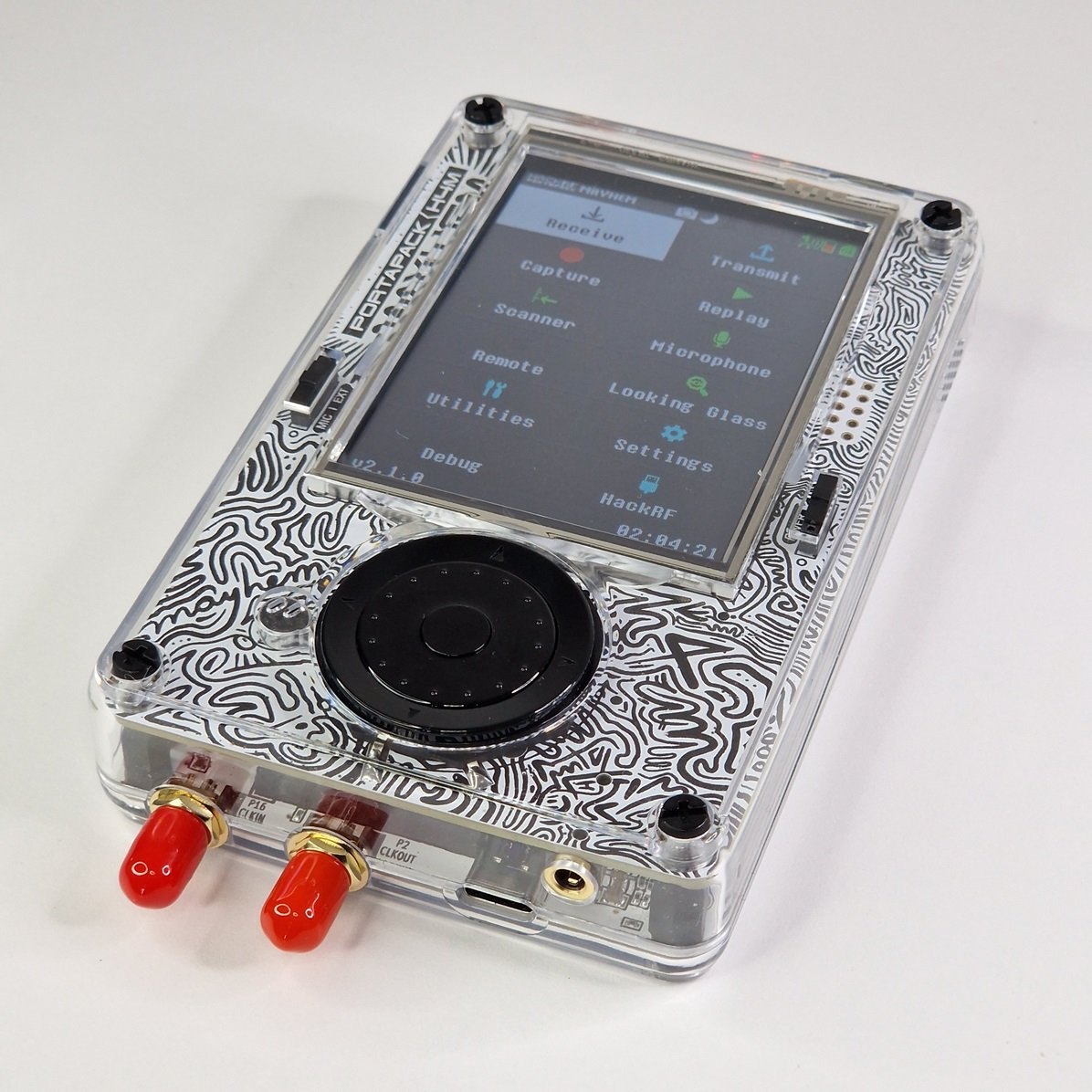
The two-firmware reality (HackRF + Mayhem), Mayhem's PortaRF-relevant features, fork landscape, vendor pre-flash policy
6.1 About this volume
Vol 6 covers the PortaRF firmware ecosystem. There are two firmware components running on a PortaRF — the HackRF board’s firmware (on the LPC4320) and the PortaPack board’s firmware (on the LPC4330, almost always Mayhem). Most operators only update Mayhem; HackRF firmware updates are rare. Understanding both — and the fork landscape around Mayhem — is essential before flashing anything custom.
Cross-reference: HackRF One Vols 4-6 cover Mayhem in full depth (UI walkthrough, app catalog, build pipeline, Havoc-vs-Mayhem history). The subject here is the PortaRF-specific firmware considerations — the vendor pre-flash situation, the variant-targeting requirements for PortaRF’s PortaPack revision, and the operational discipline around keeping firmware stable for field engagements.
6.2 The two-firmware reality (HackRF + PortaPack)
6.2.1 Firmware split
Table 1 — 2.1 Firmware split
| Firmware | Target | Source | Update method | Update frequency |
|---|---|---|---|---|
| HackRF firmware | LPC4320 (the HackRF board’s MCU) | https://github.com/greatscottgadgets/hackrf | hackrf_spiflash over USB | Rare (years between updates) |
| PortaPack firmware (Mayhem) | LPC4330 (the PortaPack board’s MCU) | https://github.com/portapack-mayhem/mayhem-firmware | SD-card flash (drop .bin on SD, reboot) | Frequent (monthly typical) |
Two MCUs, two firmwares. They communicate over the GPIO header that physically connects the HackRF board to the PortaPack board.
6.2.2 What each firmware does
HackRF firmware (LPC4320):
- Controls the RF subsystem (MAX2837 transceiver, RFFC5072 mixer, MAX5864 ADC/DAC, Si5351 clock)
- Manages USB enumeration as a USB device
- Implements the HackRF API that
hackrf_*host tools use - Streams I/Q samples over USB
- Receives commands (frequency, gain, sample rate, TX/RX mode) and configures the silicon
- Implements the GPIO communication protocol that PortaPack uses to control it
PortaPack firmware (LPC4330 — Mayhem):
- Renders the user interface (menus, spectrum, waterfall, app screens)
- Reads input from buttons + encoder + QWERTY
- Manages the microSD filesystem (captures, replay files, presets)
- Implements all the Mayhem “apps” (decoders, recorders, generators)
- Talks to the HackRF over GPIO to control the radio
- Provides standalone operation independent of any host PC
6.2.3 Why the split exists
This isn’t a PortaRF-specific design — it’s inherited from the HackRF + PortaPack architecture:
- HackRF was designed first as a USB-tethered SDR; the LPC4320 runs the radio firmware
- PortaPack was a community-built “let’s add a screen and buttons” daughter card; the LPC4330 runs an independent firmware
- The two communicate over the HackRF’s GPIO header
When integrated into PortaRF, this dual-firmware architecture is preserved — both MCUs still run their own firmwares; the integration is mechanical (one enclosure) not electrical (still two boards).
6.2.4 Practical consequences
- Updating Mayhem doesn’t change how the HackRF behaves at the RF level
- Updating HackRF firmware doesn’t change Mayhem’s UI or app set
- Bricking one doesn’t necessarily brick the other (Mayhem-corrupt unit still talks USB; HackRF-corrupt unit still has Mayhem’s UI)
- Recovery paths are independent — Vol 8 covers both
6.3 Mayhem — the canonical PortaPack fork
Mayhem is the actively-developed canonical fork of the original PortaPack firmware. Source: https://github.com/portapack-mayhem/mayhem-firmware. License: GPL (per the upstream HackRF + PortaPack origins).
6.3.1 What Mayhem is
A community-maintained firmware that:
- Runs on any PortaPack-class hardware (H1, H1+, H2, H2+, H4M variants)
- Implements ~60-80 apps for SDR work (RX, TX, capture, decode)
- Supports both standalone operation and USB-tethered modes
- Has a wiki documenting all apps and their workflows
- Is actively maintained by a community of contributors
6.3.2 Why Mayhem dominates
Earlier PortaPack firmwares (Havoc, Stock) are essentially end-of-life. Mayhem has:
- Active maintenance — ~2-4 minor releases per year
- Bug fix discipline — community responds to issues within days
- Feature additions — new decoders and apps added regularly
- Hardware support breadth — supports all PortaPack revisions
- Documentation — comprehensive wiki
For 2026-era PortaRF, Mayhem is the canonical choice essentially always.
6.3.3 Mayhem on PortaRF specifically
OpenSourceSDRLab pre-flashes PortaRF with current Mayhem at time of manufacture. Practical implications:
- Out-of-box: PortaRF boots Mayhem; no flash required to use
- Updates: SD-card flash for newer Mayhem releases (typically 5-10 minutes per update)
- Custom builds: PortaRF can run any Mayhem build that matches its PortaPack revision (H2+ or H4M)
- No vendor lock: Mayhem is open-source; PortaRF doesn’t restrict to OSL-signed builds (unlike some commercial firmwares)
6.3.4 Mayhem source code structure (briefly)
For developers interested in custom firmware (Vol 10 covers this in depth):
mayhem-firmware/
├── firmware/                    Main firmware tree
│   ├── application/             Top-level Mayhem code
│   │   ├── apps/               Per-app source (RX, TX, decode apps)
│   │   ├── ui/                 UI rendering primitives
│   │   └── main.cpp            Entry point
│   ├── baseband/                LPC4330 baseband processor code (DSP)
│   └── common/                  Shared utilities
├── flashloader/                 Bootloader / firmware updater
└── docs/                        Architecture docs
The code is C++ (with some C and assembly). Build target is the LPC4330 ARM Cortex-M4 + Cortex-M0 (dual core; M4 runs the UI/apps, M0 runs the baseband DSP).
6.4 Mayhem feature catalog on PortaRF
Mayhem’s feature catalog is inherited from HackRF One — same silicon, same firmware, same feature set. Cross-reference HackRF One Vol 5 for the full catalog. PortaRF-relevant highlights:
6.4.1 Receive apps
Table 2 — 4.1 Receive apps
| App | Function | Best PortaRF use |
|---|---|---|
| Narrowband RX | Tune to a single frequency, demodulate, listen | Quick check on a known signal |
| Wideband Spectrum | Show real-time spectrum + waterfall | Survey a band; find unknown emitters |
| Spectrum Painter | Reverse-engineering aid — see signal characteristics | Forensic analysis of unknown signals |
| Capture | Record raw I/Q to SD for offline analysis | The workhorse for field captures |
6.4.2 Decode apps
Table 3 — 4.2 Decode apps
| Decoder | Frequency | What it does |
|---|---|---|
| ADS-B | 1090 MHz | Decode aircraft transponder messages |
| AIS | 161-162 MHz | Decode ship AIS messages |
| POCSAG | various | Pager messages |
| BTLE | 2402-2480 MHz | Bluetooth LE advertisement scanning |
| NRF | 2.4 GHz | NRF24L01+ packet decoding |
| RDS | FM broadcast | Radio Data System decoding |
| ERT | 902-928 MHz | Smart meter data |
| AFSK | various | Generic FSK decoder |
| TPMS | 315/433 MHz | Tire pressure monitoring system |
| Mobilinkd / FT8 | various | Amateur radio modes |
| Various ISM | 433/868/915 MHz | LPRF, garage door, keyfobs |
For PortaRF specifically: decoders run on-device with full Mayhem responsiveness. No host PC needed. Decoded data displays on screen + saves to SD.
6.4.3 Transmit apps
Table 4 — 4.3 Transmit apps
| App | Function | Authorization required |
|---|---|---|
| Replay | Transmit a captured I/Q file | Yes — TX is always regulated |
| Beacon | Generate a configurable beacon signal | Yes |
| Generate | Synthesize specific protocols (POCSAG, BTLE, NFC, etc.) | Yes |
| Jam | Wideband jamming signal | Authorization + jurisdiction allows |
| BLE spam | Send BLE advertisements | Authorization, ethical use |
For all TX apps: Vol 11 § 7 covers the legal posture.
6.4.4 Tools
Table 5 — 4.4 Tools
| Tool | Function |
|---|---|
| File manager | Browse, delete, rename files on SD |
| Calibration | Frequency-offset calibration (PPM trimming) |
| Settings | Display brightness, region, time, etc. |
| About | Firmware version, HackRF info |
| Bluetooth | (some builds) BLE host-mode operation |
| Wi-Fi | (some builds) connect to a network for telemetry |
6.4.5 PortaRF-specific feature usefulness
Apps that work especially well on PortaRF (vs porta):
- Wideband Sweep: handheld form factor enables walk-and-sweep; porta is bench-tethered for this
- Live Decoder Display: in-the-moment decoding is more useful when you’re in the field
- Capture-Then-Walk: leave PortaRF capturing while you move; porta needs a laptop tether
- Replay-from-Pocket: handheld replay is natural; porta-replay requires the stack to be powered
Apps that work better on porta:
- Long-form captures (>1 hour): bench setup, no battery concern
- Tethered analysis: easier with porta + permanent host PC
- Multi-tool integration: porta + scope + spectrum analyzer + signal generator all on the same bench
6.5 Mayhem release cadence + breaking changes
6.5.1 Release rhythm
Historical pattern (based on Mayhem repo activity):
- Minor releases: 2-4 per year (e.g., v1.7.0 → v1.7.1 → v1.7.2 over ~3-4 months)
- Major releases: every 6-12 months (e.g., v1.7 → v1.8 → v1.9)
- Patch releases: occasionally for specific bug fixes
Release notes are on GitHub releases page. Most releases are backwards-compatible with SD-card data; some require regenerating presets or settings.
6.5.2 Breaking changes history (high-level pattern)
Mayhem occasionally introduces breaking changes:
- Settings file format changes: typically auto-migrated; some require manual reset
- Preset file format changes: rare; usually accompanied by migration tools
- App architecture refactors: invisible to user; affects custom builds
- PortaPack revision support shifts: occasionally drops support for very old hardware
For PortaRF (modern hardware, H2+ or H4M): breaking changes generally don’t apply. If running an older PortaRF (e.g., 2022 production), check release notes before updating.
6.5.3 Update strategy for field-engaged operators
For a PortaRF (hypothetical):
- Stable release: stick to a known-good Mayhem version for active engagements
- Test new releases off-engagement: install in a non-critical period; verify all expected apps work
- Have a rollback plan: keep the previous known-good .bin on SD as backup
- Notes: document the specific version + any settings changes per engagement
For experimental work: latest mainline is fine; bugs get fixed quickly.
6.5.4 What “current” Mayhem means in 2026-05
As of 2026-05-13, Mayhem is at the v1.x range with active development. Specific current version on PortaRF would depend on vendor’s flash timing — could be anywhere from a few months old to current at time of shipment.
To check current version: Mayhem boot screen + “Settings → About” should display version. Compare against GitHub releases to see how far behind shipping firmware is.
6.6 Alternative firmwares (Havoc, stock PortaPack, custom forks)
6.6.1 Havoc — the predecessor
Havoc was an earlier PortaPack firmware fork that preceded Mayhem:
Table 6 — Havoc was an earlier PortaPack firmware fork that preceded Mayhem
| Aspect | Havoc | Mayhem (today) |
|---|---|---|
| Active development | No (mostly maintenance only) | Yes (active) |
| Feature completeness | ~60% of Mayhem’s catalog | 100% |
| Bug fixes | Minimal | Active |
| Community size | Small | Large |
| Recommended? | No, except for very specific legacy reasons | Yes |
Most of what Havoc had has been merged into Mayhem. The Havoc-vs-Mayhem distinction is largely historical now.
6.6.2 Stock PortaPack — the original
Stock PortaPack firmware (the original) is:
- The reference implementation that Mayhem forked from
- Now end-of-life
- Less feature-complete than even Havoc
- Not recommended for any use
If you encounter stock PortaPack on a unit: flash to Mayhem immediately.
6.6.3 Custom forks
Various community members maintain custom Mayhem forks for specific purposes:
- Demand-side custom decoders (specific protocols Mayhem doesn’t have)
- Display optimizations (battery savings, custom themes)
- Workflow-specific UIs (e.g., pen-testing-focused menu reorganization)
- Educational variants (simplified UI for newer users)
For PortaRF: stick to mainline Mayhem unless you have a specific reason for a fork. Custom forks may not receive bug fixes; mainline does.
6.6.4 OpenSourceSDRLab branded firmware
OpenSourceSDRLab may ship a branded variant of Mayhem (vendor-customized with their logo or default settings). If so:
- Functionally identical to mainline Mayhem
- May or may not receive separate update releases (likely just follows mainline)
- Updates from OSL-branded to mainline should work fine (both flash via the same SD card mechanism)
If unsure: ask the vendor or check the boot screen + “About” — the source repo should be identifiable.
6.7 HackRF firmware — the second half
HackRF firmware is the LPC4320-side code that runs on the HackRF board. PortaRF inherits whatever firmware OpenSourceSDRLab pre-flashed.
6.7.1 What’s in the HackRF firmware
- USB enumeration (libhackrf protocol)
- RF subsystem control (transceiver, mixer, clock, switches)
- I/Q sample streaming (over USB to host)
- Command interface (frequency, gain, sample rate, TX/RX mode)
- GPIO communication with PortaPack
6.7.2 Why HackRF firmware updates are rare
The HackRF silicon is mature. Firmware changes are typically:
- Bug fixes for edge cases (specific sample rates, specific frequency combinations)
- Security patches (rare)
- Minor performance improvements
- Support for new variants (R10+, H4M) — once added, stable
In practice: HackRF firmware on a unit can sit unchanged for years and work correctly.
6.7.3 When to update HackRF firmware
- The vendor specifically says to (rare; only for known issues)
- You’re chasing a bug that’s documented as firmware-related
- You’re testing custom HackRF firmware (advanced; usually for research)
For PortaRF: don’t update HackRF firmware unless there’s a specific reason. Working firmware = stable platform.
6.7.4 The update procedure
If HackRF firmware update is necessary:
# 1. Connect PortaRF to host PC via USB-C
# 2. Back up factory firmware FIRST
hackrf_spiflash -r portarf_factory_hackrf.bin

# 3. Verify hackrf_info works
hackrf_info

# 4. Download new firmware from official source
#    (only use trusted sources — vendor docs, official HackRF releases)

# 5. Flash new firmware
hackrf_spiflash -w hackrf_one_usb_R10.bin

# 6. Disconnect + reconnect to verify
hackrf_info
If the unit doesn’t enumerate after flashing: DFU recovery (Vol 8 § 4).
6.7.5 The “Heath-modified” firmware question
Some Heath-modified HackRF revisions ship with Heath-specific firmware that handles the protection chip differently or reports the revision name. PortaRF may or may not have this — verify via hackrf_info:
hackrf_info

# Standard output:
# Found HackRF
# Index: 0
# Serial number: ...
# Board ID Number: 2 (HackRF One)
# Firmware Version: 2023.01.1
# Part ID Number: 0xa000cb3c 0x00641864

# Heath-modified may add:
# Modified design: Clifford Heath
# (or similar)
If hackrf_info reports a unique board ID, version, or text identifier: that’s the Heath-modified firmware signature. Standard mainline HackRF firmware works on Heath hardware too; the Heath-specific firmware just adds reporting.
6.8 OpenSourceSDRLab’s pre-flash policy
6.8.1 What vendors typically pre-flash
OpenSourceSDRLab almost certainly:
- Pre-flashes current Mayhem at time of manufacture
- Pre-flashes appropriate HackRF firmware (matches the Heath revision)
- Configures region settings (or leaves at default)
- Includes an SD card with pre-flashed Mayhem (in case the on-board flash gets corrupted)
6.8.2 What’s NOT typically pre-flashed
- Custom protocol decoders (those are open-source community projects)
- Vendor-specific lock-in (no proprietary firmware that prevents Mayhem from working)
- Pre-loaded captures or presets
- Pre-flashed Mayhem with vendor branding (unconfirmed; may exist)
6.8.3 Verifying the pre-flash on a new unit
On first power-on of a new PortaRF:
- Note the Mayhem version from the boot screen — record in unit log
- Note the HackRF firmware version from
hackrf_infoover USB-C - Verify boot is clean (no error messages on Mayhem load)
- Test basic functions (RX an FM broadcast, verify TX into a dummy load)
- Note the SD card included — typically pre-flashed with the same Mayhem version
6.8.4 If something seems off
If the pre-flash seems incorrect (wrong version, errors, missing apps):
- Don’t troubleshoot in the field — return to a known environment
- Document what’s wrong (boot screen content, error messages, missing functionality)
- Contact vendor with the unit serial number and the observed issue
- Most issues are easily fixable by reflashing a known-good Mayhem version from SD
6.9 Choosing a firmware variant for PortaRF
6.9.1 The decision tree
For most users:
Is PortaRF working correctly out of box?
   │
   YES → Use it. Don't touch firmware.
   │
   NO → Reflash Mayhem mainline (vendor support if needed)
         └─ Specific bug? → Try latest Mayhem patch
         └─ Wrong PortaPack target? → Check variant; use matching .bin
         └─ Hardware fault? → RMA, not firmware
For advanced users (custom development):
Need a specific Mayhem feature that's in dev branch?
   │
   YES → Use dev branch Mayhem build
   │
   NO → Stable Mayhem mainline

Working on a Mayhem custom app?
   │
   YES → Fork mainline, build, flash to dev unit
   │
   NO → Mainline
6.9.2 What to never do
- Never flash a non-PortaPack firmware (e.g., a Flipper FAP) — wrong silicon target; will brick
- Never flash without backing up the current firmware first
- Never interrupt a flash (power loss, USB disconnect) — risk of corrupted firmware
- Never flash from an untrusted source — supply chain attack is a real risk
- Never flash in a noisy environment (USB cable jiggle, brownout-prone power) — corruption risk
6.9.3 Recovery if you flash badly
If you flash a wrong firmware:
- PortaPack reflash: drop a known-good Mayhem .bin on SD, reboot — usually recovers
- HackRF reflash from DFU mode: hold a specific button while powering on; PortaRF enters DFU; flash via USB
- Vendor RMA: if both above fail; warranty may or may not cover user-error reflashes
Vol 8 covers detailed recovery procedures.
6.10 Resources
Mayhem firmware (canonical)
- Mayhem repo: https://github.com/portapack-mayhem/mayhem-firmware
- Mayhem wiki: https://github.com/portapack-mayhem/mayhem-firmware/wiki
- Mayhem releases: https://github.com/portapack-mayhem/mayhem-firmware/releases
- Mayhem Discord (community): linked from wiki
HackRF firmware
- HackRF repo: https://github.com/greatscottgadgets/hackrf
- HackRF firmware releases: same repo, releases page
- HackRF API documentation: https://github.com/greatscottgadgets/hackrf/wiki
Cross-references
- HackRF One Vol 4 (Mayhem walkthrough):
../../../HackRF One/03-outputs/HackRF_One_Complete.html - HackRF One Vol 5 (Mayhem app catalog): same path
- HackRF One Vol 6 (Mayhem fork history): same path
- HackRF One Vol 8 (flashing + recovery): same path
Sibling references
- porta’s Mayhem version history:
../../../HackRF One/00-inventory/porta.md - Hack Tools comparison:
../../../_shared/comparison.md
Alternative firmwares (historical)
- Havoc firmware (legacy): https://github.com/furrtek/portapack-havoc
- Stock PortaPack: https://github.com/sharebrained/portapack-hackrf
End of Vol 6. Next: Vol 7 covers programming + APIs — hackrf_* host tools, GNU Radio integration, and the path from PortaRF’s USB interface to custom signal processing pipelines.
Comments (0)