GL-iNet GL-BE3600 · Volume 9
GL-iNet GL-BE3600 Volume 9 — Tethering, Cellular, and mwan3 Failover
Android/iPhone tethering, LTE/5G dongles, modeswitch, the Mode-cycle button, and mwan3 cascade rules
9.1 About this Volume
The third leg of the kit’s connectivity tripod: cellular, via either a phone tether (USB) or a USB cellular dongle. Plus the mwan3 policy cascade that ties everything together — Ethernet primary, Wi-Fi-as-WAN second, phone tether third, dongle last.
Reads:
- Vol 2 §5 for the USB host that all of this plugs into.
- Vol 5 §6 for the mwan3 policy framework.
- Vol 8 for repeater mode (the alternative to tethering when the venue offers Wi-Fi).
9.2 The Three Cellular Paths
Table 1 — 2. The Three Cellular Paths
| Path | Device | Driver | Setup time |
|---|---|---|---|
| Phone tether (Android) | Phone in USB-tether mode | RNDIS or NCM | ~30 s |
| Phone tether (iPhone) | iPhone in Personal Hotspot mode, USB-attached | NCM (Apple iAP, then PDP up) | ~45 s |
| Cellular dongle | Quectel/Huawei/Sierra USB modem | usb-modeswitch + ModemManager + comgt | 1–3 min |
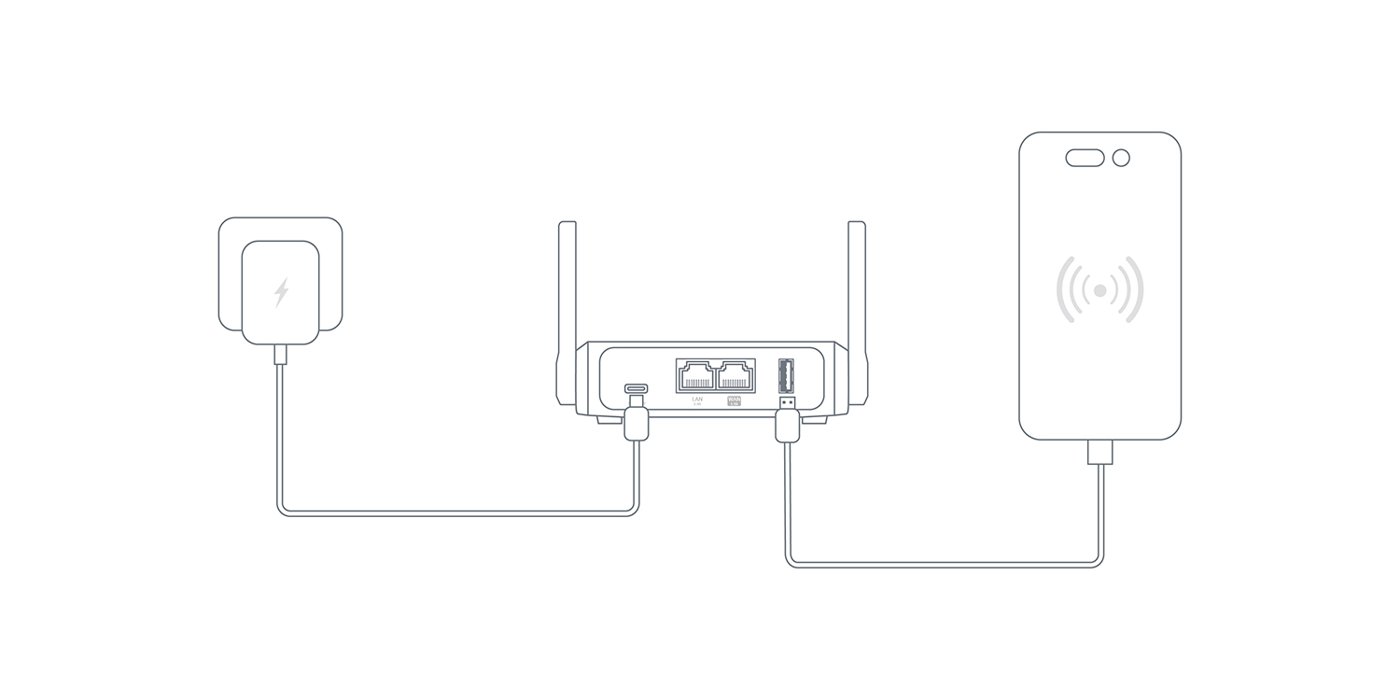
Phone tether is fast and lazy: plug the phone into the BE3600’s USB-A, hit Mode → Tethering, done. Cellular dongle is the right answer when you want the phone to keep its battery for phone things and the data plan is a separate SIM.
9.3 Phone Tethering (Android)
9.3.1 The host-side flow
- Plug Android phone into the back-panel USB 3.0 port (Type-A) using a USB-A-to-USB-C cable (or whatever your phone uses).
- On the phone: Settings → Network & Internet → Hotspot & Tethering → USB tethering (path varies by manufacturer; same idea).
- The phone enumerates as a USB-Ethernet device. The Linux kernel presents it as
usb0oreth1. - Press the front Mode button until the OLED highlights “Tethering”. The
gl-modedaemon (Vol 3 §6) brings up DHCP on the new interface. - ~10 seconds later, the device has IP and the kit SSID has internet via cellular.
9.3.2 RNDIS vs NCM
Android exposes USB tethering via two USB-class device modes:
- RNDIS — Microsoft’s proprietary USB networking class. Older Android (pre-12) defaults to RNDIS.
- NCM (Network Control Model) — the open standard. Android 12+ moved to NCM as the default; older Linux drivers may not auto-bind.
The GL-iNet build ships with both kmod-usb-net-rndis and kmod-usb-net-cdc-ncm so either mode works without extra package installs. If a phone enumerates but no usb* interface appears, check dmesg for the class — sometimes a phone exposes RNDIS-class but not the descriptors the kernel expects, and the workaround is to flip phone-side to NCM if available.
9.3.3 Throughput
Table 2 — 3.3 Throughput
| Phone-LTE | Phone-5G | |
|---|---|---|
| Best case | ~80 Mbps | ~400 Mbps |
| Typical hotel/airport | 10–30 Mbps | 30–100 Mbps |
| With VPN active | 60–80% of above | 60–80% of above |
USB tethering is essentially uncapped from the BE3600 side — the bottleneck is whatever the phone gets from the cellular network. Wi-Fi tethering (using the phone as a hotspot the BE3600 attaches to in Repeater mode) typically performs worse because of the Wi-Fi-as-WAN overhead — USB is the cleaner path.
9.3.4 Battery considerations
The BE3600 will draw power from the phone over USB if the phone is set up to do so. Two configurations:
- Phone-charges-router (default): phone is the host and provides a small amount of bus power. The BE3600 draws very little because it has its own USB-C PD input. This drains the phone faster.
- Router-charges-phone: not really a thing. The BE3600’s USB-A is host-class, not power-source-oriented; phones usually negotiate “I’m the device, supply me” rather than “supply me from this”.
For travel: keep the BE3600 plugged into wall power (via USB-C PD), let the phone charge from its own dedicated brick.
9.4 iPhone Tethering
iPhones tether over USB via NCM as well, but with an extra wrinkle: the iPhone wants to authenticate the host using Apple’s iAP (iAccessory Protocol) before it allows the network to come up.
9.4.1 What you need
opkg install kmod-usb-net usbutils libimobiledevice usbmuxdlibimobiledevice and usbmuxd provide the iAP handshake. After install, plug the iPhone in, allow “Trust this device” on the phone, and usbmuxd should bring up the Personal Hotspot interface.
The GL-iNet build doesn’t ship libimobiledevice by default — it’s an opt-in for iPhone users. Once installed, it persists across reboots (it’s in the overlay).
9.4.2 The iPhone-specific quirks
- The phone must explicitly enable Personal Hotspot. It’s not always on by default; toggle it in Settings → Personal Hotspot.
- The “Trust this device” prompt has to be cleared each time you plug into a new device or after a long disconnect.
- iOS aggressively turns Personal Hotspot off when no client is connected, to save battery. If the BE3600 reboots and re-attaches, it’s worth re-enabling Hotspot on the phone first.
9.5 Cellular Dongles
A USB cellular dongle is its own device — the kit gets cellular without depending on the phone. The dongle has its own SIM slot and its own radio.
9.5.1 The dongle compatibility matrix
Table 3 — 5.1 The dongle compatibility matrix
| Dongle | Tech | Driver path | Notes |
|---|---|---|---|
| Quectel EP06 (LTE Cat 6) | LTE | option driver, mode=at | Solid; well-supported |
| Quectel EM12-G / RM500Q (5G) | 5G | option, sometimes qmi_wwan | Requires firmware tweaks for some carriers |
| Huawei E3372 / E8372 (LTE) | LTE | option, sometimes cdc_ether | Cheap, reliable; some variants only do hilink (RNDIS) mode |
| Sierra MC7430 / EM7565 (LTE) | LTE | option + qmi_wwan | Lab-grade; expensive; widely supported |
| Generic AliExpress 5G dongle | 5G | varies | Quality varies wildly; assume nothing |
The detection cascade:
- Plug in.
usbmoswitchfires (usb-modeswitchpackage), looks at the USB descriptors, recognizes the dongle from the20-usb-modeswitch.confrules. usb-modeswitchflips the dongle from “USB storage emulation” mode (some dongles ship like that to advertise their drivers) to “modem” mode.- The kernel
optiondriver binds to the modem ttyUSB devices. - ModemManager (or the GL-iNet equivalent) sends AT commands to negotiate the cellular connection.
- PPP or QMI brings up the network interface.
9.5.2 The Mode button → Cellular flow
The BE3600’s gl-mode daemon orchestrates this:
- User presses Mode button until “Cellular” is highlighted on the OLED.
- Daemon checks for a known dongle on the USB bus.
- If found, runs the modeswitch + AT-command sequence.
- Brings up the resulting network interface (
wwan0,cdc-wdm0, etc.). - Updates the routing table; mwan3 picks up the new member.
- OLED stays on “Cellular” until you button-cycle off.
If no dongle is found, the OLED briefly shows an error icon and reverts to the previous mode.
9.5.3 Carrier-specific quirks
Table 4 — 5.3 Carrier-specific quirks
| Concern | Notes |
|---|---|
| APN settings | Most dongles auto-detect APN from the SIM. If they don’t, set manually via Admin Panel → Internet → Cellular → APN. |
| 5G NSA vs SA | NSA (Non-Standalone, anchored to LTE) works everywhere. SA (Standalone, pure 5G core) may require firmware updates on the dongle. |
| Carrier locks | Some dongles are SIM-locked to a single carrier. Buy unlocked or a carrier you’ll actually use. |
| Roaming | The dongle supports roaming if the SIM does — that’s outside the router’s control. |
9.6 mwan3 Failover Cascade
Now that all three paths exist, mwan3 ties them together. Continuing the example from Vol 5 §6.2:
config policy 'travel_cascade'
    list use_member 'eth_pri'
    list use_member 'wifi_pri'
    list use_member 'tether_pri'
    list use_member 'cell_pri'
    option last_resort 'unreachable'
Behavior:
- Ethernet active → traffic via Ethernet. Wi-Fi/tether/cellular are tracked but unused.
- Ethernet drops → mwan3 detects (3 failed pings), promotes Wi-Fi-as-WAN if up, traffic shifts.
- Both Ethernet and Wi-Fi down → tether becomes primary if a phone is plugged in.
- All three down → cellular dongle becomes primary if present.
- Nothing available →
last_resort 'unreachable'returns ENETUNREACH instead of routing through nothing (which would cause weird timeouts).
The transitions are visible in mwan3 status:
mwan3 status
# Interface status:
#  interface wan_eth is online and tracking is active (active)
#  interface wan_wifi is online and tracking is active (online)
#  interface wan_tether is offline (down)
#  interface wan_cell is offline (down)
9.6.1 Tuning the failover speed
Default mwan3 timing:
interval 5— ping every 5 secondsdown 3— 3 consecutive failures = downup 8— 8 consecutive successes = back up
So a real Ethernet-drop takes 15 seconds to fail over to Wi-Fi. Tighten for snappier travel use:
config interface 'wan_eth'
    option interval '2'
    option down '2'
    option up '4'
That’s failover in ~4 seconds, restoration in ~8 seconds. The cost: more aggressive flapping if the link is genuinely intermittent.
9.7 Practical Travel-Kit Failover Stories
Three scenarios that the cascade should handle well:
9.7.1 Hotel Ethernet drops while video-conferencing
- mwan3 detects in ~4 seconds (with tightened config).
- Wi-Fi-as-WAN is up (the kit was configured before the trip), takes over.
- The video call stalls for a few seconds while NAT mappings rebuild.
- Resumes — your peer never sees a real disconnect.
9.7.2 Walk out of hotel; want to keep working in coffee shop
- Disconnect Ethernet → mwan3 fails over to Wi-Fi-as-WAN.
- Walk out of Wi-Fi range → mwan3 fails over to phone tether.
- Phone has signal → traffic resumes.
- Coffee shop has Wi-Fi → re-configure repeater mode (Mode button → Repeater → scan → select → password).
9.7.3 Travel day — airport security to rental car
- Airport Wi-Fi captive portal authenticated on the router.
- Walk to gate → out of Wi-Fi range → phone tether takes over.
- On the plane → no connectivity (Mode button → off, or cellular still works in flight mode if SIM allows).
- Land → phone tether picks up cellular signal.
- Rental car → continue tethering until reaching the destination.
The kit is designed for this kind of intermittent connectivity. mwan3 is the glue that makes it not feel manual.
9.8 Cheatsheet Updates
Inputs to Vol 12:
- Phone tether: USB-A in, Mode button → Tethering, done. RNDIS or NCM both work; no driver fuss.
- iPhone tether requires
libimobiledevice+usbmuxd— opt-in install; one-time setup. - Cellular dongle: Quectel/Huawei/Sierra are the safe bets; cheap AliExpress 5G is a coin flip.
- mwan3 cascade:
metric 1/2/3/4ascending = preference order Ethernet → Wi-Fi → Tether → Cellular. - Failover timing: tighten
interval/down/upto2/2/4for snappy travel use. - Cellular dongles can pull >900 mA — high-bandwidth 5G dongles may need external power injection.
Comments (0)