PWNagotchi · Volume 4
PWNagotchi Volume 4 — Cases & Enclosures, with a chapter-length deep dive on Mike J. Kelly's Motorola Advisor pager mod
The wild case ecosystem — 3D-printed brick, clamshell, pocket; vendor pre-builts; and the iconic donor-shell case-mods, anchored by the Motorola Advisor
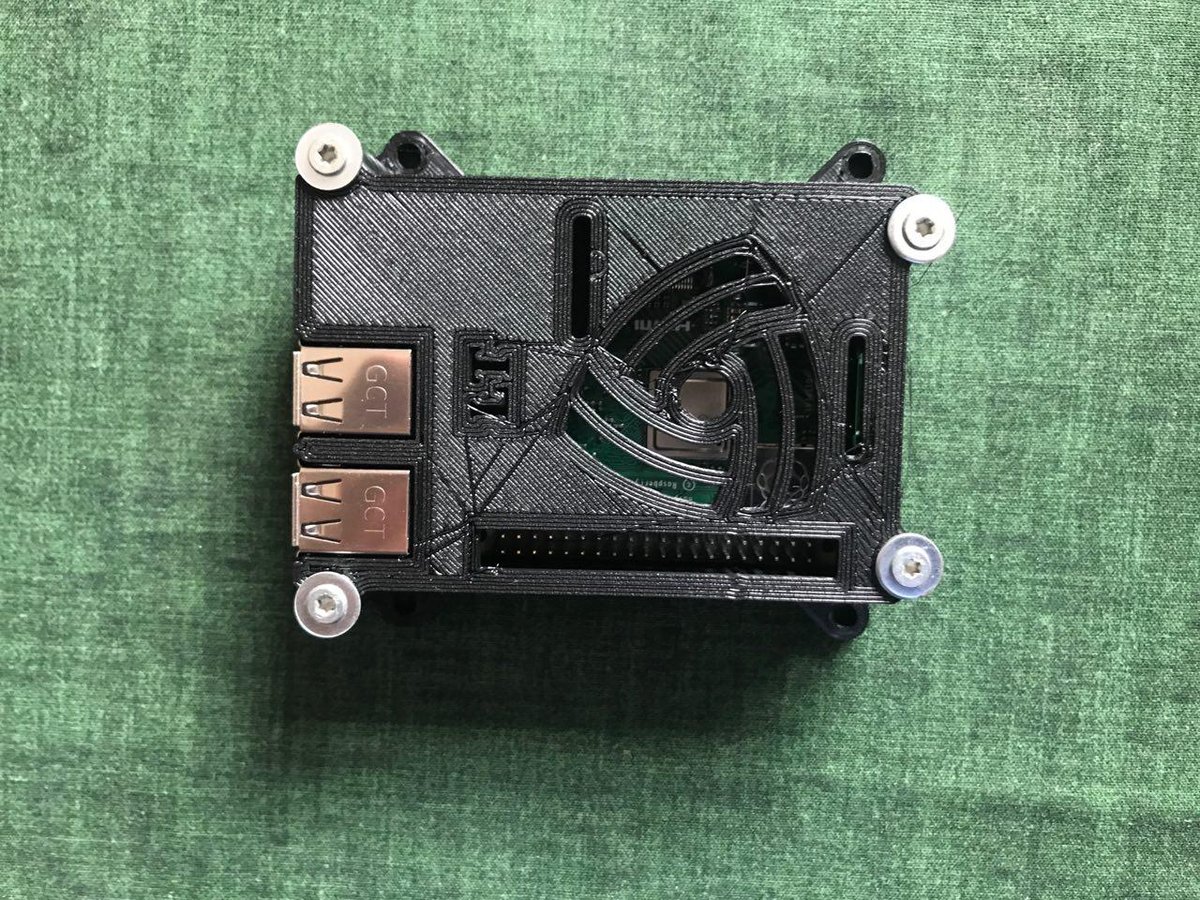
A Pwnagotchi is not a board-on-a-desk project. The whole point is that you carry it — on a backpack, in a jacket pocket, hung from a lanyard, set on a windowsill. The case is the device. Three things are non-negotiable:
- The e-ink panel must be supported along its full perimeter. EPD glass cracks at the edges under torque. A “panel sticking out of a slot” case is wrong.
- The case must not detune the 2.4 GHz antenna. PETG/PLA/ABS are all fine; metal cases and carbon-fiber-loaded filaments are not (see Vol 2 §2.1).
- The battery has to be safe. A 1S LiPo in a rigid case + a soft bump = puncture risk. Use a hard-shell pouch or wrap the cell in Kapton tape; never put the cell flush against a sharp PCB edge.
Beyond those three, the case is purely aesthetic — and the Pwnagotchi community has made that an art form.
4.1 The 3D-printed case ecosystem
Thingiverse / Printables host dozens of community Pwnagotchi case designs. The four lineages that dominate:
4.1.1 The “brick” — the canonical case
A simple two-piece (or three-piece) PETG box, ~75×35×18 mm, with a window for the e-ink panel on the top face and slots for the micro-USB ports on the side. Designed for Pi Zero W + Waveshare 2.13” v4 + 1200 mAh LiPo. The most-printed Pwnagotchi case in the world.
   ┌─────────────────────────────────┐   ← top face (lid)
   │  ┌──────────────────────────┐  │
   │  │                          │  │  ← e-ink window (cutout)
   │  │      [face renders       │  │     ~50×30 mm
   │  │       here]              │  │
   │  │                          │  │
   │  └──────────────────────────┘  │
   │  ●                          ●  │  ← screw holes (M2.5)
   └─────────────────────────────────┘
   │      [Pi Zero W + LiPo]         │   ← body (base)
   │                            ┌────┤
   │                            │µUSB│  ← side cutout, power-only port
   │                            └────┤
   └─────────────────────────────────┘
Printables search: “pwnagotchi case waveshare 2.13”. Several authors; the DavidsTechShop and Anykey versions are well-reviewed. Print in PETG, 0.2 mm layers, 30% infill, no supports needed if the e-ink window is oriented up.
Build time: ~3-4 hr print + 30 min assembly.
4.1.2 The clamshell
A flip-open variant — e-ink panel on the lid, Pi Zero + battery on the base, hinged along one long edge. Closed it looks like a small notebook; open it shows the face. Adds protection (the panel is covered when not in use) at the cost of one-handed operation and a more involved hinge that wears out.
Print difficulty: moderate (the hinge needs print-in-place clearances or separately printed hinge pins).
4.1.3 The pocket / wearable
A slim variant designed to hang from a lanyard or fit into a shirt pocket. Often integrates a USB-C charge port on the bottom edge (requires a separate breakout board). The most “device-like” of the open-source cases. Print difficulty: high (thin walls, tight tolerances around the e-ink panel).
4.1.4 The skull / Bender / DIY-art
The community has produced themed cases — a fanged plastic skull, a Bender-from-Futurama head, a Stormtrooper helmet — that wrap the standard internals in a sculptural shell. These are unique pieces. The build is mostly aesthetic; the electronics are identical to the brick.
Figure 2.1 — 3D-printed Pi case. Via Wikimedia Commons.
4.2 Vendor pre-built and case-only sellers
For users who don’t want to print, several sellers offer cases (case-only or case + assembled device):
Table 1 — For users who don't want to print, several sellers offer cases (case-only or case + assembled device)
| Seller | What | Notes |
|---|---|---|
| Lab401 (FR) | Pre-built Pwnagotchi units + case-only kits | Boutique pricing; well-curated builds. EU shipping. |
| Tindie (US, marketplace) | Multiple sellers offering case-only or kit form | Quality varies wildly. Read seller reviews. |
| Etsy | A few hobbyist case sellers | Mostly the 3D-printed brick in custom colors. |
| The Pi Hut (UK) | Pi Zero W + Inky pHAT kit (DIY-oriented) | Not Pwnagotchi-specific but a clean bundle. |
| AliExpress | ”Pwnagotchi case” listings | Buyer beware — frequently the wrong panel revision or no panel at all. |
The pre-built market exists primarily for users who want a Pwnagotchi as a gift or aesthetic object rather than a project. For a serious build, print or buy a case-only kit and assemble.
4.3 Case-mod tradition — Pwnagotchi inside other things
The Pwnagotchi’s small footprint and clearly-defined I/O (USB-C/micro-USB power, optional GPIO buttons, e-ink display) make it a natural target for donor-shell case-mods — taking a different consumer-electronics shell and fitting a Pwnagotchi inside. Notable examples from the community:
Table 2 — The Pwnagotchi's small footprint and clearly-defined I/O (USB-C/micro-USB power, optional GPIO buttons, e-ink display) make it a natural target for donor-shell case-mods — taking a different consumer-electronics shell and fitting a Pwnagotchi inside. Notable examples from the community
| Donor shell | Builder / notable | Why this shell |
|---|---|---|
| Motorola Advisor pager (1990s) | Mike J. Kelly | Cultural irony — the original “wireless personal device” repurposed as a present-day Wi-Fi mischief tool. Section 6 is dedicated to this build. |
| Game Boy Pocket | Multiple builders | Clamshell-ish form factor, the original LCD aperture mounts a 2.13” e-ink cleanly. Battery compartment fits a 1200 mAh LiPo. |
| Old Blackberry | A handful of builders | The trackball/keyboard adds nothing functional, but the form factor is iconic. |
| Vintage Tamagotchi shell | One known build (the “Tama-gotchi-Pwnagotchi”) | The cuteness loop closes. Requires a very small e-ink panel; impractical in practice. |
| Cassette tape shell | A novelty build | The cassette is gutted; the Pi + e-ink mounts where the tape spools were. |
Of these, the Motorola Advisor mod is by far the most well-documented, most-replicated, and most-photographed.
4.4 The Raspberry Pi 3 + project-box variant
If you went with a Pi 3 (Vol 2 §9 footnote — Pi Zero unobtainable), the case story is different: there are excellent generic Pi 3 project boxes (Adafruit’s “Bud Industries” line, Hammond cases) that fit a Pi 3 + 7” e-ink panel cleanly. The result is a bench-top Pwnagotchi rather than a portable. Not within scope of this volume; the design pattern is “industrial project box, label-maker, plug it in.”
4.5 The Motorola Advisor pager case-mod (Mike J. Kelly)
This section is the reason this volume exists at chapter length. The Motorola Advisor Pwnagotchi mod is the most iconic case-mod the project has produced. Mike J. Kelly published the original write-up and STL files in 2020-2021, with photos and a talk at a regional security conference. The cultural framing — turning a 1990s wireless personal device into a 2020s wireless mischief device — is irresistible.
4.5.1 The donor — Motorola Advisor pager (1990s)
The Motorola Advisor is the alphanumeric pager that defined the 1990s commercial paging era. Released 1993-1994, in service through the early-to-mid 2000s, the Advisor was the workhorse alphanumeric pager carried by doctors, IT staff, on-call engineers, and (with another product variant, the Advisor Elite) general consumers.
Specifications worth knowing for the case-mod:
Table 3 — Specifications worth knowing for the case-mod
| Spec | Value | Why it matters for the mod |
|---|---|---|
| Form factor | Clamshell, ~78×52×18 mm closed | Slightly larger than a Pi Zero brick; fits comfortably |
| Body | ABS plastic, two halves + clear LCD bezel | The bezel is removable; replaced with the e-ink window |
| Display | 4-line × 20-char STN LCD, ~50×25 mm visible | The aperture fits a 2.13” e-ink panel after ~2 mm of clearance trim |
| Buttons | A 3-position rocker on the top edge (up/down/select), plus a recessed reset on the back | The rocker is repurposed as Pwnagotchi GPIO navigation; the reset becomes a soft-shutdown trigger |
| Battery | 1× AA alkaline | The AA compartment fits a 1200 mAh 503048 LiPo cleanly |
| RF receiver | 929 MHz POCSAG / FLEX paging — discrete components plus a Motorola RF ASIC | Removed entirely. The shell is purely cosmetic post-mod. |
| Antenna | Internal helical wound around the RF can | Removed with the receiver. The Pi Zero’s PCB antenna is the operating Wi-Fi antenna. |
| Weight | 78 g with battery | Post-mod: ~115 g with Pi Zero W + e-ink + LiPo |
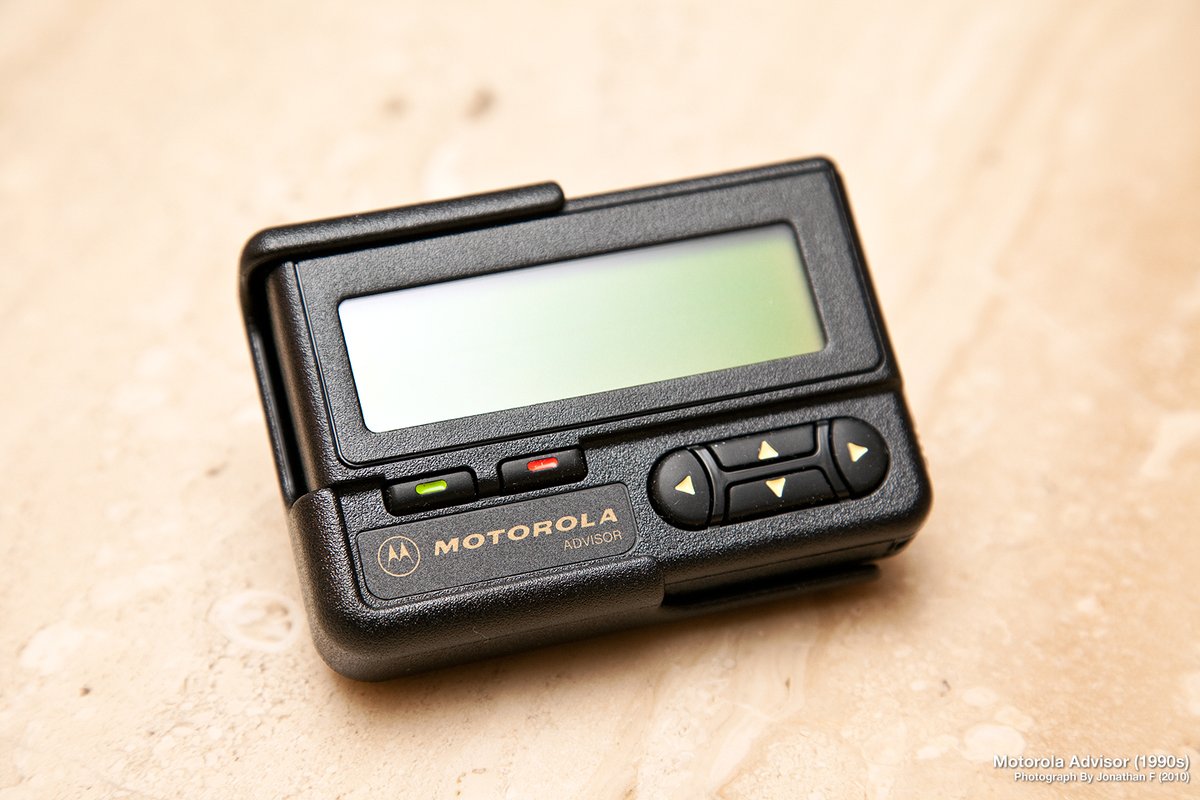
Figure 6.1 — File:Motorola Advisor Pager (5005137730).jpg by rfdigitalwpg. License: CC BY 2.0. Via Wikimedia Commons.
4.5.2 Sourcing an Advisor
eBay is the canonical source. As of 2026, working or dead Motorola Advisors sell for $5-25 depending on condition. Dead pagers are fine — the case-mod removes the electronics entirely.
Search terms that hit:
- “Motorola Advisor pager” (the alphanumeric)
- “Motorola Advisor II” (a later revision, same case, also fine)
- “Motorola Advisor Gold” (rare, presentation variant — pay more for the gold trim if you want the bling)
What to avoid:
- Motorola Advisor Elite — smaller numeric-only pager. Same brand family, different shell, will NOT fit the Pi Zero. Kelly’s STLs do not target it.
- Motorola Bravo / Bravo Plus — older numeric pagers, even smaller, do not fit.
- Motorola Pageboy — the pre-Advisor model — same problem.
- Pagers without the clear LCD bezel — the bezel is replaced but a missing one means more 3D-print work.
4.5.3 The teardown
Disclaimer: opening a 25-year-old consumer electronics device can crack brittle plastic. Move slowly. Don’t pry on the LCD bezel — it lifts straight up after the screws are out.
- Remove the battery cover. Standard Motorola sliding cover on the back; thumb-pressure latch.
- Remove the AA battery. Set aside.
- Remove the four case screws — small Phillips, hidden under the battery cover (two) and behind the belt-clip recess (two). The belt clip itself unsnaps without screws.
- Lift the back half away from the front. The two halves are held together by case screws + a soft plastic snap along the perimeter. Apply gentle even pressure with a thin plastic prying tool (a guitar pick works); avoid metal screwdrivers — they mar the case.
- Lift the PCB out. The PCB sits in a tray on the back half. The LCD ribbon connects via a small ZIF connector — open the connector latch, slide the ribbon out.
- Remove the LCD. The LCD module is glued to the front half. Run a thin razor along the perimeter to release. Be patient. (If you crack it, fine — you weren’t going to use it anyway.)
- Remove the rocker button. The rocker is a separate piece that lifts out once the front half is empty.
What you should now have, set aside:
- Front case half (with the LCD aperture, the rocker button slot, and the bezel)
- Back case half (with the belt-clip mount and the battery compartment)
- The rocker button itself
- The PCB (discard, recycle, or display in your lab as art)
4.5.4 The 3D-printed inserts
Mike J. Kelly publishes three STL files for the mod:
Table 4 — Mike J. Kelly publishes three STL files for the mod
| STL | Purpose | Print recommendation |
|---|---|---|
pi_zero_mount.stl | Tray that seats the Pi Zero W in the back case half, with cutouts for the micro-USB ports aligned to the case’s existing side openings | PETG, 0.2 mm layers, 40% infill |
eink_bracket.stl | A flat bracket that holds the Waveshare 2.13” v4 e-paper HAT panel rigidly behind the original LCD aperture in the front case half, with a window that exposes the panel’s active area | PETG, 0.2 mm layers, 30% infill |
battery_spacer.stl | A small spacer that fills the AA compartment dead-space around the 503048 LiPo so the cell doesn’t shift during a drop | PLA is fine; this part doesn’t get warm |
Print time: ~2-3 hours combined on a Prusa Mini or Bambu A1.
4.5.5 The Pi Zero → original rocker wiring
The Advisor’s top-edge rocker is a passive mechanical switch with three positions (up / down / center-press). Kelly’s mod wires it to three Pi Zero GPIO pins to give the Pwnagotchi a hardware navigation control:
Table 5 — The Advisor's top-edge rocker is a passive mechanical switch with three positions (up / down / center-press). Kelly's mod wires it to three Pi Zero GPIO pins to give the Pwnagotchi a hardware navigation control
| Rocker position | Pi GPIO | Pwnagotchi action |
|---|---|---|
| Up | GPIO 17 (pin 11) | Page up in event log |
| Down | GPIO 27 (pin 13) | Page down in event log |
| Center-press | GPIO 22 (pin 15) | Force display refresh + announce on pwngrid |
The wiring is three discrete pull-down resistors (10 kΩ each from each GPIO to GND) plus three thin (30 AWG) wires from each rocker contact to the corresponding GPIO. The rocker’s common contact ties to 3V3 (pin 1 or 17). Closing a contact pulls the GPIO high, triggering an edge in RPi.GPIO.
The button-handling code is a small Pwnagotchi plugin Kelly published alongside the STLs (advisor_buttons.py). It registers GPIO callbacks via on_loaded() and emits Pwnagotchi bettercap.api events on press. See apps/advisor_buttons/ in this project once acquired.
4.5.6 The reassembly
- Test-fit the Pi Zero in the
pi_zero_mount.stltray. Sand any tight spots; the Zero should drop in without forcing. - Mount the e-ink HAT panel into the
eink_bracket.stlbracket. Use a dab of E6000 or hot glue on the bracket corners — not on the e-ink itself. - Wire the rocker contacts to GPIO per §6.5. Cover wire runs with Kapton tape to prevent shorts against the LCD aperture rim.
- Drop the bracket-mounted e-ink into the front case half, behind the original LCD aperture. The aperture is slightly larger than the panel’s active area; the bezel covers the gap.
- Drop the Pi-mounted tray into the back case half.
- Connect the e-ink HAT’s 40-pin connector to the Pi Zero’s GPIO header. (This is where you’d normally stack a PiSugar 3 — for the Advisor mod, use a PowerBoost-style external charge board instead, because the PiSugar’s height pushes the Pi out of alignment with the case.)
- Mount the LiPo + PowerBoost in the original AA battery compartment. Route the USB-mini charge cable to a side cutout (cut with a Dremel or a small file; ~3×8 mm slot).
- Close the case. Insert the original case screws.
- Snap the belt clip back on. Pop the rocker button into its slot in the front face.
4.5.7 First boot in the new shell
Flash the jayofelony image to a microSD, configured for waveshare_4 (Vol 8). Insert the SD, plug in via the new charge port (or temporarily via the Pi’s OTG port for SSH access). The gotchi face renders behind the Advisor’s original LCD aperture; the rocker controls page through the event log.
The visual punchline: a device that looks exactly like a 1990s alphanumeric pager — same logo, same rocker, same belt clip — flips open and displays an animated cartoon face capturing modern Wi-Fi handshakes.
4.5.8 Field-use notes specific to the Advisor mod
- The Advisor case is slightly RF-attenuating for 2.4 GHz Wi-Fi vs the open brick case (~1.5 dB measured by a builder on the Reddit thread). Acceptable for short-range capture; suboptimal for “park on a windowsill and capture the block.”
- The belt clip on the back makes the device carry-friendly in a way no other Pwnagotchi case is. You can wear it on the hip and forget it. The cultural irony of carrying a Pwnagotchi like a 1990s pager is the whole point.
- The rocker buttons are mechanical contacts from a 25-year-old part. They get dirty / intermittent. A periodic application of Deoxit Gold to the contact surfaces is the maintenance plan.
- The original AA compartment battery door snaps shut firmly but is not waterproof. Don’t leave the device out in the rain.
- For photo-ops, a working FLEX/POCSAG signal still hits 929 MHz pager bands in some US metros. A second Advisor (un-modded, working) tuned to the local pager network can sit next to the Pwnagotchi-Advisor for the joke photo.
4.5.9 Variations on the Advisor mod
Several community builders have published variations on Kelly’s mod:
- The OLED variant — replaces the e-ink with an SSD1306 OLED. Faster refresh, but the OLED won’t fit the LCD aperture cleanly and the burn-in problem (Vol 3 §8) returns. Most builders skip this.
- The Inky pHAT variant — uses a Pimoroni Inky pHAT (slightly smaller than the Waveshare 2.13”) in place of the Waveshare. Fits the aperture with even less trimming. Mainline Pwnagotchi already supports the Inky pHAT, so no driver work. Reasonable alternative.
- The “working pager + Pwnagotchi” Frankenstein — keeps the Advisor’s original receiver PCB intact, mounts the Pi Zero + e-ink as a parasite in extra interior space (achieved by removing the AA compartment instead of the receiver). The Advisor’s original LCD still works as a POCSAG receiver; the e-ink shows the Pwnagotchi face on a separate cutout. Higher build complexity; novelty value.
4.5.10 Why this build matters
The Mike J. Kelly Motorola Advisor Pwnagotchi is the case-mod that taught the wider community that “the case is the device.” Before it, Pwnagotchi builds were mostly indistinguishable bricks. After it, the case-mod tradition exploded — Game Boy pockets, Blackberries, kids’ toys, retro calculators. The Advisor mod’s cultural framing made the Pwnagotchi visible outside the niche, and made the project look (to outsiders) like an obvious art object rather than a hobbyist board-with-a-screen.
It’s also a strong choice for a first Pwnagotchi case — the donor pager is $10-15 on eBay, the work is mechanical, and the result is the single most photogenic device in this entire hub.
4.6 Case-selection decision matrix
Table 6 — 7. Case-selection decision matrix
| User priority | Recommended case |
|---|---|
| Cheapest possible | Print the canonical brick yourself (PETG, ~$5 of filament) |
| Best aesthetics | Mike J. Kelly Motorola Advisor mod |
| Maximum portability | Pocket / wearable 3D-print, with USB-C charge |
| Maximum protection | Clamshell — e-ink covered when closed |
| Gift / display | Vendor pre-built from Lab401 or Tindie |
| Color e-ink (large) | Custom case sized for Pimoroni Inky Impression 4” (community designs exist on Printables) |
| First build, want it tonight | Brick |
| First build, want the cultural payoff | Advisor mod |
4.7 Case BOM extras
Beyond the case itself, two small additions improve every build:
- M2.5 brass heat-set inserts — for any 3D-printed case. Screwing self-tapping screws into PETG holes works for ~3-5 disassemblies before the threads strip. Heat-set inserts (Voron / e3D types) are $0.10 each and permanent. ~6-8 per case.
- A small piece of double-stick foam tape — to mount the LiPo securely inside the case. A loose LiPo rattles and risks tab fatigue at the connector.
4.8 Cheatsheet updates from this volume
Items to roll into Vol 12 (laminate-ready cheatsheet):
- “Default case: 3D-printed brick, PETG, sized for Pi Zero + Waveshare 2.13” v4.” (§2.1)
- “Use brass heat-set inserts for screw holes — PETG strips.” (§8)
- “Motorola Advisor mod: source $5-25 alphanumeric Advisor (NOT Advisor Elite); Kelly’s 3 STLs; Waveshare 2.13” v4 + PowerBoost (not PiSugar — too tall).” (§6)
- “Advisor mod attenuates 2.4 GHz ~1.5 dB vs open brick.” (§6.8)
- “Never put cell flush against PCB edges — Kapton-tape or hard-shell pouch.” (§1)
Comments (0)