GL-iNet GL-BE3600 · Volume 1
GL-iNet GL-BE3600 Volume 1 — Series Overview, the BE3600 in the GL-iNet Lineup, and the Travel-Kit Role
What this router is, where it sits, what role it plays, with depth indices into Vols 2–12
1.1 About this Series
This is a twelve-volume engineer-grade reference for the GL-iNet GL-BE3600 — marketed as the Beryl AX Pro — Wi-Fi 7 travel router. The series covers the specific unit (beryl, S/N 28948a560fe74fd5, MAC 94:83:C4:C7:EA:E2, MT7986-class SoC, dual-band Wi-Fi 7) configured as the networking half of the travel kit alongside the Flipper Zero TJ411.
The series follows the canonical Hack Tools deep-dive protocol: twelve HTML volumes, an HTML index, source markdown that can also pandoc to docx if a printable copy is wanted later. Each volume earns its keep with schematic-grade theory of operation, decision matrices with real tradeoffs, BOMs with part numbers where relevant, and forward/backward cross-references — not paraphrased vendor bullet points.
1.1.1 What’s covered
- Hardware down to the SoC and RF subsystem (Vol 2).
- Firmware from kernel up to GL-iNet’s Admin Panel UI (Vol 3), plus boot/recovery/flashing including escape paths to pure OpenWrt and third-party builds (Vol 4).
- Networking under the hood — DSA topology, VLAN bridging, nftables, mwan3 (Vol 5).
- Wi-Fi 7 specifics that distinguish this router from a Wi-Fi 6 box: MLO, 320 MHz channels, OFDMA refinements, WPA3-Personal/SAE, regulatory domain handling (Vol 6).
- Travel-kit workflows — VPN-at-the-edge (Vol 7), captive portals and repeater mode (Vol 8), tethering and cellular failover (Vol 9), pentest/survey/capture (Vol 10), day-to-day ops (Vol 11), and the laminate-ready cheatsheet (Vol 12).
1.1.2 What’s not covered
- GL-iNet’s cloud service beyond identification (the
cloud_device_idand how to disable it). The cloud service is not used in this setup; full coverage isn’t worth its own volume. - Specific upstream OpenWrt PRs or kernel patches GL-iNet has open at any given moment. The vendor branch moves; pin to a known-good build and document delta when it matters.
- Wi-Fi 6E (6 GHz) — this SKU is dual-band (2.4 + 5 GHz), no 6 GHz radio. Vol 6 names the missing band but doesn’t dwell on it.
- Power-over-Ethernet — this device is USB-C-powered, no PoE input, and the 2.5 GbE switch is not PoE-out. If a future kit needs PoE, that’s a different router.
1.1.3 How to read this series
Reading order is the volume number. Each volume’s first section is About this Volume which says what’s covered, what depth, and which volumes back-reference it. Cross-references are real hyperlinks (relative HTML paths in the rendered output, [Vol N §M.K](volNN.html#anchor) in markdown source). Vol 12 is a standalone field cheatsheet you can print, laminate, and keep in the travel kit; the body volumes have per-section “Cheatsheet updates” call-outs that flow into Vol 12.
1.2 What the BE3600 Is — and What It Isn’t
1.2.1 What it is
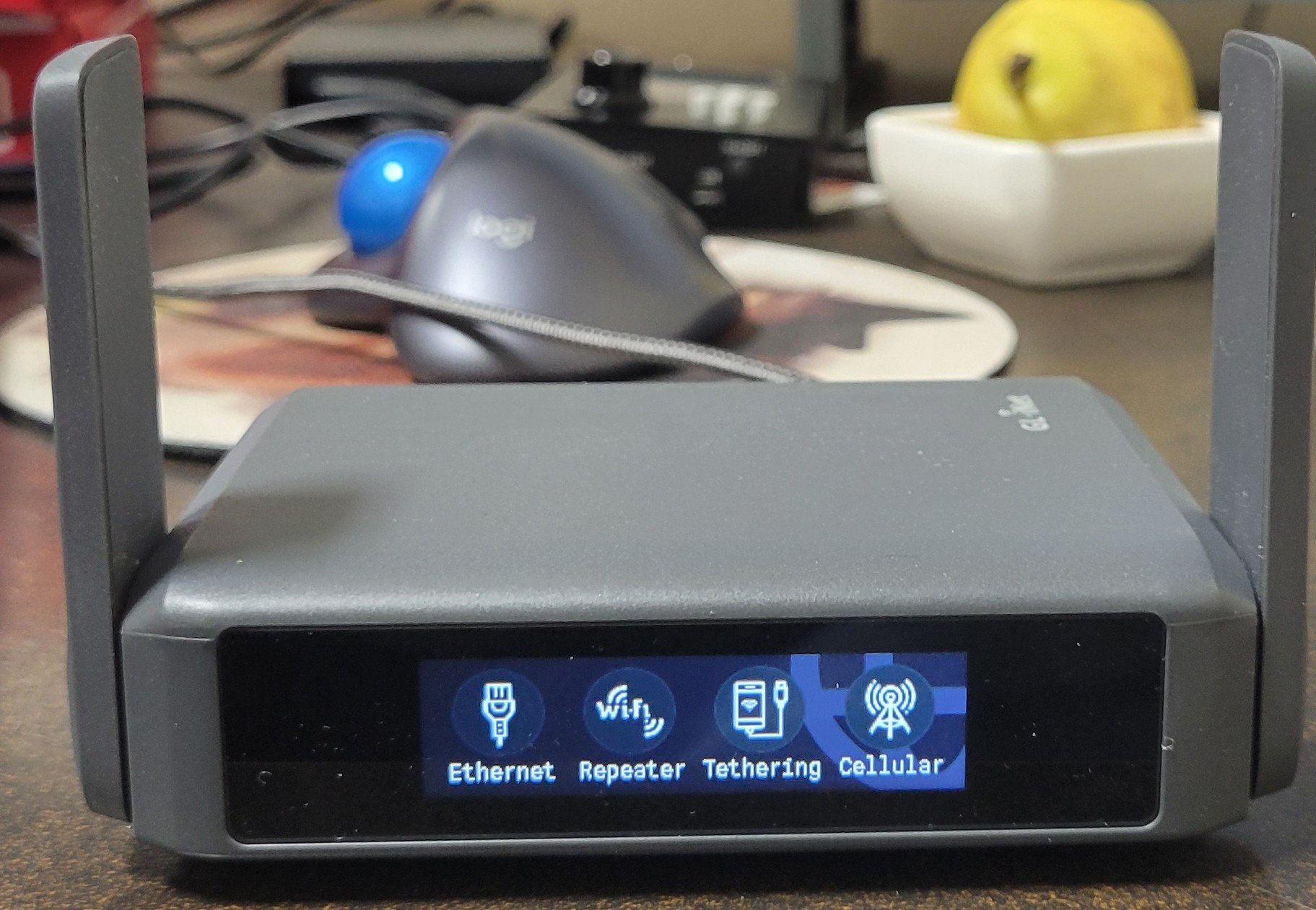
A small (~115 × 85 × 35 mm), USB-C-powered, Wi-Fi 7 dual-band travel router built around a MediaTek MT7986 (Filogic 830) SoC, with a 2.5 GbE LAN port, a 2.5 GbE WAN port, a USB 3.0 host, two foldable external antennas, and a front-panel OLED + Mode button. It runs OpenWrt under the hood with GL-iNet’s branded Admin Panel UI grafted on top — meaning the convenient default workflows are one-tap, but anything OpenWrt can do (LuCI, SSH, opkg, custom packages, raw nftables) is one ladder rung deeper.
Its design center is the travel kit, not the home network. That shows up in:
- USB-C PD power input that negotiates 5 V / 9 V / 12 V — a single travel charger handles every voltage profile.
- Foldable antennas that lay flat against the case for stowage.
- A front OLED + Mode button so you can switch between Ethernet / Repeater / Tethering / Cellular without opening a laptop.
- A factory subnet of
192.168.8.0/24(vs the OpenWrt default192.168.1.0/24) to avoid clashing with whatever home network you might be plugged into.
1.2.2 What it isn’t
- Not a home gateway. The radios and switching capacity are sized for one or two users at a time, not a household of streaming devices. Throughput tops out well below what a fixed-location Wi-Fi 7 AP can sustain.
- Not a high-density AP. Two streams per band, two foldable omnidirectional antennas. A coffee-shop laptop or a hotel-room family is fine; a 30-person conference table is not.
- Not cellular by itself. This SKU has no integrated modem. The Cellular mode on the front OLED requires a USB cellular dongle in the back USB 3.0 port (Vol 9 §3 has the matrix). GL-iNet’s Spitz / MUDI lines integrate cellular natively if that’s a hard requirement.
- Not a security appliance. It runs nftables and can be configured for serious firewall/IDS work (Vol 10), but out-of-the-box it’s a travel router, not a Suricata-armed gateway.
- Not a guarantee of privacy. It’s a tool for moving traffic through a VPN tunnel reliably; the threat model still includes whoever runs the upstream network, the VPN provider, and the endpoints. Vol 7 §6 covers what the router can and can’t enforce.
1.2.3 Where it sits in the travel kit
The kit has two members today: this router (beryl) and the Flipper Zero (TJ411).
Table 1 — 2.3 Where it sits in the travel kit
| Layer | Role | Tool |
|---|---|---|
| Physical / RF (300 MHz–6 GHz, NFC, IR) | Field instrument for known protocols, hotel-room IR, NFC keycard duplication | Flipper Zero TJ411 |
| Network (Layer 2 → 4) | Gateway, VPN tunnel, DHCP, DNS, captive-portal helper, USB tethering | GL-BE3600 (this series) |
| Application (Layer 7) | Browser, SSH, GIS / video / etc. | Laptop / phone |
These are complementary, not overlapping. The Flipper handles the radios that aren’t Wi-Fi (and the IR / NFC stuff Wi-Fi can’t reach), the BE3600 handles the IP plumbing, the laptop and phone do the work above the network layer. Vol 11 §2 walks the kit-startup sequence; the short version is router up, VPN up, devices on router, Flipper available for whatever the room demands.
1.3 The Beryl AX Pro in the GL-iNet Lineup
GL-iNet’s catalog is sprawling enough to be confusing. The Beryl is the mid-tier travel line; Slate is the upgrade tier; Flint is fixed-location; Spitz / MUDI / X3000 are cellular-equipped; Convexa-S / Convexa-B sit at the enterprise edge. Within the Beryl family there have been generational jumps every ~18 months. The current snapshot:
Table 2 — GL-iNet's catalog is sprawling enough to be confusing. The Beryl is the mid-tier travel line; Slate is the upgrade tier; Flint is fixed-location; Spitz / MUDI / X3000 are cellular-equipped; Convexa-S / Convexa-B sit at the enterprise edge. Within the Beryl family there have been generational jumps every ~18 months. The current snapshot
| Model | Code | Wi-Fi | Wired | USB | Notes |
|---|---|---|---|---|---|
| Beryl (orig) | GL-MT1300 | Wi-Fi 5 (AC1300) | 2× 1 GbE | USB 2.0 | Discontinued; the original “Beryl” |
| Beryl AX | GL-MT3000 | Wi-Fi 6 (AX3000) | 2× 1 GbE | USB 3.0 | Long-running 2022–2025 mid-tier |
| Beryl AX Pro | GL-BE3600 | Wi-Fi 7 (BE3600) | 2× 2.5 GbE | USB 3.0 | This unit. Wi-Fi 7 generation. |
| Slate AX | GL-AXT1800 | Wi-Fi 6 (AX1800) | 2× 1 GbE | USB 3.0 | Slate-tier, smaller form factor |
| Slate 7 | GL-BE9300 | Wi-Fi 7 (BE9300) | 2× 2.5 GbE + 10 GbE | USB 3.0 | Tri-band Wi-Fi 7 (adds 6 GHz), 10 GbE |
| Flint 2 | GL-MT6000 | Wi-Fi 6 (AX6000) | 4× 2.5 GbE + 1 GbE WAN | USB 3.0 | Fixed-location flagship |
| Spitz AX | GL-X3000 | Wi-Fi 6 (AX3000) | 2× 2.5 GbE | USB 3.0 + SIM | Integrated 5G modem |
| Mudi v2 | GL-E750V2 | Wi-Fi 5 (AC750) | 2× 1 GbE | USB 2.0 + SIM + battery | Privacy/journalism handheld |
The BE3600 is positioned squarely as the Wi-Fi 7 generational refresh of the Beryl AX: same form factor, same intent, same kind of travel-router DNA, with the radio class and switch class bumped one tier. If a future cellular-integrated travel router is needed, the upgrade target is Spitz AX (GL-X3000) rather than buying a separate hotspot. If 6 GHz becomes worth the price premium, the upgrade is Slate 7 (GL-BE9300) which adds the 6 GHz radio and a 10 GbE port for proper home/office use.
1.3.1 Why “BE3600”?
GL-iNet (and the Wi-Fi industry generally) names dual-band Wi-Fi 7 SKUs by the theoretical aggregate PHY rate in Mbps with a BE prefix:
BE3600≈ 2402 Mbps (5 GHz, 160 MHz, 2×2 stream) + 1147 Mbps (2.4 GHz, 40 MHz, 2×2 stream) ≈ 3549 Mbps, rounded up.- That’s PHY-rate ceiling, not real-world throughput. Useful real-world throughput is bounded by the 2.5 GbE WAN port at ~2.35 Gbps wire rate; even a perfectly cooperative client can’t pull more across the box.
- 6 GHz is absent on this SKU; the next number up (
BE9300on the Slate 7) is what tri-band marketing looks like.
Real numbers from this hardware family land roughly at 2.0–2.3 Gbps single-client 5 GHz under ideal conditions and a fraction of that on 2.4 GHz; Vol 6 §4 has the channel-width / spatial-stream tradeoff matrix.
1.4 This Specific Unit — Beryl
The unit covered by this series (also recorded structurally in MY_GEAR/inventory.yaml):
Table 3 — The unit covered by this series (also recorded structurally in [MYGEAR/inventory.yaml](../../../MYGEAR/inventory.yaml))
| Field | Value |
|---|---|
| Model | GL-iNet GL-BE3600 (Beryl AX Pro) |
| Serial | 28948a560fe74fd5 |
| MAC | 94:83:C4:C7:EA:E2 |
| Cloud Device ID | cl7eae2 |
| Factory SSID | GL-BE3600-ae2 |
| Current SSID | @TJ55219 |
| Factory default Wi-Fi key (OEM tag) | 7AZS97HE4N |
| Management IP | 192.168.8.1 |
| Power input | USB-C PD, 5 V/3 A · 9 V/3 A · 12 V/2.5 A |
| FCC ID | 2AFIW-BE3600 |
| IC | 23019-BE3600 |
| Wi-Fi class | Wi-Fi 7 dual-band (2.4 GHz + 5 GHz) |
| Cellular | None (no modem integrated) |
| Hardware revision | Not printed on tag — read from Admin Panel → System → Overview if needed |
The cloud-management identifier cl7eae2 follows GL-iNet’s convention: cl7e literal prefix + last four hex digits of the primary MAC (eae2 here). It’s used to bind the device to a GL-iNet Cloud account; if the cloud service is not in use, it’s harmless metadata on the bottom tag.
The bottom-tag regulatory line — “Use Indoor only for W52,W53” — is the DFS marking on the 5 GHz band. W52 (5150–5250 MHz) and W53 (5250–5350 MHz) are indoor-restricted in Japan/EU/CA regulatory domains, which the firmware enforces based on the country code set in Wireless settings. Vol 6 §6 covers DFS and regulatory in detail.
1.5 The Decision Tree — When to Use What
The travel kit has redundant ways to put a laptop on the internet. Picking the right one is fast once you know the failure modes of each.
1.5.1 What’s the input?
Table 4 — 5.1 What's the input?
| Venue offers | Use this | Reason |
|---|---|---|
| Wired Ethernet, no captive portal | Router → Ethernet (router as gateway) | Best throughput, most stable, VPN-at-edge possible. |
| Wired Ethernet, with captive portal | Router → Ethernet, MAC-clone the laptop | Authenticate once on the router; captive helper passes traffic through. Vol 8 §3 is the recipe. |
| Wi-Fi only, no captive portal | Router → Repeater mode | Router authenticates upstream, re-broadcasts your kit SSID. VPN still works. |
| Wi-Fi only, with captive portal | Router → Repeater + portal helper | Same plus the captive helper UI. Browser flow is on whoever clicks first. |
| Cellular tether (Android phone) | Router → Tethering mode (USB-C from phone) | Phone plugs into back-panel USB. RNDIS or NCM auto-detected. |
| Cellular dongle | Router → Cellular mode (USB dongle) | Quectel / Huawei / Sierra modules. modeswitch handles the mode-class flip. |
| Nothing — pure cellular fallback | Phone hotspot, no router | If the router is in a bag and you need to be productive now, the phone alone is fine for an hour. |
1.5.2 What’s the threat model?
Table 5 — 5.2 What's the threat model?
| Concern | Router can help by | Router cannot help by |
|---|---|---|
| Venue Wi-Fi sniffing your traffic | VPN-at-edge: every device on the kit SSID is tunneled | Hiding that a tunnel exists (timing/volume analysis) |
| Captive-portal MITM injection | DNS-over-HTTPS upstream; HTTPS-only browsing | Defeating a MITM box that successfully strips TLS (rare on hotel networks; assume zero on hostile ones) |
| Per-device profiling by venue | One MAC visible to upstream (the router’s WAN MAC) | Hiding the router’s MAC unless you actively clone it |
| Browser fingerprinting at the application layer | Nothing — that’s an L7 problem | Anything below the app layer changes browser fingerprints |
| Hostile peer on the venue Wi-Fi | All your devices are behind the router’s NAT, isolated | Anything that needs to be on the same L2 segment as the peer (probe-response attacks etc.) |
The router is a network-layer privacy and convenience tool, not a security appliance. Vol 7 §6 documents the kill-switch firewall that actually prevents traffic-leakage when the VPN drops; Vol 11 §3 has the full travel-checklist that turns this matrix into a routine.
1.5.3 Decision flow — quick reference
Plugged in / connected to a venue?
├── No  → Phone hotspot or wait
└── Yes → Open Admin Panel (192.168.8.1)
          │
          ├── VPN already connected?
          │   ├── Yes → Verify kill-switch state, you're done
          │   └── No  → VPN → Connect (WireGuard config from password manager)
          │
          ├── Captive portal?
          │   ├── No   → Done
          │   └── Yes  → Captive-portal helper or browser to portal page;
          │              authenticate, the router carries the auth state
          │
          └── Tethering / cellular?
              ├── Phone tether → plug USB-C, Mode button → Tethering, done
              └── Cellular dongle → plug USB-A, Mode button → Cellular, wait for modeswitch
1.6 Volume Reading Order
You can read straight through 1 → 12, but the volumes are designed to be a graph, not a linear book. Common paths:
- “Got the unit, what now?” → Vol 1 (this) → Vol 2 (hardware) → Vol 11 (ops checklist) → start using it.
- “It boots loop / I bricked it” → Vol 4 §3 (recovery flow) → Vol 4 §4 (sysupgrade) → Vol 4 §6 (TFTP nuclear option).
- “VPN is the only thing I care about” → Vol 1 (this) → Vol 7 (entire) → Vol 11 §3 (travel checklist).
- “I want to use this for kismet / packet research” → Vol 1 (this) → Vol 5 (DSA + bridges) → Vol 10 (entire).
- “I’m flashing pure OpenWrt” → Vol 3 §3 (GL build vs upstream delta) → Vol 4 §5 (the upgrade path) → Vol 5 (rebuild networking from defaults) → Vol 6 (Wi-Fi config from defaults).
The cross-references inside each volume tell you which other volumes are needed for full context; follow them and the graph fills in.
1.7 Cheatsheet Updates Feeding into Vol 12
Each body volume contributes one or more one-pagers to Vol 12. From Vol 1 the cheatsheet inputs are:
- Default credentials and network settings —
192.168.8.1mgmt IP,192.168.8.0/24LAN, factory SSIDGL-BE3600-ae2, factory key on the bottom tag. - Mode-cycle reference — Ethernet · Repeater · Tethering · Cellular, accessible from front Mode button without a laptop.
- Decision flow (§5.3 above) — printable as the top-of-card reminder.
Vol 12 §1 expands these into the laminate.
Comments (0)